
1. Introduction
Thank you for choosing the WLIVE Farmhouse TV Stand. This manual provides essential information for the safe assembly, operation, and maintenance of your new media console. Please read these instructions carefully before beginning assembly and retain them for future reference.
2. Safety Information
WARNING: Assembly is required. To prevent tip-over, securely fasten the furniture to the wall using the appropriate wall anchor hardware provided. Always follow the assembly instructions carefully. Failure to do so can result in serious injury or death.
- Keep all small parts and packaging materials away from children.
- Ensure all connections are secure before placing any items on the stand.
- Do not exceed the maximum load capacity of 110 lbs (50 kg).
- Place the TV stand on a level and stable surface.
3. Setup and Assembly
This TV stand is designed for straightforward assembly. Please follow the detailed step-by-step instructions included in the separate assembly manual provided with your product. Ensure you have all necessary parts and tools before you begin.
3.1 Unpacking and Part Identification
- Carefully remove all components from the packaging.
- Verify that all hardware and panels are present by comparing them to the parts list in your assembly manual.
- If any parts are missing or damaged, do not proceed with assembly. Contact customer support immediately.
3.2 Assembly Steps
- Follow the numerical sequence of steps outlined in your assembly manual.
- Use the provided tool to tighten all fasteners. Do not overtighten, as this may damage the material.
- Ensure all panels are correctly oriented and aligned before securing them.
3.3 Wall Anchoring
After assembly, it is crucial to secure the TV stand to the wall using the provided anti-tip hardware. This prevents accidental tip-over, especially in households with children or pets.
- Locate the wall anchor hardware in your package.
- Follow the specific instructions in your assembly manual for proper wall attachment.
- Ensure the wall anchors are firmly secured to a wall stud or appropriate wall material.
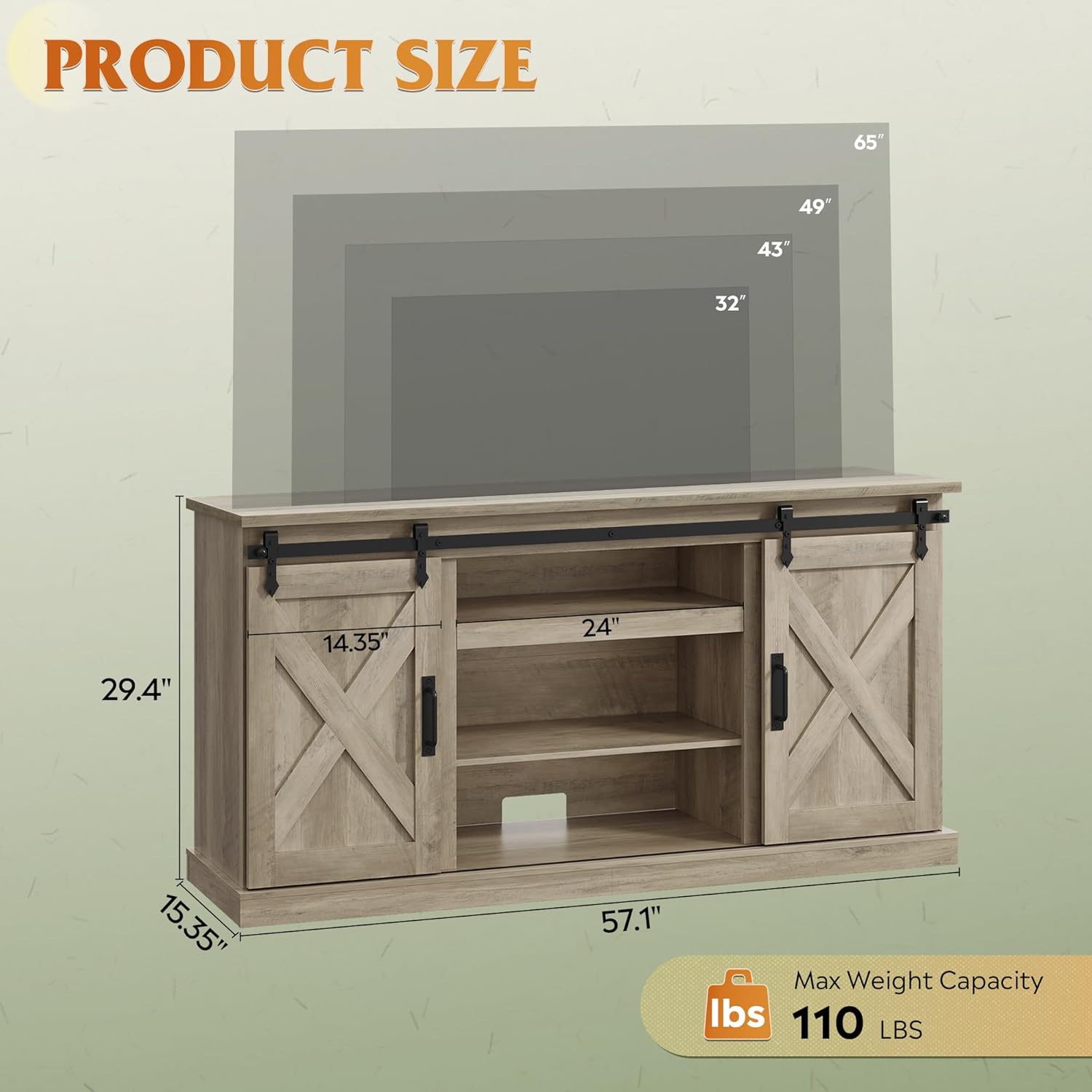
Figure 1: Product Dimensions and TV Size Compatibility

Figure 2: Key Features of the TV Stand
4. Operating Instructions
4.1 Sliding Barn Doors
The TV stand features two X-shaped barn doors that slide smoothly along a top track. These doors allow you to easily conceal or reveal the storage compartments as desired.
- To open or close, gently slide the door along the track using the metal handles.
- Avoid forcing the doors if they encounter resistance. Check for obstructions.

Figure 3: Sliding Barn Door Operation
4.2 Adjustable Shelves
The central and side compartments are equipped with adjustable and removable shelves, providing flexible storage options for your media devices, books, and decorative items.
- To adjust a shelf, remove any items, then carefully lift the shelf and reposition the shelf pins to the desired height.
- Ensure all four shelf pins are securely inserted into the corresponding holes before placing the shelf.

Figure 4: Adjustable Shelf Mechanism
4.3 Cable Management
The back panel of the TV stand includes dedicated cutouts for cable management, helping to keep your electronic device cords organized and out of sight.
- Route all power and signal cables through these openings to maintain a clean and tidy setup.
- Avoid pinching cables between the stand and the wall or other furniture.
Video 1: WLIVE Farmhouse TV Stand Features Overview. This video demonstrates the sliding barn doors, adjustable shelves, and overall design of the TV stand.
5. Maintenance and Care
- Cleaning: Wipe the surfaces with a dry, soft cloth. Avoid using abrasive cleaners, harsh chemicals, or polishes that may damage the finish.
- Spills: Immediately wipe up any spills with a dry cloth to prevent moisture damage.
- Fasteners: Periodically check all screws and connections to ensure they remain tight. Retighten if necessary to maintain stability.
- Placement: Avoid placing the TV stand in direct sunlight or near heat sources, as this can cause discoloration, warping, or other damage to the material.
- Moving: When moving the TV stand, always lift it rather than dragging it to prevent damage to the legs or structure.
6. Troubleshooting
- Difficulty during assembly: If you encounter issues with parts fitting or screws appearing too short, double-check the instruction manual for correct orientation and part identification. Ensure all pre-drilled holes align before tightening. If issues persist, contact customer support.
- Wobbly stand: Ensure all screws and fasteners are fully tightened. Verify the stand is placed on a level surface. If necessary, use furniture levelers (not included) to stabilize the unit.
- Doors not sliding smoothly: Check the barn door tracks for any obstructions or debris. Ensure the doors are correctly seated on the tracks and that the rollers are clean.
- Damaged parts: If any parts arrive damaged or become damaged during assembly, do not attempt to repair them. Contact customer support for replacement parts.
7. Specifications
| Feature | Detail |
|---|---|
| Brand | WLIVE |
| Model Number | ADSG098 |
| Color | Grey Oak |
| Style | Farmhouse |
| Material Type | Engineered Wood |
| Item Dimensions (W x D x H) | 57.1 x 15.35 x 29.4 inches |
| Item Weight | 76.3 Pounds |
| Maximum Load Weight | 110 lbs (50 kg) |
| TV Size Capacity | Up to 65 inches |
| Number of Shelves | 4 |
| Additional Features | Adjustable Shelf, Removable Shelf |
| Assembly Required | Yes |
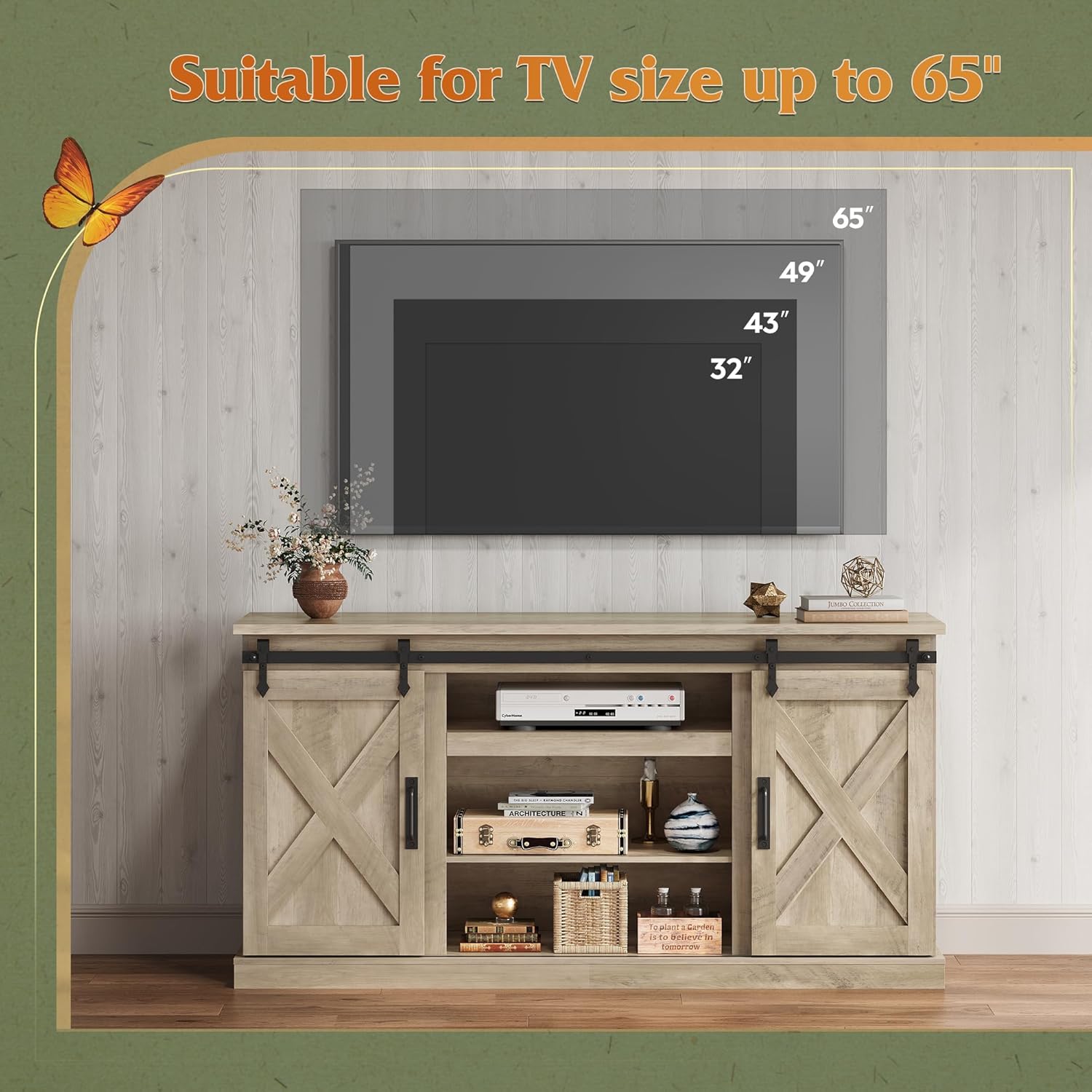
Figure 5: TV Size Compatibility up to 65 inches
8. Warranty Information
No specific warranty information is provided with this product in the general product details. Please refer to your purchase documentation, the product packaging, or contact WLIVE customer support directly for details regarding any applicable warranty terms and conditions.
9. Customer Support
For assistance with assembly, missing parts, product inquiries, or warranty claims, please contact WLIVE customer support. Refer to the contact information provided in your purchase documentation or visit the official WLIVE website for the most up-to-date support options.
Manufacturer: WLIVE
