Product Overview
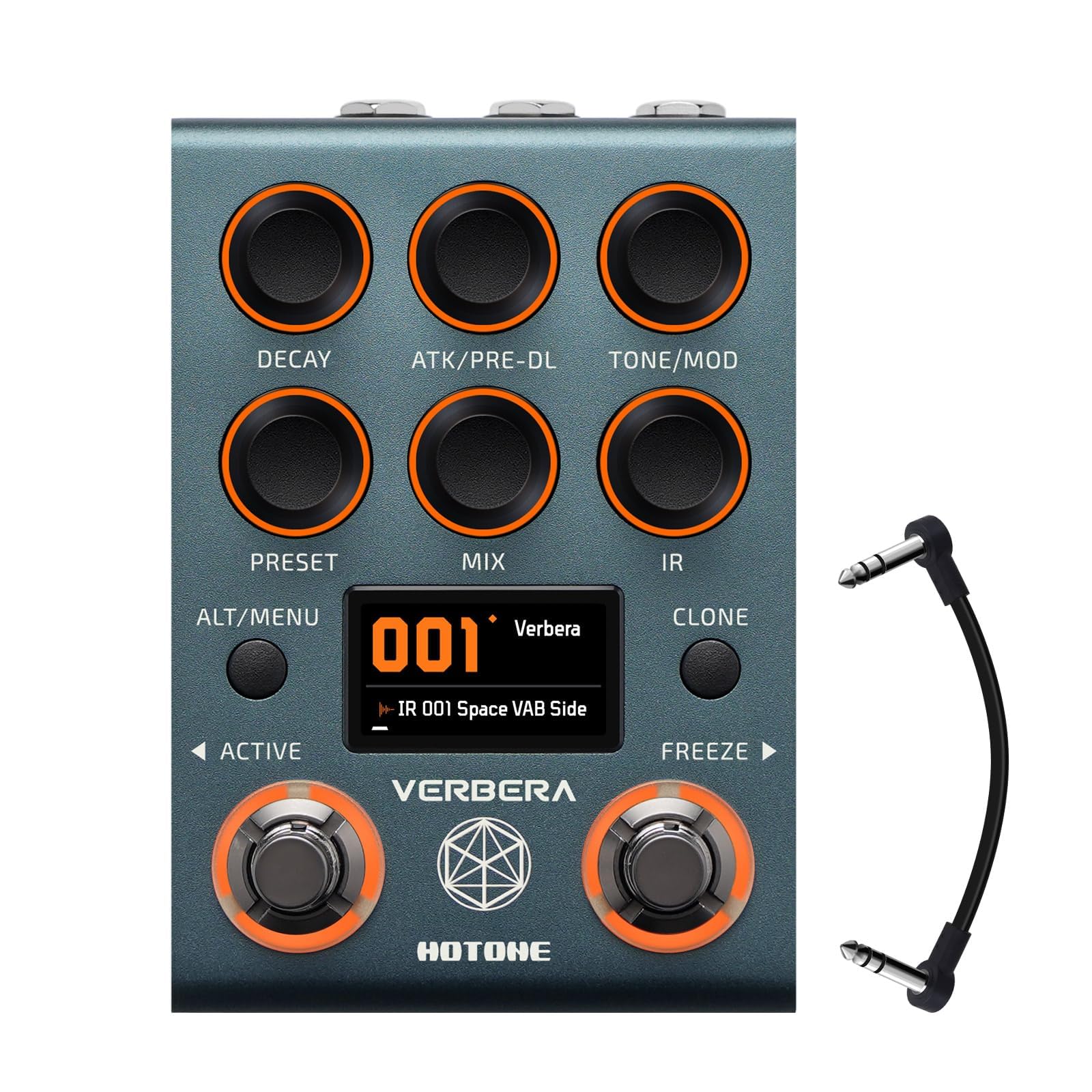
The Hotone Verbera Convolution Reverb Pedal (Model NC-200) is a versatile, studio-grade reverb effect designed for guitar, synthesizers, and FX loops. It combines advanced Impulse Response (IR) convolution technology with Hotone's proprietary XR algorithmic engine to deliver a wide range of realistic and surreal ambient textures.
- 120 Iconic & Original IRs Built-In: Access a library of 120 studio-grade impulse responses, recreating legendary spaces like cathedrals, symphony halls, and sci-fi atmospheres.
- Dual Reverb Engine for Deep Sound Design: Blend ultra-realistic IR convolution reverb with Hotone’s proprietary XR algorithmic engine for surreal, ambient textures.
- Real-Time Control with MIDI, EXP & Freeze: Switch presets, freeze trails, or adjust parameters on-the-fly using MIDI, an expression pedal, or dual footswitch modes.
- High-Performance Audio with Studio-Ready Specs: Features 32-bit AD/DA conversion, analog dry-thru circuitry, and up to 20s reverb tails for pristine, professional sound quality.
- Full IR Management via Neon Collector App: Easily manage user IRs, import .wav files, and update firmware through USB with the free software for PC/Mac.


Setup
Power Connection
Connect a 9V DC, 1A (center negative) power supply to the pedal's power input. Ensure the power supply meets these specifications to prevent damage.
Audio Connections
- Input: Connect your instrument (guitar, synth) or the output of a previous effect pedal to the 1x 6.35mm (1/4") TRS Input jack.
- Output: Connect the 2x 6.35mm (1/4") TRS Output jacks to your amplifier, audio interface, or the input of the next effect pedal. For stereo operation, use both output jacks. The pedal defaults to MONO operation; refer to the operating section for switching to stereo.
MIDI and Expression Pedal Connections
The pedal features 2x 3.5mm (1/8") TRS Jack for MIDI or expression pedal connectivity. These allow for real-time control over parameters and preset switching.
USB Connection
Use the USB 2.0 Type-C jack to connect the pedal to a PC or Mac for use with the Neon Collector App. This app facilitates IR management, .wav file import, and firmware updates.

Operating Instructions
Controls Overview

- DECAY: Adjusts the length of the reverb tail.
- ATK/PRE-DL: Controls the attack of the reverb or the pre-delay time.
- TONE/MOD: Adjusts the tone (brightness/darkness) or the modulation intensity of the reverb.
- PRESET: Selects between different stored presets.
- MIX: Blends the dry and wet (effected) signals.
- IR: Selects the Impulse Response.
- CLONE: Activates the IR cloning function.
- ACTIVE Footswitch: Toggles the effect on/off.
- FREEZE Footswitch: Holds the current reverb tail indefinitely.
IR Management and Customization
The Verbera pedal comes with 120 iconic and original IRs. You can expand this library by importing your own .wav files using the Neon Collector App. Connect the pedal to your computer via USB to access the app for managing user IRs and updating firmware.

Stereo/Mono Configuration
By default, the Verbera pedal is set to MONO. To switch to STEREO operation, access the pedal's internal settings. Consult the full digital manual for detailed instructions on navigating the settings menu.
Official Product Videos
Video 1: Hotone Verbera Tutorial. This video provides a comprehensive tutorial on how to use the Hotone Verbera Convolution Reverb Pedal, covering its features and functionalities.
Video 2: Hotone Verbera Convolution Reverb Pedal. This video showcases the Hotone Verbera Convolution Reverb Pedal in action, demonstrating its sound capabilities and various reverb types.
Maintenance
Cleaning
Wipe the pedal with a soft, dry cloth. Avoid using abrasive cleaners or solvents, as these can damage the finish and internal components.
Firmware Updates
Periodically check for firmware updates via the Neon Collector App. Keeping your pedal's firmware up-to-date ensures optimal performance and access to new features.
Backup Presets
Before making significant changes or updating firmware, it is recommended to perform a complete backup of your custom presets using the Neon Collector App. This will prevent loss of personalized settings.
Troubleshooting
- No Sound: Ensure all audio cables are securely connected to the correct input/output jacks. Verify the power supply is properly connected and functioning. Check the MIX knob to ensure the wet signal is not completely off.
- Unexpected Sound/Effect: Review the settings of the DECAY, ATK/PRE-DL, TONE/MOD, PRESET, MIX, and IR knobs. Ensure the correct preset is selected.
- Difficulty Seeing Labels/Buttons: In dim lighting conditions, the labels and smaller buttons may be difficult to read. Consider using external lighting or familiarizing yourself with the layout in a well-lit environment.
- Cannot Revert to Original Patch: If a setting is changed and you wish to revert to the original patch, you may need to exit and re-enter the patch. Consider backing up presets before extensive tweaking.
Specifications
| Feature | Specification |
|---|---|
| Input Jack | 1x 6.35mm (1/4") TRS Jack |
| Output Jack | 2x 6.35mm (1/4") TRS Jack |
| MIDI/EXP Jack | 2x 3.5mm (1/8") TRS Jack |
| USB Jack | USB 2.0 Type-C |
| Input Impedance | 1 Meg Ohm |
| Output Impedance | 1K Ohm |
| A/D & D/A | High-performance 32-bit |
| DSP | 32-bit processing |
| SNR | 115dB |
| Frequency Response | ±0.1dB, 20Hz–20kHz |
| Max Input Level | +13dBu |
| Bypass | Analog Dry Thru + Buffer |
| Power Supply | 9V DC, 1A (Center Negative) |
| Dimensions (W x D x H) | 125.5mm × 84mm × 62.5mm |
| Weight | 485g (1.07 lbs) |
| Body Material | Metal |
| Color | Black |
| Item Model Number | NC-200 |
Warranty
Please refer to the manufacturer's official website or contact customer support for detailed warranty information regarding the Hotone Verbera Convolution Reverb Pedal (Model NC-200).
Support
For technical support, software downloads (Neon Collector App), and additional resources, please visit the official HOTONE website. You may also contact their customer service directly for assistance.


