
1. Product Overview
The JZBRAIN FE-5318 Shiatsu Foot Massager with Heat is designed to provide a comprehensive foot massage experience. It combines deep kneading, air compression, soothing heat, and vibration to relieve tension and discomfort in your feet. This device is suitable for daily use, offering relaxation after long hours of standing or work. It features customizable settings to tailor the massage to your personal preferences.
Key Features:
- 6 Preset Massage Modes: Combines kneading, compression, vibration, and heat in various rhythms.
- Adjustable Intensities: 3 kneading speeds, 3 compression levels, 3 vibration intensities, and 3 heat settings (104/113/122°F).
- Targeted Massage: Rotating rollers target forefoot and heel, while air bags provide full-wrap compression.
- User-Friendly Controls: Equipped with an LCD screen, intuitive physical buttons, and an infrared remote control.
- Timer Function: Set massage durations for 10, 20, or 30 minutes with automatic shut-off.
- Washable Foot Sleeves: Removable zippered covers for easy cleaning and hygiene.
- Portable Design: Compact and lightweight for convenient use anywhere in your home or office.
- Anti-Slip Base: Ensures stability during use on various surfaces.

Image 1.1: Overview of the JZBRAIN FE-5318 Foot Massager's customizable comfort options, including 6 massage modes, 3 vibration levels, 3 heat levels, 3 kneading intensities, 3 compression levels, and 3 timer settings.
2. Setup Instructions
- Unpack the Device: Carefully remove the JZBRAIN FE-5318 foot massager from its packaging. Ensure all components, including the AC power adapter and remote control, are present.
- Position the Massager: Place the massager on a flat, stable surface. The anti-slip rubber feet on the base will help keep it secure during use.
- Connect Power: Insert the AC power adapter into the power input port located on the back of the massager. Plug the other end of the adapter into a standard electrical outlet.
- Prepare the Remote Control: The remote control may require batteries (not included) or have a protective tab to remove before first use. Refer to the remote control section in the user manual for specific instructions.
- Initial Inspection: Before first use, inspect the interior foot sleeves to ensure they are properly zipped and secured.
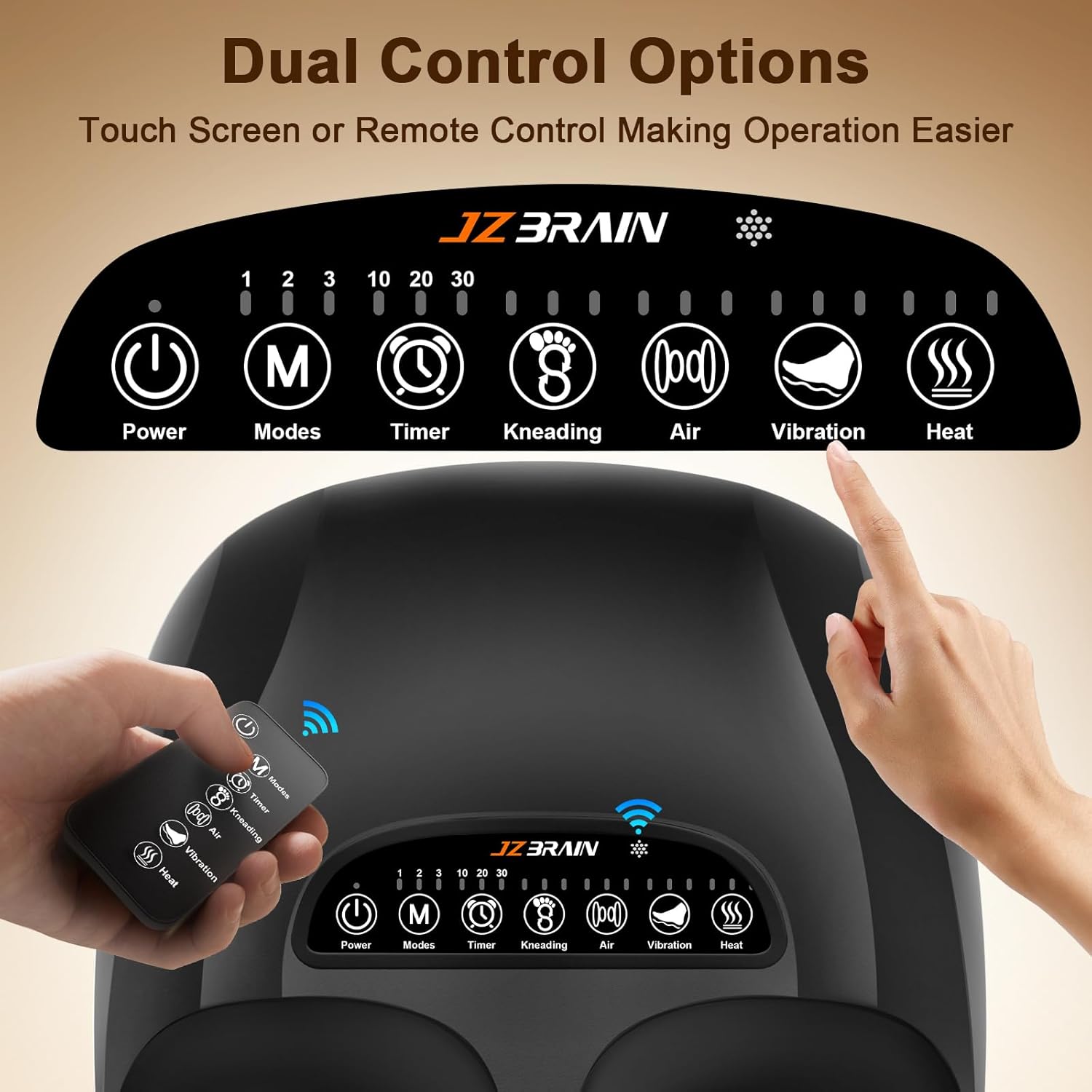
Image 2.1: The JZBRAIN FE-5318 Foot Massager showing the control panel, foot inserts, and accompanying remote control and power adapter.
3. Operating the Massager
The JZBRAIN FE-5318 offers both on-device touch controls and a convenient infrared remote control for easy operation.
3.1 Getting Started:
- Sit Comfortably: Sit in a comfortable chair with your feet positioned in front of the massager.
- Insert Feet: Gently place your bare feet or feet with thin socks into the foot chambers. Ensure your feet are fully inserted for optimal massage coverage.
- Power On: Press the Power button on the control panel or the remote control to turn on the device. The indicator light will illuminate.
Video 3.1: Official JZBRAIN video demonstrating the deep kneading Shiatsu foot massager with heat in operation, highlighting its various features.
3.2 Adjusting Massage Settings:
Use the control panel buttons or the remote control to customize your massage experience:
- Modes (M): Press the Modes button to cycle through 6 preset massage modes that combine different functions.
- Timer: Select a massage duration of 10, 20, or 30 minutes. The device will automatically shut off after the selected time.
- Kneading: Adjust the kneading intensity with 3 available speeds. This controls the rotating rollers that target your soles.
- Air Compression: Choose from 3 compression levels to control the intensity of the air bags around your feet.
- Vibration: Select one of 3 vibration intensities (Low, Medium, High) to enhance relaxation and relieve stiffness.
- Heat: Activate or adjust the heat function with 3 temperature settings (104°F, 113°F, 122°F). The gentle warmth helps ease tightness.

Image 3.2: Dual control options for the JZBRAIN FE-5318 Foot Massager, featuring both an intuitive touch panel and a convenient infrared remote control.

Image 3.3: Illustration of the 3 adjustable heat levels (104°F, 113°F, 122°F) provided by the JZBRAIN FE-5318 Foot Massager.
4. Maintenance
Proper maintenance ensures the longevity and hygiene of your JZBRAIN FE-5318 foot massager.
4.1 Cleaning the Foot Sleeves:
- Remove Sleeves: The interior foot sleeves feature a zippered cover with a Velcro base. Unzip and detach the sleeves from the massager.
- Wash: Hand wash the foot sleeves with mild soap and water, or machine wash on a gentle cycle. Do not bleach or tumble dry.
- Dry: Air dry the sleeves completely before reattaching them to the massager.
- Reattach: Once dry, reattach the sleeves by aligning the Velcro and zipping them back into place.
4.2 General Cleaning:
- Unplug: Always unplug the massager from the power outlet before cleaning.
- Wipe Down: Use a soft, damp cloth to wipe the exterior of the massager. Do not use abrasive cleaners or immerse the device in water.
- Storage: When not in use, store the massager in a cool, dry place, away from direct sunlight and moisture. The power cord can be neatly wrapped around the base for compact storage.

Image 4.1: Features of the JZBRAIN FE-5318 Foot Massager, including its portability, anti-slip rubber pad, and easily removable, washable foot covers for hygiene.
5. Troubleshooting
If you encounter any issues with your JZBRAIN FE-5318 foot massager, please refer to the following common solutions:
- Device Not Turning On:
- Ensure the power adapter is securely plugged into both the massager and a working electrical outlet.
- Check if the power outlet is functional by plugging in another device.
- No Massage Function/Weak Massage:
- Verify that the desired mode, kneading, compression, or vibration settings are activated and set to an appropriate intensity level.
- Ensure your feet are properly positioned within the foot chambers.
- Heat Function Not Working:
- Confirm that the heat function is turned on and set to one of the three heat levels.
- Allow a few minutes for the heating elements to warm up.
- Remote Control Not Responding:
- Check and replace the batteries in the remote control if necessary.
- Ensure there are no obstructions between the remote and the massager's infrared receiver (located at the snowflake-shaped panel window).
- Unusual Noises:
- Some operational noise is normal due to the internal mechanisms (motors, air pump). If the noise is excessively loud or unusual, discontinue use and contact customer support.
If the problem persists after attempting these steps, please contact JZBRAIN customer support for further assistance.
6. Specifications
| Feature | Detail |
|---|---|
| Model Number | FE-5318 |
| Brand | JZBRAIN |
| Product Dimensions | 16 x 12.5 x 6.2 inches |
| Item Weight | 6.94 Pounds |
| Power Source | Corded Electric |
| Massage Techniques | Compression, Shiatsu, Vibration |
| Heat Settings | 104°F, 113°F, 122°F |
| Timer Settings | 10, 20, 30 minutes (Auto Shut-off) |
| Max Foot Size | US Men's Size 12 (EU 46) |
| Material Type | Plastic |
| Color | Black |
7. Warranty & Support
7.1 Manufacturer Warranty:
The JZBRAIN FE-5318 Shiatsu Foot Massager comes with a 1 Year Manufacturer Warranty. This warranty covers defects in materials and workmanship under normal use. Please retain your proof of purchase for warranty claims.
7.2 Customer Support:
For any questions, concerns, or warranty inquiries regarding your JZBRAIN foot massager, please contact JZBRAIN customer support. Refer to the contact information provided in your product packaging or on the official JZBRAIN website for the most up-to-date support channels.
JZBRAIN is committed to providing high-quality products and excellent customer service. We aim to ensure your satisfaction with our products.