Download PDFFree PDF. The Save button below keeps a bookmark and private notes in your account.
TP-Link Deco Wi-Fi 7 Tri-Band BE14000 Whole Home Mesh System (Deco BE67 3-Pack) User Manual
Model: Deco BE67 (3-Pack) | Brand: TP-Link
1. Product Overview
The TP-Link Deco BE67 (3-Pack) is a Tri-Band Whole-Home Mesh Wi-Fi 7 System designed to provide seamless, high-speed internet coverage throughout your entire home. Utilizing cutting-edge Wi-Fi 7 technology, this system delivers a total bandwidth of 14 Gbps, making it ideal for demanding applications such as 4K/8K streaming, immersive AR/VR gaming, and rapid data transfers. With AI-driven roaming and extensive coverage up to 8,100 sq. ft., the Deco BE67 ensures stable and uninterrupted connections for up to 200 devices, eliminating buffering and dropped connections.
1.1. Package Contents
Verify that all items are included in your package:
3 x Deco BE67 units
1 x RJ45 Ethernet cable
3 x Power adapters
1 x Installation Guide
1.2. Key Features
Next-Gen Wi-Fi 7 with 8-Stream Tri-Band: Delivers speeds up to 8,647 Mbps on 6 GHz, 4,324 Mbps on 5 GHz, and 688 Mbps on 2.4 GHz, optimizing performance for the latest Wi-Fi 7 devices.
Maximized Coverage: Provides up to 8,100 sq. ft. of seamless Wi-Fi coverage for over 200 devices simultaneously.
10 Gbps Port for Multi-Gigabit Connectivity: Each Deco unit features 10 Gbps, 2.5 Gbps, and 1 Gbps WAN/LAN ports, supporting internet plans up to 10 Gbps. Includes a built-in USB 3.0 port for additional connectivity.
Seamless AI-Driven Roaming: Creates a unified home network where AI-Roaming technology automatically connects devices to the optimal Deco unit for uninterrupted Wi-Fi.
Multi-Link Operation (MLO) Technology: Combines multiple Wi-Fi bands into one powerful stream for strong, uninterrupted connections, even when moving.
Easy Setup & Universal Compatibility: Simple setup via the Deco app with step-by-step instructions. Compatible with all Wi-Fi routers and internet providers.
TP-Link HomeShield Security: Includes premium security services with features like Basic Network Security, Quality of Service, and Parental Controls.
TP-Link Cybersecurity Commitment: Designed, built, and maintained with advanced security as a core requirement, aligning with CISA's Secure-by-Design pledge.
2. Setup Guide
2.1. Initial Setup
Follow these steps to set up your TP-Link Deco BE67 system:
Connect and Power On: Connect one Deco unit to your modem using the provided Ethernet cable and power on both the modem and the Deco unit.
Download Deco App: Download the TP-Link Deco app from your mobile device's app store (available for iOS and Android).
Configure via App: Launch the Deco app and follow the intuitive in-app instructions to configure your mesh network. The app will guide you through connecting additional Deco units and setting up your Wi-Fi network name and password.
Figure 2.1: Simple, Easy, Yet Powerful Setup. This image illustrates the three main steps for setting up the Deco system: connecting the unit to a modem, downloading the Deco app, and configuring the network through the app's interface.
2.2. Network Placement
For optimal whole-home coverage, strategically place your Deco units. The 3-pack system is designed to cover up to 8,100 sq. ft. Place the main Deco unit near your modem, and distribute the other units evenly throughout your home to create a strong, seamless mesh network. Avoid placing units near large metal objects, thick walls, or other sources of interference.
Figure 2.2: Stronger Signal, Smarter Connection. This diagram illustrates how multiple Deco units are strategically placed within a home to extend Wi-Fi coverage, showing coverage areas for 1-pack, 2-pack, and 3-pack configurations, reaching up to 8,100 sq. ft. for the 3-pack.
3. Operation and Advanced Features
3.1. Tri-Band Wi-Fi 7 Speed
The Deco BE67 leverages Wi-Fi 7 technology across three distinct bands to deliver unparalleled speed and efficiency. This allows for smooth 4K/8K streaming, lag-free AR/VR gaming, and rapid downloads, even with multiple devices connected simultaneously.
Approximate Band Speeds
Wi-Fi Band
Maximum Speed
6 GHz Band
8647 Mbps
5 GHz Band
4324 Mbps
2.4 GHz Band
688 Mbps
Figure 3.1: Tri-Band Wi-Fi 7 Speed. This image visually represents the maximum theoretical speeds available on each Wi-Fi band (6 GHz, 5 GHz, 2.4 GHz) and highlights common applications that benefit from these high speeds, such as 4K/8K streaming and VR/AR experiences.
3.2. Multi-Gigabit Wired Performance
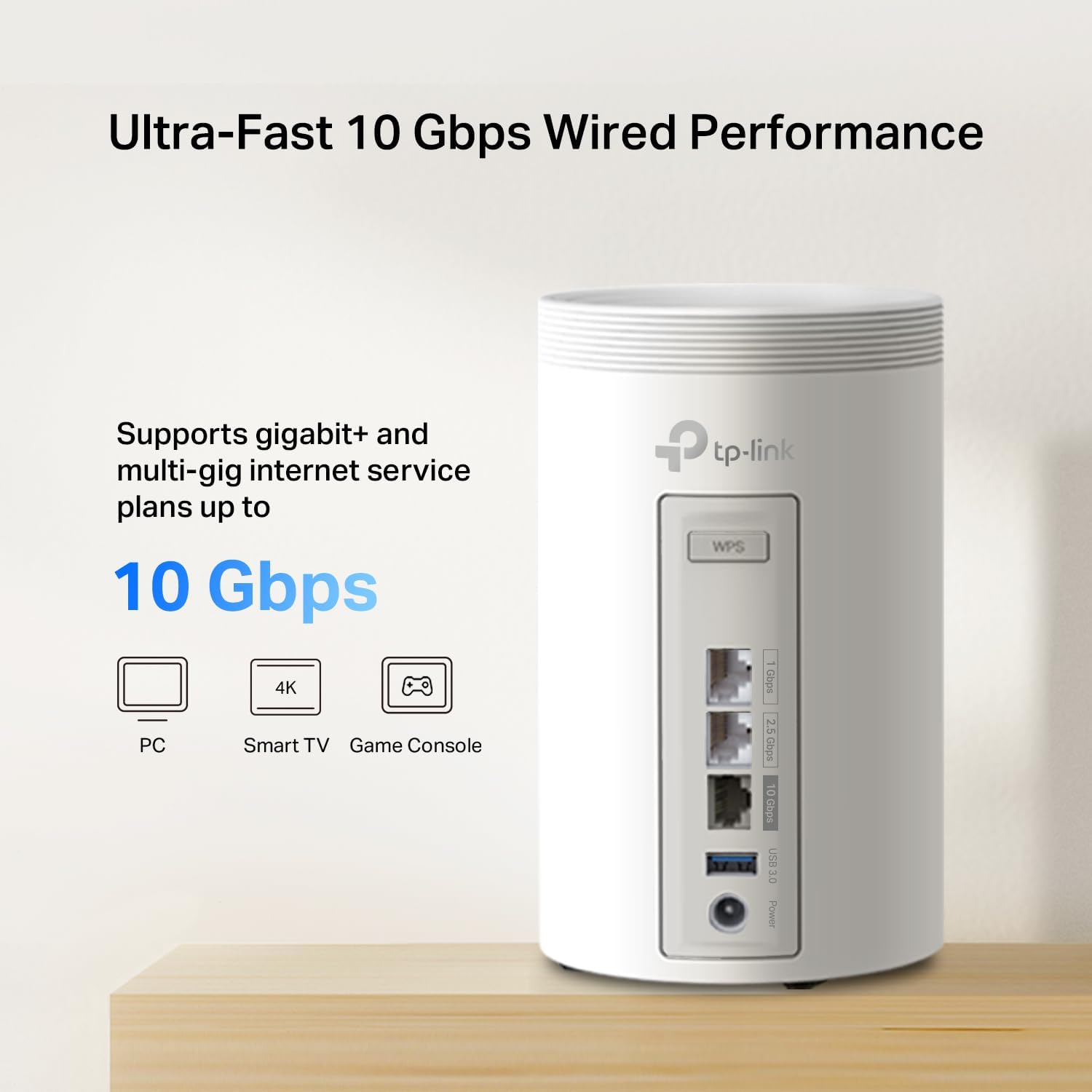
Each Deco BE67 unit is equipped with a 10 Gbps WAN/LAN port, a 2.5 Gbps WAN/LAN port, and a 1 Gbps WAN/LAN port. These multi-gig ports allow you to fully utilize high-speed internet plans up to 10 Gbps, ensuring fast and reliable wired connections for devices like PCs, smart TVs, and gaming consoles. A built-in USB 3.0 port provides additional options for network-attached storage or other peripherals.
Figure 3.2: Ultra-Fast 10 Gbps Wired Performance. This image focuses on the rear panel of a Deco unit, showcasing its high-speed Ethernet ports (10 Gbps, 2.5 Gbps, 1 Gbps) and a USB 3.0 port, emphasizing its capability to support multi-gig internet plans.
3.3. Seamless AI-Driven Roaming and Backhaul
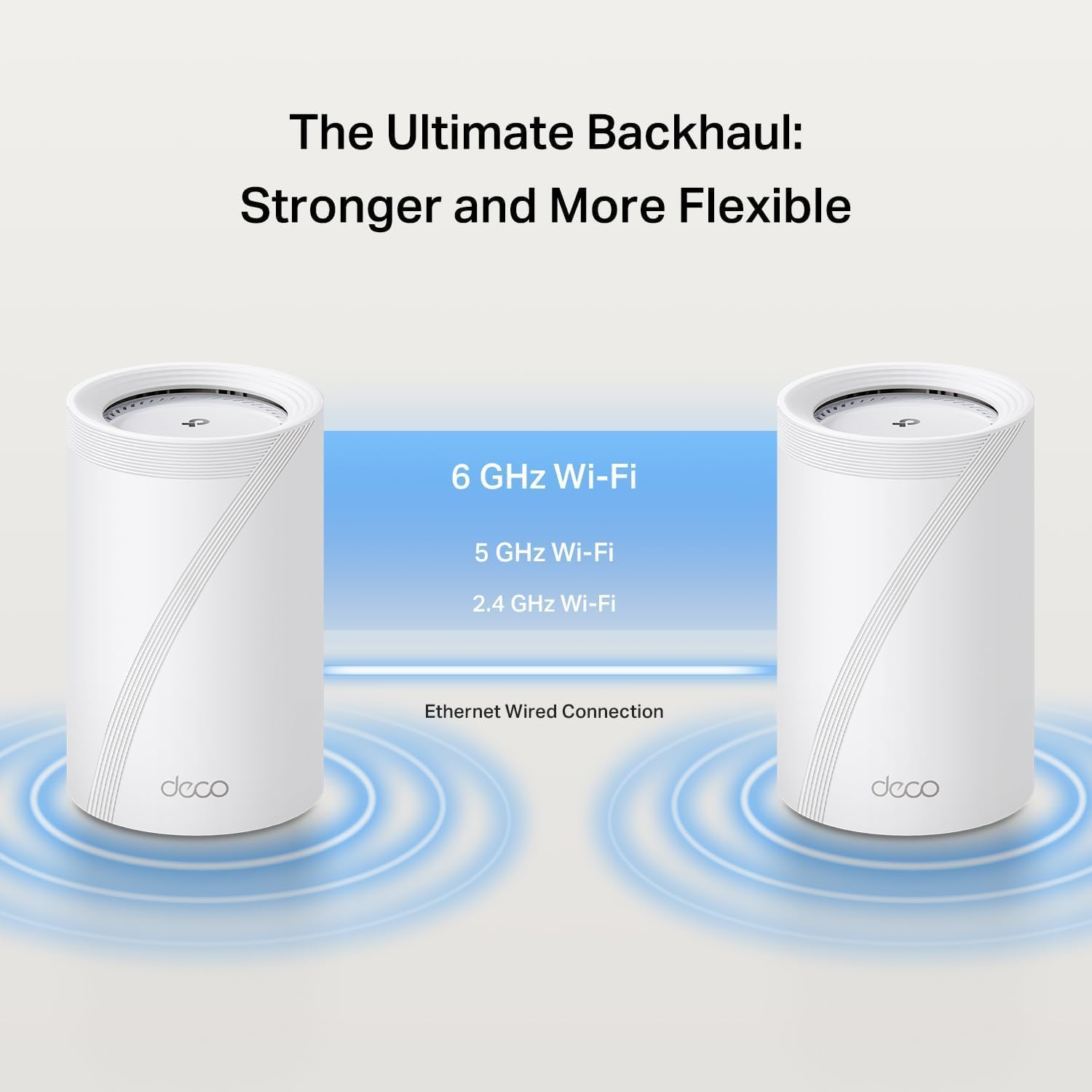
The Deco mesh system creates a single, unified network name, allowing your devices to automatically switch to the strongest Wi-Fi signal as you move throughout your home. This AI-Roaming technology ensures a smooth and uninterrupted connection. The system also utilizes a powerful backhaul, intelligently choosing between Wi-Fi 6 GHz, 5 GHz, 2.4 GHz, and wired Ethernet connections to ensure the fastest data transfer between Deco units.
Figure 3.3: The Ultimate Backhaul: Stronger and More Flexible. This image explains the concept of simultaneous wired and wireless backhaul, where Deco units can use both Ethernet cables and Wi-Fi bands (6 GHz, 5 GHz, 2.4 GHz) to establish the most efficient connection between them, ensuring stable performance.
3.4. TP-Link HomeShield Security
TP-Link HomeShield provides comprehensive network security and parental control features to protect your home network and connected devices. Key features include Basic Network Security, Quality of Service (QoS) for prioritizing traffic, and robust Parental Controls to manage internet access for family members. TP-Link is committed to cybersecurity, adhering to the U.S. Cybersecurity and Infrastructure Security Agency’s (CISA) Secure-by-Design pledge, ensuring advanced security is a core requirement in device design and maintenance.
Figure 3.4: Our Commitment to Cybersecurity and Privacy. This image emphasizes TP-Link's dedication to security, showcasing their Secure-by-Design pledge and the integrated HomeShield service, which offers various security and parental control features for Deco mesh products.
4. Maintenance
To ensure optimal performance and security of your TP-Link Deco BE67 system, regular maintenance is recommended:
Firmware Updates: Always keep your Deco units updated to the latest firmware version. This can be easily done through the Deco app, which will notify you of available updates. Firmware updates often include performance improvements, new features, and security patches.
Physical Placement: Ensure Deco units are placed in well-ventilated areas to prevent overheating. Avoid covering them or placing them in enclosed spaces.
Regular Reboots: Periodically rebooting your Deco system (e.g., once a month) can help clear temporary issues and refresh network performance. This can be done via the Deco app or by unplugging and replugging the power adapters.
Network Monitoring: Use the Deco app to monitor your network status, connected devices, and any potential security alerts provided by HomeShield.
5. Troubleshooting
If you encounter issues with your Deco BE67 system, consider the following common troubleshooting steps. For more detailed assistance, refer to the TP-Link support website or contact customer service.
No Internet Connection:
Check if your modem is working correctly.
Ensure the Ethernet cable between the modem and the main Deco unit is securely connected.
Reboot your modem and Deco system.
Slow Wi-Fi Speeds:
Verify your internet service provider's speed.
Ensure Deco units are optimally placed to minimize interference and maximize coverage.
Check for any background applications or devices consuming significant bandwidth.
Update Deco firmware via the app.
Devices Not Connecting:
Ensure the device is within the Deco network's range.
Verify the Wi-Fi password is correct.
Try restarting the problematic device.
Check the Deco app for any blocked devices or parental control settings affecting connectivity.
Deco Unit LED Status:
Solid Green: Working normally.
Solid Red: No internet connection.
Pulsing Blue: Ready for setup or setting up.
Pulsing Red: Disconnected from the main Deco unit.
6. Technical Specifications
TP-Link Deco BE67 (3-Pack) Specifications
Feature
Detail
Product Dimensions
6.93 x 4.23 x 4.23 inches (per unit)
Item Weight
5.09 pounds (total for 3-pack)
Item Model Number
Deco BE67(3-Pack)
Brand
TP-Link
Model Name
Deco 7 Pro BE14000
Special Features
Access Point Mode, Alexa Compatible, Guest Mode, Parental Control, QoS
Personal Computer, Security Camera, Smart Television, Smartphone, Tablet
Recommended Uses
Home Networking
Included Components
3 x Deco BE67 units, 1 x RJ45 Ethernet cable, 3 x Power adapters, 1 x Installation Guide
Connectivity Technology
Ethernet, USB 3.0, Wi-Fi
Color
White
7. Warranty and Support
7.1. Product Warranty
TP-Link products come with a limited warranty. For detailed information regarding the warranty period, terms, and conditions applicable to your Deco BE67 system, please visit the official TP-Link website or refer to the warranty card included in your product packaging.
7.2. Customer Support
For technical assistance, setup guidance, or troubleshooting, TP-Link offers comprehensive customer support:
TP-Link Support Website: Visit tp-link.com/us/support/ for FAQs, downloads, and support resources.
Deco App: The Deco app provides in-app support, network diagnostics, and easy access to common solutions.
Phone Support: Contact TP-Link customer service at 1-866-225-8139 for direct assistance.
Ask about setup, troubleshooting, compatibility, parts, safety, or missing instructions. Manuals+ will review the question and use this page’s manual context to help answer it.