
Introduction
This manual provides essential information for the safe and efficient operation, setup, and maintenance of your MJX Hyper GO 14211 1/14 Brushless 4X4 RC Desert Truck. Please read this manual thoroughly before using the product to ensure optimal performance and longevity.

The MJX Hyper GO 14211 RC Desert Truck, including its remote control, two batteries, and a set of extra wheels.
Safety Information
Important Safety Precaution: When not in use, always remove the battery from the car. Do not leave the battery installed in the vehicle for extended periods.
What's in the Box
- 1 x 14211 RC Desert Truck
- 1 x T3D Transmitter (Remote)
- 2 x 2S 2000 mAh Batteries
- 1 x USB Charging Cable
- 1 x Cross Wrench
- 1 x Screwdriver
- 4 x Extra Wheels
Setup
1. Battery Charging and Installation
Ensure both 2S 2000 mAh Lithium Ion batteries are fully charged before first use. Use the provided USB charging cable. Once charged, carefully install the battery into the designated compartment of the RC truck. Refer to the truck's internal layout for correct placement.

Internal view of the RC truck, highlighting the brushless motor, 45A ESC, and independent receiver.
2. Transmitter Setup
The T3D transmitter operates on a 2.4GHz frequency, allowing multiple vehicles to race without interference. Power on the transmitter, then the RC truck. They should automatically pair. The TD knob on the transmitter allows for maximum speed limit adjustment, which is beneficial for beginners.
3. Body Shell Installation
The polycarbonate (PC) material body shell is designed for durability. Secure the body shell using the anti-loss body clips. The design also incorporates dust protection components to keep internal parts clean.

Attaching the durable polycarbonate body shell, featuring anti-loss clips and dust protection.
4. Gyro Adjustment
The integrated gyroscope enhances stability and improves drifting performance. It is recommended to adjust the gyro to approximately 75% for optimal control. Note that activating the gyro may affect the vehicle's ability to drive perfectly straight in reverse.
Official MJXRC video demonstrating the Hyper GO 14211 in action, showcasing its features and performance.
Operating Your RC Truck
1. Basic Controls
Use the steering wheel on the transmitter for directional control and the trigger for throttle (forward/reverse) and braking. Familiarize yourself with the controls in an open, safe area before attempting high-speed maneuvers.
2. Speed Modes
The truck is equipped with a powerful Hobby 2852 4400kv brushless motor. It can reach speeds of 28 mph with a 2S battery and up to 45 mph with a 3S LIPO battery (sold separately). The TD knob on the transmitter allows you to limit the maximum speed, making it suitable for various skill levels.
3. Driving on Different Terrains
The 69mm oil-filled shocks provide excellent suspension and control across various terrains. The truck is designed to handle rugged conditions, including dirt, gravel, and short grass. However, performance may vary on extremely challenging surfaces.
The RC truck demonstrating its versatility on different terrains, supported by its metal oil-filled shocks.
4. Drifting
The gyroscope significantly aids in achieving controlled drifts. Experiment with throttle and steering inputs to master drifting techniques. Adjusting the gyro sensitivity can further refine your drifting experience.
Maintenance
1. Chassis and Drivetrain Inspection
Regularly inspect the rugged 6061 aluminum chassis components, sealed differential outdrives, metal gearbox internals, and durable steel universal telescopic drive shafts for any signs of wear or damage. Ensure all screws are tightened.

Close-up of the truck's robust chassis, featuring metal drive systems, steel driveshafts, and a metal gear servo.
2. Shock Absorber Maintenance
The 69mm oil-filled shocks are fully tunable. Check them periodically for leaks or damage. The pressure bladders for air/oil separation and threaded spring pre-load collars allow for quick ride height adjustments and tuning.
3. Battery Care
Always remove the battery when the truck is not in use. Store batteries in a cool, dry place. Avoid overcharging or completely draining the batteries to prolong their lifespan.
4. General Cleaning
After each use, especially after driving in dusty or dirty conditions, clean the truck to prevent debris buildup. The anti-loss body clip design and dust protection components help, but regular cleaning is still recommended.
Troubleshooting
- No Power: Check battery connection and charge level. Ensure the truck and transmitter are both powered on.
- Loss of Control: Verify transmitter batteries. Ensure the truck and transmitter are paired correctly. Adjust gyro settings if necessary.
- Reduced Performance: Check for debris in moving parts, especially around the wheels and drivetrain. Inspect tires for wear. Ensure batteries are fully charged.
- Unusual Noises: Discontinue use immediately and inspect the drivetrain, motor, and gears for any obstructions or damage.
Specifications
| Feature | Detail |
|---|---|
| Product Dimensions | 12.6 x 6 x 4.4 inches |
| Item Weight | 4.8 pounds |
| Item Model Number | 14211 |
| Manufacturer Recommended Age | 14 years and up |
| Batteries | 1 Lithium Ion battery required (included) |
| Motor | Hobby 2852 4400kv Brushless Motor |
| ESC | 45A (compatible 2S/3S battery) |
| Control Range | 120m |

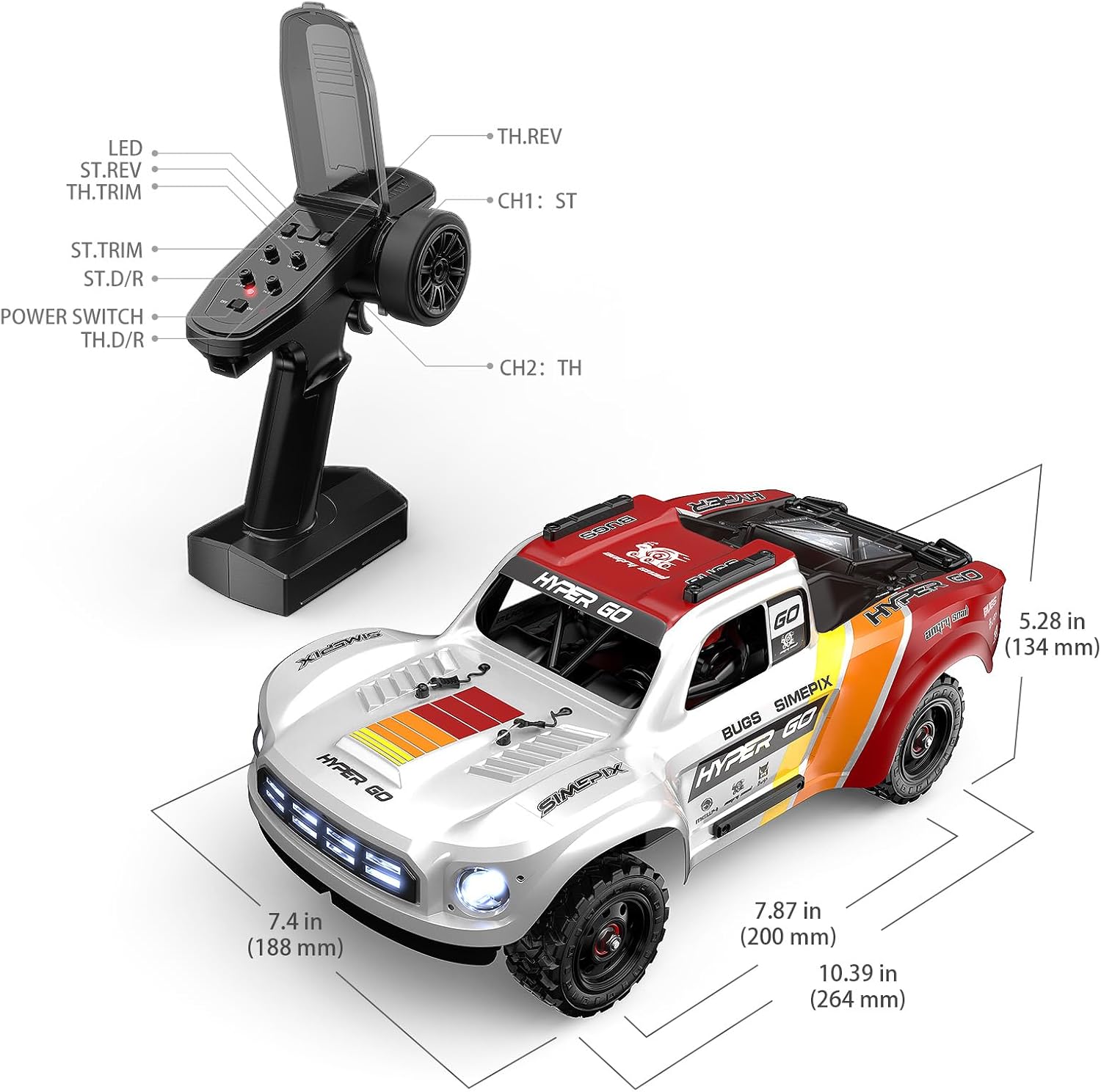
Detailed dimensions of the MJX Hyper GO 14211 RC Desert Truck.
Warranty and Support
For warranty information or technical support, please contact MJX customer service directly. Refer to the product packaging or the official MJX website for contact details.


