
1. Introduction
This manual provides detailed instructions for the proper use and maintenance of your TRAUSI T6 Open Ear Wireless Earbuds. Please read this manual thoroughly before using the product to ensure optimal performance and longevity.
2. Product Overview
2.1 Package Contents
The TRAUSI T6 package includes the following items:
- TRAUSI T6 Wireless Earbuds (x2)
- Charging Case (x1)
- Type-C Charging Cable (x1)
- Owner's Manual (x1)
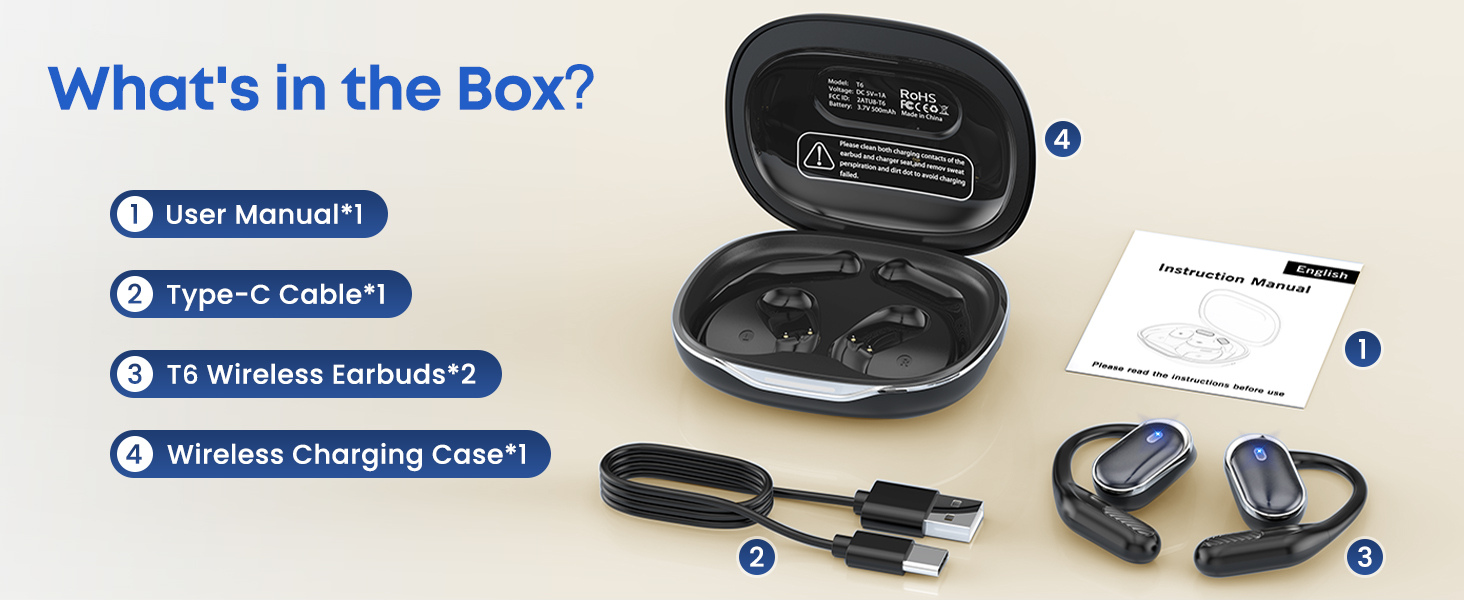
Image: TRAUSI T6 package contents, showing earbuds, charging case, Type-C cable, and user manual.
2.2 Key Features
- Open-Ear Design: Allows awareness of surroundings while listening.
- Bluetooth 5.3: Ensures stable and fast wireless connection.
- Extended Playtime: Up to 50 hours of total playtime with the charging case.
- IPX7 Waterproof: Resistant to sweat and rain, suitable for sports.
- Touch Controls: Intuitive gestures for audio and call management.
- Stereo Sound: Delivers clear and dynamic audio.

Image: Illustration of the TRAUSI T6's open-ear design, highlighting sound conduction without ear canal obstruction.

Image: Detailed view of the TRAUSI T6's internal sound components, emphasizing 3D panoramic space sound, 16.2mm drivers, and Hi-Fi stereo capabilities.
3. Setup
3.1 Charging the Earbuds and Case
Before first use, fully charge the earbuds and the charging case.
- Place the earbuds into the charging case. Ensure they are correctly seated.
- Connect the Type-C charging cable to the charging port on the case and a USB power source.
- The indicator lights on the charging case will illuminate to show charging status. A full charge is indicated when all lights are solid or turn off, depending on the model.
The earbuds provide up to 50 hours of total playtime with multiple charges from the case.

Image: TRAUSI T6 charging case with earbuds, illustrating the battery level display.
3.2 Bluetooth Pairing
To connect your TRAUSI T6 earbuds to a device:
- Open the charging case. The earbuds will automatically enter pairing mode.
- On your device (smartphone, tablet, laptop), enable Bluetooth.
- Search for available Bluetooth devices and select "TRAUSI T6" from the list.
- Once connected, a voice prompt will confirm successful pairing.
The earbuds will automatically reconnect to the last paired device when taken out of the case, if Bluetooth is enabled on the device.
4. Operating Instructions
4.1 Wearing the Earbuds
For optimal comfort and sound, follow these steps to wear your earbuds:
- Take out the earbuds from the charging case.
- Hang the end of the earphone on the ear bone.
- Turn the earphone and slide it behind the ear.
- Adjust the ear hook, wear, and pull down the ear hook for a secure fit.

Image: Step-by-step guide demonstrating the correct way to wear the TRAUSI T6 earbuds.
4.2 Touch Controls
The TRAUSI T6 earbuds feature touch-sensitive controls on each earbud. The functions are as follows:
| Action | Function |
|---|---|
| Tap Once | Play/Pause Music, Answer/End Call |
| Tap Twice (Left Earbud) | Previous Track |
| Tap Twice (Right Earbud) | Next Track |
| Tap & Hold (Left Earbud) | Volume Down |
| Tap & Hold (Right Earbud) | Volume Up |
| Tap & Hold for 2 seconds | Reject Call |
| Tap & Hold for 5 seconds | Power On/Off |
| Tap Three Times | Activate Voice Assistant |
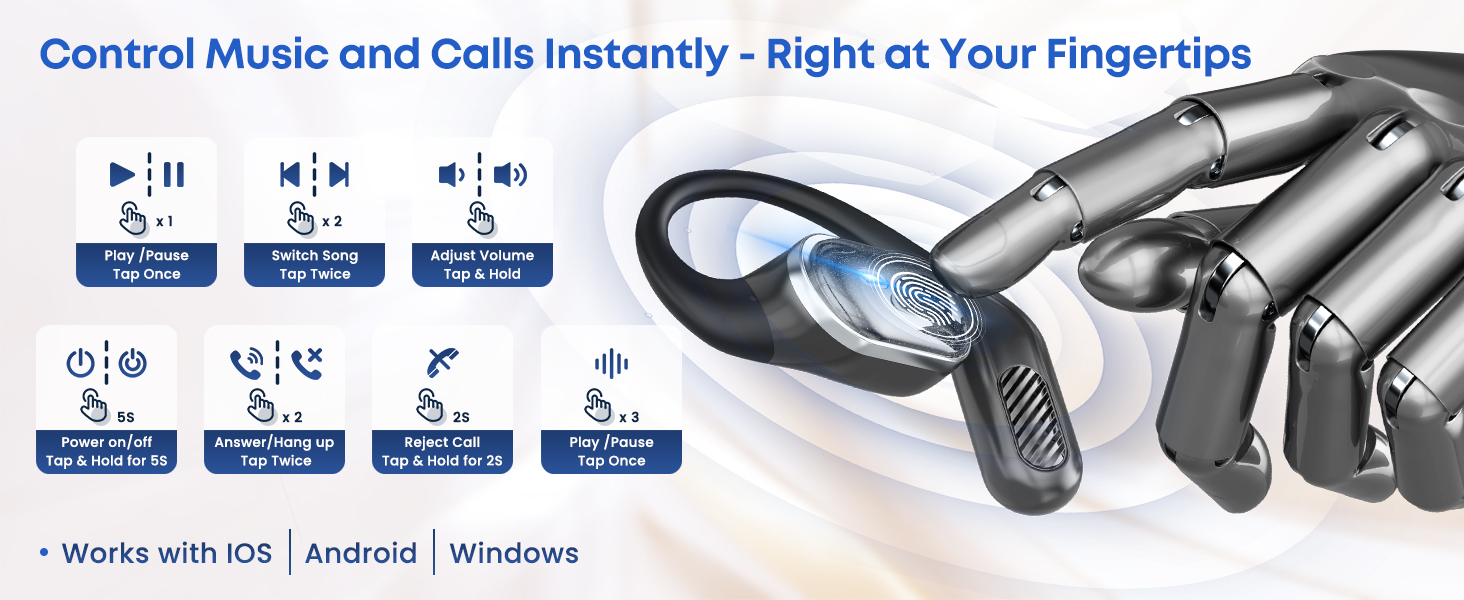
Image: Visual representation of the touch control functions on the TRAUSI T6 earbuds.
5. Maintenance
5.1 Cleaning and Care
- Regularly clean the earbuds and charging case with a soft, dry, lint-free cloth.
- Avoid using abrasive materials, solvents, or chemical cleaners.
- Ensure charging contacts on both earbuds and case are clean and dry to prevent charging issues.
5.2 Water Resistance (IPX7)
The TRAUSI T6 earbuds are IPX7 waterproof, meaning they can withstand immersion in water up to 1 meter for 30 minutes. They are resistant to sweat and rain, making them suitable for workouts and outdoor activities. However, they are not recommended for swimming or diving. Avoid exposure to saltwater.

Image: TRAUSI T6 earbuds demonstrating IPX7 waterproof rating with water splashes.
5.3 Storage
When not in use, store the earbuds in their charging case to protect them and ensure they remain charged.
6. Troubleshooting
If you encounter issues with your TRAUSI T6 earbuds, refer to the following common solutions:
- No Sound: Ensure earbuds are charged, properly paired, and volume is adjusted on both the earbuds and your device.
- Cannot Pair: Make sure Bluetooth is enabled on your device and the earbuds are in pairing mode. Try turning Bluetooth off and on again on your device.
- Intermittent Connection: Ensure there are no obstructions between the earbuds and your device. Keep within the 10-meter Bluetooth range. Avoid strong electromagnetic interference.
- Earbuds Not Charging: Check if the charging cable is securely connected and the charging contacts on both earbuds and case are clean.
- One Earbud Not Working: Try placing both earbuds back into the case, closing it, and then taking them out again to reset the connection.
If problems persist, consult the TRAUSI customer support for further assistance.
7. Specifications
| Feature | Detail |
|---|---|
| Model Name | T6 |
| Connectivity Technology | Bluetooth |
| Bluetooth Version | 5.3 |
| Bluetooth Range | 10 Meters |
| Water Resistance Level | IPX7 |
| Control Type | Touch Control |
| Ear Placement | Open Ear |
| Earpiece Shape | Hook |
| Material | Plastic |
| Item Weight | 0.035 ounces (per earbud) |
| Product Dimensions | 2 x 1 x 3 inches |
| Batteries | 1 A batteries required (included) |
| Manufacturer | TRAUSI |
8. Warranty and Support
TRAUSI products are designed for reliability and performance. For warranty information, please refer to the documentation included with your purchase or visit the official TRAUSI website. For technical support or customer service inquiries, please contact TRAUSI customer support through their official channels.