
1. Introduction
This manual provides essential instructions for the safe and effective use of your DOAO A3 Pro Electric Razor. Please read this manual thoroughly before first use and retain it for future reference.
The DOAO A3 Pro is designed for men's shaving, offering both wet and dry shaving capabilities. It features 3D floating heads, powerful dual-track blades, a pop-up trimmer, and a waterproof design for easy cleaning.
2. Package Contents
Verify that all items listed below are present in your package:
- DOAO A3 Pro Electric Shaver
- Protective Lid
- Cleaning Brush
- Travel Bag
- USB-C Power Cable
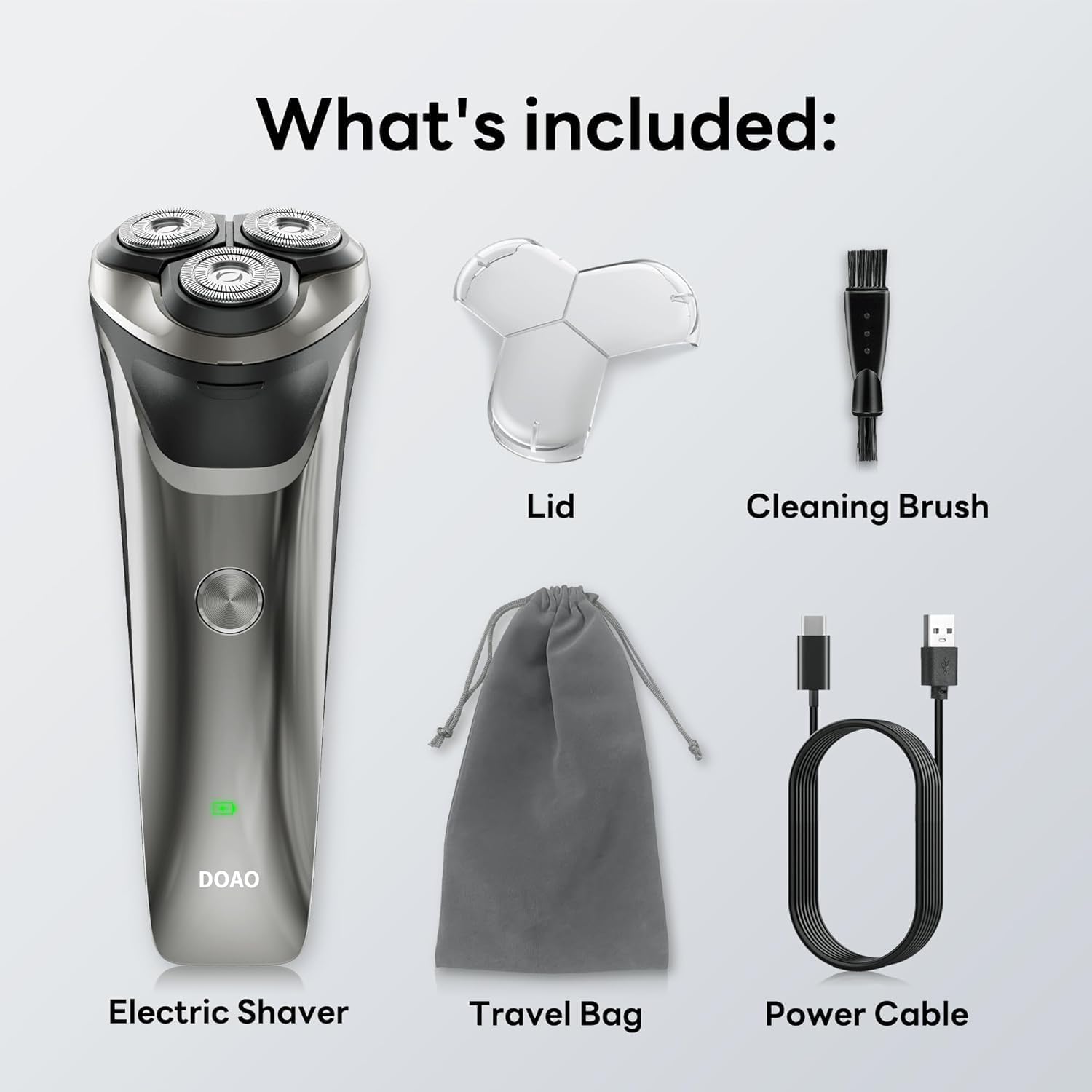
Image: All components included in the DOAO A3 Pro Electric Razor package.
3. Product Features
- 3D Floating Heads: Ergonomically designed to adapt to facial contours for a close shave.
- Powerful Dual-Track Blades: High-speed motor with blades cutting up to 56,000 times per minute for efficient shaving.
- 100% Waterproof Design: Suitable for wet or dry shaving and easy cleaning under running water.
- Pop-Up Trimmer: Integrated trimmer for precise grooming of sideburns, mustaches, and beard edges.
- Long-Lasting Battery: Provides up to 120 minutes of continuous use on a 1.5-hour charge.
- USB-C Charging: Convenient and fast charging.

Image: Illustration of the shaver's 3D floating heads and powerful dual-track blades.
4. Setup
4.1 Initial Charge
- Before first use, fully charge the shaver.
- Connect the USB-C power cable to the charging port on the shaver.
- Plug the other end of the USB-C cable into a compatible USB power adapter (not included) or a computer USB port.
- The LED indicator will show charging status. A full charge typically takes 1.5 hours.
- Once fully charged, disconnect the shaver from the power source.

Image: The shaver connected to its USB-C charging cable, illustrating battery life and charging time.
5. Operating Instructions
5.1 Shaving
The DOAO A3 Pro supports both wet and dry shaving.
Dry Shaving:
- Ensure your face is clean and dry.
- Press the power button to turn on the shaver.
- Move the shaver in small, circular motions over your skin, applying gentle pressure.
- Stretch your skin with your free hand to ensure hairs stand upright for a closer shave.
Wet Shaving:
- Apply shaving foam or gel to your face.
- Press the power button to turn on the shaver.
- Move the shaver in small, circular motions over your skin.
- Rinse the shaver head under running water during shaving to prevent clogging.

Image: A user demonstrating wet shaving with the DOAO A3 Pro electric razor.
5.2 Using the Pop-Up Trimmer
- Locate the pop-up trimmer switch on the back of the shaver.
- Slide the switch upwards to activate the trimmer.
- Use the trimmer to shape sideburns, mustaches, or to define beard lines.
- After use, slide the switch downwards to retract the trimmer.

Image: The integrated pop-up trimmer in use for precise grooming.
6. Maintenance
6.1 Cleaning the Shaver
Regular cleaning ensures optimal performance and hygiene.
Daily Cleaning (After Each Use):
- Turn off the shaver.
- Open the shaver head by pressing the release button (if applicable) or gently pulling it open.
- Rinse the shaver head and the hair chamber thoroughly under warm running water.
- Shake off excess water and allow the shaver head to air dry before closing or attaching the protective lid.
Thorough Cleaning (Weekly or as Needed):
- Turn off the shaver and detach the shaver head.
- Use the provided cleaning brush to remove any trapped hairs from the blades and inner chamber.
- Rinse all parts under warm running water.
- Ensure all parts are completely dry before reassembling.

Image: The shaver head being rinsed under running water, highlighting its waterproof feature.
6.2 Blade Replacement
For optimal shaving performance, it is recommended to replace the shaver heads every 12 months, or sooner if you notice reduced performance or discomfort.
- Turn off the shaver.
- Gently twist and pull the old shaver head upwards to remove it.
- Align the new shaver head with the shaver body and press down until it clicks into place.
7. Troubleshooting
| Problem | Possible Cause | Solution |
|---|---|---|
| Shaver does not turn on. | Battery is depleted. | Charge the shaver fully. |
| Poor shaving performance / pulling hairs. | Blades are dull or clogged with hair. | Clean the shaver head thoroughly. Consider replacing the shaver head if performance does not improve. |
| Shaver stops during use. | Battery is low. | Recharge the shaver. |
| Charging indicator not working. | Faulty cable or power adapter. | Try a different USB-C cable or power adapter. Ensure connections are secure. |
If the problem persists after attempting these solutions, please contact customer support.
8. Specifications
- Model: A3 Pro
- Power Source: Battery Powered (1 A battery included)
- Battery Type: Lithium-ion
- Charging Time: Approximately 1.5 hours
- Operating Time: Up to 120 minutes (approx. 60 days of daily use)
- Waterproof Rating: 100% Waterproof
- Special Feature: Cordless, Pop-up Trimmer
- Recommended Use: Face
- Manufacturer: DOAO
- Package Dimensions: 8.03 x 6.1 x 2.52 inches
- Item Weight: 9.88 ounces
9. Warranty and Support
Your DOAO A3 Pro Electric Razor comes with comprehensive support and warranty:
- Lifetime Warranty: Enjoy peace of mind with a lifetime warranty on your product.
- 365-Day Warranty: Specific warranty details may apply, refer to product registration for full terms.
- Lifetime Technical Help: Access to technical assistance for the lifespan of your product.
- Free Return & 100% Refund: Hassle-free returns and full refunds if you are not satisfied.
- 24/7 Fast Support: Responsive customer support available within 12 hours.
For any inquiries, technical assistance, or warranty claims, please contact DOAO customer support through the platform where you purchased the product.

Image: DOAO customer support information.
