
1. Overview
The EYTSE HA05 is a portable USB C DAC (Digital-to-Analog Converter) and headphone amplifier designed to enhance your audio experience. It features dual CS43131 DAC chips, supporting high-resolution audio up to 32-bit/384kHz PCM and DSD256. Its compact, battery-free design allows for plug-and-play operation across various devices.

The EYTSE HA05 Portable USB C DAC Headphone Amplifier, showcasing its sleek design and Hi-Res Audio certification.
Key Features:
- Ultra-Light, Battery-Free Design: Crafted from aerospace aluminum for portability and convenience, requiring no external charging.
- Dual CS43131 Flagship DAC: Delivers pristine, uncolored sound with an ultra-low distortion rate (<0.0003% THD+N).
- High-Resolution Audio Support: Supports 32-bit/384kHz PCM and DSD256 decoding for exceptional clarity and detail.
- Dual Audio Outputs: Features a 3.5mm single-ended jack and a 4.4mm balanced jack for versatile headphone compatibility.
- Smart Gain Control: Offers adjustable gain settings to match various headphone sensitivities and listening preferences.
- Universal Plug-and-Play: Compatible with Android, Windows, Mac, and iPhone 15 (native support) without requiring drivers.

Illustration highlighting the dual CS43131 DAC chips and gold-plated USB-C for stable power transmission, ensuring high-fidelity audio.
2. What's in the Box
Verify that all items are present in the package:
- HA05 Headphone Amplifier
- Type-C to Type-C Cable
- USB-A to USB-C Adapter
- User Manual
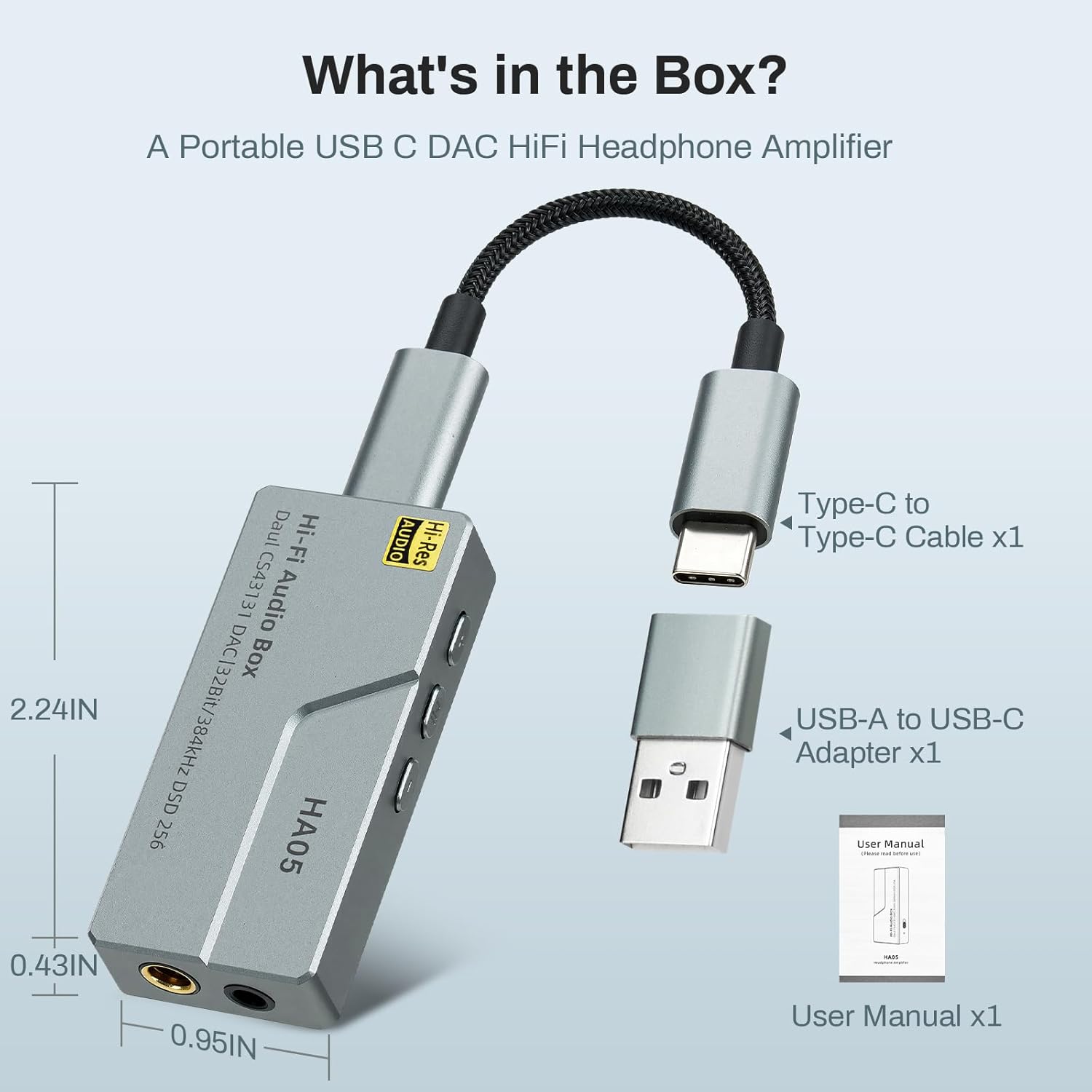
A visual representation of the HA05 Headphone Amplifier and its included accessories: Type-C to Type-C cable, USB-A to USB-C adapter, and user manual.
3. Setup and Connection
The HA05 is designed for plug-and-play functionality, requiring no additional drivers for most compatible devices.
Connecting to Your Device:
- Identify the USB-C port on your smartphone, tablet, laptop, or PC.
- Connect one end of the provided Type-C to Type-C cable to the HA05's USB-C input.
- Connect the other end of the Type-C to Type-C cable to your device's USB-C port. If your device only has a USB-A port, use the included USB-A to USB-C adapter.
- Plug your headphones into either the 3.5mm single-ended output or the 4.4mm balanced output on the HA05. Ensure the headphone jack is fully inserted.
- The device should automatically recognize the HA05 as an audio output. Select it from your device's audio settings if necessary.

The HA05 connected to a laptop via USB-C, demonstrating its compatibility with personal computers.

A collage illustrating various connection designs and applications for the HA05, including smartphones, tablets, and laptops.
This video demonstrates the setup and features of the EYTSE HA05 Portable USB C DAC Headphone Amplifier, including its physical buttons and dual audio outputs.
4. Operating Instructions
Physical Controls:
The HA05 features physical buttons for convenient control over your audio playback:
- Volume Up (+): Press to increase the audio volume.
- Volume Down (-): Press to decrease the audio volume.
- Play/Pause: Press the center button to play or pause audio playback.

A detailed view of the HA05's physical control buttons (volume up, down, play/pause) and its 3.5mm and 4.4mm audio output jacks.
Gain Control:
The HA05 includes a smart gain switch to optimize output for different headphones. Use the switch on the side of the device to toggle between low gain (for sensitive headphones/earbuds) and high gain (for less sensitive or high-impedance headphones).
- Low Gain: Suitable for most in-ear monitors (IEMs) and highly sensitive headphones, providing a relaxed listening experience.
- High Gain: Recommended for headphones with higher impedance or lower sensitivity, delivering a more immersive and powerful sound.

An illustration demonstrating the dual gain settings (Low Gain/Relaxing and High Gain/Immersive) available on the HA05 for tailored audio output.
Voice Calls:
The HA05 supports voice calls when connected to compatible devices and headphones with an inline microphone. Enjoy clear communication with enhanced audio quality.

A user making a voice call with the HA05 connected to their smartphone, highlighting its support for high-definition communication.
5. Compatibility
The HA05 is designed for broad compatibility with various devices and operating systems:
- Operating Systems: Android, iOS (iPhone 15 Pro Max/Plus, iPad), Windows, Mac.
- Devices: Smartphones, tablets, laptops, PCs, and other devices with a USB-C port.

An image showing the HA05 connected to a smartphone, with icons indicating compatibility with Android, iOS, macOS, and Windows operating systems.
6. Maintenance
To ensure the longevity and optimal performance of your EYTSE HA05, follow these maintenance guidelines:
- Cleaning: Use a soft, dry cloth to clean the exterior of the device. Avoid using harsh chemicals, solvents, or abrasive materials.
- Storage: Store the HA05 in a cool, dry place away from direct sunlight and extreme temperatures.
- Handling: Handle the device with care. Avoid dropping it or subjecting it to strong impacts.
- Moisture: Keep the device away from water and other liquids. Moisture can damage internal components.
- Cable Care: Do not bend or twist the cables excessively. Store them neatly to prevent damage.
7. Troubleshooting
If you encounter issues with your HA05, refer to the following common troubleshooting steps:
- No Sound:
- Ensure the HA05 is securely connected to both your source device and headphones.
- Check your source device's audio output settings to confirm the HA05 is selected.
- Verify that the volume on both your source device and the HA05 is not muted or set too low.
- Test with different headphones or a different source device to isolate the issue.
- Distorted Sound:
- Reduce the volume on your source device and the HA05.
- Ensure your audio files are not corrupted or of low quality.
- If using high gain, try switching to low gain, especially with sensitive headphones.
- Device Not Recognized:
- Disconnect and reconnect the HA05.
- Try using a different USB-C port or the included USB-A adapter if applicable.
- Restart your source device.
- Ensure your device's operating system is up to date.
- Intermittent Connection:
- Check all cable connections for looseness or damage.
- Avoid placing the device near sources of electromagnetic interference.
If these steps do not resolve the issue, please contact EYTSE customer support for further assistance.
8. Specifications
| Feature | Detail |
|---|---|
| Model Number | HA05 |
| DAC Chip | Dual CS43131 |
| PCM Decoding | Up to 32-bit/384kHz |
| DSD Decoding | DSD256 |
| Outputs | 3.5mm Single-Ended, 4.4mm Balanced |
| THD+N | <0.0003% |
| Product Dimensions | 2.24 x 1.02 x 0.47 inches |
| Item Weight | 2.89 ounces |
| Connectivity | USB-C |
| Material | Aerospace Aluminum |
9. Warranty and Support
EYTSE products are manufactured to high-quality standards. For information regarding warranty coverage, terms, and conditions, please refer to the warranty card included in your product packaging or visit the official EYTSE website.
If you require technical assistance, have questions about product functionality, or need to report an issue, please contact EYTSE customer support. Contact details can typically be found on the official EYTSE website or within the product packaging.