
1. Introduction
This instruction manual provides essential information for the safe and effective use of your CJP-Geek 12V AC-DC Adaptor Charger. Please read this manual thoroughly before using the product and retain it for future reference. This adaptor is specifically designed to be compatible with the CONOPU DH-CS01 dehumidifier.
2. Product Overview
The CJP-Geek 12V AC-DC Adaptor Charger is a reliable power supply unit featuring robust construction and built-in safety mechanisms. It converts standard AC wall power to the DC power required by your compatible device.
2.1 Key Features
- Wide Compatibility: Designed for use with the CONOPU DH-CS01 dehumidifier.
- Durable Construction: Features a sturdy flame-retardant exterior shell to protect internal components.
- Built-in Protections: Includes multiple safety features for secure operation.
2.2 Adapter Components and Dimensions
The adapter consists of a power brick, an input cable (connecting to the wall outlet), and an output cable with a DC connector (connecting to the device).
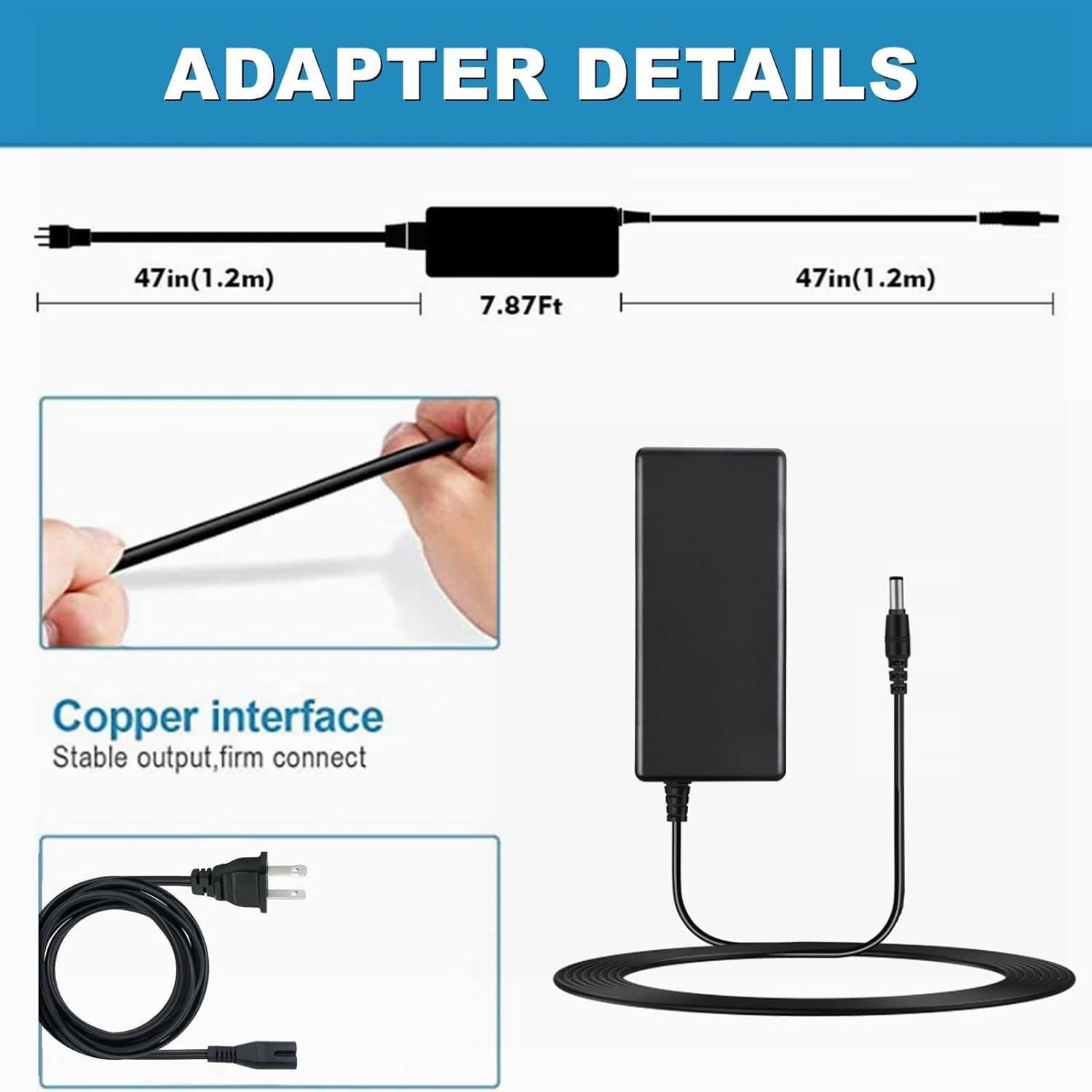
Image 1: CJP-Geek 12V AC-DC Adaptor Charger with detailed dimensions. The image shows the total length of the adapter, including the input and output cables, each approximately 47 inches (1.2 meters) long, and the central power brick. It also highlights the 'Copper interface' for stable output and firm connection, and the standard AC plug.
2.3 Adapter Label Details
The product label provides important electrical specifications and certifications.

Image 2: Close-up of the CJP-Geek AC Adaptor label. This label displays the model number (P/N: 48W), input voltage range (100-240V ~ 1.6A (1.5A) 50-60Hz), and output specifications (12V --- 4A). It also shows various safety certifications and warnings.
3. Safety Information
Your CJP-Geek adaptor is equipped with multiple protection features to ensure safe operation and protect your connected devices.
3.1 Built-in Protections
- Over Voltage Protection: Safeguards against excessive voltage input.
- Over Current Protection: Prevents damage from excessive current flow.
- Short Circuit Protection: Automatically shuts down power in case of a short circuit.
- Input Protection: Protects against irregularities in the input power.
- Over Load Protection: Prevents damage when the connected device draws too much power.
- Over Charge Protection: (Applicable if charging a battery, though this is a power supply)
- Temperature Protection: Helps prevent overheating of the adapter.

Image 3: Visual representation of the safety features of the CJP-Geek AC Adaptor. Icons illustrate Over Load Protection, Over Voltage Protection, Over Charge Protection, Over Current Protection, Short Circuit Protection, and Temperature Protection.
3.2 General Safety Precautions
- Do not expose the adaptor to water, moisture, or extreme temperatures.
- Avoid dropping or subjecting the adaptor to strong impacts.
- Do not attempt to open or modify the adaptor.
- Ensure the adaptor is used in a well-ventilated area.
- Keep out of reach of children.
4. Setup and Connection
Follow these steps to properly set up and connect your CJP-Geek AC-DC Adaptor Charger.
- Verify Compatibility: Ensure your device is the CONOPU DH-CS01 dehumidifier and requires a 12V DC power input.
- Connect to Power Outlet: Plug the AC input cable of the adaptor into a standard 100-240V AC wall outlet.
- Connect to Device: Insert the DC output connector of the adaptor firmly into the power input port of your CONOPU DH-CS01 dehumidifier.
- Power On: Once both connections are secure, you can power on your dehumidifier.
Always ensure connections are snug to prevent intermittent power supply or damage.
5. Operation
The CJP-Geek 12V AC-DC Adaptor Charger operates automatically once connected. It provides a stable 12V DC power supply to your CONOPU DH-CS01 dehumidifier.
- The adaptor is designed for continuous operation within its specified limits.
- No user intervention is required during normal operation.
6. Maintenance and Care
Proper maintenance ensures the longevity and reliable performance of your adaptor.
- Cleaning: Disconnect the adaptor from both the wall outlet and the device before cleaning. Use a soft, dry cloth to wipe the exterior. Do not use liquid cleaners or solvents.
- Storage: When not in use, store the adaptor in a cool, dry place, away from direct sunlight and extreme temperatures. Avoid tightly coiling the cables to prevent damage.
- Inspection: Periodically inspect the cables and connectors for any signs of wear, fraying, or damage. If any damage is observed, discontinue use and replace the adaptor.
7. Troubleshooting
If you encounter issues with your CJP-Geek AC-DC Adaptor Charger, refer to the following common problems and solutions:
| Problem | Possible Cause | Solution |
|---|---|---|
| No power to device | Loose connection Faulty wall outlet Damaged adaptor | Ensure all connections are secure. Test the wall outlet with another device. Inspect the adaptor for visible damage. If damaged, replace it. |
| Adaptor feels excessively hot | Normal operation (slight warmth) Overload or poor ventilation Internal fault | A slight warmth is normal. Ensure adequate ventilation around the adaptor. Disconnect the adaptor and allow it to cool. If it consistently overheats, discontinue use. If the adaptor is excessively hot to touch, disconnect immediately and do not use. |
| Device not functioning correctly | Incorrect adaptor Device fault | Confirm the adaptor is the correct model for your CONOPU DH-CS01 dehumidifier. Test the dehumidifier with another compatible power source if available, or consult the dehumidifier's manual. |
If the problem persists after trying these solutions, please contact customer support.
8. Specifications
Detailed technical specifications for the CJP-Geek 12V AC-DC Adaptor Charger.
| Feature | Specification |
|---|---|
| Model Number | CJP25708-163 |
| Input Voltage | 100-240V AC |
| Input Frequency | 50/60Hz |
| Output Voltage | 12V DC |
| Output Current | 4A |
| Compatible Device | CONOPU DH-CS01 dehumidifier |
| Color | Black |
| Item Weight | 3 ounces |
| Special Feature | Short Circuit Protection |
| Material | Flame-retardant exterior shell |
9. Support and Warranty
For technical assistance or inquiries regarding your CJP-Geek 12V AC-DC Adaptor Charger, please contact the manufacturer or your retailer.
Specific warranty details are not provided in this manual. Please refer to the product packaging or contact the seller for warranty information.