
Important Safety Information
WARNING: Keep hands and feet away from the rotating brush during operation. Do not use in enclosed spaces to prevent injury from debris or carbon monoxide poisoning.
Always wear appropriate personal protective equipment, including eye protection, when operating the power broom. Ensure the work area is clear of bystanders and pets. Before performing any maintenance or adjustments, always remove the battery from the tool.
Product Overview
The DEWALT 20V Battery Power Broom Sweeper (DXSBXA2017-002) is designed for efficient debris removal from various outdoor and indoor surfaces. This bare tool features a 10-inch brush diameter and a 15.25-inch sweeping width, allowing for effective coverage of large areas.
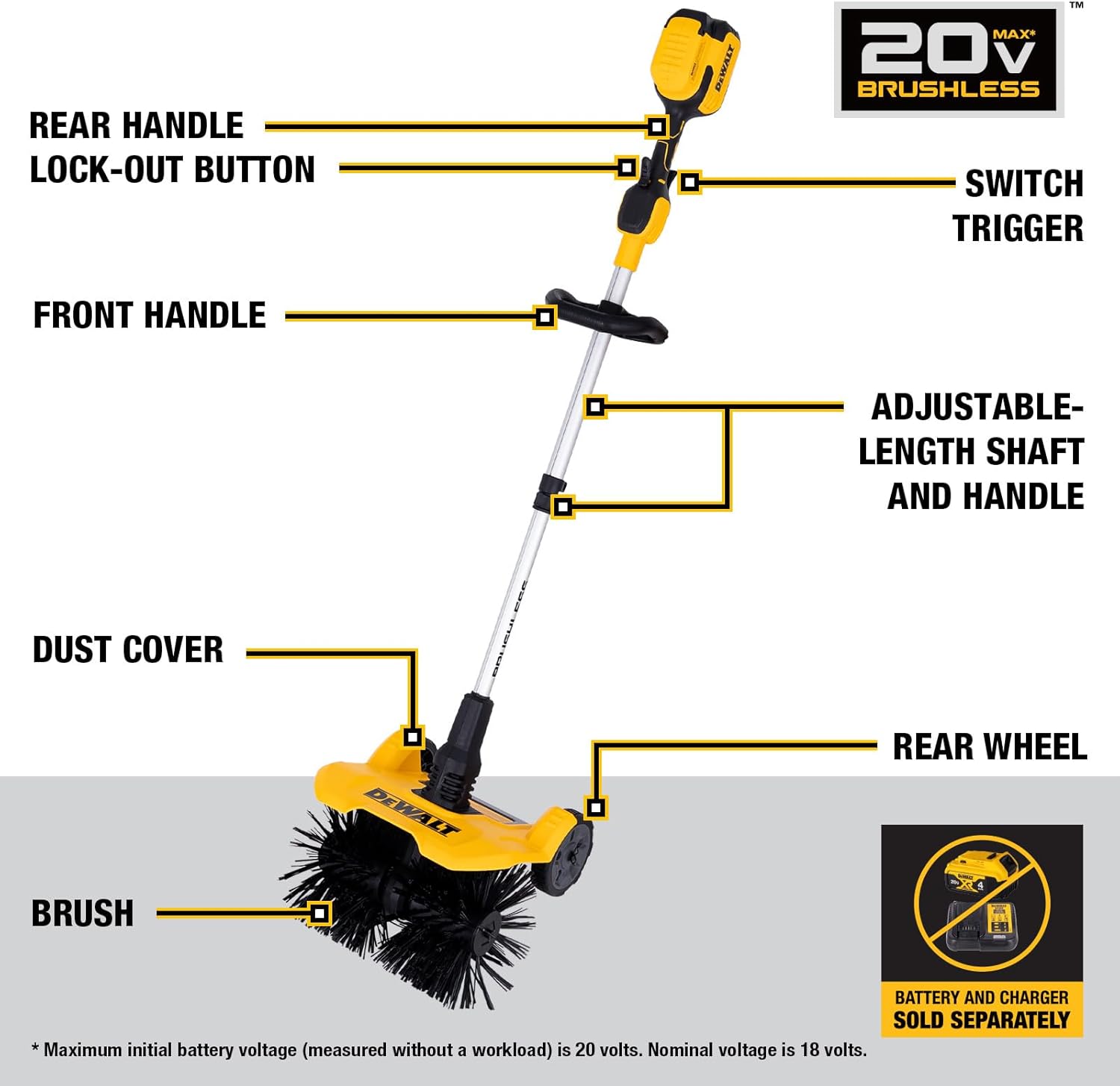
Figure 1: DEWALT 20V Battery Power Broom Sweeper with key components labeled, including the rear handle lock-out button, switch trigger, front handle, adjustable-length shaft, dust cover, brush, and rear wheel.
The sweeper is equipped with a high-efficiency motor for consistent power and extended runtime. Its compact and lightweight design, weighing approximately 16.5 lbs, ensures comfortable operation. The adjustable pole allows users to customize the height for ergonomic use, and the front handle provides an easy grip for maneuvering.
Assembly and Setup
- Attach Wheels: Securely attach the rear wheels to the main unit. Ensure they are firmly in place before operation.
- Adjust Pole Length: Loosen the adjustable pole clamp. Extend or retract the shaft to a comfortable operating height. Tighten the clamp to secure the pole.
- Install Battery: Insert a charged DEWALT 20V MAX* battery (sold separately) into the battery compartment until it clicks into place. Ensure the battery is fully seated.
- Check Controls: Familiarize yourself with the rear handle lock-out button and the switch trigger.

Figure 2: Proper insertion of a DEWALT 20V MAX battery into the power broom. Battery and charger are sold separately.
Operating Instructions
The DEWALT Power Broom is designed for clearing debris, leaves, dust, and light snow from various surfaces such as artificial turf, grass, patios, decking, and driveways. It can also be used indoors in workshops or basements.
- Starting the Sweeper: To start the sweeper, press and hold the rear handle lock-out button, then squeeze the switch trigger. Release the lock-out button once the sweeper is running.
- Operating Technique: Push the sweeper forward at a steady pace. Allow the rotating brushes to do the work. For optimal results, overlap each pass slightly to ensure complete coverage.
- Surface Adaptability: The durable rear wheels assist in smooth maneuvering across multiple surfaces. Adjust the angle of the sweeper to maintain light pressure of the bristles against the ground for effective sweeping without excessive resistance.
- Stopping the Sweeper: Release the switch trigger to stop the sweeper.

Figure 3: The power broom effectively clearing leaves, dirt, and snow from different outdoor surfaces.
Video 1: Official demonstration of the DEWALT 20V Battery Power Sweeper in action, showcasing its ability to clear various types of debris from different surfaces.
Maintenance
- Brush Inspection: Regularly inspect the brushes for wear or damage. Replace brushes if they become excessively worn to maintain optimal sweeping performance.
- Cleaning: After each use, clean the dust cover and brushes to remove accumulated debris. Use a damp cloth to wipe down the exterior of the tool. Do not use harsh chemicals or abrasive cleaners.
- Battery Care: Store batteries in a cool, dry place away from direct sunlight. Do not store batteries in a discharged state for extended periods.
- Storage: Store the power broom in a dry, secure location, out of reach of children.
Troubleshooting
| Problem | Possible Cause | Solution |
|---|---|---|
| Sweeper does not start | Battery not inserted correctly or discharged; Safety lock not engaged. | Ensure battery is fully seated and charged. Press the rear handle lock-out button before squeezing the trigger. |
| Reduced sweeping performance | Worn brushes; Excessive debris accumulation; Incorrect operating angle. | Inspect and replace brushes if worn. Clean brushes and dust cover. Adjust the angle to apply light pressure to the bristles. |
| Shaft slides during use | Adjustable pole clamp not tightened sufficiently. | Ensure the adjustable pole clamp is securely tightened after setting the desired height. |
Specifications
- Brand: DEWALT
- Model Number: DXSBXA2017-002
- Power Source: Battery Powered (20V)
- Brush Diameter: 10 inches
- Sweeping Width: 15.25 inches
- Item Weight: 16.76 Pounds
- Product Dimensions (D x W x H): 15.35" x 15.04" x 70.87"
- Ideal Snow Depth: Up to 6.5 inches
Warranty and Support
For warranty information, technical support, or to purchase replacement parts, please refer to the official DEWALT website or contact DEWALT customer service directly. Keep your purchase receipt for warranty claims.

