
1. Introduction
Thank you for choosing the FOTING 12-inch Sand Filter Pump. This pump is designed to provide efficient and powerful filtration for your above-ground pool, ensuring crystal-clear water. With its 1/2HP motor, 3000 GPH flow rate, and versatile 6-way valve, it is suitable for pools up to 8000 gallons. This manual provides essential information for safe installation, operation, and maintenance of your sand filter pump.
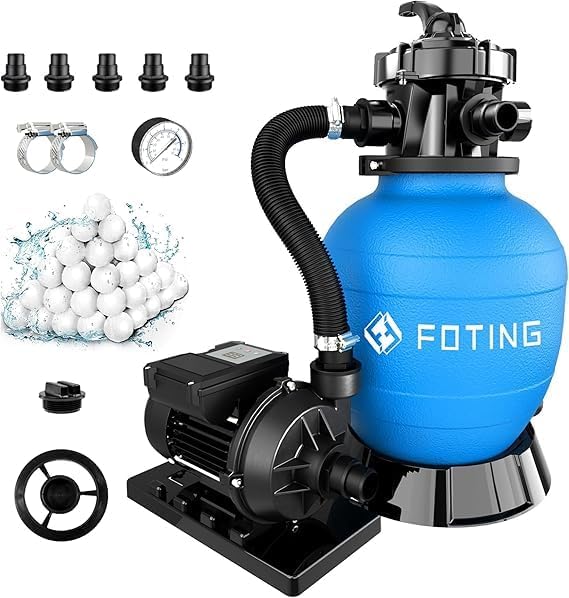
Overall view of the FOTING 12-inch Sand Filter Pump and its included accessories.
2. Safety Information
Please read all safety warnings and instructions carefully before operating the pump to prevent injury or damage.
- This pump has been evaluated for use with water only. Do not use with other liquids.
- Risk of electric shock: Do not plug into power while standing on a wet or damp surface. Always ensure your hands and feet are dry before handling electrical components.
- To reduce the risk of electric shock, connect only to a properly grounded, grounding-type receptacle.
- Install only on a circuit protected by a Ground Fault Circuit Interrupter (GFCI).
- Refer to the instruction manual for proper installation procedures to reduce the risk of electric shock.
- Always disconnect power to the pump before performing any maintenance or service.

Control panel displaying important safety warnings.
3. Product Components and Specifications
The FOTING Sand Filter Pump comes with all necessary components for assembly and operation. Below is a list of included parts and key specifications.
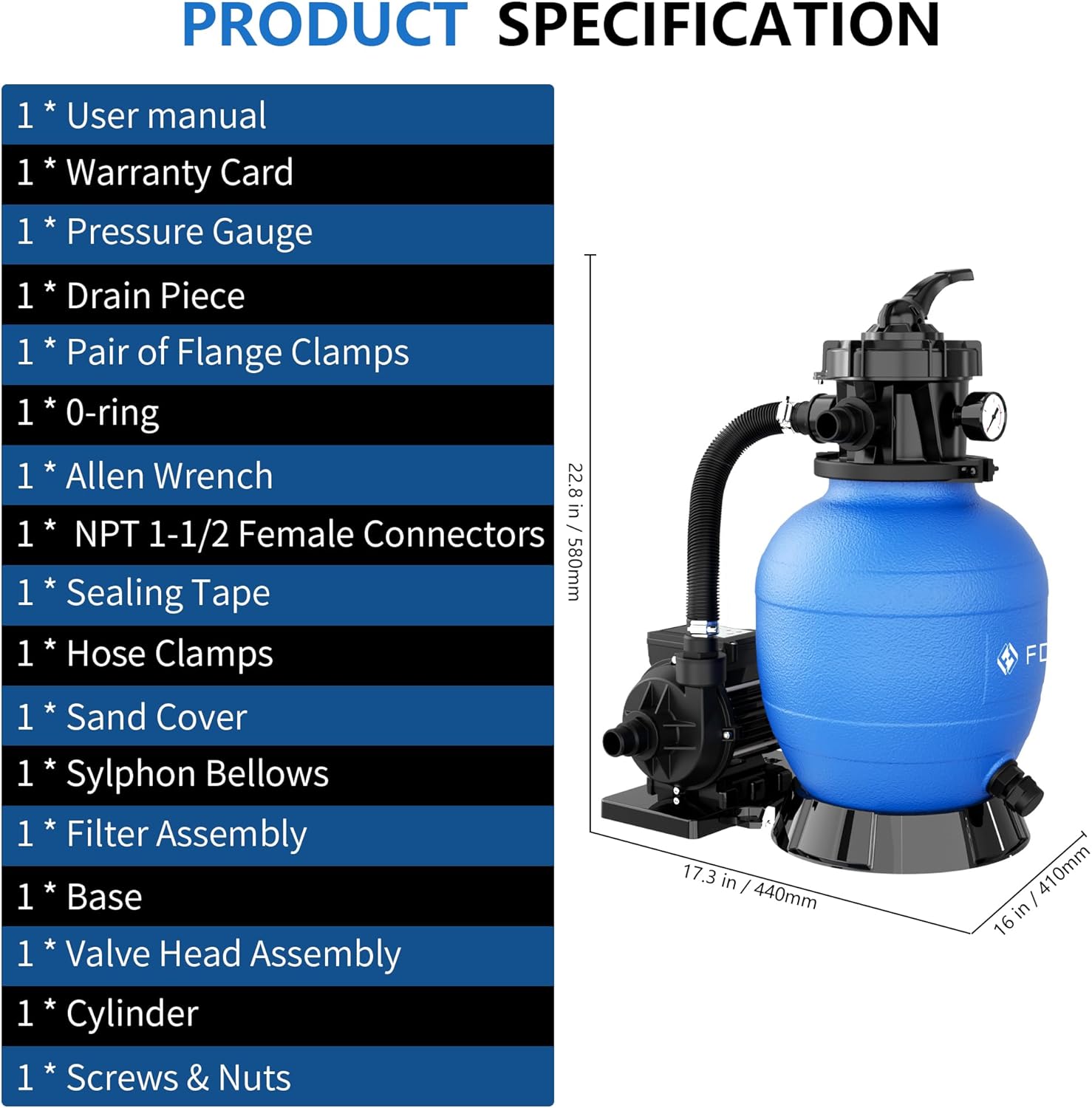
Detailed list of included components and product dimensions.
Included Components:
- User manual
- Warranty Card
- Pressure Gauge
- Drain Piece
- Pair of Flange Clamps
- O-ring
- Allen Wrench
- NPT 1-1/2 Female Connectors
- Sealing Tape
- Hose Clamps
- Sand Cover
- Sylphon Bellows
- Filter Assembly
- Base
- Valve Head Assembly
- Cylinder
- Screws & Nuts
Key Specifications:
| Specification | Value |
|---|---|
| Manufacturer | FOTING |
| Item Weight | 25.4 pounds |
| Product Dimensions | 13.38 x 17.32 x 21.25 inches |
| Size / Model | 3000GPH (12in) |
| System Flow Rate | 3000 GPH |
| Motor Horsepower | 1/2 HP |
| Max Head | 27 ft |
| Sand Capacity | 44 lb |
| Filter Balls Included | 200g |
| Recommended Pool Size | Up to 8000 gallons |
| Valve Type | 6-Way Valve |
| Timer | Built-in (24-hour dual-mode) |
4. Setup and Installation
Proper setup is crucial for the optimal performance and longevity of your sand filter pump. Follow these general guidelines for installation.
4.1 Assembly
- Positioning: Place the pump on a firm, level surface near your pool, ensuring it is protected from direct weather exposure and has adequate ventilation.
- Base Assembly: Securely attach the pump and filter tank to the base using the provided screws and nuts.
- Valve Head Installation: Carefully place the valve head assembly onto the filter tank, ensuring the O-ring is properly seated to prevent leaks. Use the flange clamps to secure it.
- Pressure Gauge: Install the pressure gauge into its designated port on the valve head.

Pressure gauge for monitoring system performance.
4.2 Adding Filter Media
The FOTING pump is compatible with both filter sand and filter balls. For this model, 200g of filter balls are included.
- Remove the sand cover from the top of the filter tank.
- Carefully pour the filter media (sand or filter balls) into the tank. Refer to the specifications for the maximum capacity (44 lbs sand or equivalent filter balls).
- Replace the sand cover and ensure it is securely fastened.

Filter balls are an efficient filter media option.
4.3 Connecting Hoses
Connect the pump to your pool using 1-1/2 inch PVC hoses. Use sealing tape on threaded connections to prevent leaks and secure hoses with hose clamps.
- Connect the pool's skimmer/intake line to the pump's inlet.
- Connect the pump's outlet to the filter tank's inlet.
- Connect the filter tank's outlet to the pool's return line.
- Ensure all connections are tight and leak-free.

Hose connectors for secure attachment.
5. Operating Instructions
Your FOTING sand filter pump features a 6-way valve and an intelligent timing system for versatile operation.
5.1 6-Way Valve Functions
The multi-port valve allows you to perform various operations by simply rotating the handle to the desired position. Always turn off the pump before changing valve positions.

The 6-way valve provides multiple operational modes.
- FILTER: This is the normal operating position for filtering pool water. Water flows through the filter media, trapping debris, and returns clean to the pool.
- BACKWASH: Used for cleaning the filter media. Water flow is reversed, flushing trapped debris out through the waste port. Perform backwash when the pressure gauge reading is 8-10 PSI above its clean operating pressure.
- RINSE: Used after backwashing to flush out any remaining dirty water from the valve and lines before returning to filter mode. Run for 30-60 seconds.
- WASTE: Bypasses the filter and sends water directly out the waste port. Useful for vacuuming heavy debris directly to waste or lowering pool water level.
- CLOSED: Stops all water flow to the filter. Never use this setting while the pump is running.
- RECIRCULATE: Bypasses the filter and circulates water directly back to the pool. Useful for mixing chemicals without filtering.

Visual guide to the 6-way valve functions.
5.2 Intelligent Timing System
The pump features a 24-hour dual-mode intelligent timing system, allowing you to customize filtration cycles.
- Single Cycle Mode: The pump runs for a set duration and then turns off until manually restarted or the next programmed cycle.
- Continuous Cycle Mode: The pump runs continuously for the programmed duration each day, automatically restarting at the beginning of the cycle.
Refer to the digital display and control buttons on the pump for setting your desired time and mode. The pump offers 10 time settings for flexible operation.

The digital display for setting timing modes.

Explanation of Single Cycle and Continuous Cycle modes.
6. Maintenance
Regular maintenance ensures the efficiency and longevity of your FOTING sand filter pump.
6.1 Routine Cleaning
- Backwashing: Perform backwashing when the pressure gauge indicates a rise of 8-10 PSI above the clean operating pressure. This typically means the filter media is saturated with debris.
- Rinsing: Always follow backwashing with a rinse cycle (30-60 seconds) to settle the filter media and flush out any remaining dirty water.
- Skimmer Basket: Regularly empty the skimmer basket to ensure optimal water flow to the pump.
6.2 Filter Media Management
- Check Filter Media: Periodically inspect your filter sand or filter balls for signs of clumping or degradation.
- Replace Filter Media: Filter sand typically needs replacement every 3-5 years, while filter balls may last longer but should be cleaned or replaced as needed based on water clarity and pressure.
6.3 Winterization
If you live in an area with freezing temperatures, proper winterization is essential to prevent damage to your pump and filter system.
- Drain all water from the pump, filter tank, and hoses.
- Disconnect hoses and store them in a dry, protected area.
- Store the pump and filter tank indoors in a dry, frost-free location.
- Set the 6-way valve to the "Winter" position if available, or an open position to relieve pressure.
7. Troubleshooting
This section addresses common issues you might encounter with your FOTING sand filter pump.
| Problem | Possible Cause | Solution |
|---|---|---|
| Low water flow / Poor filtration |
|
|
| Pump not starting |
|
|
| Water leaking from connections |
|
|
| Cloudy pool water after filtering |
|
|

The pump's effectiveness in clearing cloudy pool water.
8. Warranty and Customer Support
FOTING stands behind the quality of its products.
8.1 Warranty Information
This FOTING Sand Filter Pump is backed by a three-year warranty from the date of purchase. This warranty covers manufacturing defects and ensures peace of mind regarding your product's performance. Please retain your proof of purchase for warranty claims.
8.2 Customer Service
For any questions, technical assistance, or warranty claims, please contact FOTING customer service. Our team is dedicated to providing superior after-sales support.
Contact Information:
- Email: support@foting.com (example email)
- Phone: 1-800-XXX-XXXX (example phone number)
- Website: Visit the FOTING Store on Amazon