
1. Introduction
Thank you for choosing the GUGTTR Under Desk Elliptical Machine. This 2-in-1 electric leg exerciser is designed to provide a low-impact, convenient workout experience for users of all ages, including seniors, individuals in rehabilitation, and office workers. It promotes healthy circulation, strengthens lower body muscles, and improves joint flexibility without putting undue pressure on your joints.
This manual provides essential information for the safe and effective use of your elliptical machine. Please read it thoroughly before operation and retain it for future reference.

The GUGTTR Under Desk Elliptical Machine, featuring a compact design, foot pedals, and an integrated display. A remote control is also shown.
2. Important Safety Information
- Consult your physician before starting any new exercise program, especially if you have pre-existing medical conditions.
- Ensure the machine is placed on a stable, level surface during use to prevent tipping.
- Do not stand on the machine. It is designed for seated use only.
- Keep children and pets away from the machine during operation.
- The maximum user weight recommendation for this machine is 500 pounds. Do not exceed this limit.
- Keep hands and feet clear of all moving parts.
- Unplug the machine from the power outlet when not in use or before cleaning.
- Do not use the machine if it is damaged or malfunctioning.

This low-impact exerciser is gentle on joints, helping to reduce knee injury, protect the spine, and safeguard ankle joints, making it suitable for various users.
3. Package Contents
Please check the box for the following items:
- 1 x GUGTTR Under Desk Elliptical Machine
- 1 x Remote Control
- 1 x Power Cord
- 1 x Lubricant Oil
- 1 x User Guide (this manual)
4. Setup Guide
The GUGTTR Under Desk Elliptical Machine requires no assembly. It is ready to use right out of the box.
- Placement: Place the elliptical machine on a flat, stable surface. Ensure there is enough clear space around the machine for comfortable use and to prevent obstruction of the pedals. It is designed to fit conveniently under most desks.
- Power Connection: Connect the power cord to the machine's power input port and then plug it into a standard electrical outlet.
- Remote Control: Ensure the remote control has working batteries (not included, typically 2x AAA).
5. Operating Instructions
Once the machine is plugged in, you can begin your workout. The machine can be operated using the control panel on the unit or the included remote control.
Modes of Operation
The GUGTTR elliptical offers both automatic and manual modes to suit your preference.
Automatic Modes (P1-P3)
These preset programs offer varying speeds and directions for a guided workout. Simply select the desired program (P1, P2, or P3) and the machine will automatically adjust the intensity and pedal direction.
Manual Mode (HR)
In Manual Mode, you have full control over the speed and direction of the pedals. This allows for a customized workout tailored to your specific needs.
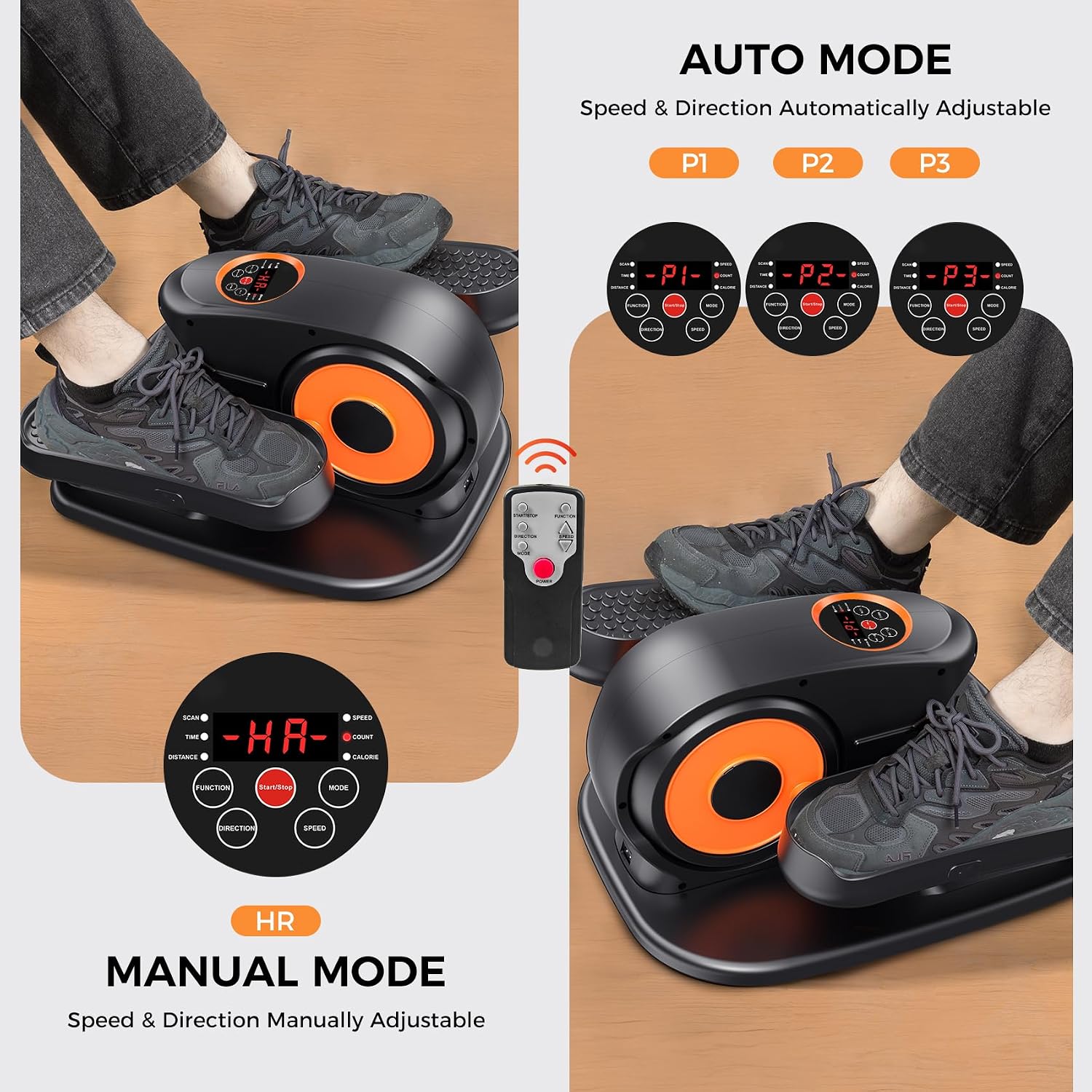
This image illustrates the two primary modes of operation: Automatic (P1, P2, P3) where speed and direction adjust automatically, and Manual (HR) where the user controls speed and direction via the remote control.
Using the Remote Control
The remote control allows you to conveniently adjust settings without bending down.
- Start/Stop: Press the 'Start/Stop' button to begin or end your workout.
- Mode: Press the 'Mode' button to switch between Automatic (P1, P2, P3) and Manual (HR) modes.
- Speed: Use the '+' and '-' buttons to increase or decrease the speed in Manual Mode (12 adjustable speeds).
- Direction: Press the 'Direction' button to switch between forward and backward pedal motion.
- Function: Cycles through display metrics (SCAN, TIME, DISTANCE, SPEED, CALORIES).
Understanding the LCD Display
The integrated LCD display provides real-time feedback on your workout progress:
- SCAN: Automatically cycles through all metrics.
- TIME: Displays the duration of your workout.
- DISTANCE: Shows the estimated distance covered.
- SPEED: Indicates the current speed of the pedals.
- CALORIES: Estimates the calories burned during your session.

The intuitive LCD display provides real-time workout data including time, distance, speed, and calories. Control buttons for function, start/stop, mode, direction, and speed are clearly visible.

Engineered with noise-dampening technology, the GUGTTR elliptical operates at less than 15dB, ensuring a quiet exercise experience that won't disturb others.
6. Maintenance and Care
Cleaning
Wipe down the machine with a soft, damp cloth after each use. Do not use abrasive cleaners or solvents, as these may damage the finish. Ensure the machine is unplugged before cleaning.
Lubrication
Periodically apply a small amount of the included lubricant oil to the moving parts, such as the pedal joints and internal mechanisms, to ensure smooth operation and prolong the machine's lifespan. Refer to the specific lubrication points indicated in the diagram (if available in a physical manual) or apply to any points where friction is noticeable.
Storage
The GUGTTR elliptical machine features a compact design and a built-in handle for easy portability and storage. Store the machine in a cool, dry place away from direct sunlight and extreme temperatures when not in use.

The GUGTTR elliptical features a compact design for easy storage under desks and a built-in handle for convenient portability between locations.
7. Troubleshooting
If you encounter any issues with your GUGTTR Under Desk Elliptical Machine, please refer to the following common problems and solutions:
| Problem | Possible Cause | Solution |
|---|---|---|
| Machine does not power on. | Power cord not properly connected. No power from outlet. | Ensure power cord is securely plugged into both the machine and a working electrical outlet. Test the outlet with another device. |
| Pedals are not moving smoothly or are stuck. | Lack of lubrication. Obstruction in the mechanism. | Apply lubricant oil to moving parts. Check for any foreign objects obstructing the pedals. |
| Unusual noise during operation. | Lack of lubrication. Loose components. | Apply lubricant oil. Check for any loose screws or parts and tighten them if necessary. |
| Remote control not working. | Dead batteries. Obstruction between remote and machine. | Replace batteries in the remote control. Ensure there is a clear line of sight between the remote and the machine's sensor. |
| Display not showing correct data. | Sensor issue. | Ensure all connections are secure. If the problem persists, contact customer support. |
8. Product Specifications
| Feature | Specification |
|---|---|
| Model Name | SF-S6 |
| Brand | GUGTTR |
| Color | Orange |
| Material | Alloy Steel |
| Resistance Mechanism | Air |
| Maximum Weight Recommendation | 500 Pounds |
| Item Weight | 17.3 Pounds |
| Item Dimensions (LxWxH) | 18.3 x 16.9 x 11 inches |
| Suggested Users Age | 8-80 years old |
9. Warranty and Customer Support
Warranty: The GUGTTR Under Desk Elliptical Machine comes with a 2-year manufacturer's warranty, covering defects in materials and workmanship from the date of purchase.
Return Policy: Every customer who owns an elliptical exercise machine can enjoy a three-month return policy.
Customer Support: GUGTTR offers lifetime after-sales support and lifelong technical assistance. If you have any questions, concerns, or require assistance with your elliptical machine, please do not hesitate to reach out to us via Amazon messages or email. Our dedicated support team is always here to help.