
1. Introduction
Thank you for choosing the Muvai 59-inch L-Shaped Electric Standing Desk. This manual provides essential information for the safe assembly, operation, and maintenance of your new desk. Please read this manual thoroughly before installation and keep it for future reference.
This electric standing desk features an adjustable height mechanism, a reversible L-shaped desktop, and an integrated cable management tray, designed to enhance your workspace ergonomics and organization.
2. Safety Information
- Always assemble the desk according to the provided instructions.
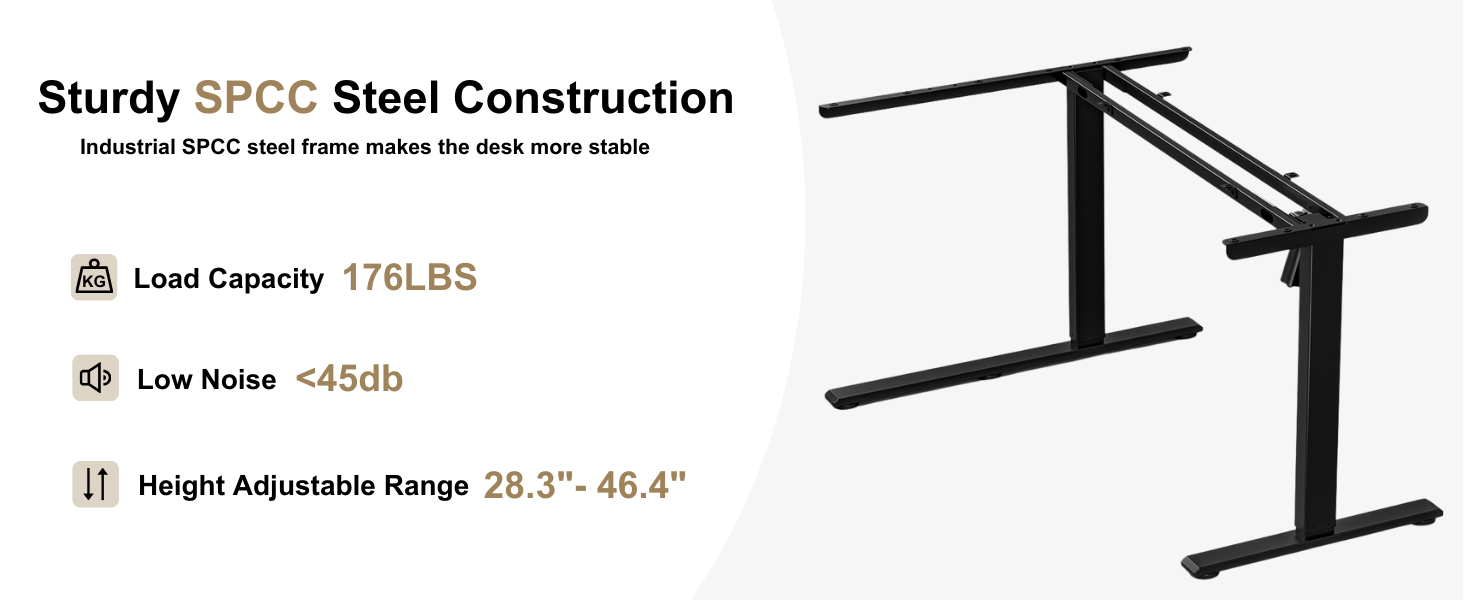
- Do not exceed the maximum weight capacity of 176 lbs (80 kg). Overloading can cause damage and injury.
- Ensure all screws and bolts are securely tightened before use. Periodically check and re-tighten as necessary.
- Keep children and pets away from the desk during height adjustments to prevent accidents.
- Be cautious when adjusting the desk height to avoid pinching hands or objects.
- Place the desk on a level surface to ensure stability.
- Do not sit or stand on the desk.
- Disconnect power before cleaning or performing any maintenance.
- Only use the provided power adapter.
3. Package Contents
Please verify that all components are present and undamaged before beginning assembly. If any parts are missing or damaged, contact customer support.
- Desktop Panels (3 sections)
- Desk Frame Components (Legs, Crossbars, Motor, Control Box)
- Control Panel with Digital Display
- Cable Management Tray
- Cup Holder
- Headphone Hook
- Adjustable Foot Pads
- All necessary screws, bolts, and assembly tools (Allen wrenches)
- Power Adapter and Cable
4. Assembly Instructions
Assembly typically takes 30-59 minutes. It is recommended that two people assemble this desk. A Phillips screwdriver or drill (not provided) may be required in addition to the included tools.
4.1 Pre-Installation Guide
- Assemble on a soft surface (e.g., foam, carpet) to prevent scratches.
- Ensure you have a Phillips screwdriver or drill (not provided).
- It is recommended to have a friend assist with assembly.
4.2 Step-by-Step Assembly
Refer to the detailed installation video below for a visual guide. The desk can be assembled as either a left or right L-shaped configuration.
Official installation guide video for the Muvai L-shaped standing desk, demonstrating step-by-step assembly instructions.
- Assemble the Desk Frame: Attach the side brackets and feet to the main crossbar using the provided M6*12 screws. Ensure the adjustable foot pads are installed.
- Connect the Drive Rod: Insert the drive rod into the motor and the opposite leg mechanism. Secure it with the provided fasteners.
- Assemble the Desktop: Join the three desktop panels using the wooden dowels and secure them with the ST5*16 screws and metal plates. You can choose to configure it as a left or right L-shape.
- Attach Desktop to Frame: Carefully place the assembled desktop onto the desk frame. Align the pre-drilled holes and secure the desktop to the frame using the ST5*16 screws.
- Install Accessories: Attach the cable management tray, cup holder, and headphone hook to the underside of the desk using the ST5*16 screws.
- Connect Electronics: Connect the control panel and motor cables to the control box. Plug the power adapter into the control box and then into a power outlet.



5. Operating Instructions
5.1 Control Panel Overview

- Up/Down Arrows (▲ / ▼): Press and hold to adjust the desk height up or down. Release to stop at the desired height.
- Digital Display: Shows the current desk height in inches.
- Memory Presets (1, 2, 3): Store and recall preferred desk heights.
- Reset Button (↺): Used for initial setup and troubleshooting.
5.2 Setting Memory Presets
- Adjust the desk to your desired height using the up/down arrows.
- Press one of the memory preset buttons (1, 2, or 3) for 3 seconds until the display flashes or beeps. The current height is now saved to that preset.
- To recall a saved height, simply press the corresponding memory preset button (1, 2, or 3). The desk will automatically move to the saved position.
5.3 Initial Reset Procedure
Before first use or after a power interruption, perform a reset:
- Long press the Reset button (↺) for 3 seconds.
- Wait for the display to flash "---". Release the button.
- The desktop will automatically run down to its lowest position and then rebound 3-5mm. This indicates the reset program has completed.

6. Maintenance
- Cleaning: Wipe the desk surface with a dry cloth. For stubborn marks, use a slightly damp cloth with mild soap, then dry immediately. Avoid harsh chemicals or abrasive cleaners.
- Cable Management: Periodically check the cable management tray to ensure cables are neatly organized and not pinched or damaged.
- Fasteners: Regularly inspect all screws and bolts to ensure they remain tight. Re-tighten if necessary.
- Motor: The motor is designed for maintenance-free operation. Do not attempt to lubricate or disassemble the motor or lifting columns.
7. Troubleshooting
If you encounter any issues, please refer to the following common problems and solutions:
| Problem | Possible Cause | Solution |
|---|---|---|
| Desk does not move. | Power cable disconnected; Control panel cable loose; Overload. | Check all cable connections. Ensure desk is not overloaded (max 176 lbs). Perform a reset. |
| Desk moves unevenly or stops. | Obstruction; Uneven weight distribution; Drive rod issue. | Remove any obstructions. Redistribute weight evenly. Perform a reset. If issue persists, check drive rod connection. |
| Display shows an error code. | System error. | Perform a reset. If the error code persists, contact customer support with the specific code. |
| Desk makes unusual noise. | Loose fasteners; Obstruction. | Check and tighten all fasteners. Ensure no objects are interfering with the lifting mechanism. |
If troubleshooting steps do not resolve the issue, please contact Muvai customer support.
8. Specifications
| Feature | Detail |
|---|---|
| Brand | Muvai |
| Model Number | MUVAI (B0FHGG93Q6) |
| Shape | L-Shape (Reversible) |
| Product Dimensions (D x W x H) | 40"D x 59"W x 28.3"-46.4"H |
| Color | Black Carbon |
| Base Material | Alloy Steel (Industrial-grade SPCC steel frame) |
| Top Material Type | Wood (Scratch-resistant, Waterproof, Easy to Clean) |
| Tabletop Thickness | 0.6 Inches |
| Minimum Height | 28.3 Inches |
| Maximum Height | 46.4 Inches |
| Lifting Mechanism | Electric |
| Noise Level | Under 45dB |
| Number of Height Presets | 3 |
| Maximum Weight Capacity | 176 Pounds (80 kg) |
| Item Weight | 66 Pounds |
| Included Components | Adjustable Foot Pad, Cable Management Tray, Cup Holder, Headphone Hook |
| Recommended Assembly Persons | 2 |
| Product Care Instructions | Wipe with Dry Cloth |
9. Warranty and Support
The Muvai 59-inch L-Shaped Electric Standing Desk comes with a Limited Warranty. Please refer to the warranty card included in your package for specific terms and conditions.
For technical support, missing parts, or warranty claims, please contact Muvai customer service through the retailer where you purchased the product or visit the official Muvai website.