
Motorola PB8T0009IN | PB8T0003IN | XT2531-2
Motorola G96 5G User Manual
Comprehensive Guide for Your Motorola G96 5G Smartphone
Introduction
This manual provides detailed instructions for the setup, operation, maintenance, and troubleshooting of your Motorola G96 5G smartphone. Please read this guide thoroughly to ensure optimal performance and longevity of your device.
The Motorola G96 5G is designed for users seeking a balance of style, reliability, and next-generation connectivity. It features an immersive 6.67-inch Full HD+ 3D curved pOLED display, IP68-rated water and dust resistance, and an advanced 50MP main camera with OIS.
What's in the Box
Upon unboxing your Motorola G96 5G, verify that all components are present:
- Motorola G96 5G Smartphone
- 33W TurboPower Charger
- USB Cable (Type-C)
- SIM Tray Ejector Tool
- Quick Start Guide and Safety Information
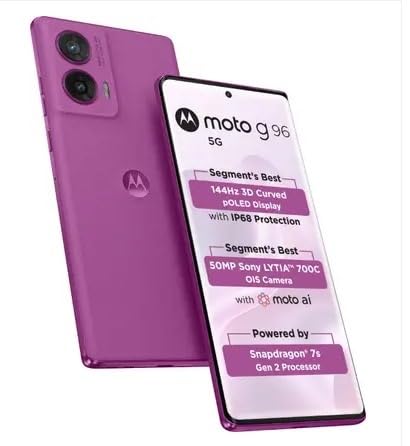
Image: The Motorola G96 5G smartphone, showcasing its front and back, alongside the included 33W charger, USB cable, and SIM ejector tool.
Setup
1. Inserting the SIM Card and microSD Card
- Locate the SIM tray on the side of your device.
- Insert the SIM tray ejector tool into the small hole next to the tray and press firmly until the tray pops out.
- Place your Nano-SIM card(s) and/or microSD card into the designated slots on the tray. Ensure the gold contacts face down.
- Carefully reinsert the tray into the phone until it clicks into place.
2. Initial Power On and Setup Wizard
- Press and hold the Power button until the Motorola logo appears.
- Follow the on-screen instructions to select your language, connect to Wi-Fi, and sign in with your Google account.
- Configure security settings, including fingerprint-on-display and face unlock, for enhanced device protection.
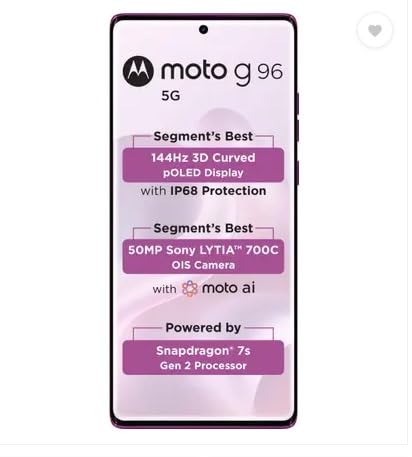
Image: Front view of the Motorola G96 5G, illustrating the display and its curved edges, relevant for initial setup and interaction.
Operating Your Device
Display and Navigation
The Motorola G96 5G features a 6.67-inch Full HD+ 3D curved pOLED display with a 144Hz refresh rate for smooth visuals. Navigate using gestures or the traditional three-button navigation bar, configurable in settings.
Camera Features
Your device is equipped with an advanced camera system:
- Main Camera: 50MP with Optical Image Stabilization (OIS) for crisp photos and stable videos.
- Ultrawide/Macro Sensor: 8MP for expansive shots and detailed close-ups.
- Front Camera: 32MP, supporting 4K video recording for high-quality selfies and video calls.
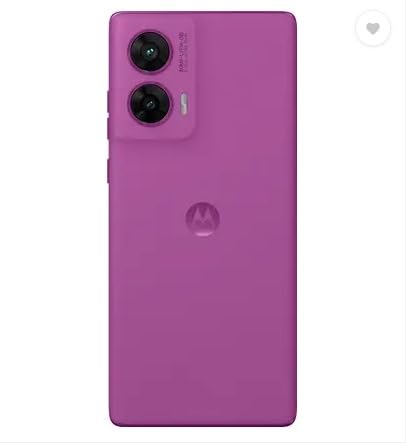
Image: Rear view of the Motorola G96 5G, highlighting the dual camera module and the Motorola logo, illustrating the camera system.
Performance and Battery
Powered by the Snapdragon 7s Gen 2 processor, the G96 5G offers efficient performance. The 5500mAh battery supports 33W TurboPower charging for quick recharges.
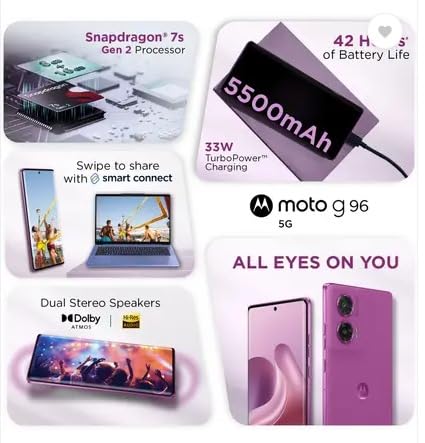
Image: A collage illustrating key features of the Motorola G96 5G, including the Snapdragon 7s Gen 2 processor, 5500mAh battery with 33W TurboPower charging, smart connect functionality, and dual stereo speakers with Dolby Atmos.
Connectivity
The device supports 5G, 4G, 3G, and Wi-Fi connectivity. It also includes GPS, AGPS, LTEPP, GLONASS, GALILEO, and QZSS for precise location services.

Image: A visual representation emphasizing the Motorola G96 5G's seamless 5G connectivity with 13 bands, including VoNR support and 4x4 MIMO, highlighting its advanced network capabilities.
Maintenance
- Software Updates: Regularly check for and install system updates to ensure optimal performance, security, and access to new features.
- Cleaning: Use a soft, lint-free cloth to clean the screen and body. Avoid abrasive materials or harsh chemicals.
- Water and Dust Resistance: The device has an IP68 rating, meaning it is protected against dust ingress and can withstand immersion in up to 1.5 meters of fresh water for up to 30 minutes. However, it is not waterproof. Avoid exposing it to saltwater, chlorinated water, or other liquids.
- Battery Care: To prolong battery life, avoid extreme temperatures and do not let the battery fully discharge frequently. Use only the provided 33W TurboPower charger.
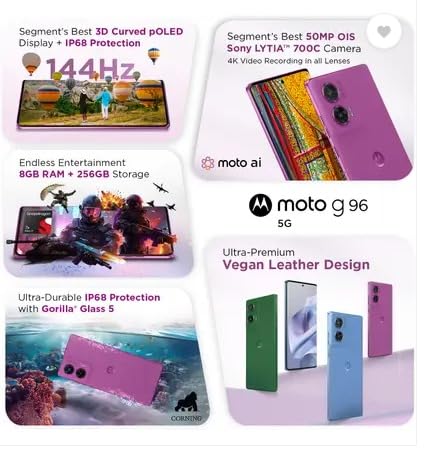
Image: A composite image highlighting the Motorola G96 5G's 144Hz 3D Curved pOLED Display, advanced 50MP OIS camera, 8GB RAM + 256GB storage, and Ultra-Durable IP68 Protection with Gorilla Glass 5, emphasizing its robust design and features.
Troubleshooting
| Problem | Possible Solution |
|---|---|
| Device not powering on | Ensure the battery is charged. Connect to the 33W charger for at least 15 minutes. If unresponsive, perform a force restart by holding the Power button for 10-15 seconds. |
| Poor battery life | Reduce screen brightness, disable unnecessary background apps, turn off Wi-Fi/Bluetooth when not in use, and limit location services. Check battery usage in settings to identify power-hungry apps. |
| Camera issues (blurry images, app crash) | Clean the camera lens. Restart the camera app or the phone. Ensure sufficient storage space. Check for system updates. |
| Network connectivity problems | Toggle Airplane Mode on and off. Restart the device. Check SIM card insertion. Reset network settings (Settings > System > Reset options > Reset Wi-Fi, mobile & Bluetooth). |
If issues persist after attempting these solutions, please contact Motorola customer support.
Specifications
| Feature | Detail |
|---|---|
| Model Number | PB8T0009IN | PB8T0003IN | XT2531-2 |
| Operating System | Android 15.0 |
| Processor | Snapdragon 7s Gen 2 (4nm) Octa-core |
| RAM | 8 GB (Expandable up to 24 GB with RAM Boost) |
| Storage | 256 GB (Internal) |
| Display | 6.67" Full HD+ 3D Curved pOLED, 144Hz Refresh Rate, 10-bit billion color depth, 1600 nits peak brightness |
| Main Camera | 50MP LYTIA 700C with OIS |
| Ultrawide/Macro Camera | 8MP |
| Front Camera | 32MP (4K video support) |
| Battery | 5500 mAh |
| Charging | 33W TurboPower |
| Water & Dust Resistance | IP68 Rated |
| Dimensions | 16.19 x 7.33 x 0.79 cm |
| Weight | 178 g |
| Audio | Dual Stereo Speakers with Dolby Atmos & HiRES |
| Connectivity | 5G, 4G, 3G, Wi-Fi, Bluetooth, GPS |
Warranty and Support
Your Motorola G96 5G comes with a 1-year brand warranty from the date of purchase, covering manufacturing defects. This warranty is supported by nationwide service.
For warranty claims, technical assistance, or further inquiries, please contact Motorola customer support through their official website or authorized service centers. Keep your proof of purchase for warranty validation.
Additional protection plans, such as Screen Damage Protection and Extended Warranty, may be available for purchase separately. Refer to your retailer for details.
Related documentsPB8T0009IN | PB8T0003IN | XT2531-2


Ask a question about this manual
Ask about setup, troubleshooting, compatibility, parts, safety, or missing instructions. Manuals+ will review the question and use this page’s manual context to help answer it.