Introduction
This manual provides comprehensive instructions for the RETROSUN RF396B replacement remote control. This remote is specifically designed for use with TEMPURPEDIC Ergo adjustable bed bases. Please read these instructions carefully before use to ensure proper setup and operation.
Important Note:
Ensure that the appearance and button layout of this replacement remote control are identical to your original remote before attempting to pair or use it. This remote is not compatible with other adjustable bed bases.

Image: The RETROSUN RF396B remote control shown alongside a TEMPURPEDIC Ergo adjustable bed base, illustrating compatibility.
Setup
1. Battery Installation
The remote control requires two (2) AAA batteries (not included). Follow these steps to install them:
- Locate the battery compartment cover on the back of the remote control.
- Slide the cover downwards to open the compartment.
- Insert two AAA batteries, ensuring the positive (+) and negative (-) terminals align correctly with the indicators inside the compartment.
- Slide the battery compartment cover back into place until it clicks securely.

Image: A visual guide demonstrating the correct insertion of two 1.5V AAA batteries into the remote control's battery compartment.
2. Pairing Instructions
To ensure proper functionality, the replacement remote control must be paired with your TEMPURPEDIC Ergo adjustable bed base. Follow these steps carefully:
- Step 1: Ensure your bed base remote has fresh batteries installed.
- Step 2: Locate the Battery Backup Box on your adjustable bed base. Press the [POWER DOWN] button on the Battery Backup Box twice. A light on the Battery Backup Box will illuminate.
- Step 3: On the back of the new RETROSUN remote, press and hold down the PAIR button. The PAIR button will illuminate blue and start flashing. Continue holding until the PAIR button stops flashing and the illuminated light on the Battery Backup Box goes out.
- Step 4: Release the PAIR button and test all remote functions.
Note:
If the remote does not sync after the first attempt, check the remote's battery installation and repeat the pairing process from Step 1.
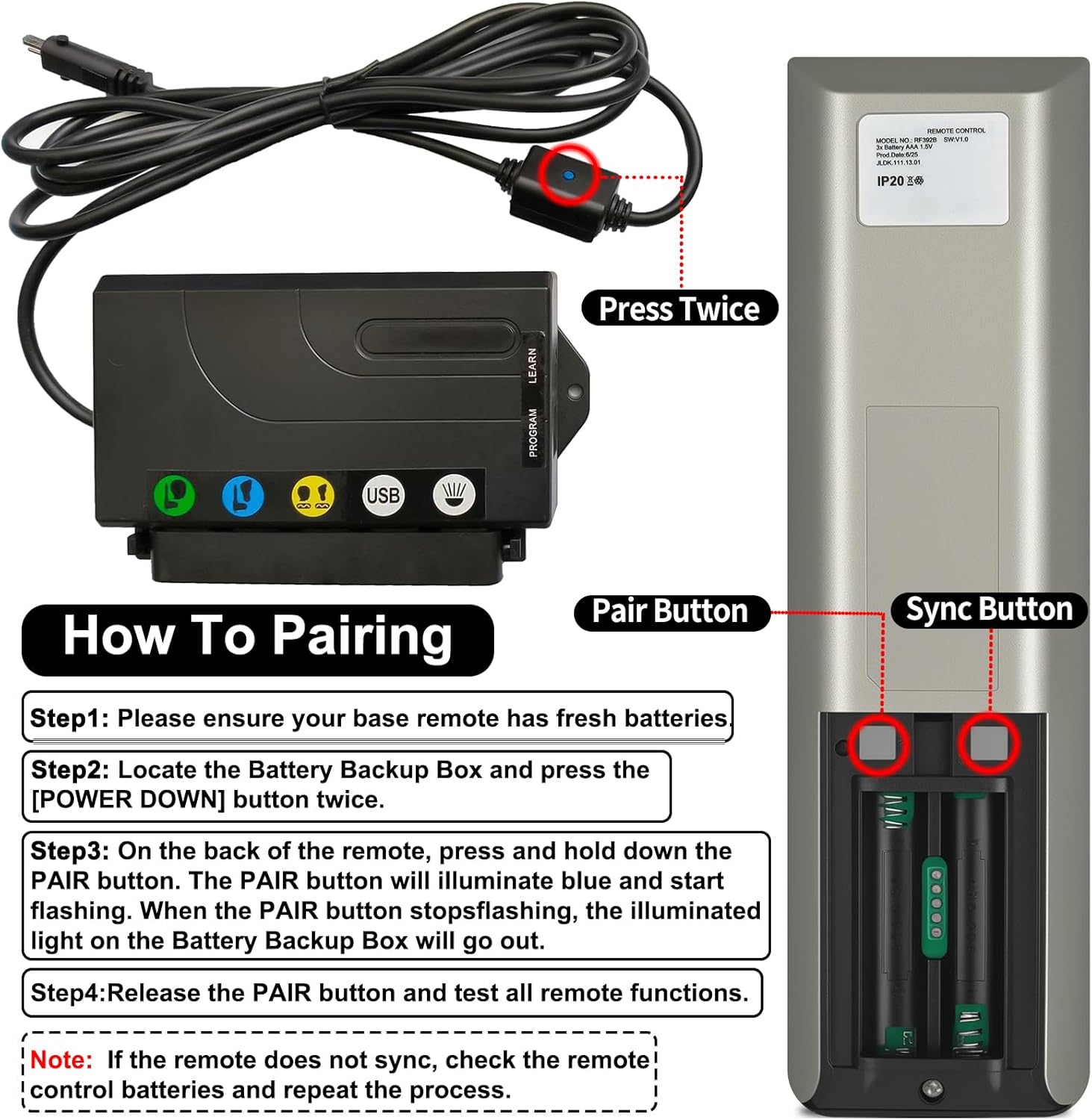
Image: A detailed visual guide for pairing the remote, highlighting the 'POWER DOWN' button on the bed base's battery backup box and the 'PAIR' button on the remote's back.
Operating the Remote Control
The RETROSUN RF396B remote control features an ergonomic design for comfortable use and a 120-degree wide-angle signal for reliable operation up to 8 meters (26 feet). Below is a description of each button's function:

Image: A labeled diagram of the remote control, detailing the function of each button for easy identification and use.
- Child Lock: Activates or deactivates the child lock feature to prevent accidental adjustments.
- Bed Lamp: Controls the integrated bed lamp (if available on your bed base).
- Antisnore: Adjusts the bed to a position designed to reduce snoring.
- Lumbar Up: Raises the lumbar support section of the bed.
- TV Position: Sets the bed to a comfortable position for watching television.
- Lumbar Down: Lowers the lumbar support section of the bed.
- Head Up: Raises the head section of the bed.
- Foot Up: Raises the foot section of the bed.
- Zero Position (ZEROG): Returns the bed to a pre-programmed 'Zero Gravity' position.
- Head Down: Lowers the head section of the bed.
- Foot Down: Lowers the foot section of the bed.
- Massage: Activates or adjusts the massage function (if available on your bed base).
- Flat: Returns the entire bed to a flat position.

Image: The remote control demonstrating its effective operational distance of 8 meters (26 feet) with a clear wireless signal.
Maintenance
Cleaning
To clean the remote control, gently wipe it with a soft, dry cloth. For stubborn dirt, a slightly damp cloth can be used, followed by immediate drying. Avoid using abrasive cleaners, solvents, or harsh chemicals, as these can damage the remote's surface or internal components.
Battery Replacement
Replace the AAA batteries when the remote's performance diminishes or if the pairing indicator light does not illuminate during the pairing process. Refer to the 'Battery Installation' section for detailed instructions on how to replace the batteries.
Troubleshooting
Remote Not Responding or Pairing Issues
- Check Batteries: Ensure fresh AAA batteries are correctly installed in the remote control. Incorrect polarity or depleted batteries are common causes of non-responsiveness.
- Repeat Pairing Process: If the remote fails to sync, carefully repeat the entire pairing procedure as outlined in the 'Pairing Instructions' section. Ensure all steps are followed precisely.
- Proximity: Ensure you are within close proximity to the bed base during the pairing process.
- Obstructions: Verify there are no physical obstructions between the remote and the bed base that could interfere with the signal.
- Compatibility: Confirm that this remote control is indeed the correct replacement for your specific TEMPURPEDIC Ergo adjustable bed base model.
Specifications
| Model Number | RF396B (Item Model Number: BW470) |
| Compatibility | TEMPURPEDIC Ergo Adjustable Bed Base |
| Connectivity Technology | Infrared |
| Max Number of Supported Devices | 1 |
| Power Source | 2 x 1.5V AAA Batteries (not included) |
| Operational Range | Up to 8 meters (26 feet) |
| Material | High-quality ABS |
| Dimensions | 7.28 x 2.09 x 0.87 inches |
| Item Weight | 2.82 ounces |
| Manufacturer | Oumeite |
Warranty and Support
Specific warranty details and direct support contact information for this RETROSUN replacement remote control are not provided in the product's available information. For any issues or inquiries, please refer to the retailer's return policy or contact the seller directly through your purchase platform.

