
Introduction
This manual provides essential information for the safe and efficient operation, maintenance, and troubleshooting of your Rowenta X-Clean 10 GZ7035WO Cordless Wet and Dry Vacuum Cleaner. Please read these instructions carefully before using the appliance and keep them for future reference.
Safety Instructions
- Read all instructions before use.
- This appliance is not intended for use by persons (including children) with reduced physical, sensory or mental capabilities, or lack of experience and knowledge, unless they have been given supervision or instruction concerning use of the appliance by a person responsible for their safety.
- Only use the appliance with the original charging station and accessories provided by Rowenta.
- Do not immerse the appliance, charging station, or adapter in water or other liquids.
- Ensure the appliance is unplugged from the power supply before cleaning or performing any maintenance.
- Do not vacuum flammable or explosive substances, hot ashes, or sharp objects.
- Keep hair, loose clothing, fingers, and all parts of the body away from openings and moving parts.
- Do not operate the appliance if it is damaged or malfunctioning. Contact authorized service for repairs.
Product Overview
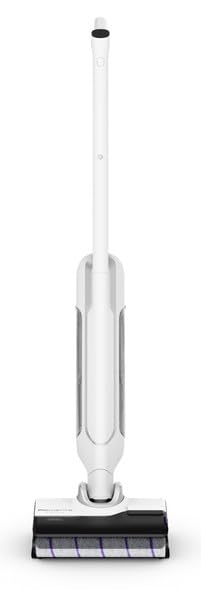
Image: The Rowenta X-Clean 10 GZ7035WO cordless wet and dry vacuum cleaner, its charging base, and a cleaning brush accessory.
The Rowenta X-Clean 10 GZ7035WO is a versatile cordless wet and dry vacuum cleaner designed for efficient cleaning of various floor types. Key components include:
- Main Unit: Contains the motor, battery, and control panel.
- Handle: Ergonomically designed for comfortable grip and control.
- Clean Water Tank: Holds fresh water and cleaning solution for wet cleaning.
- Dirty Water Tank: Collects dirty water and debris during operation.
- Brush Roll: Actively scrubs and cleans surfaces.
- Charging Station: Provides a convenient base for charging and storage.
- Accessory Kit: Includes a cleaning brush for maintenance.
Setup
- Unpack: Carefully remove all components from the packaging.
- Assemble: Attach the handle to the main unit until it clicks securely into place.
- Charge Battery: Place the vacuum cleaner on the charging station. Connect the charging station to a power outlet. The battery indicator lights will show the charging status. Allow for a full charge before first use (approximately 1 hour for full autonomy).
- Fill Clean Water Tank: For wet cleaning, remove the clean water tank, fill it with tap water (and a suitable cleaning solution if desired, following manufacturer's instructions), and reattach it securely.
Ensure all parts are correctly assembled and tanks are properly sealed before operation.
Operating Instructions
1. Starting the Appliance
- Press the power button to turn on the vacuum cleaner.
- Select the desired cleaning mode (wet or dry) and speed setting (up to 5 speeds available) using the controls on the handle.
2. Cleaning Surfaces
- For Hard Floors: Use the wet cleaning mode for effective washing and vacuuming. Move the appliance slowly over the surface.
- For Carpets: Use the dry vacuuming mode. The appliance is suitable for light carpet cleaning.
- The appliance is designed for both wet and dry use, allowing you to switch between modes as needed.
3. Emptying the Dirty Water Tank
- When the dirty water tank is full, the appliance may indicate this or you will notice reduced performance.
- Turn off the appliance and remove the dirty water tank.
- Empty the contents into a drain and rinse the tank thoroughly with clean water.
- Reattach the dirty water tank securely to the main unit.
Maintenance
1. Cleaning the Brush Roll
- Turn off and unplug the appliance.
- Remove the brush roll cover and then the brush roll itself.
- Use the provided cleaning brush to remove any hair, fibers, or debris tangled around the brush roll.
- Rinse the brush roll under running water if necessary and allow it to air dry completely before reinserting.
2. Cleaning the HEPA Filter
- Locate and remove the HEPA filter, typically found near the dirty water tank.
- Tap the filter gently to dislodge dust and debris. If washable, rinse under cold water until clean.
- Allow the filter to air dry completely for at least 24 hours before reinserting. Do not use the appliance with a wet filter.
- Replace the HEPA filter regularly (e.g., every 6-12 months) for optimal performance.
3. Cleaning Water Tanks
Regularly rinse both the clean and dirty water tanks with fresh water after each use to prevent odor and bacterial growth. Ensure they are dry before storage.
4. Storage
Store the appliance on its charging station in a dry, cool place. Ensure the tanks are empty and clean before long-term storage.
Troubleshooting
| Problem | Possible Cause | Solution |
|---|---|---|
| Appliance not turning on | Battery low or not charged. | Place the appliance on the charging station and ensure it is fully charged. |
| Poor suction or cleaning performance | Dirty or clogged HEPA filter. Clogged brush roll. Empty clean water tank. Full dirty water tank. | Clean or replace the HEPA filter. Clean the brush roll. Refill the clean water tank. Empty the dirty water tank. |
| Water leakage | Water tanks not properly sealed. Damaged tank or seal. | Ensure both clean and dirty water tanks are correctly installed and sealed. Check for any visible damage to tanks or seals. |
| Short operating time | Battery not fully charged. Battery aging. | Ensure the appliance is fully charged before use. If battery life significantly decreases, contact Rowenta customer service. |
Specifications
- Brand: Rowenta
- Model Number: GZ7035WO
- Type: Cordless Wet and Dry Vacuum Cleaner
- Power Source: Battery-powered
- Autonomy: Approximately 1 hour
- Number of Speeds: 5
- Filter Type: HEPA Filter
- Recommended Surfaces: Hard floors, carpets
- Item Weight: 1 Kilogram
- Included Components: Accessory kit, Charging station
- Special Feature: Wet/Dry functionality
Warranty and Support
Your Rowenta X-Clean 10 GZ7035WO appliance is covered by a manufacturer's warranty. For detailed warranty information, service, or technical support, please refer to the warranty card included with your product or visit the official Rowenta website. Do not attempt to repair the appliance yourself, as this may void the warranty.