
Introduction
Thank you for choosing the VANIR Smartwatch. This manual provides detailed instructions on how to set up, operate, and maintain your device. Please read this manual thoroughly before using the smartwatch to ensure proper function and to maximize your user experience.
The VANIR Smartwatch features a 2.01-inch HD touchscreen, Bluetooth call support, comprehensive health monitoring (heart rate, sleep), fitness tracking with over 100 sports modes, and smart notifications.
What's in the Box
Upon opening your VANIR Smartwatch package, please verify that all components are present:
- VANIR Smartwatch (Model VANIR-1)
- Charging Cable
- User Manual (this document)
- Watch Band
Setup Guide
1. Charging the Smartwatch
Before initial use, fully charge your smartwatch. Connect the provided charging cable to the charging port on the back of the watch and to a standard USB power adapter (not included). A full charge typically takes approximately 2 hours.
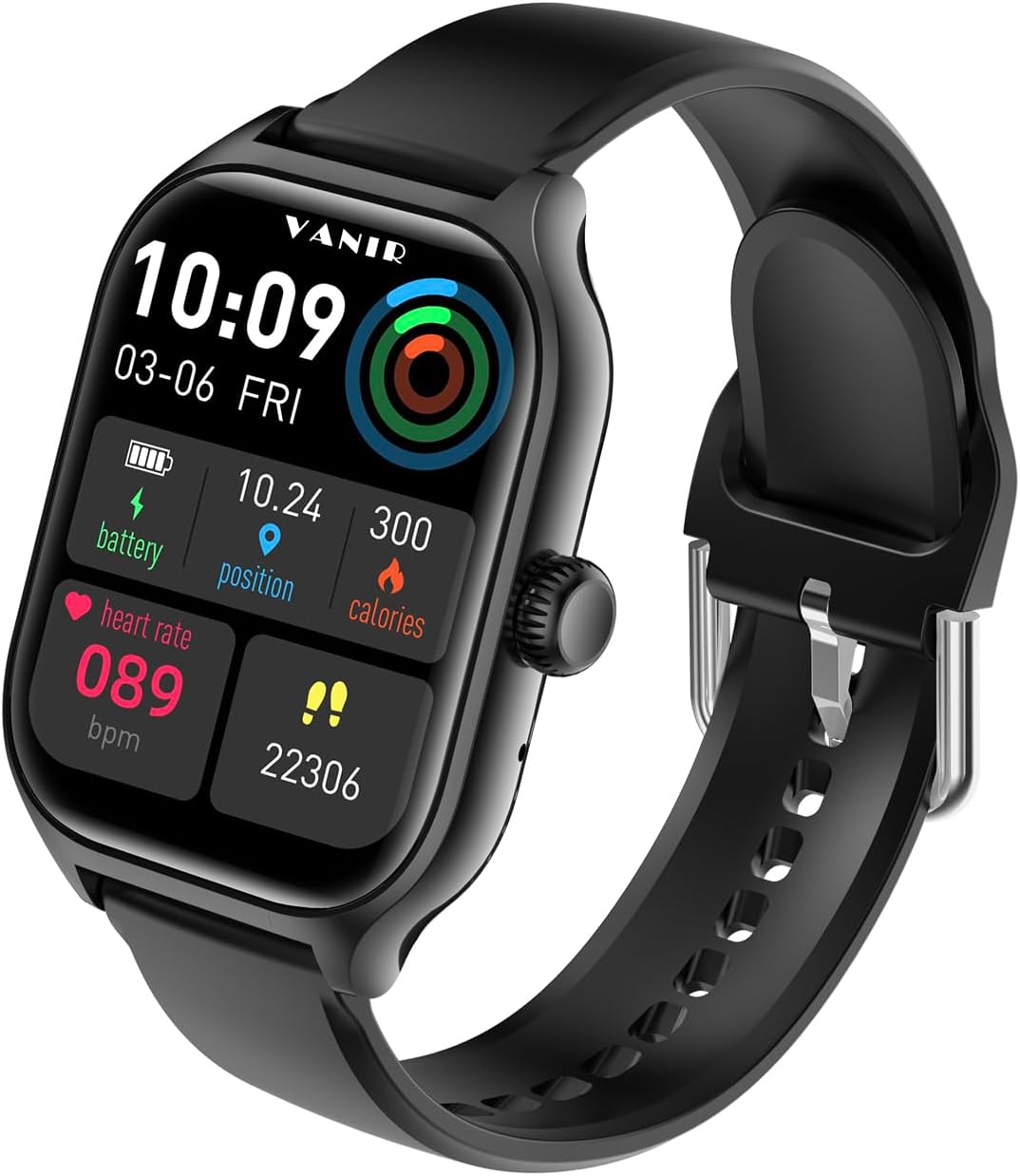
Image: The VANIR Smartwatch displaying its main interface with time, date, battery, heart rate, position, and calories. This image illustrates the watch's display during normal operation, which is relevant for understanding its charged state and readiness for use.
2. App Installation and Pairing
To unlock the full functionality of your VANIR Smartwatch, you need to install the companion application on your smartphone. The app is compatible with Android 5.0 and iOS operating systems.
- Scan the QR code in the quick start guide (if provided) or search for the "VANIR Smartwatch" app in your phone's app store (Google Play Store for Android, Apple App Store for iOS).
- Download and install the application.
- Open the app and follow the on-screen instructions to create an account or log in.
- Ensure Bluetooth is enabled on your smartphone.
- In the app, navigate to the device pairing section and select your VANIR Smartwatch from the list of available devices.
- Confirm the pairing request on both your smartphone and the smartwatch.

Image: A visual representation of the VANIR Smartwatch's key features, including pedometer, calorie amount, distance, type of movement, message notification, sleep tracking, smart alarm clock, raise to wake, incoming call notification, heart rate monitor, BP monitor, oxygen level monitor, remote capture, watch finder, sitting reminder, find my phone, social media message notification, and weather. This image helps users understand the range of functions available after successful pairing.
Operating Instructions
Basic Navigation
- Touchscreen: Swipe left/right, up/down to navigate through menus and features. Tap to select an option.
- Side Button: Press to return to the home screen or wake the display. Long press for power options.
Bluetooth Calling and Music Control
Once paired with your smartphone, you can make and receive calls directly from your smartwatch. You can also control music playback on your phone.
- Making Calls: Access the dialer or contacts list on your watch to initiate a call.
- Receiving Calls: When a call comes in, the watch will display the caller ID. Tap the green icon to answer or the red icon to reject.
- Music Control: Navigate to the music control interface on your watch to play, pause, skip tracks, or adjust volume.

Image: The VANIR Smartwatch on a user's wrist displaying an incoming call notification with the caller's number, alongside a smartphone showing the same call. This demonstrates the Bluetooth calling feature, allowing users to manage calls directly from their wrist.
Health Monitoring
The smartwatch is equipped with sensors to monitor various health metrics.
- Heart Rate: Access the heart rate monitor feature on the watch or through the app to measure your heart rate in real-time.
- Sleep Monitoring: Wear the watch while sleeping to track your sleep patterns, including deep sleep, light sleep, and wake times. Data is synchronized with the app for detailed analysis.
- Blood Oxygen: Measure your blood oxygen saturation levels on demand.

Image: A person sleeping with the VANIR Smartwatch on their wrist, accompanied by an infographic illustrating sleep data such as 8 hours 30 minutes total sleep, 3 hours 10 minutes deep sleep, 4 hours 5 minutes light sleep, and a 1 hour 15 minute alarm. This image highlights the smartwatch's sleep tracking capabilities and how it helps users understand their sleep quality.
Sports Modes
The smartwatch supports over 100 sports modes to track your physical activities. Select the appropriate mode before starting your workout to record specific data such as distance, calories burned, and exercise duration.

Image: Two individuals engaged in a basketball activity, with one wearing the VANIR Smartwatch. The watch screen shows "Running" mode with details like total time (00:07:20), total steps (22306), and total heat (226 kcal). This image demonstrates the smartwatch's multi-sport tracking feature during physical activity.
Notifications and Alerts
Receive real-time notifications from your smartphone directly on your wrist. Ensure notification permissions are enabled in the companion app and your phone settings.
- Supported apps include WhatsApp, Facebook, Instagram, WeChat, QQ, and more.
- The watch will vibrate and display the notification content.
Remote Camera Control
Use your smartwatch as a remote shutter for your smartphone camera. Open the camera function in the companion app, then activate the remote control feature on your watch to take photos.
Find Phone/Watch
If you misplace your phone or watch, use the "Find Device" feature. From the watch, you can make your phone ring. From the app, you can locate your watch.

Image: The VANIR Smartwatch screen showing "Looking for" a phone, with a green phone icon, next to a smartphone displaying a magnifying glass icon. This visual illustrates the "Find Phone/Watch" feature, helping users locate their paired devices.
Maintenance
Cleaning
Regularly clean your smartwatch and watch band with a soft, dry cloth. If necessary, use a slightly damp cloth with mild soap, then wipe dry. Avoid harsh chemicals or abrasive materials.
Water Resistance
The VANIR Smartwatch has an IPX5 water resistance rating. This means it is resistant to splashes and sweat, making it suitable for workouts and light rain. It is not recommended for swimming, showering, or submersion in water.
Battery Life and Charging
The 400mAh battery provides up to 7 days of continuous use and 30 days of standby time. To prolong battery life, avoid extreme temperatures and fully charge the device when the battery is low.
Troubleshooting
If you encounter issues with your VANIR Smartwatch, refer to the following common solutions:
- Watch not turning on: Ensure the watch is fully charged. Connect it to the charging cable and a power source for at least 30 minutes.
- Cannot pair with smartphone:
- Ensure Bluetooth is enabled on your phone and the watch.
- Make sure the watch is within range of your phone.
- Restart both your phone and the smartwatch.
- Check if the app has necessary permissions on your phone.
- Inaccurate health data: Ensure the watch is worn snugly on your wrist, about one finger's width above your wrist bone. Clean the sensors regularly.
- Notifications not appearing: Verify that notification permissions are granted to the companion app in your phone's settings. Also, check the app's settings to ensure notifications for specific applications are enabled.
- Screen unresponsive: Try restarting the watch by long-pressing the side button. If unresponsive, allow the battery to fully drain and then recharge.
Specifications
| Feature | Detail |
|---|---|
| Model Number | VANIR-1 |
| Display Size | 2.01 Inches |
| Battery Capacity | 400 mAh |
| Battery Type | Lithium Ion |
| Water Resistance | IPX5 |
| Connectivity | Bluetooth 5.0 |
| Operating System Compatibility | Android 5.0 & iOS (and above) |
| Memory Storage Capacity | 256 MB |
| Item Weight | 3.52 ounces (0.1 Kilograms) |
| Shape | Square |
| Special Features | Activity Tracker, Multisport Tracker, Heart Rate Monitor, Sleep Monitor, Bluetooth Call Support |
Warranty and Support
Your VANIR Smartwatch is covered by a standard manufacturer's warranty. For specific warranty terms and conditions, please refer to the warranty card included in your product packaging or contact VANIR customer support.
For technical support, troubleshooting assistance, or warranty claims, please contact VANIR customer service through the contact information provided on the official VANIR website or within the companion application.


