
1. Introduction
This manual provides detailed instructions for the installation, operation, and maintenance of your CGOGC 10-inch Octa-Core Car Stereo. This multimedia player is designed for Toyota Camry models from 2015 to 2017, offering advanced features such as Wireless CarPlay, Android Auto, GPS navigation, FM/AM radio, Bluetooth connectivity, and a high-resolution touchscreen display. Please read this manual thoroughly before installation and use to ensure proper function and safety.
2. Safety Information
- Always ensure the vehicle is turned off and the battery is disconnected before performing any installation or wiring.
- Professional installation is recommended to avoid damage to the product or vehicle.
- Do not operate the device in a manner that distracts you from driving. Always prioritize road safety.
- Keep the device away from water, moisture, and extreme temperatures.
- Use only approved accessories and parts.
3. Package Contents
Verify that all items are present in your package:
- Car Radio (Head Unit)
- Power Cable
- Adapter Cable
- RCA Cable
- Dual USB Cables
- Camera
- Camera IN Cable
- GPS Antenna
- Microphone
- Installation Tool

4. Installation Guide
This car stereo is designed for direct plug-and-play installation in Toyota Camry 2015-2017 models, compatible with factory camera and steering wheel controls. Installation tools are provided.
4.1. Pre-Installation Steps
- Disconnect Battery: Before starting, disconnect the negative terminal of your vehicle's battery to prevent electrical shorts.
- Remove Original Radio: Carefully use the provided installation tool to pry out the trim surrounding your original car radio player. Once the trim is loose, remove the screws securing the original unit and gently pull it out.

4.2. Wiring Connections
Refer to the wiring diagram and connect the provided harnesses and cables to the corresponding ports on the back of the new head unit and your vehicle's wiring system.
- Power and Speaker Connections: Connect the main power and speaker harness plug to the corresponding socket on the back of the product.
- Antennas: Connect the GPS antenna and radio antenna.
- USB Cables: Connect the dual USB cables for external device connectivity.
- Backup Camera: Connect the reversing image detection cable and video plug for the backup camera.
- External Microphone: Connect the external microphone for improved call quality.
- CANBUS: Ensure the CANBUS port is connected if your vehicle requires it for steering wheel controls or other factory features.

4.3. Install New Head Unit
Once all connections are secure, carefully install the new head unit into the center console opening. Ensure it fits snugly and secure it with the original screws. Reattach any trim pieces removed earlier.
5. Operating Instructions
5.1. Basic Operation
The unit runs on an Android smart operating system with a 10-inch IPS 1280*720 touchscreen. Navigate through applications and settings by tapping and swiping on the screen.
5.2. Wireless CarPlay and Android Auto
This car stereo supports both Apple Wireless CarPlay and Android Auto. Connect your smartphone wirelessly via Bluetooth to access phone functions, music, GPS navigation, calls, notifications, and messages directly on the car stereo display. This allows for superior voice assist control and hands-free operation.

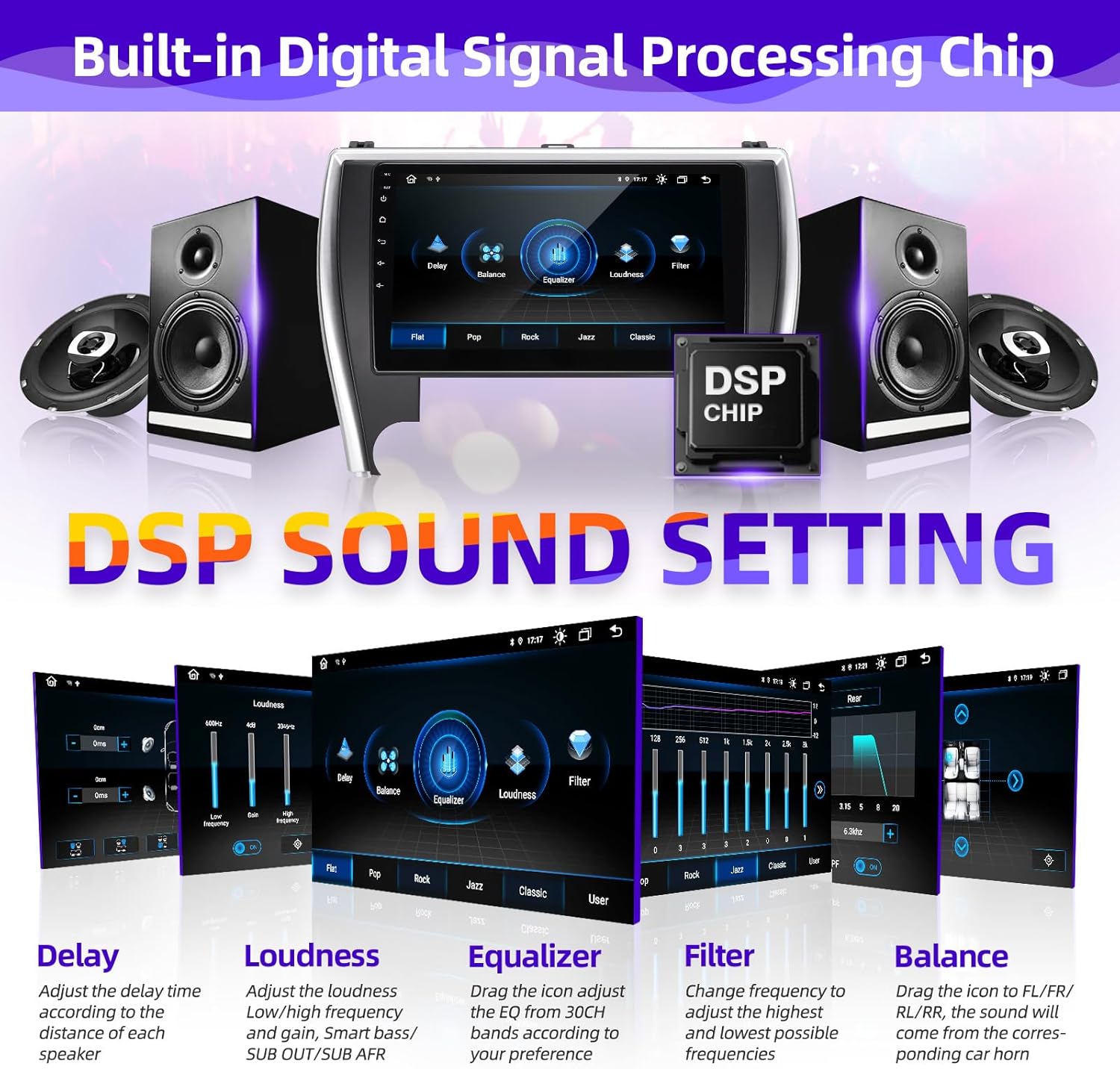
5.3. DSP Digital Processing Audio Streaming
The built-in DSP sound effect processing chip and TDA7388 power amplifier chip allow for customized audio settings. You can adjust 6 sound settings: Smart Bass, Balance, Emperor, 30-EQ, Loudness, and Filter. Customize the sound to your preferences for an enhanced audio experience.
5.4. FM/AM/RDS Radio
The unit features an ST-TDA7708 radio chip for clear FM/AM dual-band radio reception. It supports RDS (Radio Data System) functionality, providing additional information like station name and program type.

5.5. GPS Navigation
The car stereo includes GPS navigation capabilities, supporting both online and offline maps. You can install various navigation applications from the Google Play Store.

5.6. Bluetooth 5.0 Connection
Utilize Bluetooth 5.0 for hands-free calling and music playback. Pair your mobile device to the head unit for seamless integration of your phone's audio and communication features.

5.7. Media Playback
The unit supports multi-format music playback (MP3, APE, FLAC, WAV, etc.) and 1080p video playback (MP4, AVI, MKV, WMV, etc.). Enjoy high-definition media directly on the 10-inch screen, with support for split-screen display.


5.8. Application Installation
As an Android-based system, you can download and install various applications from the Google Play Store, expanding the functionality of your car stereo.

5.9. Backup Camera
The system supports an HD night vision reversing camera, providing clear visuals and parking guidelines when reversing your vehicle.

5.10. Steering Wheel Control (SWC)
The unit is compatible with your vehicle's factory steering wheel controls, allowing you to manage audio, calls, and other functions without taking your hands off the wheel.

6. Maintenance
- Screen Cleaning: Use a soft, lint-free cloth to clean the touchscreen. Avoid abrasive cleaners or solvents.
- Software Updates: Periodically check for software updates to ensure optimal performance and access to new features. Updates can typically be found through the system settings or the manufacturer's website.
- Avoid Extreme Conditions: Protect the unit from direct sunlight for prolonged periods and extreme temperatures to prevent damage.
7. Troubleshooting
- No Power: Check all power connections and ensure the vehicle's battery is properly connected. Verify fuses are intact.
- No Sound: Check speaker connections. Ensure volume is not muted or set too low. Verify audio settings (DSP, balance, fader).
- Touchscreen Unresponsive: Try restarting the unit. If the issue persists, a factory reset may be necessary (refer to system settings).
- Bluetooth/CarPlay/Android Auto Connection Issues: Ensure Bluetooth is enabled on both the phone and the head unit. Forget and re-pair the device. Check for software updates for both the head unit and your phone.
- GPS Not Working: Ensure the GPS antenna is properly installed and has a clear view of the sky. Check navigation app settings.
8. Specifications
| Feature | Specification |
|---|---|
| Operating System | Android |
| Processor | Octa Core 2.0GHz |
| RAM | 2GB |
| Internal Storage | 32GB |
| Display Size | 10 Inches |
| Display Resolution | 1280*720 IPS |
| Connectivity | Bluetooth, USB, Wi-Fi (5G) |
| Radio Chip | TDA7708 (FM/AM/RDS) |
| Amplifier Chip | TDA7388 |
| Special Features | Touchscreen, Wireless CarPlay, Android Auto, GPS Navigation, DSP Audio, Backup Camera Support, Steering Wheel Control |
| Item Weight | 4.9 Pounds |
| Package Dimensions | 15.35 x 12 x 6.6 inches |
9. Warranty and Support
9.1. Warranty Information
This product comes with a 1-year warranty from the date of purchase. For details regarding warranty claims or extended protection plans, please refer to your purchase documentation or contact customer support.
9.2. Customer Support
For any questions, technical assistance, or support regarding your CGOGC car stereo, please contact our customer service team. You can typically find contact information on the product packaging or through the seller's page on the platform where you made your purchase.
