
1. Introduction
This manual provides comprehensive instructions for the installation, operation, and maintenance of the HZVEKCRI T4201-6A Heat Transfer Temperature and Time Controller. This device is designed for precise temperature and time management in various industrial applications, particularly for heat transfer, stamping, and flat ironing machines. Please read this manual thoroughly before operating the device to ensure safe and efficient use.
2. Safety Information
Always adhere to the following safety precautions to prevent injury or damage to the equipment:
- Ensure all wiring is performed by a qualified electrician and complies with local electrical codes.
- Disconnect power before making any electrical connections or performing maintenance.
- Do not operate the controller in environments with excessive moisture, dust, or corrosive gases.
- Verify the power supply voltage matches the controller's requirements.
- The device operates with high temperatures; exercise caution to avoid burns.
- Do not open the casing of the controller unless specifically instructed to do so by a qualified technician.
3. Product Overview
3.1 Components and Display
The T4201-6A controller features a digital display for temperature and time, along with control buttons for setting parameters and indicators for operational status.

Figure 3.1: Front and Side View of the T4201-6A Controller. The front panel displays PV (Process Value) and SV (Set Value) for temperature and time, along with "OUT" and "AT" indicators. Control buttons for "TEMP" and "TIME" adjustments are visible below the display. The side shows the terminal block for electrical connections.

Figure 3.2: Top and Bottom View of the T4201-6A Controller. This image provides a perspective of the device's casing, highlighting its compact design and potential mounting points.
3.2 Dimensions
The physical dimensions of the T4201-6A controller are crucial for proper installation and integration into existing systems.
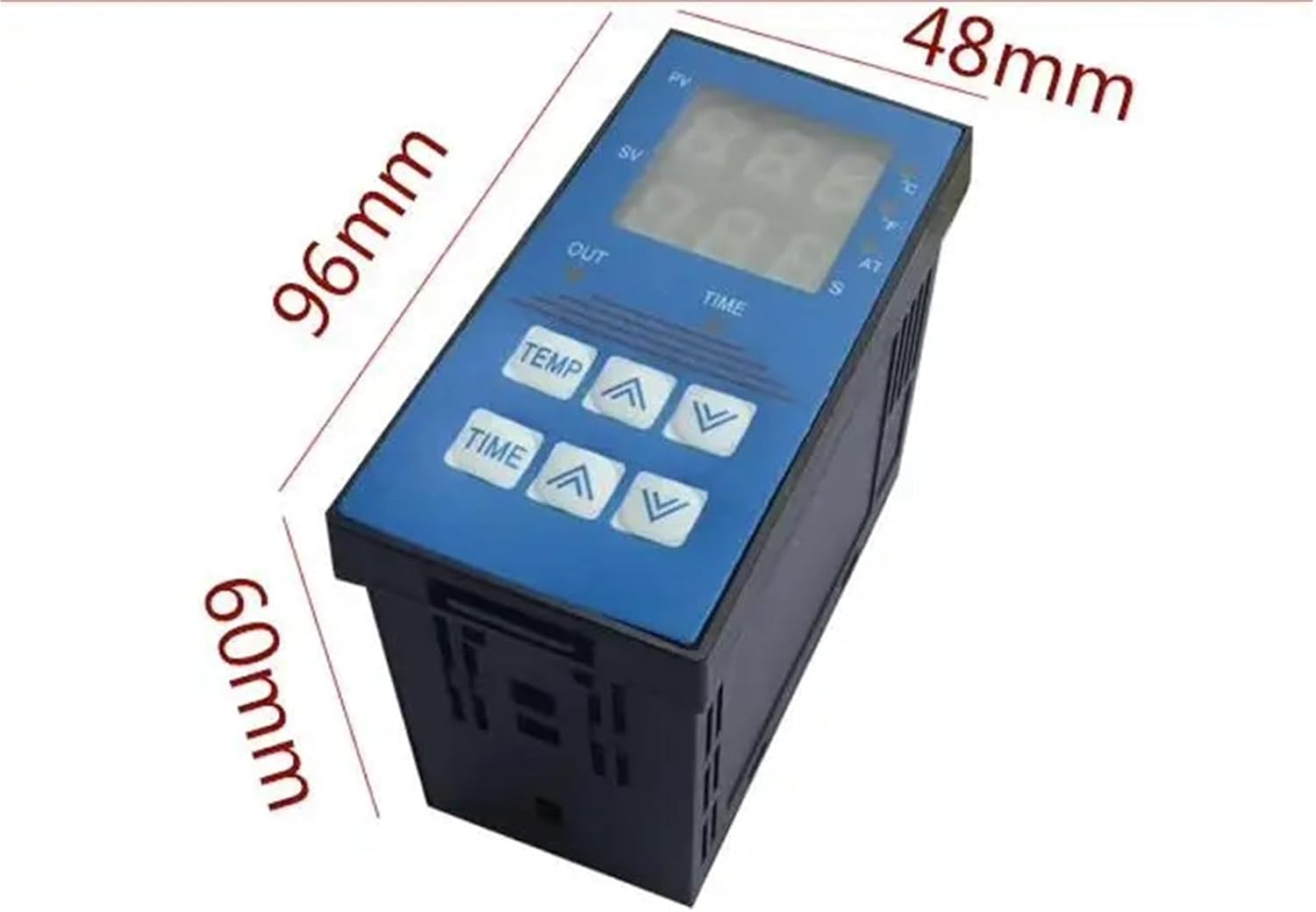
Figure 3.3: T4201-6A Controller Dimensions. The controller measures approximately 96mm in height, 48mm in width, and 60mm in depth.
4. Setup and Installation
4.1 Mounting
The T4201-6A is designed for panel mounting. Ensure adequate space for ventilation and access to wiring terminals. Refer to the dimensions in Section 3.2 for cutout requirements.
4.2 Wiring Connections
All wiring must be done with the power supply disconnected. The terminal block on the side of the controller is used for all electrical connections. While specific wiring diagrams are not provided in this manual, general connections typically include:
- Power Supply: Connect the appropriate voltage (e.g., 110V/220V AC) to the designated power input terminals.
- Temperature Sensor Input: Connect a compatible temperature sensor (e.g., K-type thermocouple, RTD) to the sensor input terminals. Ensure correct polarity if applicable.
- Output Control: Connect the heating element or other controlled device to the output terminals. This output is typically a relay contact.
- Alarm Output (if available): Connect any external alarm devices to the alarm terminals.
Consult the wiring diagram provided with your specific unit or contact a qualified technician for detailed connection instructions.
5. Operating Instructions
5.1 Power On
Once all wiring is complete and secure, apply power to the controller. The digital display will illuminate, showing the current process value (PV) and set value (SV).
5.2 Setting Temperature (SV)
- Press the TEMP button. The SV (Set Value) display for temperature will begin to flash.
- Use the ▲ (Up) and ▼ (Down) arrow buttons next to "TEMP" to adjust the desired temperature.
- Press the TEMP button again to confirm the setting and exit the setting mode.
5.3 Setting Time
- Press the TIME button. The SV (Set Value) display for time will begin to flash.
- Use the ▲ (Up) and ▼ (Down) arrow buttons next to "TIME" to adjust the desired time duration.
- Press the TIME button again to confirm the setting and exit the setting mode.
5.4 Display Indicators
- PV (Process Value): Displays the current measured temperature.
- SV (Set Value): Displays the target temperature or time setting.
- OUT: Illuminates when the control output is active (e.g., heating element is on).
- AT (Auto-Tune): Illuminates when the auto-tuning function is active. Auto-tuning helps the controller optimize its PID parameters for stable temperature control.
6. Maintenance
Regular maintenance ensures the longevity and reliable operation of your T4201-6A controller.
- Cleaning: Periodically wipe the display and casing with a soft, dry cloth. Do not use abrasive cleaners or solvents. Ensure the device is powered off before cleaning.
- Inspection: Regularly check all wiring connections for tightness and signs of wear or damage. Ensure the ventilation slots are clear of obstructions.
- Environmental Conditions: Maintain the operating environment within the specified temperature and humidity ranges to prevent damage.
7. Troubleshooting
This section addresses common issues you might encounter. For problems not listed here, contact technical support.
| Problem | Possible Cause | Solution |
|---|---|---|
| Display is blank | No power supply; incorrect wiring; internal fault. | Check power connections and voltage. Verify wiring. If problem persists, contact support. |
| Temperature reading is inaccurate | Sensor faulty; incorrect sensor type selected; sensor not properly connected. | Check sensor connection and type. Replace sensor if necessary. |
| Output (OUT) not activating | Temperature not reaching SV; wiring issue; output fault. | Ensure SV is set correctly. Check output wiring. Verify heating element functionality. |
| Controller not responding to button presses | Keypad locked; internal fault. | Power cycle the device. If issue continues, contact technical support. |
8. Specifications
| Feature | Detail |
|---|---|
| Model Number | T4201-6A |
| Brand | HZVEKCRI |
| Theory | Temperature Controller |
| Display Type | DIGITAL |
| Power Input | AC (Voltage not specified, refer to unit label) |
| Display Size | 2.0 - 3.9 Inches |
| Max Measuring Temperature | 120°C & Above |
| Style | Standing Station (Panel Mountable) |
| Usage | Industrial |
| Package Dimensions | 1.18 x 0.79 x 0.39 inches |
| Product Dimensions (Approx.) | 96mm (Height) x 48mm (Width) x 60mm (Depth) |
| Item Weight | 6.2 ounces |
| Assembly Required | No |
| Number of Pieces | 1 |
9. Warranty and Support
Specific warranty information is not provided in this manual. For details regarding warranty coverage, technical support, or replacement parts, please contact the manufacturer, HZVEKCRI, or your authorized distributor. Keep your purchase receipt as proof of purchase.
For further assistance, please refer to the contact information provided with your product packaging or visit the HZVEKCRI official website.


