
Introduction
The B2 Audio RC2 2-Inch RC Car Subwoofer System is a complete audio solution designed for RC cars, DIY audio systems, and portable speaker setups. This system includes dual B2 Audio Rampage RC2 2-inch 4-ohm subwoofers, a dual ported 3D-printed subwoofer enclosure, a custom 3D-printed amp box, and a ZK-1002T Bluetooth 200 Watt 2-Channel Amplifier Board. This manual provides instructions for proper setup, operation, and maintenance to ensure optimal performance and longevity of your audio system.
What's in the Box
- (2) B2 Audio Rampage RC2 2-Inch 4-Ohm Subwoofers
- (1) Dual Ported 3D-Printed Subwoofer Enclosure
- (1) Custom 3D-Printed B2 Audio Amp Box for ZK-1002T Amplifier
- (1) ZK-1002T Bluetooth 200 Watt 2-Channel Amplifier Board
Setup Instructions
Follow these steps to set up your B2 Audio RC2 Subwoofer System:
- Unpacking and Inspection: Unpack all components and verify contents against the 'What's in the Box' list. Inspect all items for any visible damage.
- Subwoofer Installation: Mount the two B2 Audio Rampage RC2 subwoofers into the dual ported 3D-printed enclosure. Ensure secure fastening. Note: Mounting screws are not included and must be purchased separately.
- Amplifier Installation: Place the ZK-1002T Bluetooth amplifier board into the custom 3D-printed amp box. Connect the subwoofer wires to the amplifier's speaker outputs. Observe correct polarity (+ to + and - to -).
- Power Connection: Connect the amplifier to a suitable power source (e.g., battery for RC cars or portable setups). Ensure the power supply meets the amplifier's voltage and current requirements.
- Audio Input: The amplifier supports Bluetooth 5.0 and AUX inputs. For wired connection, use an AUX cable. For wireless, proceed to Bluetooth Pairing.
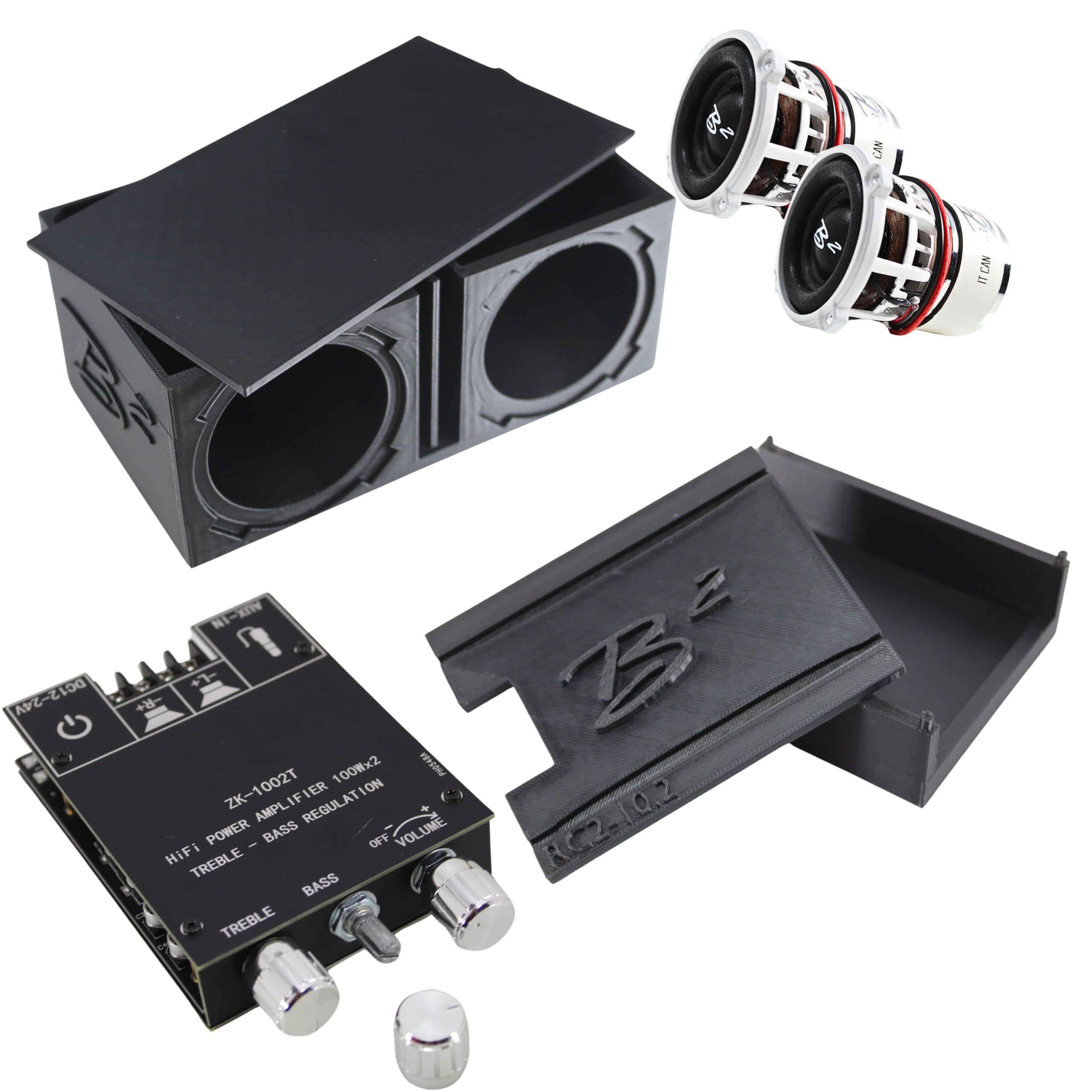
Image: The B2 Audio RC2 2-Inch RC Car Subwoofer System, featuring dual subwoofers in a vented enclosure with the amplifier box.
Video: A demonstration of the B2 Audio Rampage RC2 2-inch mini subwoofer system, showcasing its components and sound capabilities.
Operating Instructions
Once the system is set up, follow these steps for operation:
- Power On/Off: Once connected to a power source, the amplifier will power on. Use the power switch on the amplifier board or disconnect the power source to turn off.
- Bluetooth Pairing:
- Ensure the amplifier is powered on.
- On your audio device (smartphone, tablet), enable Bluetooth and search for available devices.
- Select 'ZK-1002T' (or similar name) from the list to pair.
- A confirmation sound may indicate successful pairing.
- Once paired, audio from your device will play through the subwoofer system.
- Volume Control: Adjust the main volume using the dedicated knob on the amplifier or through your connected audio device.
- Tone Control: The amplifier features knobs for adjusting bass and treble levels. Rotate clockwise to increase and counter-clockwise to decrease.
Maintenance
Proper maintenance ensures the longevity and performance of your B2 Audio RC2 Subwoofer System:
- Cleaning: Use a soft, dry cloth to clean the enclosure and amplifier. Avoid using harsh chemicals or abrasive materials. Do not expose electronic components to moisture.
- Storage: When not in use, store the system in a cool, dry place away from direct sunlight and extreme temperatures.
- Cable Management: Periodically check all wiring for secure connections and signs of wear. Replace any damaged cables immediately.
Troubleshooting
If you encounter issues with your B2 Audio RC2 Subwoofer System, refer to the following common problems and solutions:
- No Sound:
- Verify all power connections are secure and the amplifier is receiving power.
- Check speaker wire connections for correct polarity and secure contact.
- Ensure Bluetooth is paired correctly or the AUX cable is fully inserted.
- Adjust volume levels on both the amplifier and the audio source device.
- Distorted Sound:
- Reduce the volume on both the amplifier and the audio source.
- Check for loose wiring or damaged components.
- Ensure the power supply is stable and sufficient.
- Bluetooth Disconnection:
- Ensure the audio device is within range of the amplifier.
- Try unpairing and re-pairing the Bluetooth connection from your audio device's settings.
Specifications
| Feature | Detail |
|---|---|
| Brand | B2 Audio |
| Model Number | B2-RC2-10.2-DVCOMBO |
| Model Name | RC2 |
| Speaker Type | Subwoofer |
| Speaker Size | 2 Inches |
| Woofer Diameter | 2 Inches |
| Speaker Maximum Output Power | 200 Watts (100W per channel) |
| Connectivity Technology | Auxiliary, Bluetooth 5.0 |
| Audio Output Mode | Stereo |
| Number of Audio Channels | 2.1 |
| Enclosure Material | Plastic (3D-Printed) |
| Item Weight | 0.38 Pounds |
| UPC | 850066670880 |
| Specific Uses For Product | RC cars, DIY audio systems, portable speaker setups |
Warranty Information
This B2 Audio product comes with a manufacturer's limited warranty. For specific terms and conditions, including coverage details and duration, please refer to the warranty documentation included with your purchase. Retain your proof of purchase for warranty claims.
Customer Support
For technical assistance, troubleshooting, or warranty inquiries regarding your B2 Audio RC2 Subwoofer System, please contact B2 Audio customer support. Visit the official B2 Audio website for current contact information and additional resources.