
Introduction
Thank you for choosing the ANXRE NT79 71-inch Phone Tripod and Selfie Stick. This versatile device is designed to enhance your photography and videography experience, offering stability and flexibility for various shooting scenarios. Please read this manual carefully to ensure proper setup, operation, and maintenance of your new tripod.
What's in the Box
- 1 x ANXRE NT79 Phone Tripod
- 1 x Wireless Remote Shutter
- 1 x 1/4 inch Camera Mount
- 1 x User Manual
Product Overview
The ANXRE NT79 combines the functionality of a phone tripod and a selfie stick, featuring an extendable design and universal compatibility.
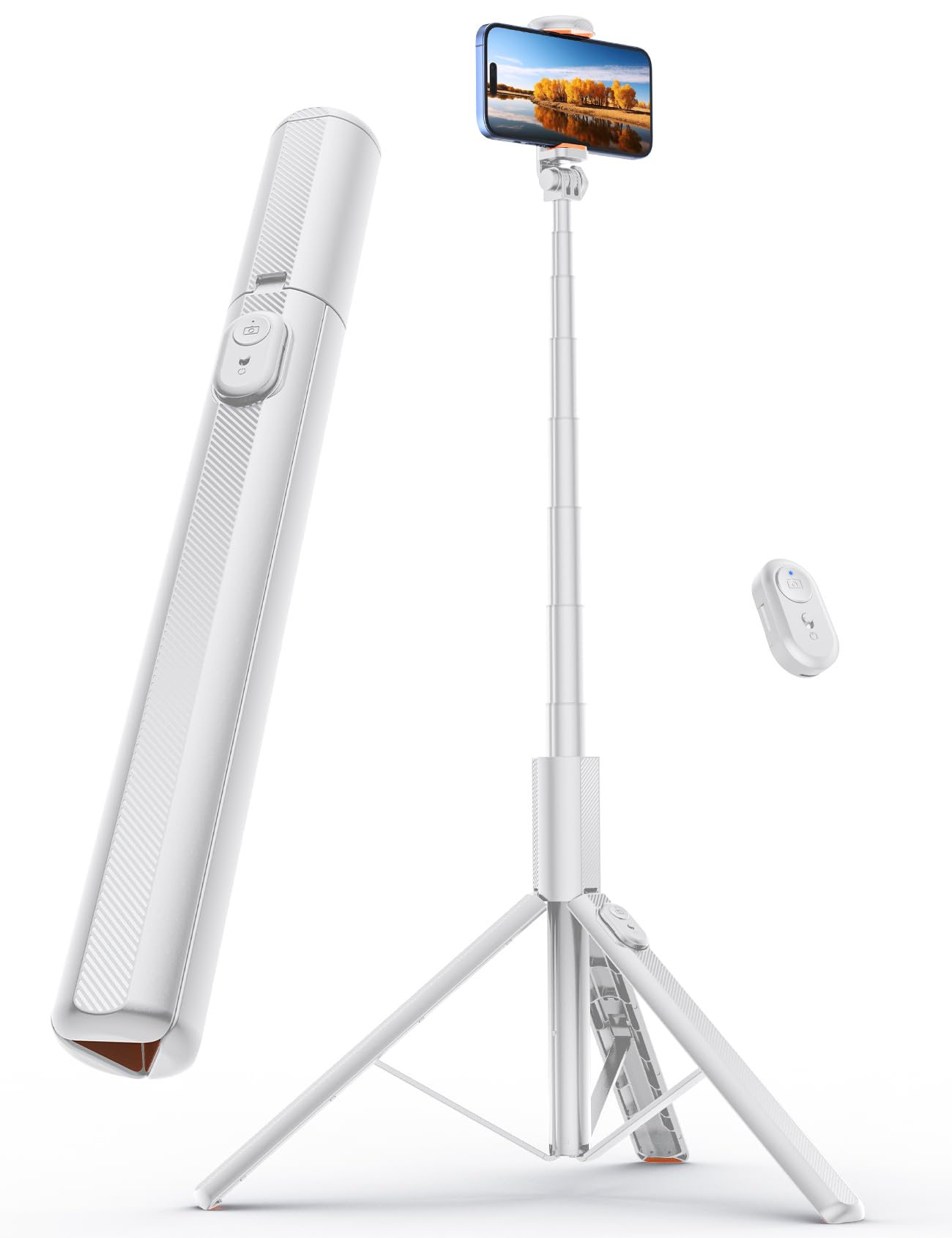
Figure 1: ANXRE NT79 Phone Tripod in its compact, folded state.
Key Features:
- Extra-Tall 71" Height: Extends up to 71 inches (180 cm) for broader views and higher angles.
- Universal Compatibility: Equipped with a 1/4" camera mount and a secure phone clamp (4"-7" phones), compatible with smartphones, cameras, and GoPros. Includes a cold shoe for accessories.
- Wireless Remote: Detachable Bluetooth remote for hands-free control of photos and videos.
- Stable Base: Reinforced tripod base with non-slip silicone feet ensures stability.
- Portable Design: Folds down to 13.58 inches (34.5 cm) and weighs 340.01 grams for easy transport.

Figure 2: The compact and integrated design of the ANXRE NT79 tripod.

Figure 3: Universal phone mount with adjustable width for various smartphone sizes.

Figure 4: Detachable Bluetooth remote control for convenient hands-free operation.
Setup Instructions
- Unfold the Tripod: Gently pull the legs outwards from the main body until they form a stable tripod base. Ensure all three legs are fully extended and locked into position for maximum stability.
- Extend the Pole: Hold the base firmly and pull the telescopic pole upwards to extend it to your desired height. The pole can extend up to 71 inches.
- Attach Phone/Camera:
- For Smartphones: Open the phone clamp and securely place your smartphone. The clamp is adjustable to fit phones from 4 to 7 inches.
- For Cameras/GoPros: Remove the phone clamp by unscrewing it. Attach your camera or GoPro using the integrated 1/4 inch screw mount.
- Adjust Angle: Loosen the knob on the phone/camera mount to adjust the angle. Tighten the knob once the desired angle is achieved. The mount also allows for horizontal and vertical orientation.
- Pair Bluetooth Remote:
- Remove the remote from its slot on the tripod handle.
- Turn on the remote (usually a small switch or button). A blue indicator light will flash.
- On your smartphone, go to Bluetooth settings and search for "ANXRE" or "NT79".
- Select and pair with the device. The blue light on the remote will become solid once paired.
Video 1: Full unboxing and demonstration of the ANXRE phone tripod, including setup steps.
Operating Instructions
- Taking Photos/Videos: Once your device is mounted and the remote is paired, open your camera application. Press the button on the remote to capture photos or start/stop video recording.
- Switching Modes: Easily switch between selfie stick mode (holding the device) and tripod mode (standing it on a flat surface).
- Using Cold Shoe: If you have accessories like a microphone or LED light, attach them to the cold shoe mount on the phone clamp for enhanced content creation.
Video 2: Demonstration of the ANXRE 71" phone tripod in use, showcasing its features and versatility.

Figure 5: Various applications of the ANXRE NT79 tripod, including live streaming, travel, group photos, and video calls.
Maintenance
- Cleaning: Wipe the tripod with a soft, dry cloth. Avoid using harsh chemicals or abrasive materials.
- Storage: Fold the tripod completely and store it in a dry, cool place away from direct sunlight when not in use.
- Remote Battery: The remote uses a replaceable coin cell battery. Replace it when the indicator light no longer illuminates or pairing becomes difficult.
Troubleshooting
- Remote Not Pairing:
- Ensure the remote is turned on and has sufficient battery power.
- Make sure Bluetooth is enabled on your smartphone.
- Forget the device in your phone's Bluetooth settings and try pairing again.
- Tripod Instability:
- Ensure all tripod legs are fully extended and locked.
- Place the tripod on a flat, stable surface.
- Avoid over-extending the pole in windy conditions.
- Phone Not Fitting in Clamp:
- Ensure the phone clamp is fully extended. It supports phones between 4 and 7 inches.
- Remove any bulky phone cases if necessary.
Specifications
| Feature | Specification |
|---|---|
| Brand | ANXRE |
| Model Name | NT79 |
| Color | White |
| Compatible Devices | Phone, Camera |
| Special Features | Foldable, Lightweight, Remote Control, Telescopic |
| Material | Aluminum |
| Item Weight | 340.01 Grams |
| Maximum Height | 71 Inches (180 cm) |
| Minimum Height | 34.5 Centimeters |
| Folded Size | 13.58" / 34.5cm |
| Built-In Media | 1/4 screw Mount, User Manual, phone tripod, wireless remote shutter |
Warranty & Support
The ANXRE NT79 Phone Tripod comes with a 12-month warranty from the date of purchase. This warranty covers manufacturing defects and workmanship under normal use. For any issues, questions, or support needs regarding your ANXRE NT79 selfie stick tripod, please contact the ANXRE service team. Our professional after-sales support is available to assist you.
For customer support, please visit the ANXRE Store on Amazon or contact us directly through the platform.