
1. Introduction
Welcome to your Alphawolf Lpad3A Android 15 Tablet. This manual provides essential information for setting up, operating, and maintaining your device. Please read it carefully to ensure optimal performance and longevity of your tablet.
The Alphawolf Lpad3A features an 11-inch FHD IPS display, an Octa-Core Unisoc T615 processor, 20GB RAM, 128GB ROM (expandable to 2TB), dual cameras (5MP front, 13MP rear), Widevine L1 support, 2.4G/5G WiFi, and an 8000mAh battery. It runs on the Android 15 operating system.
2. Package Contents
Verify that all items are present in the package:
- Alphawolf Lpad3A Android 15 Tablet
- Protective Case
- USB Type-C Charging Cable
- Power Adapter (if included)
- User Manual (this document)

Image: The Alphawolf Lpad3A tablet shown with its protective case, displaying the screen with content.
3. Device Layout
Familiarize yourself with the physical components of your tablet.

Image: A diagram illustrating various features of the Alphawolf Lpad3A tablet, including camera, ports, and buttons.
- Front Camera: For video calls and selfies.
- Rear Camera: For taking photos and videos.
- Power Button: Turns the tablet on/off or puts it to sleep.
- Volume Buttons: Adjusts audio volume.
- USB Type-C Port: For charging and data transfer.
- 3.5mm Audio Jack: For connecting headphones.
- MicroSD Card Slot: For expanding storage.
- Speakers: For audio output.
4. Setup
4.1. Initial Charge
Before first use, fully charge your tablet. Connect the USB Type-C cable to the tablet's charging port and the other end to the power adapter, then plug the adapter into a wall outlet. The charging indicator will show the charging status.
4.2. Power On/Off
- To Power On: Press and hold the Power button until the Alphawolf logo appears.
- To Power Off: Press and hold the Power button, then select "Power off" from the options on the screen.
- To Restart: Press and hold the Power button, then select "Restart" from the options.
- To Sleep/Wake: Briefly press the Power button.
4.3. Initial Setup Wizard
Upon first power-on, the tablet will guide you through the initial setup process. Follow the on-screen instructions to:
- Select your language.
- Connect to a Wi-Fi network (2.4G/5G supported).
- Sign in with your Google account or create a new one.
- Set up screen lock (PIN, pattern, password, or facial recognition).
- Review and accept terms and conditions.
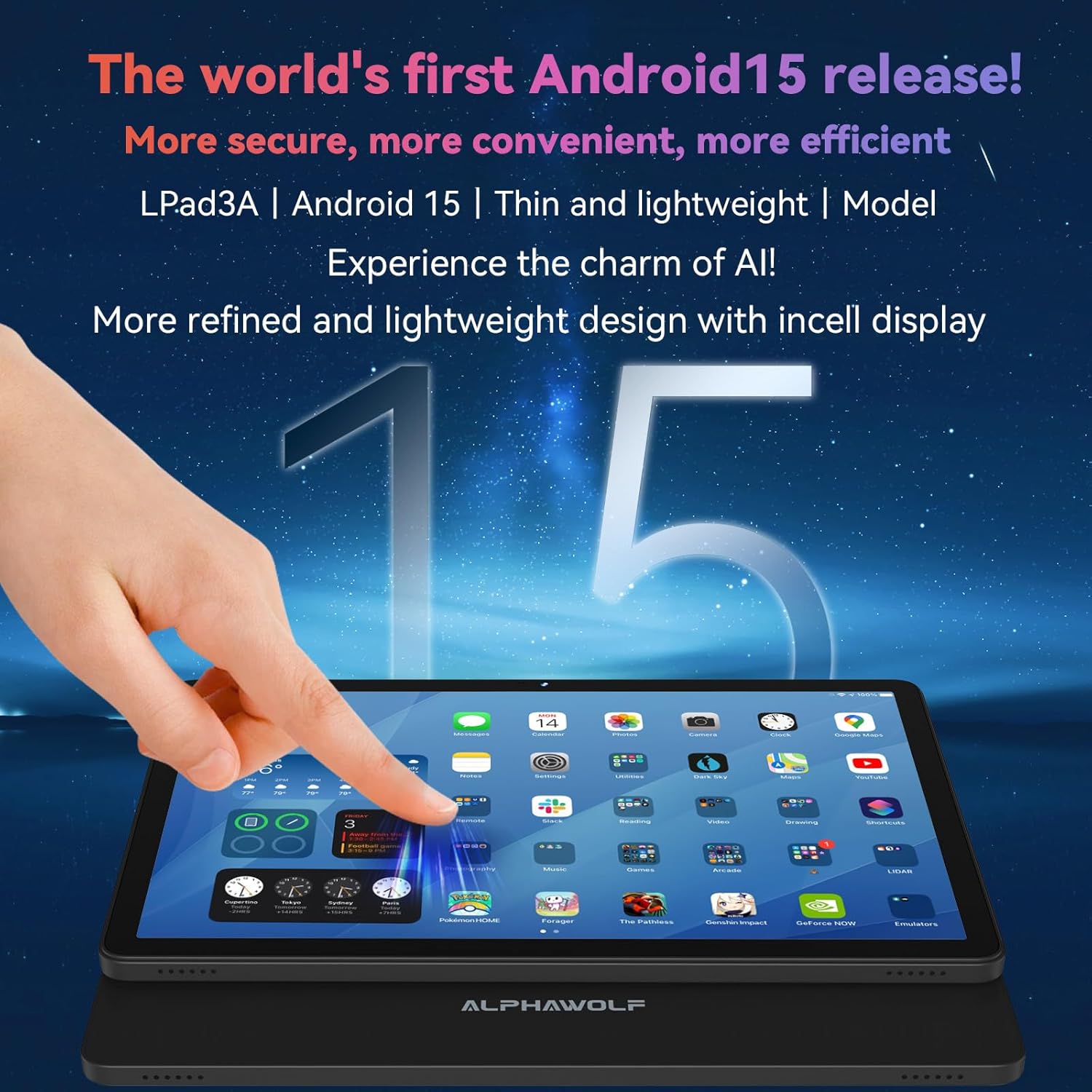
Image: The Alphawolf Lpad3A tablet displaying the Android 15 home screen with various application icons.
4.4. Expandable Storage
To expand storage, insert a MicroSD card (up to 2TB) into the designated slot. Ensure the tablet is powered off before inserting or removing the card.
5. Operating Instructions
5.1. Navigation
- Touch Gestures: Tap, swipe, pinch-to-zoom are standard Android gestures.
- Home Screen: Access apps, widgets, and notifications.
- Notification Panel: Swipe down from the top of the screen to view notifications and quick settings.
- App Drawer: Swipe up from the bottom of the screen to access all installed applications.
5.2. Wi-Fi Connection
- Go to Settings > Network & internet > Wi-Fi.
- Toggle Wi-Fi on.
- Select your desired network from the list and enter the password if prompted.
5.3. Bluetooth Pairing
- Go to Settings > Connected devices > Bluetooth.
- Toggle Bluetooth on.
- Ensure your Bluetooth device is in pairing mode.
- Select the device from the "Available devices" list to pair.
5.4. Camera Usage
Open the Camera app from the home screen or app drawer.
- Tap the shutter button to take a photo.
- Switch between photo and video modes.
- Tap the icon to switch between front (5MP) and rear (13MP) cameras.

Image: The Alphawolf Lpad3A tablet displaying its camera interface, ready to capture an image.
5.5. Widevine L1 Support
The tablet supports Widevine L1, enabling high-definition (1080P) video streaming on compatible platforms such as Netflix, Amazon Prime Video, and Disney+. Ensure you have a stable internet connection for optimal streaming quality.

Image: The Alphawolf Lpad3A tablet screen illustrating the difference between Widevine L1 (1080P) and L3 (720P) content, highlighting its HD streaming capability.
6. Maintenance
6.1. Cleaning
Use a soft, lint-free cloth to clean the screen and body of the tablet. Avoid abrasive materials or harsh chemicals.
6.2. Battery Care
- Avoid extreme temperatures.
- Do not fully discharge the battery regularly.
- Use the provided charger or a certified compatible charger.
- The 8000mAh battery provides approximately 8-10 hours of video playback or reading on a full charge.
6.3. Software Updates
Regularly check for system updates to ensure your tablet has the latest features and security patches. Go to Settings > System > System update.
6.4. Data Backup
Periodically back up important data to cloud storage or an external device to prevent data loss.
7. Troubleshooting
7.1. Tablet Not Turning On
- Ensure the battery is charged. Connect the charger and wait a few minutes before attempting to power on.
- Press and hold the Power button for 10-15 seconds to force a restart.
7.2. Wi-Fi Connection Issues
- Restart your Wi-Fi router and the tablet.
- Forget the network in Wi-Fi settings and reconnect.
- Ensure you are within range of the Wi-Fi signal.
7.3. Apps Crashing or Freezing
- Close and reopen the app.
- Clear the app's cache and data (Settings > Apps > [App Name] > Storage & cache).
- Uninstall and reinstall the app.
- Ensure the tablet's software is up to date.
7.4. Slow Performance
- Close unnecessary background applications.
- Clear cache for frequently used apps.
- Ensure sufficient storage space is available.
- Restart the tablet regularly.
8. Specifications
| Feature | Specification |
|---|---|
| Model | Lpad3A |
| Operating System | Android 15 |
| Processor | Unisoc T615 Octa-Core CPU |
| Display | 11-inch FHD IPS (1920 x 1200) |
| RAM | 20GB (8GB + 12GB expandable) |
| Internal Storage (ROM) | 128GB |
| Expandable Storage | Up to 2TB via MicroSD card |
| Front Camera | 5MP |
| Rear Camera | 13MP |
| Battery | 8000mAh |
| Wi-Fi | 2.4G/5G |
| Bluetooth | Bluetooth 5.0 |
| Audio Jack | 3.5mm |
| Widevine Support | L1 |
| Dimensions (approx.) | Thickness: 8mm, Weight: 495g |
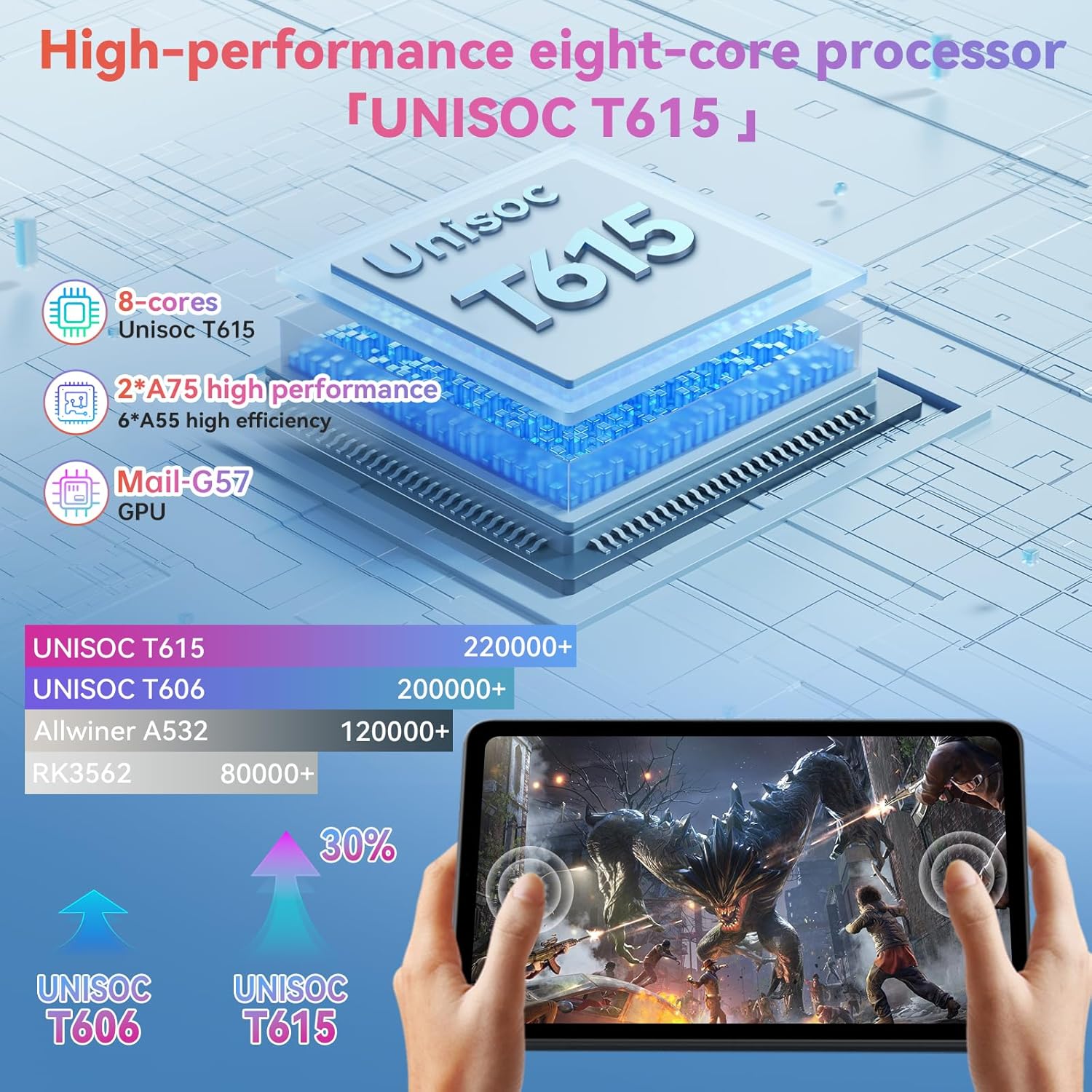
Image: A visual representation of the Unisoc T615 Octa-Core processor and its performance comparison against older models, highlighting its efficiency.
Image: An overview of the Alphawolf Lpad3A tablet's key features including display, battery, RAM, ROM, processor, and physical dimensions.
9. Warranty and Support
For warranty information and technical support, please refer to the warranty card included in your package or visit the official Alphawolf website. Keep your purchase receipt as proof of purchase.
Manufacturer: Alphawolf
Date First Available: June 12, 2025