
Introduction
This manual provides detailed instructions for the installation, operation, and maintenance of your ASURE 4+64G Android 15 Car Stereo Radio. Please read this manual thoroughly before installation and use to ensure proper functionality and to prevent damage.
Vehicle Compatibility
This car stereo is designed for a broad range of Ford, Lincoln, and Mercury vehicles. Verify your vehicle's compatibility before installation.
- Ford F-Series: F150 (2004–2008), F250/F350 (2005–2016). Note: Some 2013-2016 Platinum versions may not be compatible.
- Other Ford Models: Fusion (2006–2009), Focus ZX3 ZX4 ZX5 (2005–2007), Edge (2006–2010, some 2010 high-spec versions may not match), Escape (2008–2012 with OEM Navi screen), Explorer (2006–2010), Taurus (2008–2009), Mustang (2005–2009), Expedition (2007–2014), Shelby GT500 (2007–2009), Five Hundred (2005–2007), Freestyle (2004–2007), Freestar (2004–2007), F450 (2005–2012), E150/E250/E350 (2009–2014).
- Lincoln Models: MKX (2007–2009 high-spec versions with OEM Navi screen), Mark LT (2006–2008).
- Mercury Models: Montego (2005–2007), Milan (2005–2009), Sable (2007–2009), Mountaineer (2006–2010), Mariner (2008–2011 high-spec versions with OEM Navi screen), Monterey (2004–2007).
Important: Please check and compare the shape and size of your OEM radio before purchasing. This new item is 188mm (W) * 120mm (H).

Image: Detailed compatibility chart for various Ford, Lincoln, and Mercury models, along with an example of the stereo installed in a Ford F150 dashboard.

Image: Visual examples of compatible dashboards for Ford F150, F250/F350, E150/E250/E350, Fusion, Lincoln MKX, and Mercury Montego, alongside examples of non-compatible dashboards.
What's in the Box
Your ASURE Car Stereo package includes the following components:
- 1x ASURE 4+64G Android 15 Car Stereo Radio
- 1x Wiring Kit (Power Harness, A/V Connectors, Audio Video Ports, WiFi/BT Antenna, Reversing Camera Input, USB Cable)
- 1x Radio Aerial Adaptor
- 1x CAN BUS Decoder
- 1x GPS Cable
- 1x Microphone
- 1x User Manual (this document)
- 1x Reversing Camera

Image: A visual representation of all included accessories, including the main screen unit, power harness, CAN BUS, various cables, microphone, user manual, and reversing camera.
Setup and Installation
Follow these steps for proper installation of your ASURE Car Stereo. Professional installation is recommended if you are unfamiliar with car audio wiring.
1. Unboxing and Initial Inspection
Before starting, unbox all components and ensure everything listed in the 'What's in the Box' section is present and undamaged.
Video: This video demonstrates the unboxing process of the ASURE Car Stereo, showing all included components and initial inspection.
2. Wiring and Connections
Connect the provided wiring harness to your vehicle's factory wiring. Ensure all connections are secure. Refer to the wiring diagram for specific pin assignments.
Video: A detailed guide on how to perform the wiring installation for the ASURE Car Stereo in a Ford F150 2004-2008, including connecting the main harness and accessories.

Image: A comprehensive wiring diagram showing all connection points for the ASURE Car Stereo, including power, audio, video, USB, GPS, and antenna connections.
3. Backup Camera Installation
Connect the provided HD waterproof backup camera. Ensure the video signal cable and power cable are correctly routed and connected. The reverse trigger wire should be connected to your vehicle's reverse light circuit to automatically display the camera feed when reversing.
Video: This video provides a step-by-step guide for installing the backup camera, including routing cables and making electrical connections.
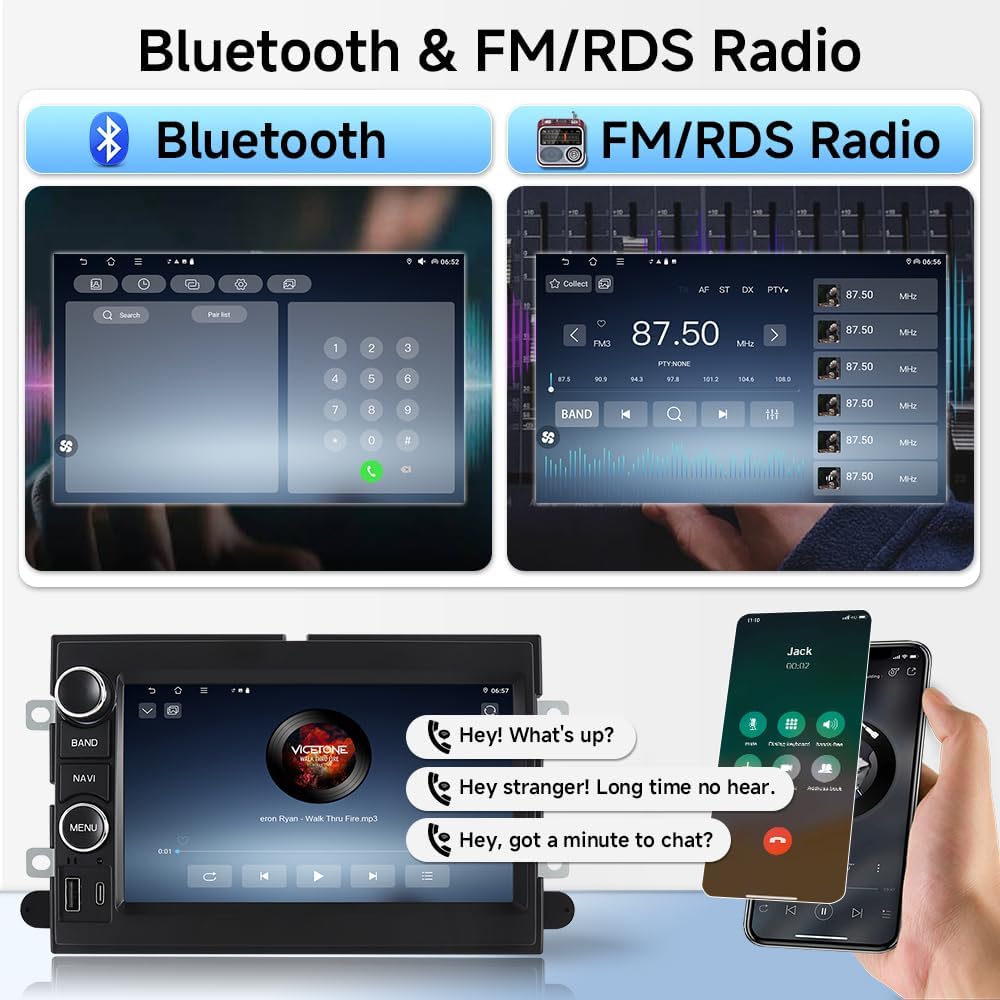
Image: Highlights the features of the AHD Reversing Camera, including night vision, 170° wide angle, waterproof design, F1.4 aperture, and distance level warnings.
Operating Instructions
Your ASURE Car Stereo runs on Android 15, offering a wide range of features for an enhanced driving experience.
1. Wireless CarPlay & Android Auto
Seamlessly integrate your smartphone for navigation, music, and calls using voice commands. This feature reduces distractions and enhances driving safety.
- Connectivity: Connect via Bluetooth for wireless CarPlay and Android Auto.
- Voice Control: Use Siri or Google Assistant for hands-free operation.

Image: Illustrates the wireless connectivity options for CarPlay, Android Auto, and Screen Mirroring, highlighting the seamless integration with smartphones.

Image: Shows the user interface for wireless CarPlay and Android Auto, demonstrating voice command functionality for navigation and messaging.
2. GPS Navigation
Utilize GPS navigation apps for both online and offline routing. Download offline maps from the Play Store for reliable navigation without an internet connection.

Image: Depicts the GPS navigation interface and highlights the WiFi connection capability for online maps and app downloads.
3. Bluetooth 5.4 & Dual-Band WiFi 6.0
Experience fast and stable connectivity for music streaming, hands-free calls, and faster app updates.
- Bluetooth 5.4: For quick device pairing and clear audio.
- WiFi 6.0: Ensures faster app installs and smoother system updates.

Image: Displays the Bluetooth calling interface and the FM/RDS radio tuner, showing how to manage calls and radio stations.
4. DSP Audio Processor
The built-in Digital Signal Processor (DSP) allows for fine-tuning of audio output, providing deeper bass, clearer mids, and balanced treble for an optimized listening experience.
5. 7-inch HD Touchscreen
The 1280x800 HD capacitive screen offers vivid visuals and responsive touch control, making interaction intuitive and effortless.
6. System Settings
Access various system settings to customize your stereo. This includes adjusting display, sound, GPS, and other device-specific options.
Video: This video demonstrates how to navigate through the ASURE car stereo's settings menu, including factory settings and CAN Type setup for vehicle-specific configurations.
Maintenance
- Screen Cleaning: Use a soft, lint-free cloth to clean the touchscreen. Avoid abrasive cleaners.
- Software Updates: Periodically check for system updates via WiFi to ensure optimal performance and access to new features.
- General Care: Avoid exposing the unit to extreme temperatures or direct sunlight for prolonged periods.
Troubleshooting
- No Power: Check all power connections and vehicle fuses. Ensure the ignition is on.
- No Sound: Verify speaker connections, amplifier power (if applicable), and audio settings (ensure AMP ON/OFF is enabled in settings).
- Touchscreen Unresponsive: Attempt a system restart. If issues persist, recalibrate the touchscreen via Factory Settings.
- CarPlay/Android Auto Not Connecting: Ensure Bluetooth is enabled on both the stereo and your smartphone. Check pairing settings.
- Backup Camera Not Displaying: Confirm the camera's power and video connections. Ensure the reverse trigger wire is correctly connected and receiving a signal when the vehicle is in reverse.
- Steering Wheel Controls Not Working: Access the 'Steering Wheel Learning' function in Factory Settings to program the controls. Verify correct wiring to Key1 and Key2 inputs.
Specifications
| Feature | Detail |
|---|---|
| Brand | ASURE |
| Operating System | Android 15 |
| Memory (RAM) | 4GB |
| Storage (ROM) | 64GB |
| Processor | 4-core |
| Screen Size | 7 Inches |
| Display Type | 1280x800 HD Capacitive LCD |
| Connectivity | Bluetooth 5.4, Wi-Fi 6.0 |
| Special Features | Wireless CarPlay, Android Auto, DSP Audio, Touchscreen, GPS Navigation, Backup Camera Input |
| Supported Navigation | GLONASS, GPS (Worldwide Map Type) |
| Mounting Type | Dashboard Mount |
Warranty and Support
Your ASURE Car Stereo comes with the following warranty and support:
- Warranty: 30 days free return and replacement, 1 year repair.
- Customer Service: For technical assistance or warranty claims, please contact ASURE customer support through your purchase platform or visit the official ASURE website.

