
1. Introduction
This manual provides detailed instructions for the setup, operation, and maintenance of your TIMEURE TU-2509 Pedometer Watch. This device is designed to track your steps, calories, and distance without the need for a smartphone application or Bluetooth connection, offering a straightforward approach to fitness monitoring.
Key Features:
- Simple & Easy to Use: Instant step counting, calorie, and distance measurement directly on your wrist. No smartphone app or Bluetooth pairing required.
- Accurate Step Tracking: Filters out untrue steps from small daily movements, recording only continuous movement exceeding 10 seconds for effective tracking.
- Large, Clear Display & Waterproof: Bright, easy-to-read display for steps, calories, distance, and time. Features 50M water resistance and a 5-second EL bright backlight.
- Comfortable Design: Equipped with an American pedometer core and a soft silicone strap, suitable for wrists measuring 4.33-7.67 inches (110-197 mm).
- Long Battery Life: Includes a replaceable CR2032 battery that can last for over one year.

2. Product Overview
The TIMEURE TU-2509 Pedometer Watch features a clear digital display and intuitive button controls for easy navigation and data access.
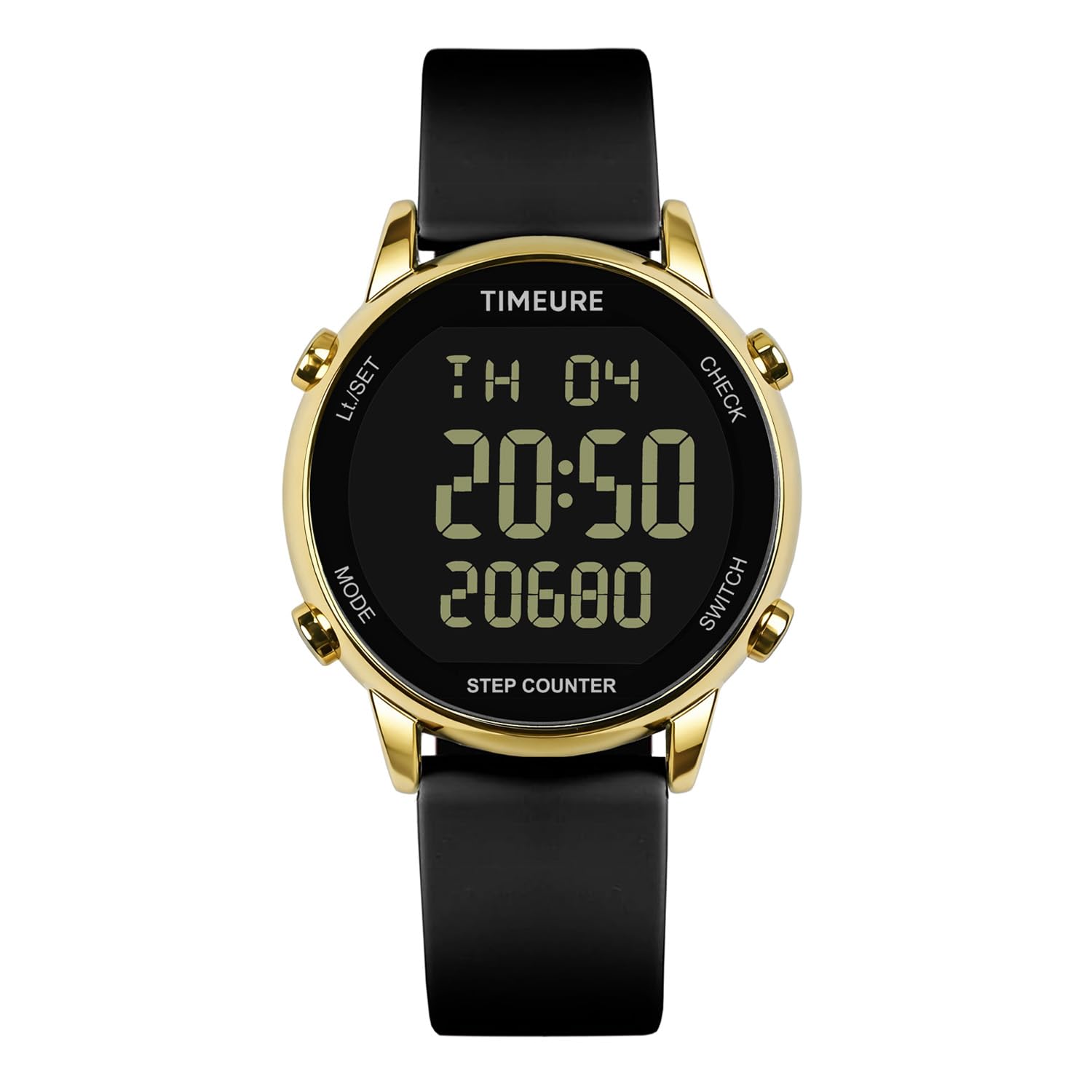
Watch Components:
- Display: Shows time, date, steps, calories, and distance.
- MODE Button: Cycles through different display modes (Time, Steps, Calories, Distance).
- LI/SET Button: Used to enter and confirm settings.
- CHECK Button: Used to review historical data or adjust values during setting.
- SWITCH Button: Used to switch between units or adjust values during setting.
- Backlight: Illuminates the display for 5 seconds in low-light conditions.


3. Setup
3.1. Initial Activation
The watch comes with a CR2032 battery pre-installed. If the display is not active, remove any protective film from the battery compartment or ensure the battery is properly seated. No further activation is typically required.
3.2. Setting Time and Date
- From the time display mode, press and hold the LI/SET button until the time digits begin to flash.
- Use the CHECK or SWITCH buttons to adjust the flashing value (e.g., hours).
- Press the MODE button to move to the next setting (e.g., minutes, 12/24-hour format, year, month, day).
- Repeat steps 2 and 3 until all desired settings are adjusted.
- Press the LI/SET button again to exit the setting mode and save your changes.
3.3. Wearing the Watch
Fasten the watch securely on your wrist. For accurate step tracking, ensure the watch is not too loose. The soft silicone strap is designed for comfort and fits wrist sizes between 4.33-7.67 inches (110-197 mm).
4. Operating Instructions
4.1. Navigating Display Modes
Press the MODE button repeatedly to cycle through the different display modes:
- Time Display: Shows current time and date.
- Step Counter: Displays the total steps taken for the current day.
- Calorie Tracker: Shows estimated calories burned.
- Distance Tracking: Displays the estimated distance traveled (Km/Miles switchable).
- Alarm: Allows setting and viewing of the alarm.
- Countdown: (If available, refer to specific on-screen prompts).

4.2. Step Tracking
The watch automatically tracks your steps. To ensure accuracy, the pedometer filters out small, incidental movements. Step counting will begin to record only when continuous movement exceeds 10 seconds.
4.3. Calorie and Distance Tracking
Based on your steps, the watch estimates calories burned and distance traveled. These values are displayed in their respective modes. You can switch between Kilometers (Km) and Miles for distance tracking using the SWITCH button when in distance mode, if supported by the model.
4.4. Setting the Alarm
- Navigate to the Alarm mode using the MODE button.
- Press and hold the LI/SET button until the alarm time digits flash.
- Use the CHECK or SWITCH buttons to adjust the alarm hour.
- Press the MODE button to move to the alarm minutes.
- Use the CHECK or SWITCH buttons to adjust the alarm minutes.
- Press the LI/SET button to save the alarm time.
- To activate/deactivate the alarm, press the CHECK button while in Alarm mode. An alarm icon will appear/disappear on the display.
4.5. Using the Backlight
In low-light conditions, press the LI/SET button to activate the EL backlight. The display will illuminate for approximately 5 seconds.

4.6. Checking Historical Steps
The watch may store historical step data. To check previous day's steps, navigate to the step counter mode and press the CHECK button. Refer to the on-screen prompts for specific navigation.
5. Maintenance
5.1. Cleaning Your Watch
To clean your watch, wipe it with a soft, damp cloth. Avoid using harsh chemicals, abrasive cleaners, or solvents, as these can damage the watch's finish and seals.
5.2. Water Resistance
The TIMEURE TU-2509 Pedometer Watch is rated for 50M water resistance. This means it is suitable for showering, bathing, and swimming in shallow water. It is not recommended for diving, snorkeling, or high-pressure water activities.

5.3. Battery Replacement
The watch uses one CR2032 button cell battery. When the display becomes dim or unresponsive, it is time to replace the battery. The battery life is approximately one year.
- Using a small screwdriver, carefully open the battery compartment cover on the back of the watch.
- Remove the old CR2032 battery.
- Insert a new CR2032 battery with the positive (+) side facing up.
- Replace the battery compartment cover and tighten the screws securely to maintain water resistance.
6. Troubleshooting
- Watch not counting steps accurately:
Ensure the watch is worn snugly on your wrist. The pedometer requires continuous arm movement to register steps; very slight or inconsistent movements may be filtered out. If using a walker or pushing a cart, arm movement may be reduced, affecting step count accuracy. - Display is dim or blank:
The battery may be low or depleted. Replace the CR2032 battery as described in Section 5.3. - Cannot set time or date:
Ensure you are pressing and holding the LI/SET button long enough to enter setting mode. Follow the steps in Section 3.2 carefully. - Watch is unresponsive:
Try replacing the battery. If the issue persists, contact customer support.
7. Specifications
| Feature | Specification |
|---|---|
| Model Number | TU-2509 |
| Brand | TIMEURE |
| Display Type | Digital |
| Screen Size | 42 Millimeters |
| Sensor Type | Pedometer |
| Water Resistance | 50M |
| Battery Type | CR2032 (Replaceable) |
| Battery Life | Approximately 1 year |
| Material | Metal (case), Silicone (strap) |
| Item Weight | 91 g |
| Wrist Size Compatibility | 110-197 mm (4.33-7.67 inches) |
| Compatible Devices | NO (Standalone device) |
8. Warranty and Support
8.1. Warranty Information
Warranty details for the TIMEURE TU-2509 Pedometer Watch are typically provided at the point of purchase or can be obtained directly from the manufacturer. Please retain your proof of purchase for any warranty claims.
8.2. Customer Support
For further assistance, technical support, or inquiries regarding your TIMEURE TU-2509 Pedometer Watch, please refer to the contact information provided by your retailer or visit the official TIMEURE website.