
1. Introduction
Thank you for choosing the Aokeo V410 4-Channel UHF Wireless Microphones System. This system is designed to provide clear and stable audio transmission for various applications, including karaoke, singing, weddings, parties, and speeches. Please read this manual thoroughly to ensure proper setup and optimal performance of your new wireless microphone system.
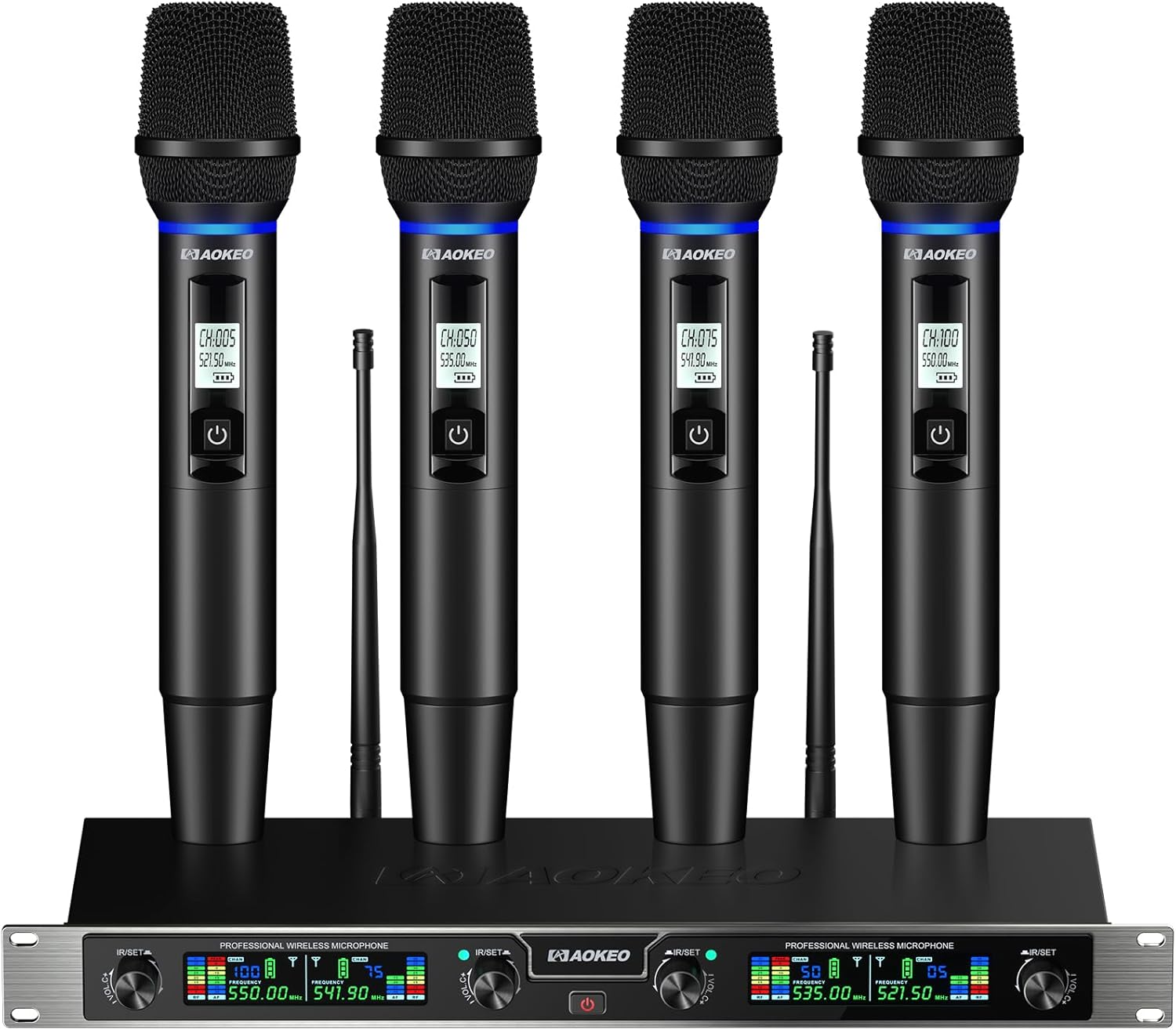
Figure 1: Aokeo V410 4-Channel UHF Wireless Microphones System, showcasing the receiver unit and four handheld microphones.
2. Key Features
- Exceptional Sound Quality & Wide Application: Experience clear and precise voice capture with UHF wireless technology, minimizing interference for a stable audio signal. Suitable for podcasts, live streaming, teaching, and stage performances.
- Intuitive LED Display with Real-Time Feedback: The receiver's LCD screen displays battery life, assigned channel, and output volume. A dynamic AF (Audio Frequency) bar graph confirms audio pickup. Each microphone also features a display for battery level, channel, and frequency.
- Effortless Frequency & Volume Control: Rotary knobs allow independent volume adjustment for each microphone. Easily match frequencies from 25 available channels per microphone to avoid crosstalk. IR sync function enables instant pairing by aligning displays with the receiver's IR port for automatic frequency search and connection.
- Versatile Connectivity Options: The receiver includes four output ports for microphones, four high-gain signal booster antennas for extended range, and a standard 6.35mm output jack. Compatible with mixers, PA systems, and other audio interfaces.
- User-Friendly Design: Microphones are battery-powered and automatically pair with the receiver upon power-on. Included anti-slip microphone grips prevent accidental drops during use.
3. Package Contents
Verify that all items listed below are included in your package:
- Handheld Microphones (x4)
- Receiver Unit (x1)
- Antennas (x4)
- Anti-slip Rings (x4)
- Power Cable (x1)
- 6.35mm Audio Cable (x1)
- AA Batteries (x8)
- User Manual (x1)

Figure 2: All components included in the Aokeo V410 Wireless Microphones System package.
4. Setup Instructions
- Connect Antennas: Screw the four antennas into the corresponding ports on the back of the receiver unit.
- Power the Receiver: Connect the power cable to the DC IN port on the receiver and plug it into a power outlet. Press the power button on the receiver's front panel to turn it on.
- Install Microphone Batteries: Unscrew the bottom part of each handheld microphone and insert two AA batteries (included), ensuring correct polarity. Screw the bottom back on.
- Power On Microphones: Slide the power switch on each microphone to the 'ON' position. The microphones will automatically pair with the receiver. The microphone display will show battery level, channel, and frequency.
- Connect to Audio System: Connect the receiver to your audio system (mixer, PA system, amplifier, karaoke machine) using the provided 6.35mm audio cable or XLR cables (not included) for individual microphone outputs. The receiver has four balanced XLR outputs (BAL A, BAL B, BAL C, BAL D) and one mixed 6.35mm output.
- Adjust Volume: Use the rotary knobs on the receiver's front panel to adjust the individual volume levels for each microphone (VOL A, VOL B, VOL C, VOL D).
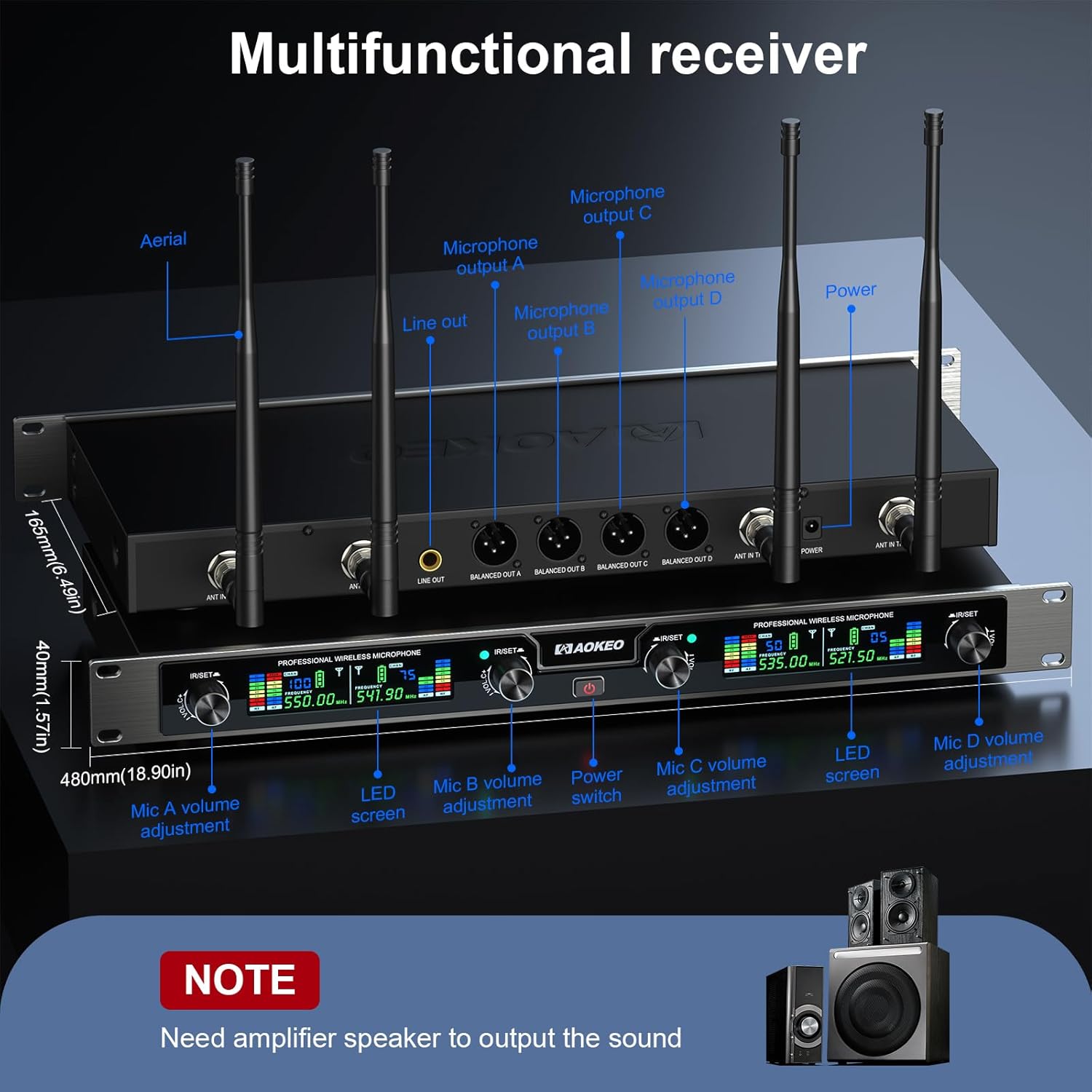
Figure 3: Receiver rear panel with balanced XLR outputs, mixed 6.35mm output, and antenna ports.

Figure 4: Receiver output interfaces and antennas for versatile connectivity.
Video 1: A user demonstrates the setup and sound quality of the Aokeo 4-channel wireless microphone system, highlighting its ease of use and clear audio output.
5. Operating Instructions
- Power On/Off: Use the power button on the receiver and the slide switch on each microphone to turn the units on or off.
- Adjusting Microphone Volume: Each microphone's volume can be individually controlled using the dedicated rotary knobs (VOL A, VOL B, VOL C, VOL D) on the receiver's front panel.
- Changing Frequencies (IR Sync): If you experience interference, you can change the microphone's frequency. Press the IR/SET button on the receiver, then align the microphone's display with the receiver's IR port. The system will automatically search for and sync to an available frequency (25 channels per microphone are available).
- Using Anti-slip Rings: Place the colored anti-slip rings onto the microphones for a secure grip and to prevent rolling when placed on a flat surface. These can also help identify individual microphones.

Figure 5: The receiver's LED display provides real-time information on microphone status.

Figure 6: Multi-channel adjustment and IR sync for seamless frequency management.
Video 2: A user demonstrates the ease of connecting and using the Aokeo wireless microphones, highlighting their suitability for group performances.
6. Maintenance
- Cleaning: Use a soft, dry cloth to clean the receiver and microphones. Avoid using harsh chemicals or abrasive materials.
- Battery Care: Remove batteries from microphones if they will not be used for an extended period to prevent leakage.
- Storage: Store the system in a cool, dry place away from direct sunlight and extreme temperatures.
7. Troubleshooting
| Problem | Possible Cause | Solution |
|---|---|---|
| No sound from microphone | Microphone or receiver is off; low battery; incorrect frequency; audio cable disconnected. | Ensure all units are powered on; replace batteries; perform IR sync to change frequency; check audio cable connections. |
| Interference or poor sound quality | Other wireless devices on the same frequency; too far from receiver; obstacles blocking signal. | Change microphone frequency using IR sync; reduce distance to receiver; ensure clear line of sight between microphone and receiver. |
| Microphone display not working | Low or dead batteries. | Replace batteries with fresh AA batteries. |
8. Specifications
- Brand: Aokeo
- Model Number: V410
- Connectivity Technology: Auxiliary, Infrared, UHF
- Connector Type: 6.35 mm Jack
- Compatible Devices: Amplifier, PA System, Karaoke Machine
- Microphone Form Factor: Handheld
- Power Source: Battery Powered
- Material: Metal
- Signal-to-Noise Ratio: 90
- Number of Channels: 4
- Item Weight: 8.23 pounds
- Package Dimensions: 21 x 11.1 x 5.75 inches
9. Warranty and Support
For warranty information or technical support, please refer to the contact details provided on the product packaging or visit the official Aokeo website. Keep your purchase receipt as proof of purchase for any warranty claims.