
Introduction to Your Fi Series 3+ Smart Dog Tracker Collar
The Fi Series 3+ Smart Dog Tracker Collar is designed to provide advanced GPS tracking, health monitoring, and safety features for your dog. This collar offers enhanced accuracy and reliability, ensuring you stay connected with your pet's well-being and location at all times.
Key features include:
- Next-Gen GPS Tracking: Real-time, nationwide location tracking with no range limits.
- Escape Alerts: Custom virtual fences alert you instantly if your dog leaves a safe zone.
- AI-Powered Health & Behavior Monitoring: Tracks activity, rest, barking, licking, scratching, eating, and drinking.
- Apple Watch Compatibility: View live location, activity, and Lost Mode from your Apple Watch.
- Smart Vet Records: Organize and store your dog's medical history within the Fi app.
What's in the Box
Your Fi Series 3+ package includes the following components:
- Fi Series 3+ Device
- Collar Band (Blue, X-Large)
- Charging Base
- USB Charging Cable

Image: Contents of the Fi Series 3+ package: the device, a blue collar band, a charging base, and a USB charging cable.
Setup Guide
Follow these steps to set up your Fi Series 3+ collar:
- Charge the Device: Place the Fi device onto the charging base. Ensure the base is plugged into a power source using the provided USB cable. The device will indicate charging status.
- Download the Fi App: Download the official Fi app from the Apple App Store or Google Play Store on your smartphone.
- Create an Account: Open the app and follow the on-screen instructions to create your Fi account and set up your dog's profile.
- Pair the Device: Follow the app's instructions to pair your Fi Series 3+ device with your account. This typically involves bringing the device close to your phone.
- Attach to Collar: Securely attach the Fi device to the collar band.
- Set Up Safe Zones: Use the app to define 'Safe Zones' around your home or other frequent locations. These virtual fences will trigger escape alerts if your dog leaves them.
- Activate Membership: A Fi membership is required for full functionality, including GPS tracking and cellular data. Ensure your 12-month membership (included with purchase) is activated within the app.
Operating Instructions
GPS Tracking and Escape Alerts
The Fi Series 3+ provides real-time GPS tracking, allowing you to monitor your dog's location nationwide without range limitations. The collar utilizes advanced GPS performance for accurate tracking.
Video: Watch this video to see how the Fi Series 3+ collar provides advanced GPS tracking and instant escape alerts, ensuring you always know your dog's location.
Set up custom virtual fences in the Fi app. If your dog crosses these boundaries, you will receive instant notifications on your smartphone. In case of an escape, the collar provides real-time updates every few seconds.
Video: This video illustrates the effectiveness of the Fi Series 3+ escape alerts, showing how quickly you can be notified if your dog leaves a designated safe zone.
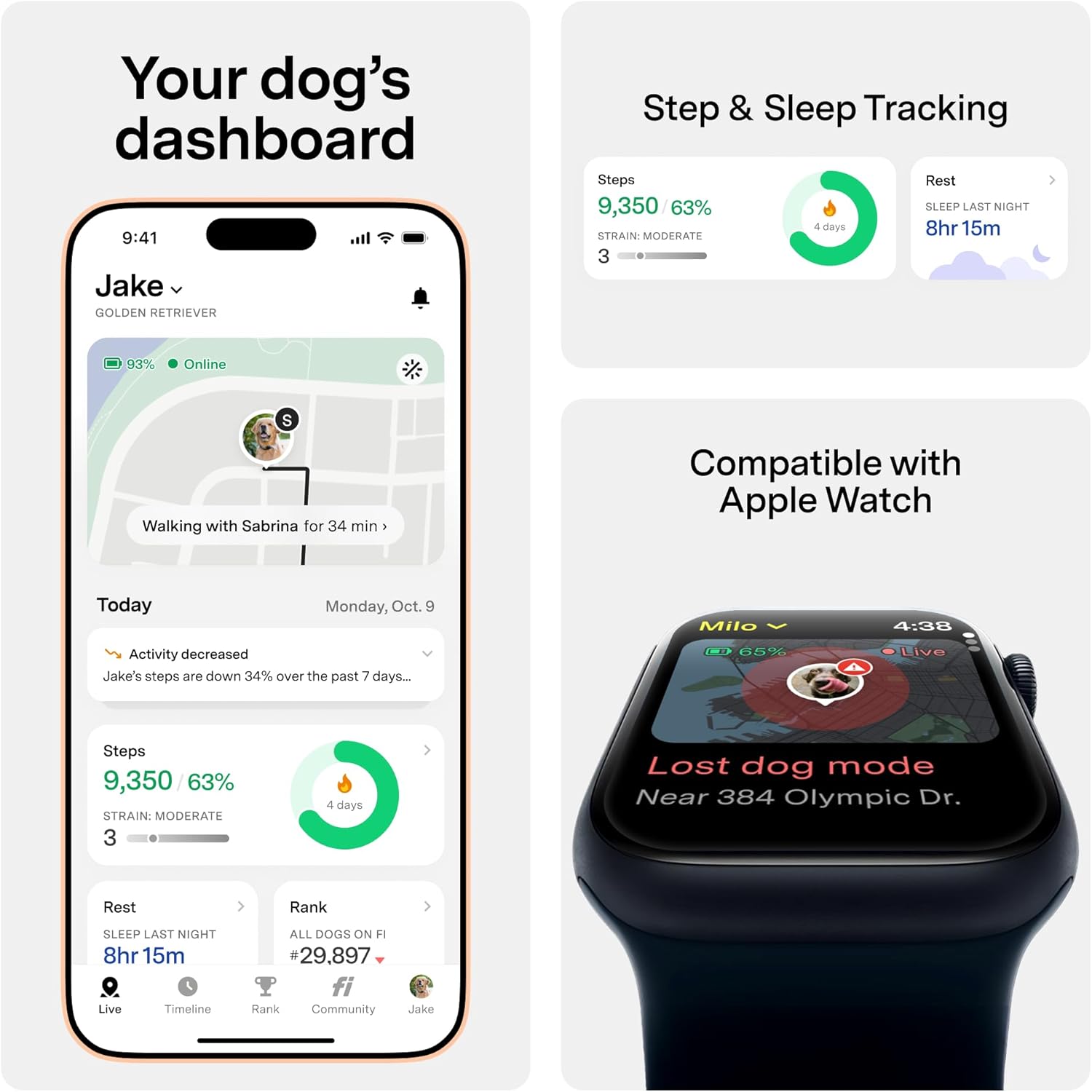
Image: Fi app displaying custom safe zones and an escape alert notification, indicating a dog has left a safe area.
Lost Dog Mode
If your dog goes missing, activate 'Lost Dog Mode' in the Fi app. This feature enhances tracking capabilities and can even enlist a 'Search Party' from the Fi community to help locate your pet faster.
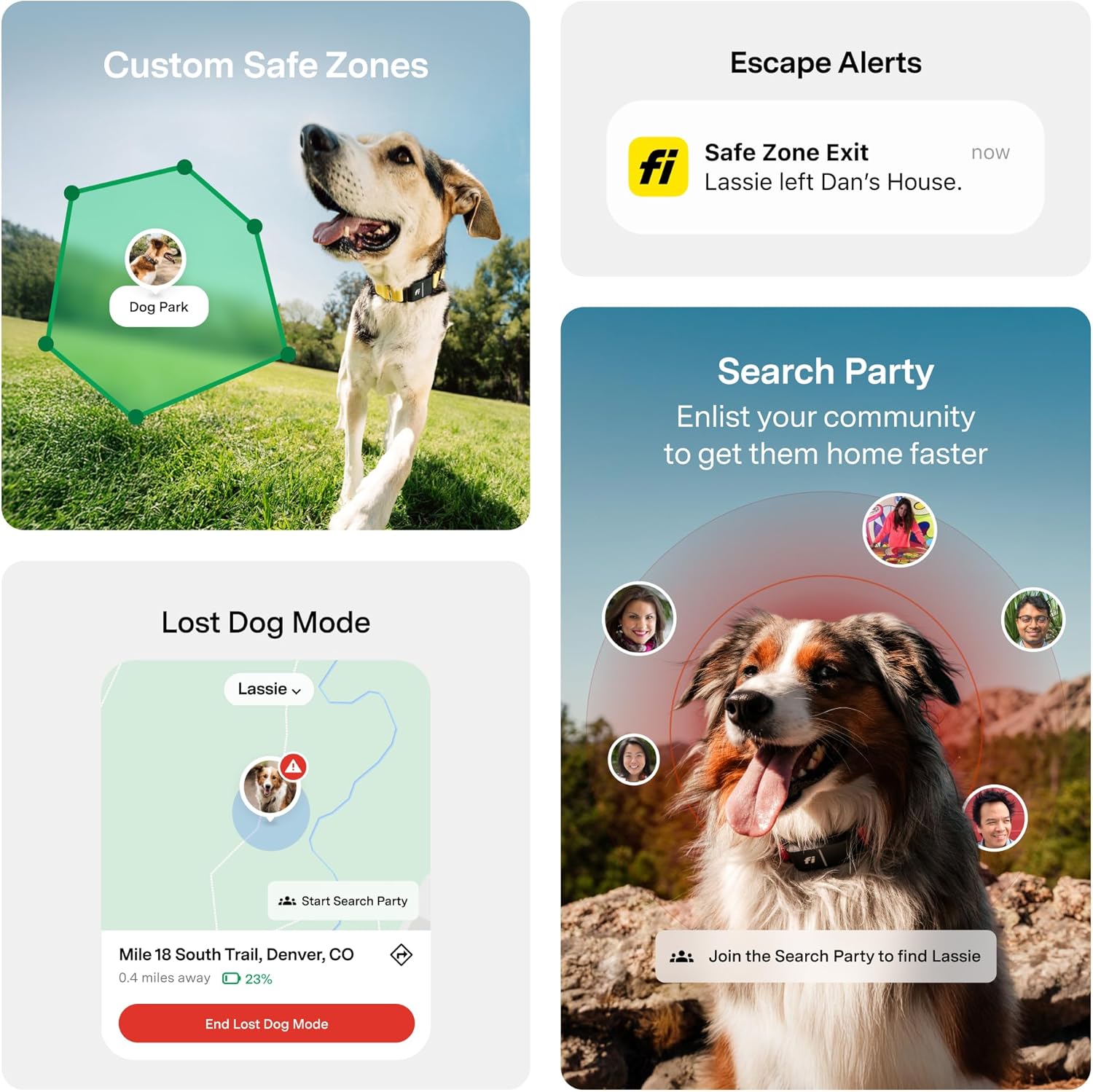
Image: Fi app showing Lost Dog Mode with real-time tracking of a dog's movement and a 'Search Party' feature to aid in recovery.
Health and Behavior Monitoring
The Fi Series 3+ is the first smart dog collar to detect and analyze various health and behavior metrics. This includes activity levels, rest periods, and specific behaviors such as barking, licking, scratching, eating, and drinking. All data is accessible through the Fi app, providing a comprehensive overview of your dog's well-being.

Image: Fi app displaying AI-powered behavior tracking and analysis for a dog, showing detailed metrics for activity, rest, scratching, barking, licking, drinking, and eating.
Apple Watch Integration
The Fi app is compatible with Apple Watch, allowing you to view live location, activity, and activate Lost Mode directly from your wrist. The built-in AI Companion can also provide care tips and personalized reminders for vet visits and vaccinations.

Image: Fi app dashboard showing a dog's activity and sleep tracking data, alongside an Apple Watch displaying live location in Lost Dog Mode.
Maintenance
Waterproof Design
The Fi Series 3+ collar is fully waterproof with an IP68/66K rating, making it suitable for use in both fresh and salt water. This ensures durability and functionality even during swimming or rainy conditions.

Image: A Golden Retriever swimming with the Fi Series 3+ collar visible, demonstrating its fully waterproof design.
Battery Life and Charging
The collar boasts an impressive battery life of up to three months on a single charge, depending on usage and network conditions. It comes with a wireless charging base for convenient recharging.

Image: The Fi Series 3+ collar showcasing its robust features including 500 lbs pull resistance, a low-profile design, a custom LED nightlight, and up to three months of battery life.
Collar Sizing Guide
To ensure optimal comfort and functionality, select the correct collar size for your dog:
| Size | Neck Circumference |
|---|---|
| X-Small (XS) | 9.5 - 11 inches |
| Small (S) | 10.5 - 13 inches |
| Medium (M) | 12.5 - 16.5 inches |
| Large (L) | 15.5 - 22 inches |
| X-Large (XL) | 20 - 31 inches |
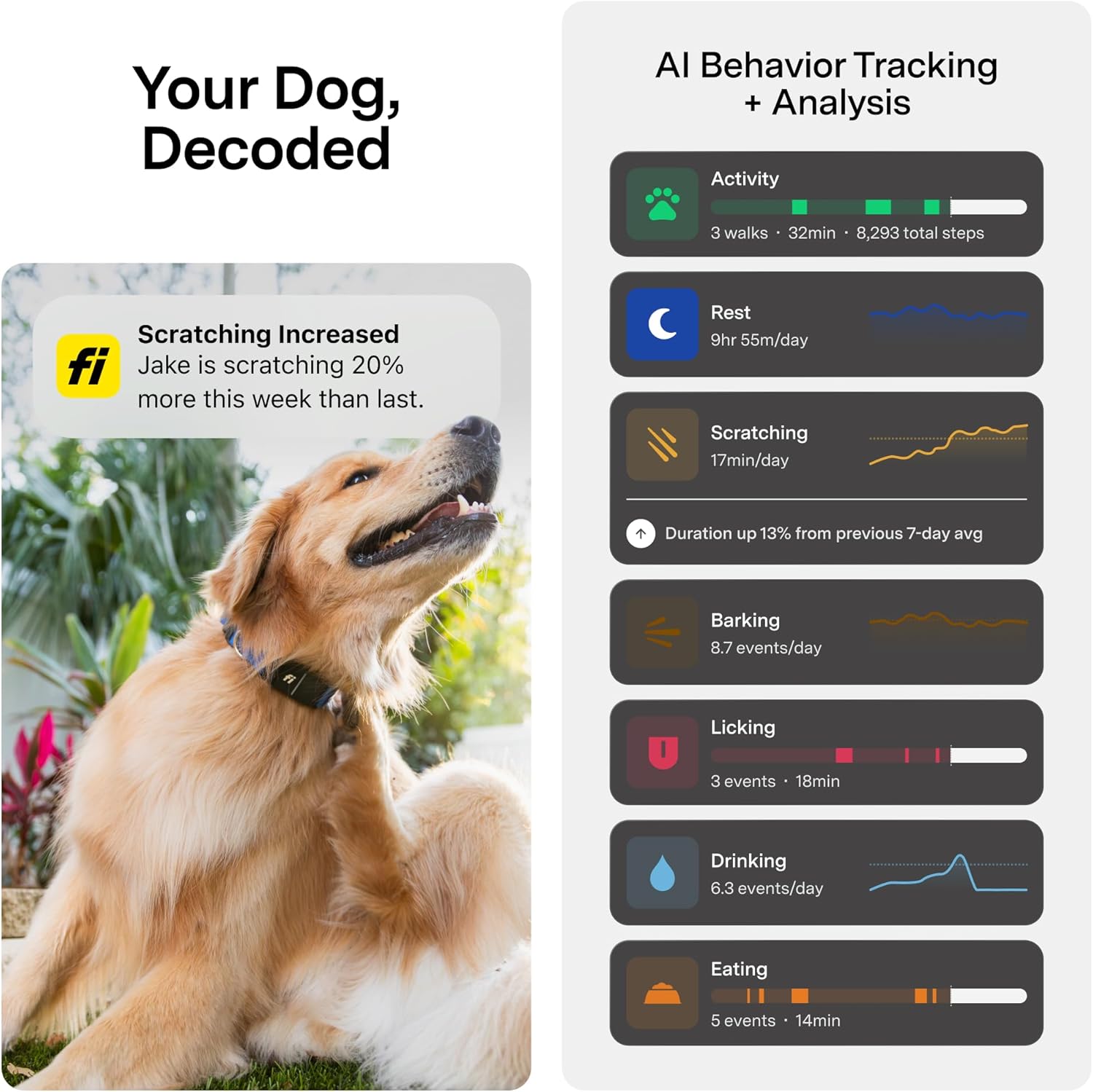
Image: Fi Series 3+ collar size guide illustrating the different sizes and their corresponding neck circumference ranges.
Troubleshooting
If you encounter issues with your Fi Series 3+ collar, consider the following:
- No GPS Signal: Ensure your dog is in an area with good cellular coverage (AT&T network). GPS accuracy can be affected by dense foliage, buildings, or remote rural areas.
- Battery Draining Quickly: Check the app for frequent 'Lost Dog Mode' activations or prolonged periods outside of a Wi-Fi-connected Safe Zone, as these consume more battery. Ensure the device is fully charged regularly.
- App Not Updating: Verify your smartphone has an active internet connection and that the Fi app is updated to the latest version.
- Collar Not Connecting: Ensure the device is charged and within Bluetooth range of your phone or a Wi-Fi-connected charging base.
For further assistance, please refer to the official Fi support resources or contact customer service.
Specifications
| Feature | Detail |
|---|---|
| Item Model Number | FCB3 |
| Batteries | 1 Nonstandard Battery (included) |
| Manufacturer | Fi |
| ASIN | B0FH81NHS1 |
| Special Feature | GPS, Virtual Fence, Escape Alerts, Lost Dog Mode |
| Connectivity Technology | Bluetooth |
| Supported Application | Apple Watch Compatible |
| Specific Uses For Product | Pet Monitoring |
| Compatible Devices | Smartphone |
| Battery Capacity | 285 Milliamp Hours |
| Item Weight | 77 Grams |
| Enclosure Material | Plastic, Silicone |
| UPC | 850064800708 |
Warranty and Support
The Fi Series 3+ Smart Dog Tracker Collar comes with a 1-Year Limited Warranty from the manufacturer, covering defects in materials and workmanship under normal use.
For warranty claims, technical support, or any questions regarding your device, please visit the official Fi website or contact their customer service department. Keep your proof of purchase for warranty validation.


