
1. Product Overview
The Baseus PrimeTrip VC2 Flex Magnetic Car Mount is designed to securely hold your smartphone in various environments, particularly within a vehicle. It features a strong magnetic grip, a vacuum-lock suction cup for stability, and a highly adjustable design for optimal viewing angles. This manual provides detailed instructions for its proper installation and use.
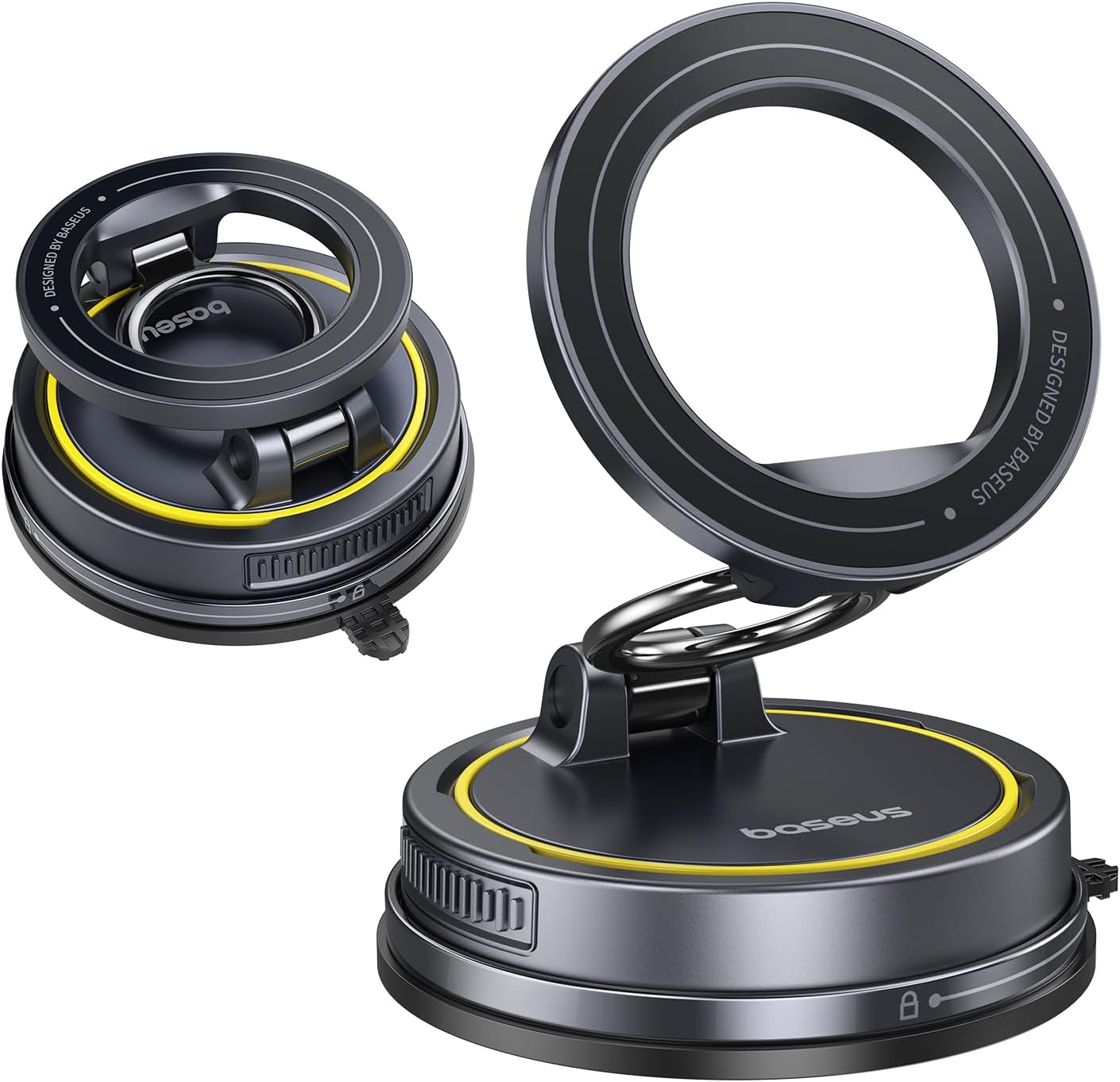
Image: The Baseus PrimeTrip VC2 Flex Magnetic Car Mount in its folded and extended positions.
2. Package Contents
Verify that all items listed below are included in your package:
- 1 x Baseus PrimeTrip VC2 Flex Magnetic Car Mount
- 1 x Cleaning Cotton Pad
- 1 x Sticker (for aesthetic customization)
- 1 x Magnetic Ring (for non-MagSafe compatible devices)
- 1 x Warranty Card
- 1 x 3M Adhesive (for base plate installation)
- 1 x Static Film

Image: All components included in the Baseus PrimeTrip VC2 Flex Magnetic Car Mount package.
3. Key Features
- Total 720° Flexibility: The mount offers complete 3-axis viewing freedom, allowing you to pull, fold, and rotate the device to achieve the perfect angle. Constructed with a durable metal alloy, it is designed to withstand over 1000 folds.
- Vacuum Lock Stability: Activate the vacuum seal by twisting the base to firmly lock the mount in place. Powered by Baseus premium vacuum technology and washable gel, this car mount can hold up to 119 lbs without shifting. It is compatible with various surfaces including leather, faux leather, pebbled surfaces, glass, and plastic.
- 35N Max. Magnetic Grip: Equipped with a high-strength N52 magnetic ring, the VC2 Flex provides a precise 1:1 magnetic fit for iPhone 12 to 17 and newer models. Older iPhones and Android devices can achieve the same powerful hold using the included magnetic ring.
- Reusable & Residue-Free: The washable gel base is non-toxic, residue-free, and designed for long-term use. It can be reused by simply rinsing it to refresh its adhesive properties. The upgraded 72mm attachment offers double the stability compared to standard 58mm bases.
- Seamlessly Compact & Portable: The mount folds flat with a single press, making it easy to carry and use in various locations such as your car, office, kitchen, or bathroom.

Image: Visual representation of the 720-degree multi-axis adjustment capability.

Image: Diagram illustrating the strong vacuum lock stability of the mount.

Image: Visual demonstration of the strong 35N magnetic grip.

Image: Comparison highlighting the reusable and residue-free gel base.

Image: The mount demonstrated in various portable and foldable configurations.
4. Setup and Installation
Follow these steps for proper installation of your Baseus PrimeTrip VC2 Flex Magnetic Car Mount:
- Choose a Surface: Select a smooth, flat surface with a diameter of at least 7.5 cm for mounting. Clean the chosen area thoroughly with the included alcohol wipe and allow it to dry completely.
- Apply the Mount: Peel off the release film from the suction base and press the mount firmly onto the cleaned surface.
- Activate Vacuum Lock: Twist the base clockwise until the suction cup is tightly locked and a vacuum seal is formed.
- Adjust and Attach: Adjust the magnetic panel to your optimal viewing angle and attach your phone.
- Curing Time: After installation, wait a full 24 hours before using the mount to ensure the adhesive fully cures and provides maximum stability.

Image: Detailed visual steps for installing the car mount.
Installation Video Guide
Video: Official guide demonstrating how to install the Baseus C03S (similar model) car mount.
5. Operating Instructions
The Baseus PrimeTrip VC2 Flex is designed for intuitive operation:
- Attaching Your Phone: Simply bring your MagSafe-compatible iPhone (or Android/older iPhone with the included magnetic ring) close to the magnetic panel. The strong magnets will automatically align and secure your device.
- Adjusting Viewing Angle: Utilize the 720° flexible arm to position your phone for optimal viewing. The multi-axis design allows for rotation and bending to suit your preference, whether in portrait or landscape mode.
- Removing Your Phone: Gently pull your phone away from the magnetic panel. The strong magnetic connection will release with a firm pull.
- Folding for Storage: When not in use, press the designated button (if applicable) or simply fold the arm flat against the base for compact storage.
Operation Video Guide
Video: Demonstration of the operation of the Vacuum Magnetic Suction Cup Car mount, including attaching and adjusting a phone.
Video: Illustrates how to freely adjust the mount for comfortable viewing in various positions.
6. Maintenance
To ensure the longevity and optimal performance of your car mount:
- Cleaning the Suction Cup: If the washable gel base loses its stickiness, simply rinse it under warm water and let it air dry. Avoid using harsh chemicals or abrasive materials, as this may damage the gel.
- General Cleaning: Wipe the mount's surface with a soft, damp cloth to remove dust or smudges.
- Storage: When not in use for extended periods, fold the mount flat and store it in a cool, dry place away from direct sunlight.
Image: Visual guide on how to clean the reusable gel base.
7. Troubleshooting
If you encounter any issues with your Baseus PrimeTrip VC2 Flex Magnetic Car Mount, refer to the following common solutions:
- Mount is not sticking: Ensure the mounting surface is clean, dry, and smooth. Rinse the gel base with water and let it air dry to restore stickiness. Make sure the vacuum lock is fully engaged by twisting the base clockwise.
- Phone is not holding magnetically: Verify that your phone is MagSafe compatible. If not, ensure the included magnetic ring is correctly applied to your phone or phone case. Check for any obstructions between the phone and the magnetic panel.
- Mount feels loose after installation: Allow the mount to cure for a full 24 hours after initial installation before heavy use. Re-engage the vacuum lock if it has loosened.
- Difficulty removing the mount: Twist the base counter-clockwise until the white dot aligns with the unlock icon, then gently lift the tab to release the suction.

Image: Visual steps for safely removing the car mount.
8. Specifications
| Brand | Baseus |
| Model | PrimeTrip VC2 Flex |
| Color | Black |
| Item Weight | 5.3 ounces |
| Package Dimensions | 5.35 x 3.39 x 1.77 inches |
| Special Features | Adjustable, Magnetic, Foldable, Reusable Washable Gel |
| Magnetic Strength | 35N (N52 Magnetic Ring) |
| Suction Capacity | Up to 119 lbs |
9. Warranty and Support
For warranty information, product support, or any inquiries not covered in this manual, please refer to the warranty card included in your package or visit the official Baseus website. You may also contact Baseus customer service directly for assistance.
Manufacturer: Baseus
Date First Available: July 10, 2025


