
Introduction
The DAREU COOL60 is a 60% Hall Effect Gaming Keyboard designed for high-performance gaming. It features magnetic switches, an 8000 Hz polling rate, and adjustable rapid trigger functionality. The keyboard is equipped with frosted transparent keycaps and dynamic RGB backlighting, offering both aesthetic appeal and advanced performance for competitive gamers.
What's in the Box
Please verify that all items listed below are included in your package:
- Keyboard Body x1
- Keycap Puller x1
- USB Cable x1
- Custom Ribbon x1
- English User Manual x1
Setup Instructions
To begin using your DAREU COOL60 keyboard, follow these simple steps:
- Connect the Keyboard: Use the provided USB-C cable to connect the keyboard to an available USB-A port on your computer or compatible device. The keyboard is wired-only and does not support wireless connections.
- Driver Installation (Optional but Recommended): The keyboard is plug-and-play for basic functionality. For advanced features and customization, download the DAREU software driver from the official DAREU website. A web-based driver is also available, with macOS support for the web driver.
- Compatibility: The keyboard is compatible with Windows 7/8/10/11. The web driver supports both Windows and macOS.

Key Features
8K Hall Effect Magnetic Switches & Polling Rate
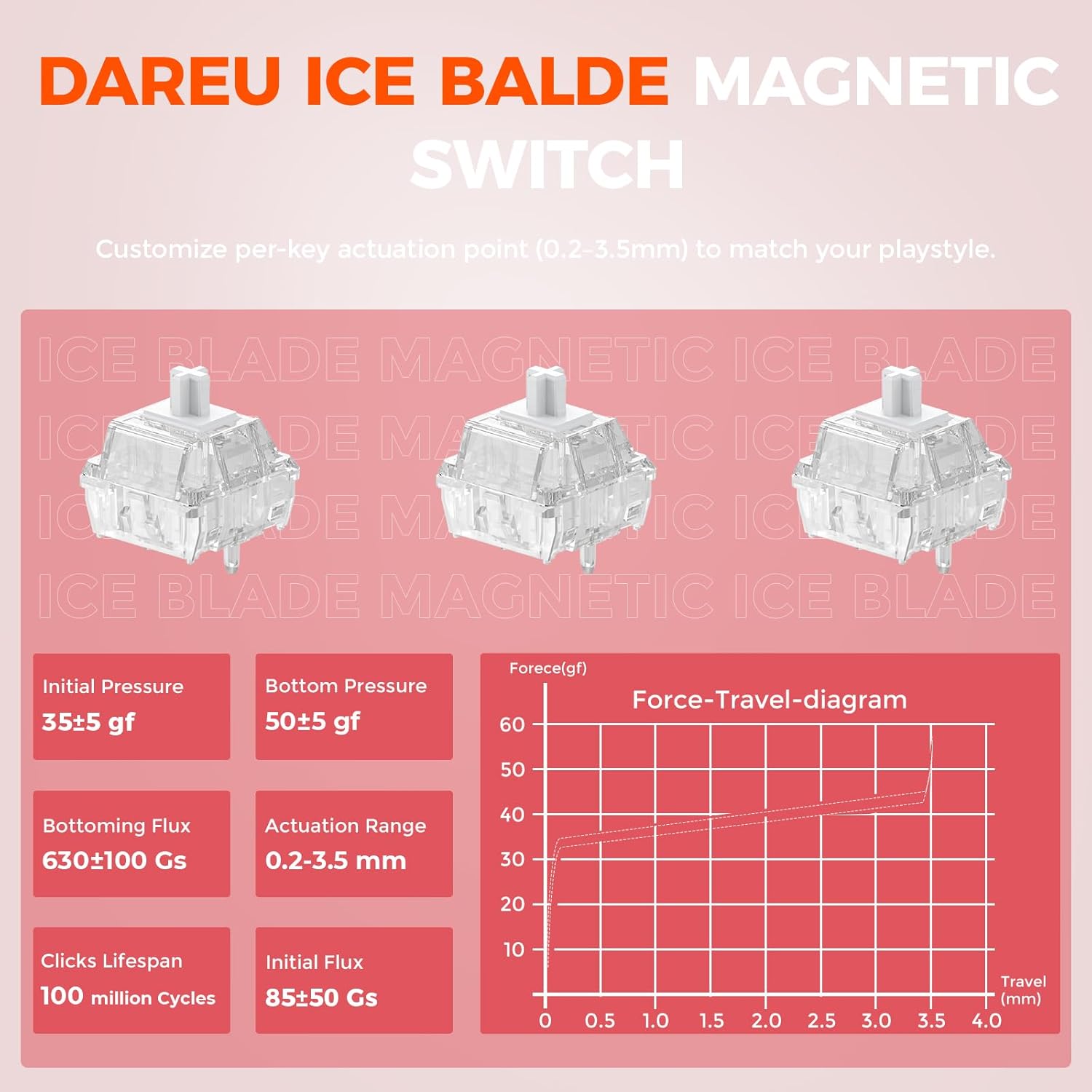
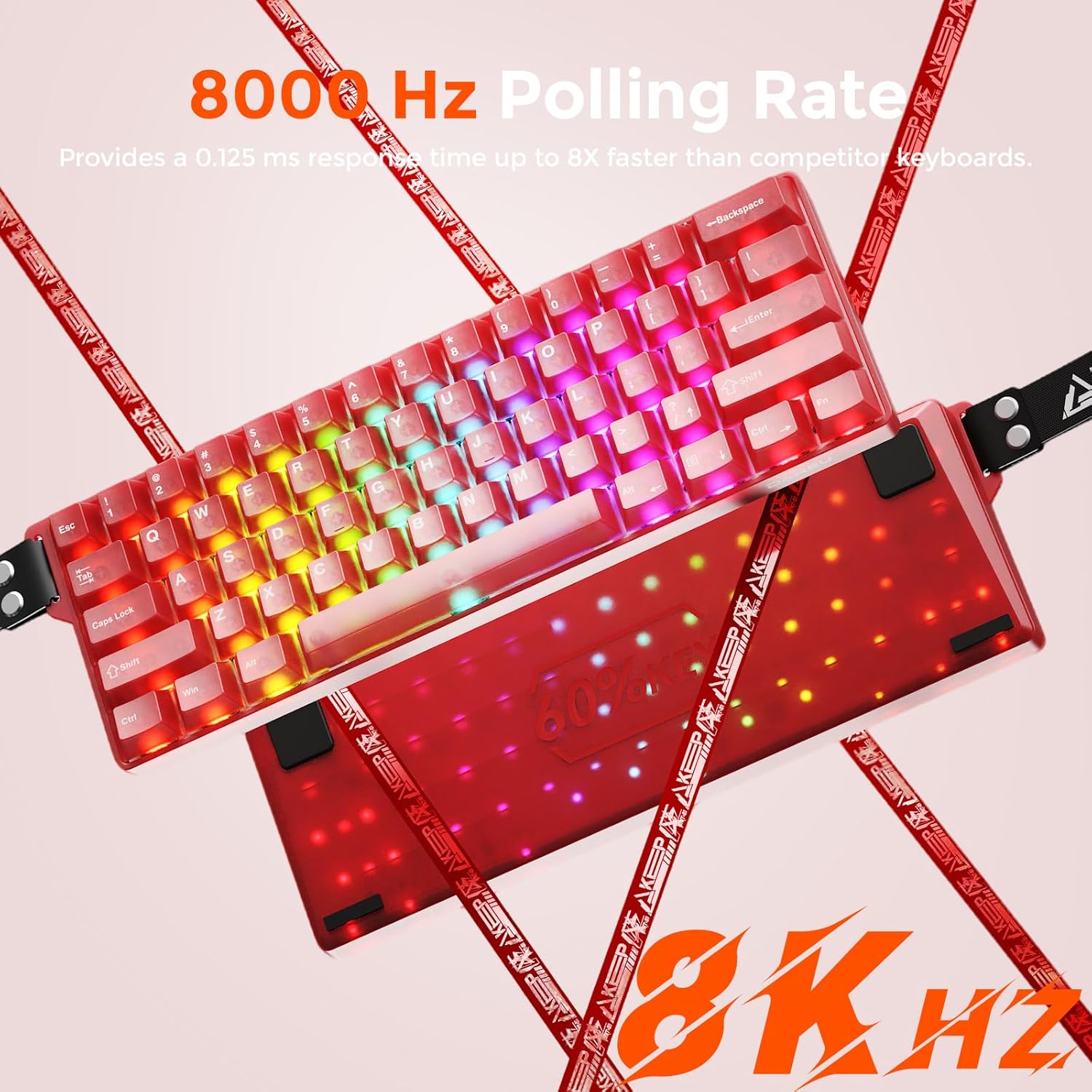
The DAREU COOL60 features Hall Effect magnetic switches and an 8000 Hz polling rate. This means the keyboard scans 8,000 times per second, providing an 8x faster response than standard 1,000Hz keyboards. This results in ultra-low latency (as low as 0.04ms) for quicker actions in games.

0.01mm Rapid Trigger Precision
The keyboard supports an ultra-low Rapid Trigger (RT) step distance of just 0.01mm, allowing for instantaneous keystroke registration. The actuation point can be adjusted from 0.2mm to 3.5mm, and press/reset sensitivity can be fine-tuned via software to match individual playstyles.


D.H.A. Algorithm
Driven by the self-developed DAREU Hyper Algorithm (D.H.A.), the keyboard is fine-tuned for tournament-grade speed and stability. It features 15 dedicated IC chips that independently manage key zones, doubling control efficiency and boosting stability by 60% for flawless inputs.

Dual Web/Software Driver System
The DAREU COOL60 supports a user-friendly driver accessible through both web browsers and desktop software. This allows for effortless configuration of key remapping, macro programming, and RGB lighting customization. Advanced functions like DKS/MT/TGL/SOCD can be configured via the software driver (Web driver supports macOS, desktop software supports Windows only).

Frosted Translucent Design & Dynamic RGB Lighting
Crafted from optical-grade PC material, the translucent casing and keycaps feature a hazy, mist-like texture. This design provides softened, eye-comfortable backlighting with exceptional uniformity and reduced glare. The keyboard features south-facing LEDs delivering 16.8 million colors and 27 effects, including a music rhythm mode (set via software).

60% Compact Wired Keyboard
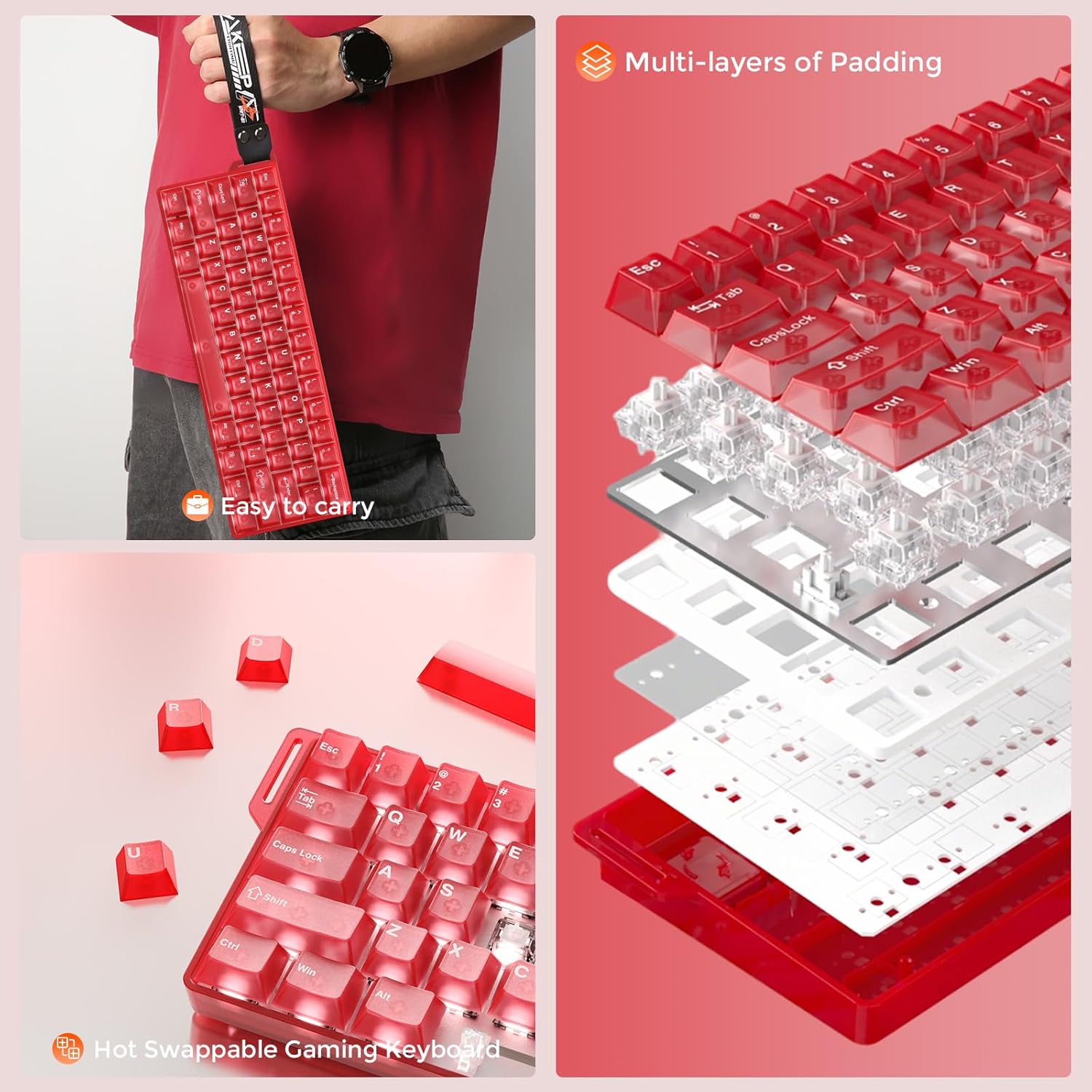
Engineered for competitive gamers, this 60% gaming keyboard frees up to 40% of desk space for optimal mouse control and a cleaner setup. Its ultra-lightweight, minimalist design is portable for LAN parties, travel, or minimalist setups.

Operating Instructions
Function (Fn) Key Combinations
The DAREU COOL60 utilizes Fn key combinations to access functions typically found on a full-sized keyboard. Refer to the user manual for a complete list of combinations. Some common functions include:
- Fn + Z: Previous Track
- Fn + X: Play/Pause
- Fn + C: Next Track
- Fn + V: Volume Down
- Fn + B: Volume Up
- Fn + N: Mute
- Fn + Backspace: Delete
- Fn + P (3 sec): Report Rate (1KHz white light flashes 3 times, 8KHz orange light flashes 3 times)
- Fn + [ { : Backlight Mode
- Fn + ] } : Backlight Color
- Fn + Space: Backlight Brightness (100%-Off-25%-50%-75%)
- Fn + Tab (3 sec): Reset
RGB Lighting Adjustment
Adjust the RGB lighting directly on the keyboard using the Fn key combinations:
- Change Backlight Mode: Press
Fn + [ {to cycle through different lighting effects. - Change Backlight Color: Press
Fn + ] }to cycle through various colors for static modes. - Adjust Brightness: Press
Fn + Spaceto cycle through brightness levels (100%, 75%, 50%, 25%, Off).

Software/Web Driver Usage
For comprehensive customization, use the DAREU software or web driver:
- Key Remapping: Assign new functions to any key.
- Macro Programming: Create and assign complex macro sequences.
- RGB Customization: Fine-tune lighting effects, colors, and patterns.
- Actuation Point Adjustment: Precisely set the actuation distance for each key.
- Advanced Functions: Configure DKS (Dynamic Keying Path), MT (Hold/Click), TGL (Toggle Switch), and SOCD (Snap Tap) settings.
Customization
Hot-Swappable Switches
The DAREU COOL60 features hot-swappable switches, allowing users to easily remove and replace individual switches without soldering. This provides flexibility to customize the typing feel and sound of the keyboard by experimenting with different switch types (tactile, linear, clicky).

Actuation Point and Sensitivity Adjustment
Leverage the software driver to precisely adjust the actuation point for each magnetic switch from 0.2mm to 3.5mm. This granular control allows for personalized responsiveness. Additionally, fine-tune the press and reset sensitivity to optimize performance for specific games or tasks.
Advanced Key Functions (DKS, MT, TGL, SOCD)
The DAREU COOL60 supports advanced key functions configurable via the software driver:
- Dynamic Keying Path (DKS): A single key can achieve up to 4 functions based on press depth.
- Hold / Click (MT): A single key provides two functions: one for holding down the key, another for clicking.
- Toggle Switch (TGL): Click the key to switch continuously triggered, hold down for normal triggering.
- Snap Tap (SOCD): Prioritizes the latest input between two selected keys without releasing the previous one, beneficial for specific game mechanics.

Maintenance
Proper maintenance ensures the longevity and optimal performance of your DAREU COOL60 keyboard.
- Cleaning Keycaps: Use a keycap puller to remove keycaps. Clean them with a soft cloth dampened with mild soap and water. Ensure they are completely dry before reattaching.
- Cleaning Chassis: Wipe the keyboard chassis with a soft, dry, lint-free cloth. Avoid using harsh chemicals or abrasive materials.
- Switch Care: When hot-swapping switches, use the provided switch puller carefully to avoid damaging the switch pins or the PCB sockets.
- Cable Management: Use the included cable tie to keep the USB cable organized and prevent tangling or damage.
Troubleshooting
If you encounter issues with your DAREU COOL60 keyboard, try the following troubleshooting steps:
- Keyboard Not Responding: Ensure the USB-C cable is securely connected to both the keyboard and the computer. Try connecting to a different USB port or computer to rule out port-specific issues.
- RGB Lighting Not Working: Check Fn key combinations for brightness (Fn + Space) and mode (Fn + [ {). Ensure the software driver is installed and configured correctly if using custom lighting.
- Keys Not Registering Correctly: Verify that the switches are properly seated in their sockets. If hot-swapping, ensure pins are not bent. Perform an Axis Calibration via the software driver.
- Software/Web Driver Issues: Ensure your internet connection is stable for the web driver. For desktop software, try reinstalling the latest version from the DAREU website.
- Reset to Factory Defaults: If issues persist, perform a factory reset by pressing
Fn + Tabfor 3 seconds.
Specifications
| Product Dimensions | 11.73 x 3.93 x 1.37 inches |
| Item Weight | 15.2 ounces |
| Manufacturer | DAREU |
| Item model number | COOL60-RD |
| Batteries | 1 Nonstandard Battery batteries required. |
| Brand | DAREU |
| Compatible Devices | Gaming Console, Laptop, Mac, PC, Tablet |
| Connectivity Technology | USB |
| Keyboard Description | Rapid Trigger Hall Effect Magnetic Switch Gaming Keyboard |
| Recommended Uses For Product | Business, Education, Everyday Use, Gaming, Multimedia, Personal, Photo Editing, Programming, Student, Video Editing |
| Special Feature | 0.01mm RT Hall effect gaming keyboard, Hot-Swappable, Music-synced RGB lighting, SOCD/DKS/MT/TGL support, Translucent keyboard |
| Color | Red |
| Keyboard backlighting color support | RGB |
| Style | Contemporary |
Warranty and Support
For warranty information, technical support, or further assistance, please contact DAREU customer service through their official website or the retailer where the product was purchased. Keep your purchase receipt as proof of purchase.

