
Introduction
This manual provides detailed instructions for the assembly, operation, and maintenance of your Merax LED Illuminated Display Cabinet. Please read this manual thoroughly before assembly and use to ensure safe and correct operation. Keep this manual for future reference.
Safety Information
Caution:
- Assemble carefully following the provided instructions.
- To prevent tipping, do not overload the display cabinet.
- Ensure the cabinet is securely anchored to the wall using the provided anti-tip kit.
- Keep out of reach of children.
- Do not expose the LED lighting system to water or excessive moisture.
- Always disconnect power before cleaning or performing maintenance on the LED lights.

Image: Close-up view of the anti-tip bracket, demonstrating how it secures the furniture to the wall for stability.
Product Overview
The Merax LED Illuminated Display Cabinet combines functionality with a modern vintage aesthetic. It features ample storage and customizable LED lighting.
Key Features:
- Elegant and Modern Design: This 80 x 40 x 138 cm display cabinet features a stylish black and brown contrast with a 5-layer structure, blending retro and modern styles. It serves as both a storage solution and a decorative piece.
- Practical and Versatile Storage: With 6 divided compartments and 2 drawers, this cabinet offers efficient and organized storage for books, collections, and other items, helping to keep your home tidy.
- Customizable LED Lighting: The integrated LED light strip, controlled via Bluetooth, allows you to adjust light color and brightness using a mobile app. Choose between warm light for relaxation or colored light for parties.
- Safe and Durable Construction: Equipped with anti-tip protection, this cabinet is particularly useful for homes with children. Its robust MDF structure and transparent acrylic panel ensure stability and safety.

Image: The display cabinet with its LED lights illuminated, highlighting various decorative items and books within its compartments.

Image: The display cabinet with its doors open, revealing the interior layout with shelves, drawers, and illuminated compartments.
Setup and Assembly
The Merax LED Illuminated Display Cabinet requires assembly. Please follow the detailed instructions provided in the separate assembly manual included with your product. Ensure all components are present before beginning assembly.
Before You Begin:
- Unpack all components and verify against the parts list in your assembly manual.
- Prepare a clean, flat, and spacious area for assembly.
- Gather necessary tools (usually a screwdriver and hammer, as specified in the assembly manual).
Placement:
- Place the cabinet on a level, stable surface.
- Avoid placing in direct sunlight or near heat sources to prevent material damage.
- Utilize the included anti-tip hardware to secure the cabinet to a wall, especially in homes with children or pets.

Image: A composite image highlighting key features such as high-quality transparent acrylic, smooth drawer slides, rebound switches for doors, and adjustable feet for leveling.
Operating the LED Lighting System
The integrated LED lighting system can be controlled via a mobile application using Bluetooth connectivity.
Connecting to the App:
- Ensure the LED light strip is powered on.
- Download the designated control app from your smartphone's app store (refer to the assembly manual for app name or QR code).
- Enable Bluetooth on your smartphone.
- Open the app and follow the on-screen instructions to pair with your display cabinet's LED system.
App Functions:
- Multiple Color Options: Select from a wide spectrum of colors to match your mood or decor.
- Dynamic Lighting Modes: Choose from various pre-set dynamic effects.
- Sound-Controlled Lighting: Lights can react to music or ambient sounds.
- Practical Timer Function: Set schedules for the lights to turn on or off automatically.
- Music-Controlled Lighting: Synchronize lights with your music playback.

Image: A visual representation of the smartphone application interface, showing options for color selection, dynamic modes, sound control, timer, and music synchronization for the LED lighting.
Maintenance
Cleaning:
- For general cleaning, wipe surfaces with a soft, damp cloth.
- Avoid using harsh chemicals, abrasive cleaners, or polishes, as these can damage the finish.
- For glass/acrylic panels, use a non-abrasive glass cleaner and a soft cloth to prevent scratches.
- Ensure the cabinet is dry after cleaning to prevent moisture damage.
Care:
- Periodically check all screws and fittings to ensure they remain tight. Retighten if necessary.
- Do not place hot items directly on the cabinet surface without protection.
- Avoid dragging the cabinet when moving; always lift it to prevent damage to the legs and structure.
Troubleshooting
| Problem | Possible Cause | Solution |
|---|---|---|
| LED lights not turning on. | Power cable disconnected; app not paired; faulty LED strip. | Check power connection. Re-pair the app via Bluetooth. Contact customer support if the strip is faulty. |
| Cabinet feels unstable or wobbly. | Uneven floor; loose assembly screws; anti-tip kit not installed. | Adjust the leveling feet. Tighten all assembly screws. Install the anti-tip kit securely to the wall. |
| Drawers or doors do not close smoothly. | Misaligned hinges/slides; obstruction. | Check for obstructions. Adjust hinges or drawer slides as per assembly manual. |
| Bluetooth app not connecting. | Bluetooth off on phone; app not updated; interference. | Ensure phone Bluetooth is on. Restart app and phone. Try pairing in a different location to avoid interference. |
Specifications
| Feature | Detail |
|---|---|
| Brand | Merax |
| Model | 80x40x138cm Vintage Brown |
| Product Dimensions (D x W x H) | 40P x 80l x 138H cm (40 x 80 x 138 cm) |
| Color | Vintage Brown |
| Material | Acrylic, Engineered Wood |
| Recommended Uses | Collections, Books |
| Special Features | Illuminated (LED) |
| Included Components | 2 drawers, 6 divided compartments |
| Number of Drawers | 2 |
| Number of Shelves | 6 |
| Assembly Required | Yes, instructions provided |
| Installation Type | Freestanding |
| Mounting Type | Floor-standing |
| Number of Doors | 2 |
| Base Type | Legs |
| Number of Compartments | 6 |
| Storage Options | 6 divided compartments and 2 drawers |
| Style | Vintage |
| Finish Type | Painted |
| Item Shape | Rectangular |
| Hardware Color | Brown |
| GTIN (UPC) | 198573363230 |
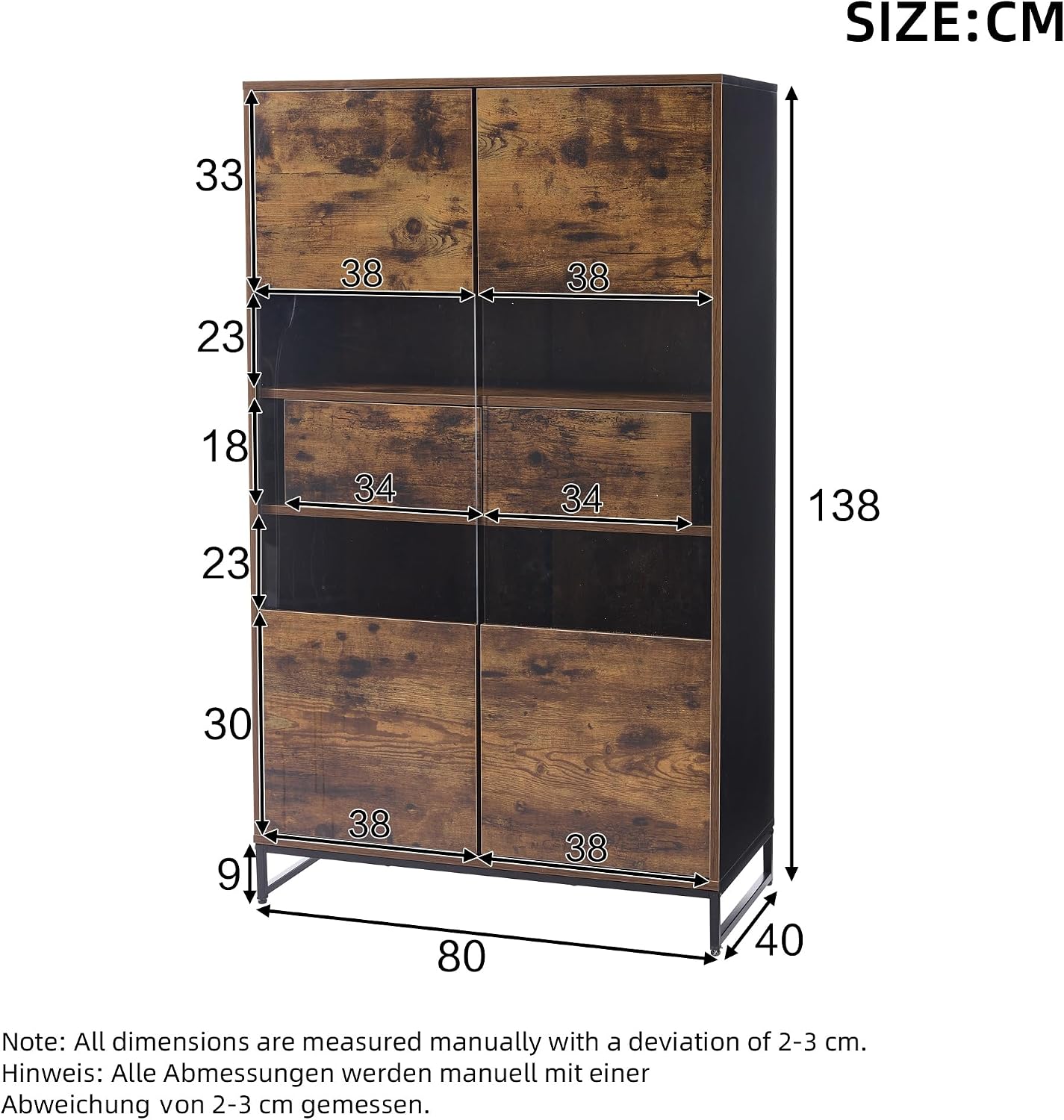
Image: A technical diagram illustrating the precise dimensions of the display cabinet, including height (138 cm), width (80 cm), and depth (40 cm), along with internal compartment measurements.
Warranty and Support
For warranty information, please refer to the documentation included with your purchase or contact Merax customer service. Keep your proof of purchase for any warranty claims.
If you encounter any issues not covered in this manual or require further assistance, please contact Merax customer support through their official website or the contact information provided in your purchase documentation.
