
1. Introduction
This manual provides instructions for the installation, operation, and maintenance of your Hajomel H105F 10.26" Wireless Carplay Screen. This device offers seamless wireless screen mirroring for iOS and Android systems via Apple CarPlay and Android Auto, ensuring stable connectivity for calls, music streaming, and real-time navigation. It features a 10.26-inch HD IPS touchscreen, a dual-camera security system with 4K front and 1080P rear cameras, and premium audio playback capabilities.
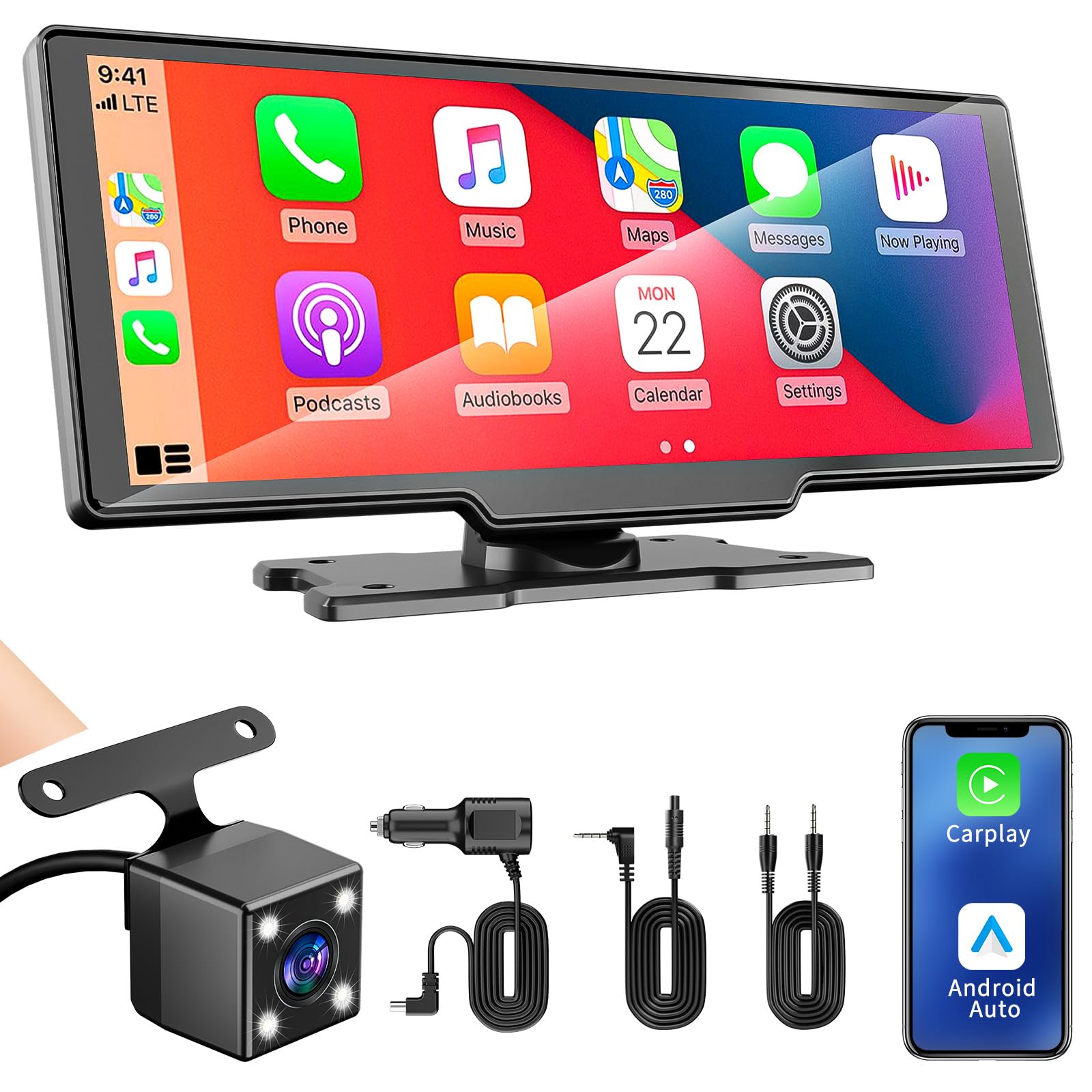
Image 1.1: Hajomel H105F 10.26" Wireless Carplay Screen. This image shows the main unit of the portable carplay screen, highlighting its large display and sleek design.
2. Setup and Installation
The Hajomel H105F is designed for plug-and-play universal installation, typically completed within minutes without requiring car disassembly.
2.1 Package Contents
- Hajomel H105F 10.26" Carplay Screen
- Power Cable (for cigarette lighter connection)
- Rear Camera (1080P waterproof)
- Mounting Hardware (e.g., dashboard mount)
- User Manual (this document)
2.2 Installation Steps
- Mount the Screen: Place the carplay screen on your dashboard using the provided mounting hardware. Ensure it is securely attached and does not obstruct your view or vehicle controls.
- Connect Power: Plug the power cable into the device and then into your vehicle's cigarette lighter socket.
- Install Rear Camera (Optional): If using the backup camera, route the camera cable from the main unit to the rear of your vehicle and mount the camera. Connect it to the designated input on the carplay screen.
- Power On: Start your vehicle. The carplay screen should power on automatically.
- Initial Pairing:
- For Apple CarPlay: On your iPhone, go to Settings > General > CarPlay and select your device.
- For Android Auto: Ensure Android Auto is installed on your Android phone. Open the app and follow the on-screen prompts to connect to the device.
3. Operating Instructions
The Hajomel H105F offers various functions accessible via its 10.26-inch IPS touchscreen.
3.1 Wireless CarPlay and Android Auto
- Once paired, your smartphone's interface for CarPlay or Android Auto will be displayed on the screen.
- Use the touchscreen to navigate apps, make calls, send messages, and control music.
- Voice commands are supported through your phone's assistant (Siri for CarPlay, Google Assistant for Android Auto).
3.2 Navigation
- Access real-time GPS navigation through compatible apps like Google Maps or Waze via CarPlay or Android Auto.
- Voice-guided directions will be streamed through your car's speakers (see Audio Playback section).
- The high-brightness touchscreen ensures clear visibility of maps in various lighting conditions.
3.3 Audio Playback
- The device includes built-in speakers for direct audio output.
- To stream audio through your vehicle's existing sound system, connect the carplay screen to your car's AUX input or use its FM transmitter function (if available and configured).
- Enjoy music, podcasts, and radio channels directly from your connected smartphone or via the device's local radio tuner.
3.4 Dual-Camera Security System
- The device records footage from the 4K front dash cam and 1080P waterproof rear camera.
- Loop Recording: When the storage (up to 128GB expandable via SD card) is full, new videos automatically overwrite older files.
- Instant Playback: Review recorded footage directly on the carplay screen without removing the SD card. Alternatively, access recordings via a mobile app (if supported) for remote viewing.
- Backup Camera Display: When reversing, the screen will automatically switch to display the rear camera feed.
4. Maintenance
To ensure the longevity and optimal performance of your Hajomel H105F, follow these maintenance guidelines:
- Cleaning: Use a soft, dry, lint-free cloth to clean the screen and exterior. Do not use abrasive cleaners, solvents, or aerosol sprays, as these can damage the device.
- Temperature: Avoid exposing the device to extreme temperatures, direct sunlight for prolonged periods, or high humidity.
- Cable Management: Ensure all cables are securely connected and not pinched or strained.
- Software Updates: Periodically check for any available firmware updates from the manufacturer to ensure optimal performance and feature compatibility.
5. Troubleshooting
If you encounter issues with your Hajomel H105F, refer to the following common problems and solutions:
| Problem | Possible Cause | Solution |
|---|---|---|
| Device does not power on. | No power from cigarette lighter; loose connection. | Ensure the power cable is securely plugged into both the device and the cigarette lighter socket. Check if the vehicle's cigarette lighter fuse is intact. |
| CarPlay/Android Auto does not connect wirelessly. | Bluetooth/Wi-Fi issues; incorrect pairing. | Ensure Bluetooth and Wi-Fi are enabled on your smartphone. Forget the device in your phone's Bluetooth settings and re-attempt the pairing process. Restart both the phone and the carplay screen. |
| Screen blacks out or device restarts frequently. | Power instability; software glitch. | Check the power connection for stability. Ensure the power cable is not loose. If the issue persists, perform a factory reset (refer to device settings) or contact customer support. |
| No audio or poor audio quality. | Incorrect audio output setting; loose AUX cable; FM transmitter interference. | Verify the audio output setting on the carplay screen (e.g., built-in speaker, AUX, FM). If using AUX, ensure the cable is fully inserted. If using FM, try a different frequency to avoid interference. Adjust volume levels on both the device and your car stereo. |
| Backup camera not displaying. | Loose camera connection; faulty camera. | Check the connection of the rear camera cable to the main unit. Ensure the camera is properly powered and mounted. |
6. Specifications
| Feature | Detail |
|---|---|
| Brand | Hajomel |
| Model | H105F |
| Screen Size | 10.26 Inches |
| Display Type | LCD (IPS Touchscreen) |
| Front Camera Resolution | 4K |
| Rear Camera Resolution | 1080P |
| Compatible Devices | Apple (CarPlay) & Android (Android Auto) |
| Connectivity Technology | Wireless (Bluetooth, Wi-Fi), USB |
| Media Type | SD (up to 128GB expandable storage) |
| Mounting Hardware | Dashboard mount |
| Power Source | Vehicle cigarette lighter |
| Parcel Dimensions | 27.41 x 16.61 x 10.39 cm |
| Item Weight | 889 g |
7. Warranty and Support
For any concerns, technical assistance, or warranty inquiries regarding your Hajomel H105F, please contact our professional support team. We aim to respond to all inquiries within 24 hours.
Please refer to your purchase documentation for specific warranty terms and contact information.