
Introduction
The SPC WF100 is a versatile fixed SIM phone designed for both business and personal use. It operates with a 4G SIM card, eliminating the need for a traditional landline. Key features include VoLTE/VoWiFi HD calls, a 3.5-inch Android screen, WiFi hotspot capability, Bluetooth connectivity, and remote configuration options. Its robust design and advanced functionalities make it suitable for various environments, from offices to homes without a fixed line.
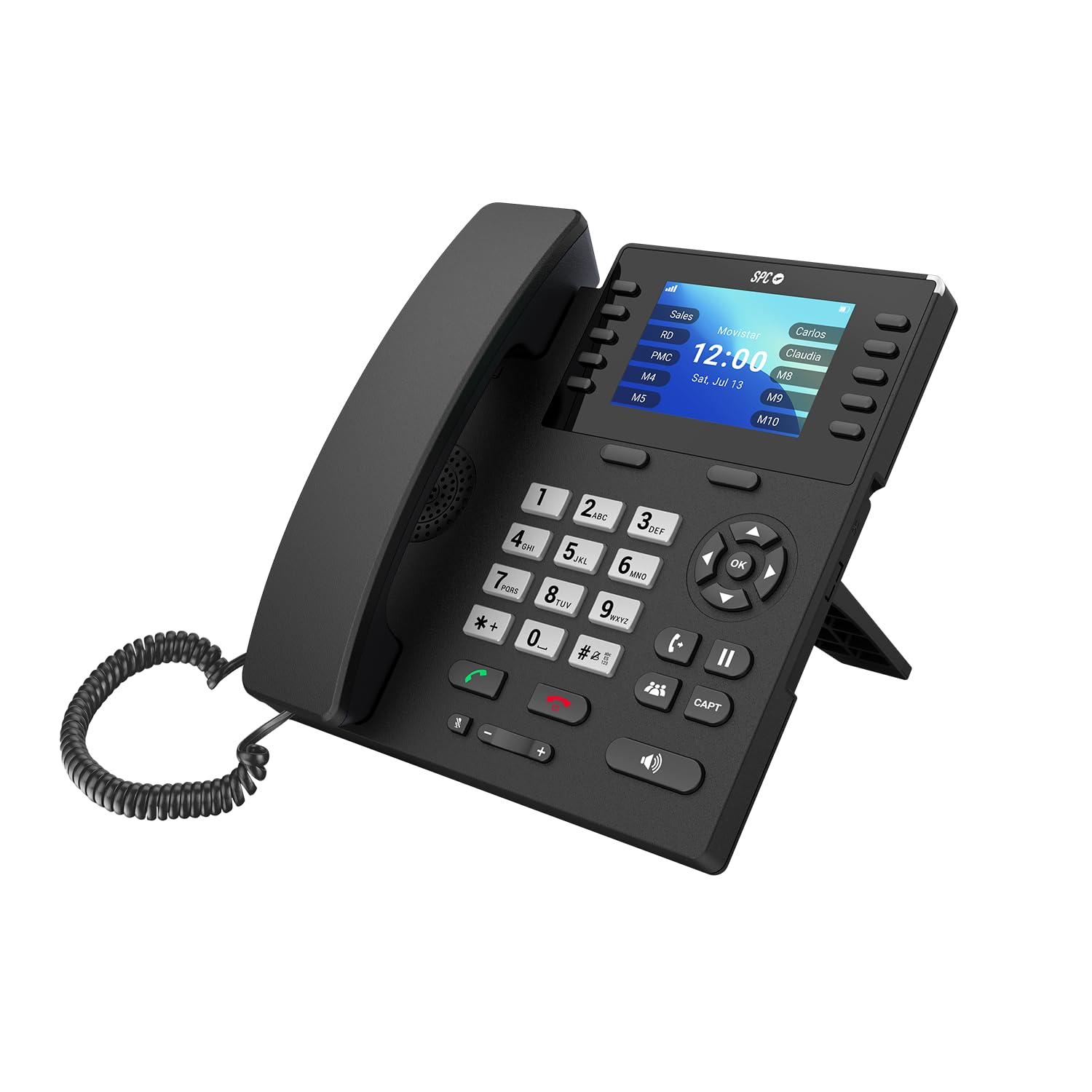
Figure 1: Front view of the SPC WF100 Fixed SIM Phone.
Setup
1. SIM Card Installation
To begin using your SPC WF100 phone, you must first install a compatible 4G SIM card. Locate the SIM card slot, typically found on the side or rear of the device. Carefully insert the SIM card into the slot until it clicks into place. Ensure the phone is powered off before inserting or removing the SIM card.

Figure 2: Illustration showing SIM card insertion.
2. Battery Installation
The phone includes a 2000mAh battery, which provides backup power and allows for operation during power outages. Open the battery compartment, usually located on the back of the phone, and insert the battery according to the polarity markings. Close the compartment securely.
3. Power Connection
Connect the provided power cable to the phone's power input port and then plug the adapter into a standard electrical outlet. The phone will typically power on automatically or can be powered on using the designated power button.
4. Initial Configuration
Upon first power-on, the phone will guide you through an initial setup process. Follow the on-screen prompts to configure basic settings such as language, date, time, and network preferences. This ensures the phone is ready for use.
Operating Instructions
1. Making and Receiving Calls
To make a call, dial the desired phone number using the numeric keypad. Lift the handset or press the speakerphone button to initiate the call. To receive an incoming call, simply lift the handset or press the answer button. The SPC WF100 supports VoLTE and VoWiFi for high-definition voice calls, ensuring clear communication.

Figure 3: Phone screen displaying call information.
2. Speed Dial and Contact Management
The phone features 10 dedicated direct memory keys (M1-M10) for quick access to your most important contacts. To program these keys, navigate to the phone's contact settings. You can synchronize your LDAP agenda in the cloud and store up to 1,000 contacts. The phone's memory can be expanded up to 128GB using a MicroSD card for additional storage.

Figure 4: Visual representation of contact synchronization.
3. WiFi Hotspot Functionality
The SPC WF100 can serve as a WiFi access point, allowing other devices such as laptops or tablets to connect to the internet using the phone's 4G data connection. This feature is particularly useful in environments without a wired network or for mobile setups.

Figure 5: Phone acting as a WiFi hotspot.
4. Bluetooth and Headset Connectivity
For hands-free communication or enhanced privacy, you can connect Bluetooth headphones or wired headsets to the phone. The device supports connections via its USB-C port or the 3.5mm audio jack. This is ideal for prolonged calls or multitasking.

Figure 6: Phone with a connected headset.
5. Advanced Call Features
The SPC WF100 integrates advanced call management features accessible via dedicated physical keys. These include call waiting, call transfer, call capture, and conference call capabilities, enhancing productivity in professional settings.

Figure 7: Dedicated function buttons for call management.
6. Remote Configuration
The phone supports remote configuration via SMS commands sent from authorized numbers. This allows for convenient management of the device, including restarts, agenda updates, and quick adjustments, without requiring physical presence. This feature is beneficial for large deployments or remote maintenance.

Figure 8: Phone in an office setting, highlighting remote configuration.
Maintenance
1. Cleaning
To maintain the phone's appearance and functionality, regularly wipe its surface with a soft, dry, lint-free cloth. Avoid using abrasive cleaners, solvents, or harsh chemicals, as these can damage the device's finish and internal components.
2. Battery Care
The integrated 2000mAh battery is designed for durability. To prolong its lifespan, avoid exposing the phone to extreme temperatures. If the phone is not constantly connected to power, periodically allow the battery to fully discharge before recharging it.
3. Software Updates
Ensure the phone's software is kept up-to-date to benefit from the latest features, performance improvements, and security enhancements. Software updates may be managed remotely via SMS commands or through the device's settings menu.
Troubleshooting
Common Issues and Solutions
- No Signal or Network Issues: Ensure the 4G SIM card is correctly inserted and activated. Check the network coverage in your area. Try restarting the phone to re-establish a connection.
- Poor Call Quality: Verify the network signal strength. If using VoWiFi, ensure your WiFi connection is stable and strong. Check that the handset and speaker are clean and free from obstructions.
- Display Turns Off Too Quickly: The phone's display is designed to turn off after an adjustable period to conserve power. Press any key on the keypad to reactivate the screen. Note that some display settings might not be permanently saved after a restart.
- Speed Dial Name Truncation: Names assigned to direct memory keys may be truncated to approximately 6-7 characters on the display. For optimal clarity, consider using shorter names for your speed dial contacts.
- Phone Not Powering On: Check that the power cable is securely connected to both the phone and the electrical outlet. Ensure the battery is properly installed and charged. If the issue persists, contact customer support.
Specifications
| Feature | Detail |
|---|---|
| Brand | SPC |
| Color | Black |
| Phone Type | Corded (Fixed SIM) |
| Material | Plastic |
| Power Source | Battery Powered |
| Dialer Type | Single Keypad |
| Item Dimensions (L x W x H) | 13.5 x 19 x 20 centimeters |
| Item Weight | 762 Grams |
| Compatible Devices | Audio Headset |
| Conference Call Capability | Basic |
| Multi-line Operation | Multi-line Operation |
| Caller ID | Yes |
| Talk Time | 12 Hours |
| Spare Parts Availability | 7 Years |
| Manufacturer | SPC |
| Country of Origin | China |
What's in the Box
The SPC WF100 package includes the following items:
- SPC WF100 Fixed SIM Phone
- Battery (2000mAh)
- Power Cable
- Desk Stand
- Quick Guide
Warranty and Support
Warranty Information
This product is covered by a warranty in accordance with current law. Please retain your proof of purchase for any warranty claims. For specific details regarding the warranty period and terms, refer to the documentation provided with your product or visit the official SPC website.
Customer Support
For technical assistance, troubleshooting, or any other inquiries regarding your SPC WF100 Fixed SIM Phone, please visit the official SPC website for support resources, FAQs, and contact information for customer service.


