
1. Overview
The XIEBro T8S Robot Vacuum and Mop Combo is designed to provide efficient and automated floor cleaning. This 2-in-1 device combines powerful vacuuming with intelligent mopping capabilities, suitable for various floor types including hard floors and carpets. It features smart control options via an app, remote, or voice commands, along with advanced navigation and obstacle avoidance for a comprehensive cleaning experience.

Figure 1: XIEBro T8S Robot Vacuum and Mop Combo with accessories.
2. What's Included
The XIEBro T8S package includes the following components:
- T8S Vacuum Robot
- Remote Control (2 AAA batteries included)
- Charging Base
- Power Adapter
- Water Tank
- Dustbin
- 4 Side Brushes
- User Manual

Figure 2: All components included with the XIEBro T8S Robot Vacuum.
3. Product Features
- 2-in-1 Vacuuming and Mopping: The T8S integrates both vacuuming and mopping functions. It features a 300ml dustbin for dry debris and a 260ml precision water tank for wet cleaning. Water flow can be adjusted via the app or remote control.
- Powerful Suction: Equipped with a digital motor, the T8S delivers up to 3200Pa of suction power. Three adjustable suction modes and carpet boost functionality allow it to adapt to various floor surfaces, including tile, hardwood, carpet, and marble.
- Smart Control Options: Control the robot using the remote control, the Tuya Smart app, or voice commands via Google Assistant. The app allows for custom cleaning paths, mode switching, and suction power adjustments. Note: The Tuya Smart app supports 2.4GHz Wi-Fi only.
- Extended Runtime & Auto-Charging: The 2600mAh lithium battery provides up to 120 minutes of cleaning time in Quiet Mode. The robot automatically returns to its charging dock when the battery level is below 15% or after completing a cleaning cycle.
- Multiple Cleaning Modes: Choose from Auto Clean, Spot Clean, and Edge Clean modes to suit different cleaning needs.
- Intelligent Obstacle Avoidance: An enhanced 3D obstacle detection system with infrared sensors allows the robot to recognize walls, stairs, and furniture, preventing collisions and falls. It can climb over obstacles up to 15° and has a 2.9-inch slim body for cleaning under furniture.
- Slim Design: The ultra-slim 2.9-inch body allows the robot to clean under low-clearance furniture.
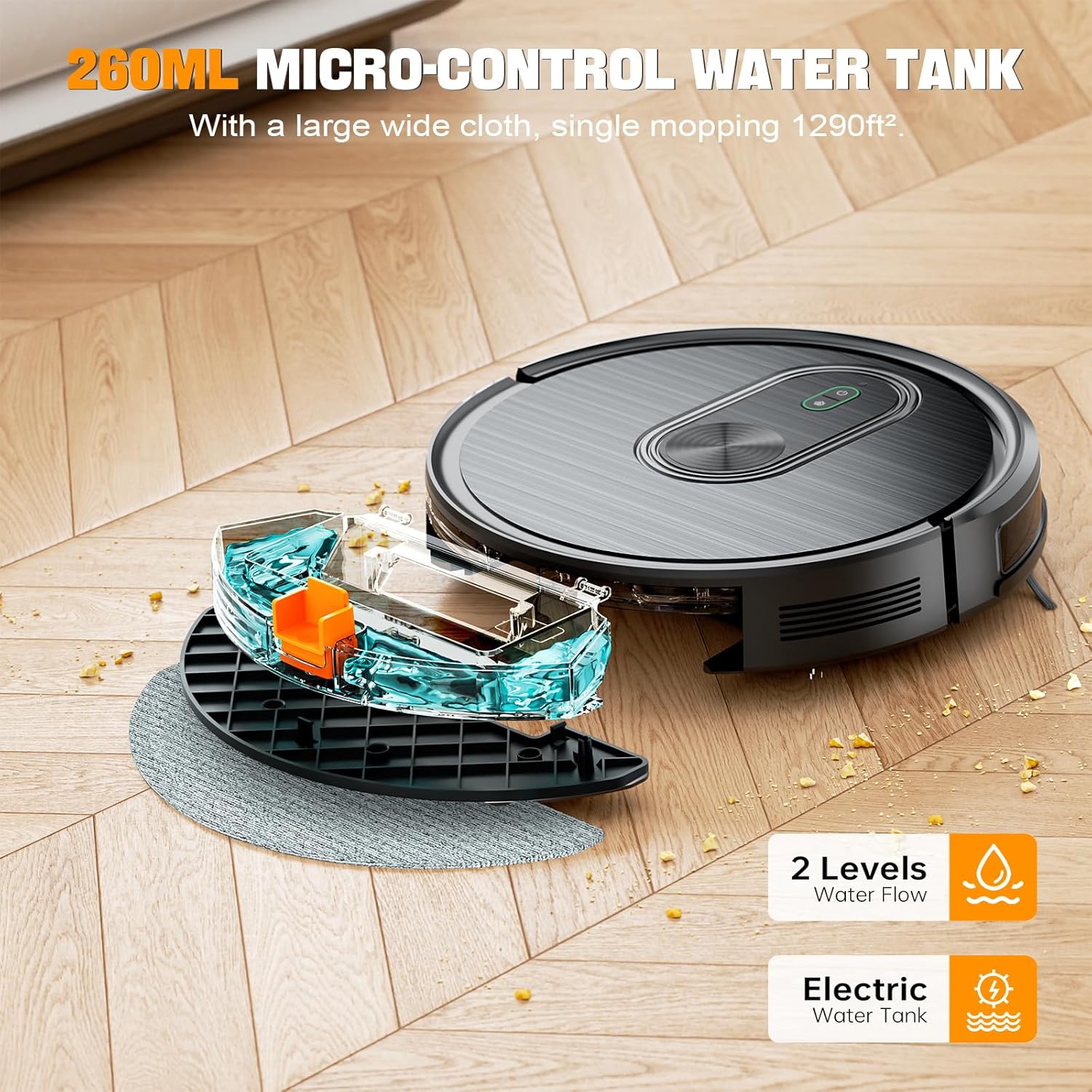
Figure 3: The T8S Robot Vacuum with its water tank and mop pad.

Figure 4: Control options for the T8S Robot Vacuum.

Figure 5: Automatic recharging feature of the T8S.

Figure 6: T8S Robot Vacuum demonstrating obstacle avoidance.
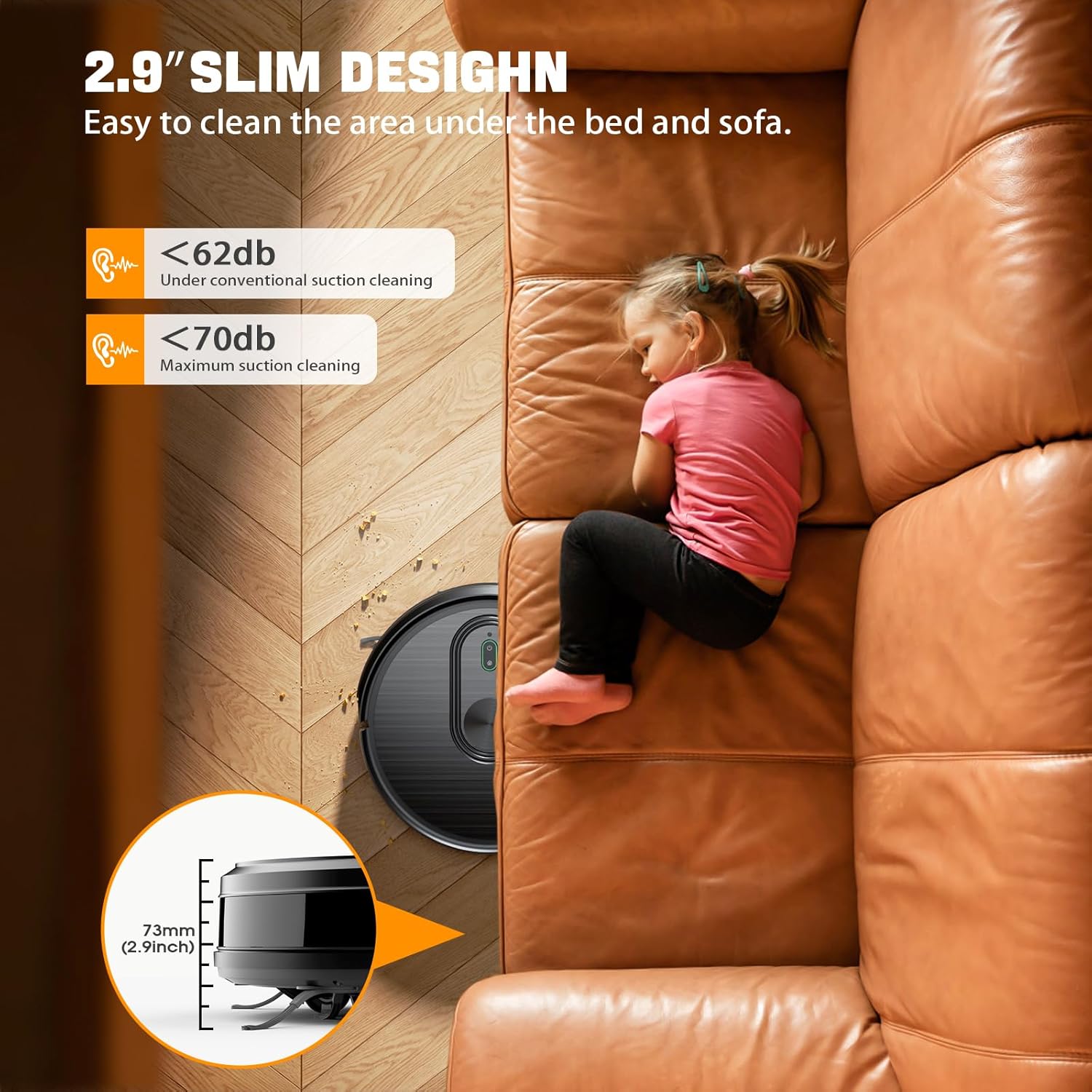
Figure 7: The slim design of the T8S allows it to clean under furniture.
Product Feature Video
Video 1: This video demonstrates the key features of the XIEBro T8S Robot Vacuum and Mop Combo, including its vacuuming and mopping capabilities, smart navigation, and slim design.
4. Setup
- Unpack the Robot: Carefully remove all components from the packaging.
- Install Side Brushes: Attach the four side brushes to the designated slots on the underside of the robot. Ensure they click into place securely.
- Place Charging Base: Position the charging base against a wall in an open area, ensuring there are no obstacles within 1 meter (3 feet) to the sides and 2 meters (6 feet) in front. Plug in the power adapter.
- Initial Charge: Place the robot onto the charging base. The indicator light will show charging status. Fully charge the robot before its first use (approximately 4-5 hours).
- Download Tuya Smart App: Scan the QR code in the user manual or search for 'Tuya Smart' in your smartphone's app store to download and install the application. Follow the in-app instructions to connect your robot to your home's 2.4GHz Wi-Fi network.
5. Operating Instructions
Starting a Cleaning Cycle
- Via Robot Button: Press the power button on the robot once to start an automatic cleaning cycle.
- Via Remote Control: Use the 'Auto' button on the remote control to start automatic cleaning. Other buttons allow for manual direction control and mode selection.
- Via Tuya Smart App: Open the app, select your T8S robot, and choose your desired cleaning mode (Auto, Spot, Edge) or schedule a cleaning time.
- Via Voice Command: Once connected to Google Assistant, use voice commands such as "Hey Google, turn on the robot" to initiate cleaning.
Cleaning Modes
- Auto Clean: The robot cleans in a systematic pattern to cover the entire area.
- Spot Clean: The robot focuses on a specific dirty area, cleaning in a spiral pattern.
- Edge Clean: The robot cleans along walls and furniture edges.
Mopping Function
To use the mopping function, fill the water tank with clean water and attach the mop pad. The robot will automatically adjust water distribution for hard floors. Do not use the mopping function on carpets.
Automatic Recharging
The robot will automatically return to its charging base when the battery is low or when a cleaning cycle is complete. Ensure the charging base is accessible.
6. Maintenance
Regular maintenance ensures optimal performance and extends the lifespan of your XIEBro T8S robot vacuum.
- Empty Dustbin: Empty the dustbin after each cleaning cycle.
- Clean Filters: Clean the high-efficiency filter and sponge filter regularly. Replace filters as needed (typically every 3-6 months).
- Clean Side Brushes: Remove and clean the side brushes to remove tangled hair or debris. Replace if worn.
- Clean Water Tank and Mop Pad: After mopping, empty any remaining water from the tank and clean the mop pad. Allow the mop pad to air dry.
- Clean Sensors: Wipe the downward sensors and anti-collision sensors with a clean, dry cloth to ensure proper navigation.
Sensor Cleaning Demonstration
Video 2: This video illustrates how to clean the downward sensors of the T8S Robot Vacuum, which is crucial for preventing navigation issues.
7. Troubleshooting
If you encounter issues with your XIEBro T8S robot vacuum, refer to the 'Common Fault Problem' section in your printed user manual for detailed solutions. Here are some general tips:
- Robot not charging: Ensure the charging base is properly plugged in and the robot is correctly docked. Clean the charging contacts on both the robot and the base.
- Robot getting stuck: Clear any loose cables, small objects, or thick rugs that might obstruct the robot's path. Ensure sensors are clean.
- Poor cleaning performance: Empty the dustbin, clean or replace filters, and clean the main and side brushes.
- App connectivity issues: Ensure your Wi-Fi network is 2.4GHz. Restart your router and the robot, then try reconnecting via the app.
8. Specifications
| Attribute | Specification |
|---|---|
| Brand | XIEBro |
| Model Name | T8S Robotic Vacuum Cleaner |
| Special Feature | Automatic Shut-Off |
| Color | Black |
| Product Dimensions | 16.9"L x 13.97"W x 4.64"H |
| Filter Type | Sponge |
| Battery Life | Up to 120 minutes (Quiet Mode) |
| Capacity | 3.48 Kilograms (Weight) |
| Power Source | Battery Powered |
| Batteries Included | Yes (1 C battery required, included) |
| Control Method | App, Remote, Voice |
| Compatible Devices | Google Home, Smartphones |
| Form Factor | Cylindrical |
| UPC | 765452450352 |
| Item Weight | 4.75 pounds |
9. Warranty and Support
The XIEBro T8S Robot Vacuum and Mop Combo comes with a 12-month warranty.
For customer support or any questions regarding your product, please contact us at: us-customer.bk@robotvac.cn.