
1. Introduction
The OTTOCAST Wireless CarPlay AI Box Nano transforms your vehicle's infotainment system into an AI-powered smart cabin. Equipped with Android 13, 8GB RAM, and 128GB storage, this device offers wireless CarPlay and Android Auto, AI voice assistance, and multimedia streaming capabilities. It is designed for seamless integration with most 2016+ vehicles featuring wired CarPlay.
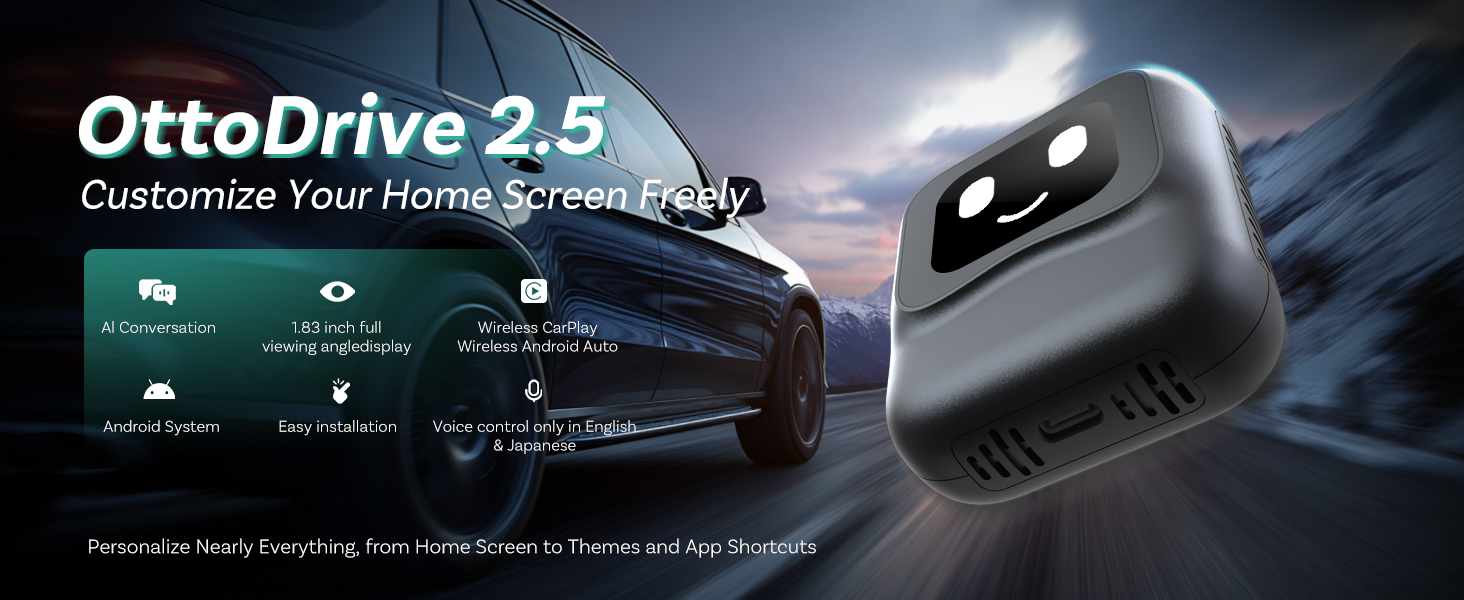
The OTTOCAST Nano AI Box enhances your driving experience by addressing common in-car navigation and entertainment limitations.
Official product video showcasing the OTTOCAST Wireless CarPlay AI Box Nano.
2. Key Features
- AI-Powered Smart Cabin: Advanced AI voice engine with ChatGPT integration for hands-free control.
- Wireless CarPlay & Android Auto: Stable and wireless connection without needing phone hotspots, thanks to built-in CloudSIM and dual-band Wi-Fi.
- Android 13 System: Access to unlimited apps and streaming services with 8GB RAM and 128GB storage for smooth performance.
- True Plug-and-Play Setup: Simple connection to your vehicle's wired CarPlay port for automatic pairing.
- Stable Performance: Powered by an upgraded Qualcomm chipset for fast boot-up and low-latency operation.
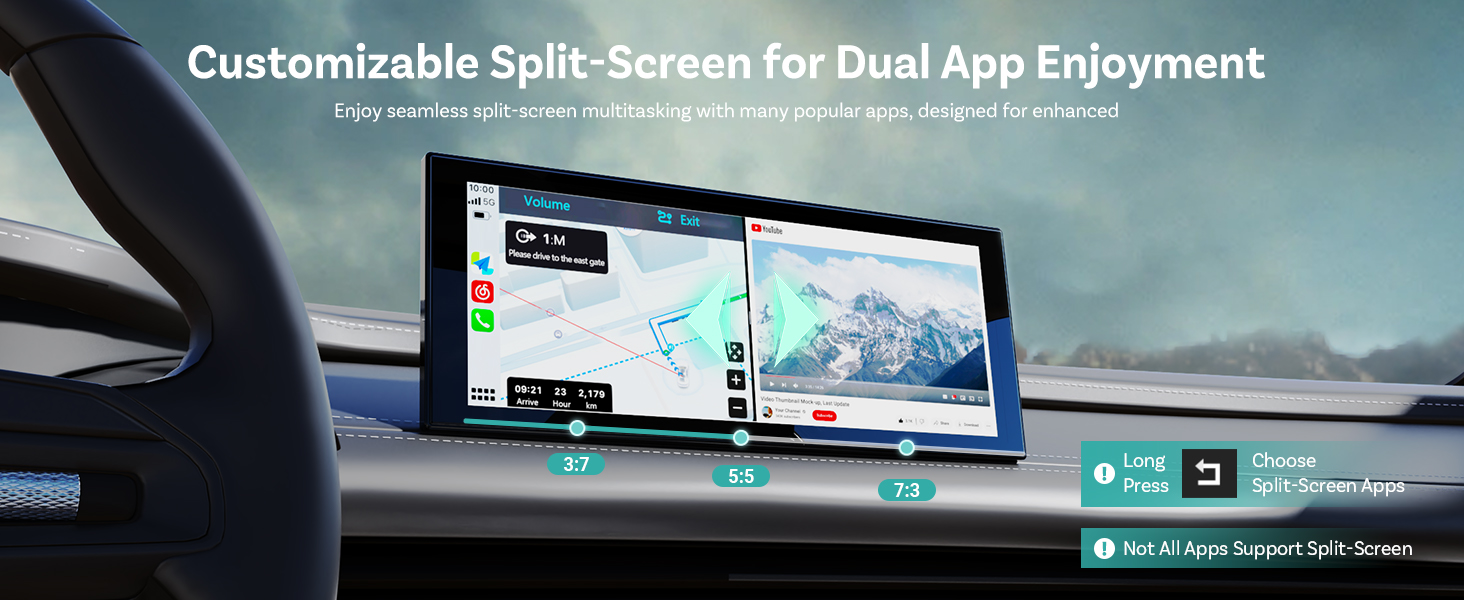
- Customizable Split-Screen: Adjustable display ratios (3:7, 5:5, 7:3) for multitasking.
- Integrated SIM/MicroSD Support: Nano SIM slot for 4G/3G networks and MicroSD slot (up to 256GB) for expanded storage.
- 1.83-Inch Interactive Display: Features customizable clock styles and real-time connection updates.

Overview of the key advantages and features of the OTTOCAST Nano AI Box.
3. Package Contents
Verify that all items are included in your package:
- NANO Main Unit
- Ball Pedestal Stand
- Y-Shaped Cable
- Cable (100 cm length)
- Adapter (USB Type-A to Type-C)
- Cable Clamps (4 pieces)
- Instruction Manual (Japanese)
- AI Voice Assistant Usage Guide
Visual representation of the OTTOCAST Nano AI Box and its accessories.
4. Setup & Installation
4.1 Initial Connection
- Ensure your vehicle has a factory-installed wired CarPlay system.
- Plug the NANO Main Unit into your car's CarPlay-compatible USB port using the provided cable.
- The device will automatically connect and display the interface on your car screen.

Simple two-step process for initial setup and internet connection.
4.2 Internet Connection
To access streaming apps and online features, connect the Nano to the internet:
- In-Car Wi-Fi: Connect to your vehicle's built-in Wi-Fi hotspot.
- Smartphone Tethering: Use your smartphone's mobile hotspot.
- Cloud SIM / Nano SIM Card: Insert a Nano SIM card for direct data connectivity or utilize the built-in Cloud SIM feature (affordable plans available).

The Nano AI Box supports both nanoSIM and microSD cards for enhanced connectivity and storage.
4.3 Android Auto Head Unit Reset
If using with an Android Auto head unit and experiencing issues:
- Locate the small hole marked with an "R" on the right side of the Nano.
- Use a paperclip or SIM pin to press into the hole.
- Hold for 3 seconds, then press once quickly to reset the mode.

Detailed steps for connecting and resetting the Nano AI Box on an Android Auto head unit.
5. Operating Instructions
5.1 AI Voice Assistant (ChatGPT Integration)
The Nano AI Box features an advanced AI voice assistant for hands-free control and interactive conversations:
- Start Chatting: Say "Hey NANO" to begin a conversation. The device's screen will display a listening expression.
- Access Interactive AI: Say "Hey GPT" to ask questions, hear stories, jokes, and receive natural responses.
- Fixed Commands: Say "Hey NANO" to activate with specific commands for navigation, music, and app control.
- Interactive Display: The 1.83-inch display shows 4 expression types (Smile, Think, Talk, Listen) that change based on voice commands.

Learn how to interact with the Nano AI Box using voice commands and its expressive display.
Effortlessly control your Nano AI Box with simple voice commands for a distraction-free driving experience.
5.2 Split-Screen Functionality
Enjoy seamless multitasking with the customizable split-screen feature:
- Adjust the screen ratio to 3:7, 5:5, or 7:3 to suit your preference.
- Navigate with one app while passengers enjoy videos on another.
- Note: Not all apps support split-screen functionality.

Visualize navigation and entertainment simultaneously with adjustable split-screen modes.
5.3 App Management & Streaming
The Android 13 system allows for easy app management and streaming:
- Download and enjoy your favorite navigation, music, and streaming apps directly on the Nano.
- Apps launch faster, run smoother, and multitask better than traditional CarPlay adapters.
- Experience one-tap app downloads and updates for intuitive use.

The Nano AI Box provides an intuitive interface for downloading and updating applications.
6. Compatibility
The OTTOCAST Wireless CarPlay AI Box Nano is compatible with most 2016+ vehicles that have factory-installed wired CarPlay. BMW vehicles are not supported.
- Compatible with iPhone (iOS 10.0 and later)
- Compatible with Android (Android 11.0 and later)
To verify if your car model is compatible with CarPlay / Android Auto, please visit: check.adaptermanual.com
Check your vehicle and smartphone compatibility with the Nano AI Box.
7. Important Notes
- Not all voice commands are recognized. Refer to the "What Can Nano Do" instruction list in the included AI Voice Assistant Usage Guide.
- The product does not include a SIM card or SD card. These are designed for flexibility; use your own SIM or SD card as required.
- Not compatible with all vehicles. Works only with 2016+ models equipped with wired CarPlay.
- To check for CarPlay: Connect an iPhone via Lightning Cable to your car's CarPlay terminal to verify activation, or consult your dealer.
- When using Android Auto, select "Yes" if prompted to use CarPlay for seamless switching between Wireless CarPlay and Android Auto.
Key considerations and tips for optimal use of the Nano AI Box.
8. Troubleshooting
If you encounter any issues with your OTTOCAST Wireless CarPlay AI Box Nano, consider the following:
- Audio Quality: If audio is static or poor, ensure all connections are secure. Try using a different USB port or cable if available.
- AI Assistant Issues: If the AI assistant does not understand commands or performs unexpectedly, refer to the AI Voice Assistant Usage Guide for specific trigger words and phrases. Ensure a stable internet connection.
- Display Problems: If the screen shows green hues or other visual anomalies, try restarting the device by unplugging and re-plugging it. Ensure the device is securely connected.
- Lag or Slow Performance: Ensure a strong Wi-Fi signal. Close unnecessary background applications on the Nano or your connected phone.
- Clock/Time Issues: If the device displays incorrect time or date, check its GPS functionality and ensure it has a clear signal. Manual time adjustment might be necessary in settings if automatic synchronization fails.
- Connectivity Issues: If the device fails to connect automatically, ensure the data cable is properly inserted and the car's system is set to factory wired CarPlay. Reset the car's system if needed.
For persistent issues, refer to the detailed instruction manual or contact OTTOCAST customer support.
9. Specifications
| Feature | Detail |
|---|---|
| Brand | OTTOCAST |
| Model Number | B0FH55GJXV |
| Operating System | Android 13 |
| RAM + Storage | 8GB RAM + 128GB Storage |
| Processor | Upgraded Qualcomm Chipset |
| Connectivity Technology | USB Type-C, Wi-Fi (Dual-band), Bluetooth |
| Wireless Technology | Wi-Fi |
| Controller Type | Internal Processor and Memory |
| Special Features | Spotify, Touchscreen, Voice Control, AI Voice Assistant, SIM/Micro SD Support, Split-Screen |
| Compatible Devices | Smartphone (iOS 10.0+, Android 11.0+) |
| Audio Output Mode | Stereo |
| Supported Internet Services | Netflix, Hulu, Spotify, YouTube |
| Format | 4K |
| GTIN / UPC | 725414685031 |

Detailed comparison of NanoAI's advanced features against other similar devices.
10. Warranty & Support
The OTTOCAST Wireless CarPlay AI Box Nano comes with a 2-Year Manufacturer Warranty, providing twice the standard protection.
For any inquiries or support, please contact OTTOCAST customer service:
- Email: Support@ottocast.com
- Availability: 7x24 Hours Online

OTTOCAST offers a 2-year warranty and dedicated customer support.
