
1. Introduction
This manual provides comprehensive instructions for the Sanorum Fitness Tracker Smart Watch. It covers setup, operation, maintenance, and troubleshooting to ensure optimal use of your device. Please read this manual thoroughly before using your smart watch.

Image 1.1: Sanorum Fitness Tracker Smart Watch. This image displays the smart watch with a white band and silver casing, showing the digital display with time, heart rate, steps, and distance metrics. An additional metal mesh band is also visible.
2. Setup
2.1 Charging the Device
Before initial use, fully charge your Sanorum Fitness Tracker. The device features fast, magnetic charging. Connect the charging cable to the designated port on the watch and a USB power source. A full charge typically provides 5-7 days of usage.
2.2 App Installation and Pairing
- Download the Companion App: Search for the official Sanorum companion app in your smartphone's app store (available for Android and iOS).
- Create an Account: Follow the on-screen instructions to create a user account or log in if you already have one.
- Enable Bluetooth: Ensure Bluetooth is enabled on your smartphone.
- Pair the Device: Open the app and follow the pairing instructions. The app will guide you through connecting your Sanorum Fitness Tracker to your phone. This process typically involves selecting your device from a list and confirming a pairing code on both the watch and phone.
3. Operation
3.1 Basic Navigation
The smart watch features a touch-sensitive screen for navigation. Swipe left, right, up, or down to access different functions and menus. Tap to select an option. Refer to the on-screen prompts for specific interactions.
3.2 Health Monitoring
- Heart Rate: The watch continuously monitors your heart rate throughout the day. View real-time data on the watch face or detailed historical data in the companion app.
- Blood Oxygen (SpO2): Track your blood oxygen levels. This feature provides insights into your overall wellness.
- Sleep Quality: The device automatically tracks your sleep patterns, including deep, light, and awake periods. Access detailed sleep analysis in the app to help improve your sleep habits.
3.3 Activity Tracking
The Sanorum Fitness Tracker supports various workout modes and tracks daily activity:
- Multi-Sport Modes: Select from various activities such as walking, running, cycling, and more to accurately record your workout data.
- Steps, Distance, and Calories: The watch automatically counts your steps, calculates distance traveled, and estimates calories burned throughout the day.
3.4 Smart Notifications
Once paired with your smartphone, the watch can display real-time notifications:
- Incoming Calls: Receive alerts for incoming calls directly on your wrist.
- Messages: View text messages and notifications from various apps (e.g., WhatsApp, Instagram) without needing to check your phone.
- Customization: Manage which app notifications appear on your watch through the companion app settings.
3.5 Waterproof Design
The Sanorum Fitness Tracker has a 5ATM waterproof rating, allowing it to withstand water pressure equivalent to a depth of 50 meters. This means you can wear it during activities such as swimming, showering, or exercising in the rain without concern. Note: The device is not suitable for hot water environments (e.g., hot tubs, saunas) or diving activities.
4. Maintenance
4.1 Cleaning
Regularly clean your smart watch and band to prevent skin irritation and maintain device functionality. Use a soft, damp cloth to wipe the screen and casing. For the band, follow the manufacturer's recommendations for the specific material (e.g., silicone, metal).
4.2 Battery Care
To prolong battery life, avoid fully discharging the device frequently. Charge the watch when the battery level is low. Store the device in a cool, dry place if not in use for extended periods.
5. Troubleshooting
- Device Not Turning On: Ensure the device is fully charged. Connect it to the charger for at least 30 minutes.
- Cannot Pair with Phone:
- Ensure Bluetooth is enabled on your phone.
- Make sure the watch is within Bluetooth range of your phone.
- Restart both your phone and the smart watch.
- Check the companion app for any specific pairing instructions or updates.
- Inaccurate Tracking Data:
- Ensure the watch is worn snugly on your wrist, about one finger-width above your wrist bone.
- Calibrate your personal details (height, weight, age) in the companion app for more accurate readings.
- Environmental factors or improper wearing can affect sensor accuracy.
- Notifications Not Appearing:
- Verify that notification permissions are granted to the companion app in your phone's settings.
- Check the app's settings to ensure specific app notifications are enabled for the watch.
- Ensure the watch is connected via Bluetooth.
6. Specifications
| Feature | Specification |
|---|---|
| Model Number | 59f477ad-d9dc-4833-916c-f04fde355742 |
| Screen Size | 1.47 Inches |
| Item Weight | 3.52 ounces |
| Battery Capacity | 200 Milliamp Hours |
| Battery Type | Lithium Polymer (1 Nonstandard Battery included) |
| Operating System | Android & iOS |
| Connectivity Technology | Bluetooth |
| Waterproof Rating | 5ATM (up to 50 meters) |
| Special Feature | Activity Tracker, Heart Rate, Blood Oxygen, Sleep Monitor |
| GPS | Via Smartphone |
7. Warranty and Support
Sanorum is committed to providing quality products and customer satisfaction. Please refer to the following information regarding support and warranty for your device:
- Lifetime Support: We offer lifetime support for our products.
- 24-Hour Service: Quick service is available via email for any inquiries or issues.
- 30-Day Return Policy: A 30-day no-reason return policy is available from the date of purchase.
- 2-Year Free Replacement: The product is covered by a 2-year free replacement warranty.
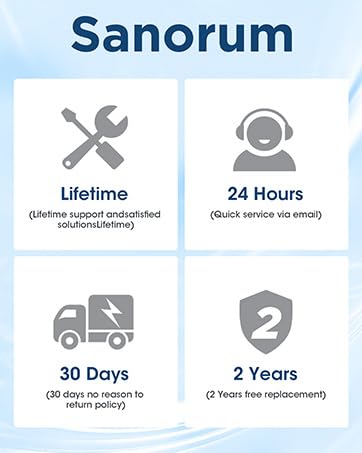
Image 7.1: Sanorum Customer Support Details. This image outlines the support services provided by Sanorum, including lifetime support, 24-hour email service, a 30-day return policy, and a 2-year free replacement warranty.
For further assistance, please contact Sanorum customer support through the contact information provided in the companion app or on the official Sanorum website.