1. Introduction
This manual provides essential information for the safe operation, maintenance, and troubleshooting of your POXURIO Portable Inverter Generator 2450W. Please read this manual thoroughly before operating the generator to ensure proper use and to prevent injury or damage.
1.1 Safety Information
WARNING: Operating this generator can produce carbon monoxide, an odorless, colorless gas. Carbon monoxide can cause nausea, fainting, or death. Always operate the generator outdoors in a well-ventilated area, far from windows, doors, and vents.
- Never operate the generator indoors, in a garage, or in any enclosed space.
- Keep children and pets away from the generator during operation.
- Fuel is highly flammable. Always refuel in a well-ventilated area with the engine off and cool.
- Do not connect the generator directly to a building's electrical system without a transfer switch installed by a qualified electrician.
- Wear appropriate personal protective equipment (PPE) when handling fuel or performing maintenance.
1.2 Package Contents
Verify that all items are present in the package:
- POXURIO Portable Inverter Generator 2450W
- Owner's Manual
- Spark Plug Wrench
- Oil Funnel
- DC Charging Cable
- Propane Hose with Regulator
- Handles (for assembly)
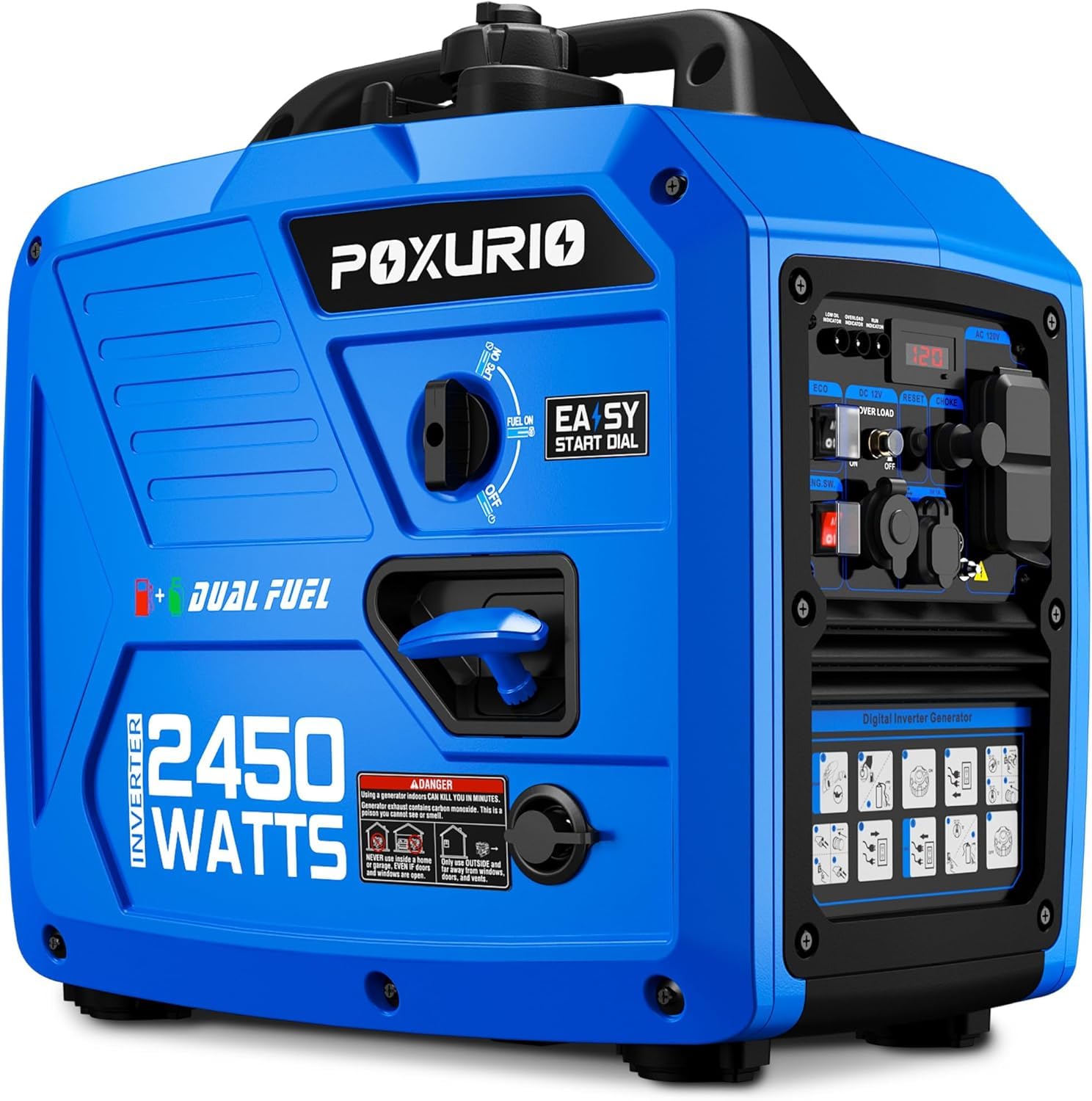
Image 1: POXURIO Portable Inverter Generator 2450W. This image shows the overall design of the generator, highlighting its compact and portable nature with a yellow casing and black accents.
2. Setup
2.1 Unpacking and Handle Assembly
Carefully remove the generator from its packaging. Attach the included handles using the provided hardware. Ensure all bolts are tightened securely.
2.2 Adding Engine Oil
The generator is shipped without engine oil. It is crucial to add the correct amount and type of oil before first use.
- Place the generator on a level surface.
- Remove the oil fill cap/dipstick.
- Using the provided oil funnel, slowly add 0.4 liters (approximately 13.5 fl oz) of 10W-30 engine oil. Do not overfill.
- Reinsert the dipstick and check the oil level. It should be at the top of the dipstick's crosshatch pattern.
- Securely replace the oil fill cap.
Recommended Oil Type: SAE 10W-30 for general use. Refer to the specifications for temperature-specific recommendations.
2.3 Adding Fuel (Gasoline or Propane)
This generator is dual fuel capable. Choose either gasoline or propane for operation.
2.3.1 Gasoline Fueling
- Ensure the generator is off and cool.
- Move the generator to a well-ventilated outdoor area.
- Unscrew the fuel cap.
- Fill the fuel tank with fresh, unleaded gasoline (minimum 87 octane) up to the fill neck, but do not overfill. The tank capacity is 6 liters.
- Securely replace the fuel cap. Wipe up any spilled fuel immediately.
2.3.2 Propane (LPG) Connection
- Ensure the generator is off.
- Connect the propane hose regulator to a standard propane tank.
- Connect the other end of the hose to the generator's LPG inlet.
- Tighten all connections securely to prevent leaks.
- Slowly open the valve on the propane tank.
3. Operating Instructions
Always ensure the generator is on a level surface and away from any obstructions.
3.1.1 Starting with Gasoline
- Ensure the fuel valve is in the "ON" position.
- Move the choke lever to the "CHOKE" position.
- Turn the engine switch to the "ON" position.
- Pull the recoil starter handle firmly and smoothly until the engine starts.
- Once the engine starts, slowly move the choke lever to the "RUN" position.
- Allow the generator to warm up for a few minutes before connecting electrical loads.
3.1.2 Starting with Propane (LPG)
- Ensure the propane tank valve is open.
- Ensure the gasoline fuel valve is in the "OFF" position.
- Move the choke lever to the "CHOKE" position.
- Turn the engine switch to the "ON" position.
- Pull the recoil starter handle firmly and smoothly until the engine starts. Propane may require a few more pulls than gasoline.
- Once the engine starts, slowly move the choke lever to the "RUN" position.
- Allow the generator to warm up for a few minutes before connecting electrical loads.
3.2 Stopping the Generator
- Disconnect all electrical loads from the generator.
- Allow the generator to run for a few minutes without load to cool down.
- If operating on gasoline, turn the fuel valve to the "OFF" position and let the engine run until it stalls from fuel starvation. This helps prevent carburetor issues.
- If operating on propane, close the valve on the propane tank. Let the engine run until it stalls.
- Turn the engine switch to the "OFF" position.
3.3 Eco Mode Operation
The Eco Mode switch, when engaged, allows the engine to automatically adjust its speed to match the electrical load. This reduces fuel consumption and noise levels when less power is required. For maximum power output, disengage Eco Mode.
3.4 Connecting Electrical Loads
- Ensure the generator is running stably before connecting appliances.
- Connect appliances one at a time, starting with the highest wattage device.
- Do not exceed the generator's rated running wattage (2450W peak, consult specifications for continuous).
- Use only grounded extension cords in good condition.
Video 1: General operation and features overview of a portable inverter generator. This video demonstrates various aspects of using the generator, including starting procedures and connecting devices.
4. Maintenance
Regular maintenance is essential for the longevity and reliable operation of your generator. Always perform maintenance with the engine off and cool, and the spark plug cap disconnected.
4.1 Maintenance Schedule
| Item | Every Use | Every 25 Hours / Monthly | Every 100 Hours / Annually |
|---|---|---|---|
| Check Engine Oil Level | ✓ | ||
| Clean Air Filter | ✓ | ||
| Change Engine Oil | (First 20 hours, then) | ✓ | |
| Inspect Spark Plug | ✓ | ||
| Inspect Fuel Filter | ✓ |
4.2 Oil Change Procedure
- Run the engine for a few minutes to warm the oil, then shut it off.
- Place a drain pan beneath the oil drain plug.
- Remove the oil drain plug and oil fill cap/dipstick to allow oil to drain completely.
- Reinstall the oil drain plug and tighten it.
- Refill with the recommended amount and type of new engine oil (0.4 liters of 10W-30).
- Check the oil level and securely replace the oil fill cap.
4.3 Air Filter Cleaning
- Remove the air filter cover.
- Remove the foam air filter element.
- Wash the filter element in warm, soapy water, then rinse thoroughly.
- Squeeze out excess water and allow it to air dry completely.
- Lightly apply clean engine oil to the filter, then squeeze out excess oil.
- Reinstall the air filter element and cover.
4.4 Spark Plug Inspection
- Remove the spark plug cap.
- Use the provided spark plug wrench to remove the spark plug.
- Inspect the spark plug for carbon buildup or wear. Clean with a wire brush or replace if necessary.
- Check the spark plug gap (refer to specifications for correct gap).
- Reinstall the spark plug and tighten it. Reattach the spark plug cap.
4.5 Storage
For long-term storage (over 30 days), proper preparation is crucial:
- Drain the fuel tank and carburetor of all gasoline, or add a fuel stabilizer.
- Change the engine oil.
- Remove the spark plug and pour a teaspoon of engine oil into the cylinder. Pull the recoil starter a few times to distribute the oil, then reinstall the spark plug.
- Clean the exterior of the generator.
- Store in a clean, dry, well-ventilated area.
5. Troubleshooting
This section provides solutions to common operational issues. If you encounter a problem not listed here, contact customer support.
| Problem | Possible Cause | Solution |
|---|---|---|
| Engine will not start | No fuel / Low oil level / Engine switch OFF / Choke incorrect / Spark plug issue | Add fuel / Add oil / Turn engine switch ON / Adjust choke / Inspect spark plug |
| No power output | Circuit breaker tripped / Overload / Eco Mode engaged (for high load) | Reset circuit breaker / Reduce load / Disengage Eco Mode |
| Engine runs rough | Stale fuel / Clogged air filter / Dirty spark plug | Drain and refill with fresh fuel / Clean air filter / Clean or replace spark plug |
| Generator shuts down during operation | Low oil shutdown / Overload / Lack of fuel | Check oil level / Reduce load / Add fuel |
Video 2: Detailed guide on common generator issues and their resolutions. This video provides visual instructions for diagnosing and fixing problems like starting difficulties or power loss.
6. Specifications
| Feature | Detail |
|---|---|
| Model | KF100337-01 |
| Brand | POXURIO |
| Starting Wattage | 2450W |
| Fuel Type | Dual Fuel (Gasoline / Propane) |
| Gasoline Tank Capacity | 6 Liters (1.58 Gallons) |
| Voltage | 120 Volts (AC) |
| Item Weight | 40 Pounds |
| Product Dimensions (L x W x H) | 19.3" x 19.3" x 11.8" |
| Noise Level | 59 dB (at 25% load) |
| Engine Oil Capacity | 0.4 Liters (approx. 13.5 fl oz) |
| Recommended Oil | SAE 10W-30 |
| UPC | 720141061882 |
7. Warranty and Support
POXURIO products are manufactured to high-quality standards. For specific warranty details, please refer to the warranty card included with your product or visit the official POXURIO website. Keep your purchase receipt as proof of purchase for warranty claims.
For technical assistance, parts, or service, please contact POXURIO customer support. Contact information can typically be found on the product packaging or the brand's official website.
Note: Unauthorized modifications or use of non-genuine parts may void your warranty.


