
GMKtec M7
GMKtec M7 Mini PC User Manual
Model: M7
Brand: GMKtec
1. Introduction
The GMKtec M7 Mini PC is a compact and powerful desktop computer designed for a wide range of computing tasks, from everyday use to demanding gaming and content creation. Featuring an AMD Ryzen 7 PRO 6850H processor and integrated AMD Radeon 680M graphics, it delivers robust performance in a small form factor. This manual provides essential information for setting up, operating, maintaining, and troubleshooting your M7 Mini PC.

Figure 1: Front and rear view of the GMKtec M7 Mini PC, showcasing its compact design and various ports.

Figure 2: The GMKtec M7 Mini PC demonstrating its small and portable size, suitable for various setups.
2. What's in the Box
Upon opening the retail packaging, please verify that all the following items are included:
- GMKtec Nucbox M7 AMD Ryzen 7 PRO 6850H 32GB+1TB Mini PC
- 1 x Power Adapter
- 1 x VESA Mount with Screws
- 1 x HDMI Cable
- 1 x User Manual (this document)

Figure 3: All components included in the GMKtec M7 Mini PC retail packaging.

Figure 4: Visual representation of the retail boxed packaging and its contents.
3. Setup
Follow these steps to set up your GMKtec M7 Mini PC:
- Connect Power: Plug the power adapter into the DC IN port on the Mini PC and then into a power outlet.
- Connect Display: Use the provided HDMI cable to connect your monitor or TV to the HDMI 2.1 port on the Mini PC. For multi-display setups, utilize the DisplayPort 2.0 and USB4 (Type-C) ports.
- Connect Peripherals: Connect your keyboard, mouse, and other USB devices to the available USB 3.2 or USB 2.0 ports.
- Network Connection: For wired internet, connect an Ethernet cable to one of the Dual Intel NIC 2.5G LAN ports. For wireless, the Mini PC supports WiFi 6.
- Power On: Press the power button on the front of the Mini PC.
- VESA Mount Installation (Optional): If desired, use the included VESA mount and screws to attach the Mini PC to the back of a compatible monitor.

Figure 5: Overview of the rich interface ports on the GMKtec M7 Mini PC, including USB, HDMI, DisplayPort, LAN, and Oculink.

Figure 6: A detailed diagram illustrating the various input/output ports available on the GMKtec M7 Mini PC for business, office, gaming, and home use.
4. Operating Instructions
4.1 Performance Modes
The M7 Mini PC features three adjustable performance modes via BIOS settings to optimize for power consumption and noise levels:
- Quiet Mode (35W): Optimized for low noise operation, suitable for light tasks.
- Balance Mode (50W): A balanced setting for general computing and moderate workloads.
- Performance Mode (65W-70W): Maximizes performance for demanding applications and gaming.
VRAM allocation can also be adjusted up to 16GB for enhanced graphics performance. Auto Power On and Wake-on-LAN options are available in the BIOS.

Figure 7: Table detailing power consumption, CPU temperature, and noise levels for each performance mode.

Figure 8: Diagram illustrating the three performance modes (Quiet, Balance, Performance) and the adjustable VRAM memory allocation.
4.2 Display Connectivity
The Nucbox M7 supports up to four simultaneous displays, offering versatile connectivity options:
- HDMI 2.1: Supports up to 8K@60Hz resolution for high-definition displays.
- DisplayPort 2.0: Supports up to 4K@144Hz resolution.
- Dual USB4 (Type-C): Provides video output for modern monitors, supporting 4K@144Hz.

Figure 9: The HDMI 2.1 port on the GMKtec M7 Mini PC, capable of delivering 8K HD quality with 48Gbps read/write speed.

Figure 10: Visualizing the 8K HD quality experience through HDMI 2.1 on the GMKtec M7 Mini PC.
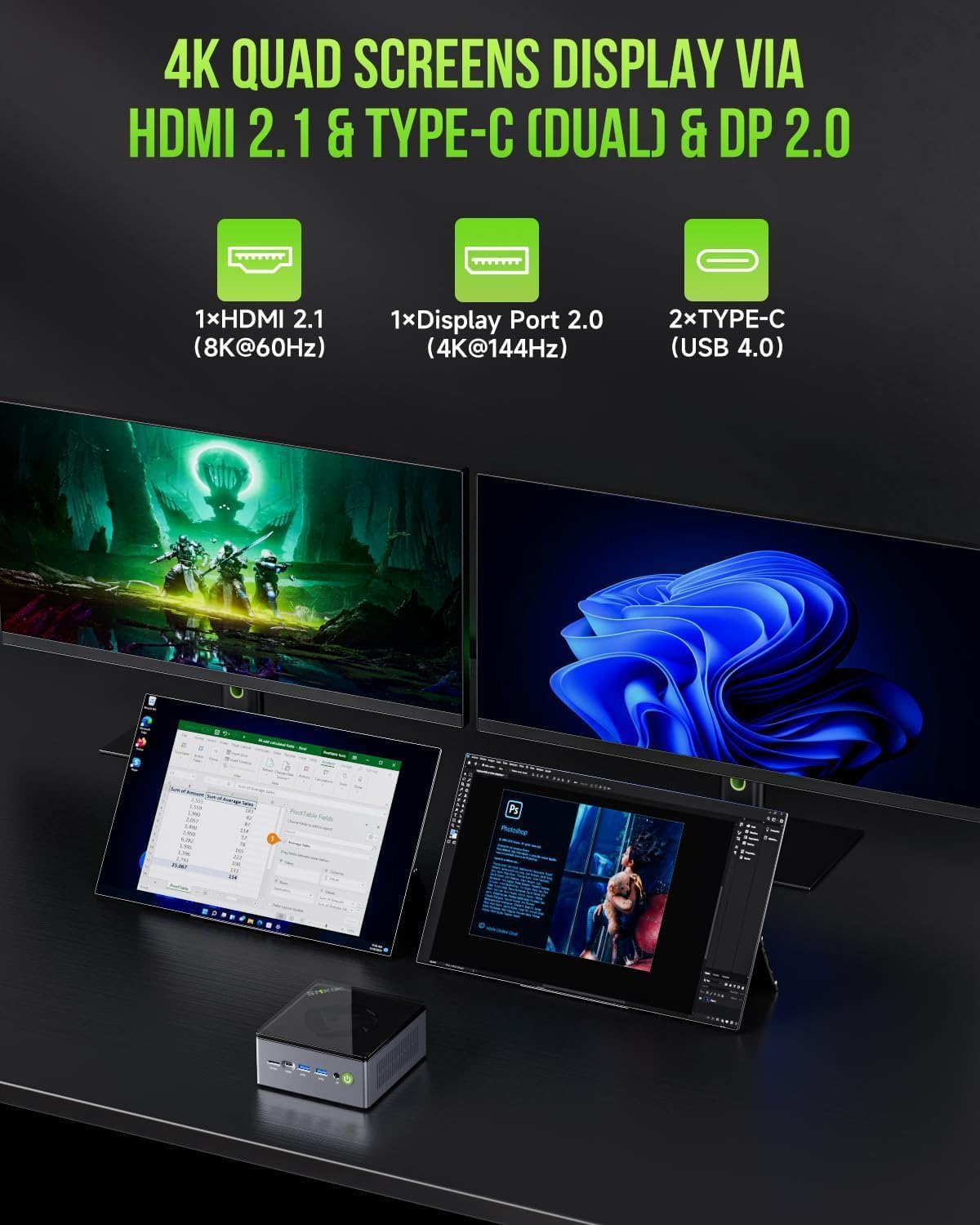
Figure 11: Example of a quad-screen display setup utilizing the HDMI 2.1, DisplayPort 2.0, and dual Type-C (USB 4.0) outputs.

Figure 12: Diagram showing the capability for 4K quad-screen display using HDMI 2.1, dual Type-C, and DisplayPort 2.0.
4.3 Network and Wireless Connectivity
The M7 Mini PC offers robust network capabilities:
- Dual NIC Intel i226V 2.5Gbps LAN: Provides high-speed wired network connections, suitable for various applications like firewalls or file servers.
- WiFi 6: Ensures faster and more reliable wireless internet for browsing, streaming, and gaming.
- Bluetooth 5.2: For stable and efficient connection to wireless devices such as speakers, printers, and projectors.

Figure 13: Highlighting the Dual 2.5G High Speed Ethernet ports for fast and reliable wired network connections.

Figure 14: Illustrating the integrated WiFi 6 and Bluetooth 5.2 capabilities for seamless wireless connectivity.
4.4 Oculink Port Usage
The M7 Mini PC features an Oculink port, which provides higher bandwidth capabilities (PCIe x4 speeds) compared to Thunderbolt's x3. This is particularly beneficial for connecting external GPUs (eGPUs) for enhanced gaming and content creation performance.
Note: Oculink does not support hot-plugging. Always power off the Mini PC before connecting or disconnecting Oculink devices.

Figure 15: Comparison of Oculink with other interfaces, highlighting its superior bandwidth for near-lossless eGPU performance.

Figure 16: Illustrates how Oculink delivers full PCIe 4.0 bandwidth (64Gbps) for enhanced gaming performance with eGPUs.
5. Maintenance
5.1 Cooling System
The M7 Mini PC features an upgraded Hyper Ice Chamber 2.0 design with larger top and bottom cooling fans and a copper base. This design ensures 360-degree airflow for efficient heat dissipation and reduced fan noise (down to 35dB in Quiet mode).
Regularly ensure that the air vents are clear of dust and obstructions to maintain optimal cooling performance.
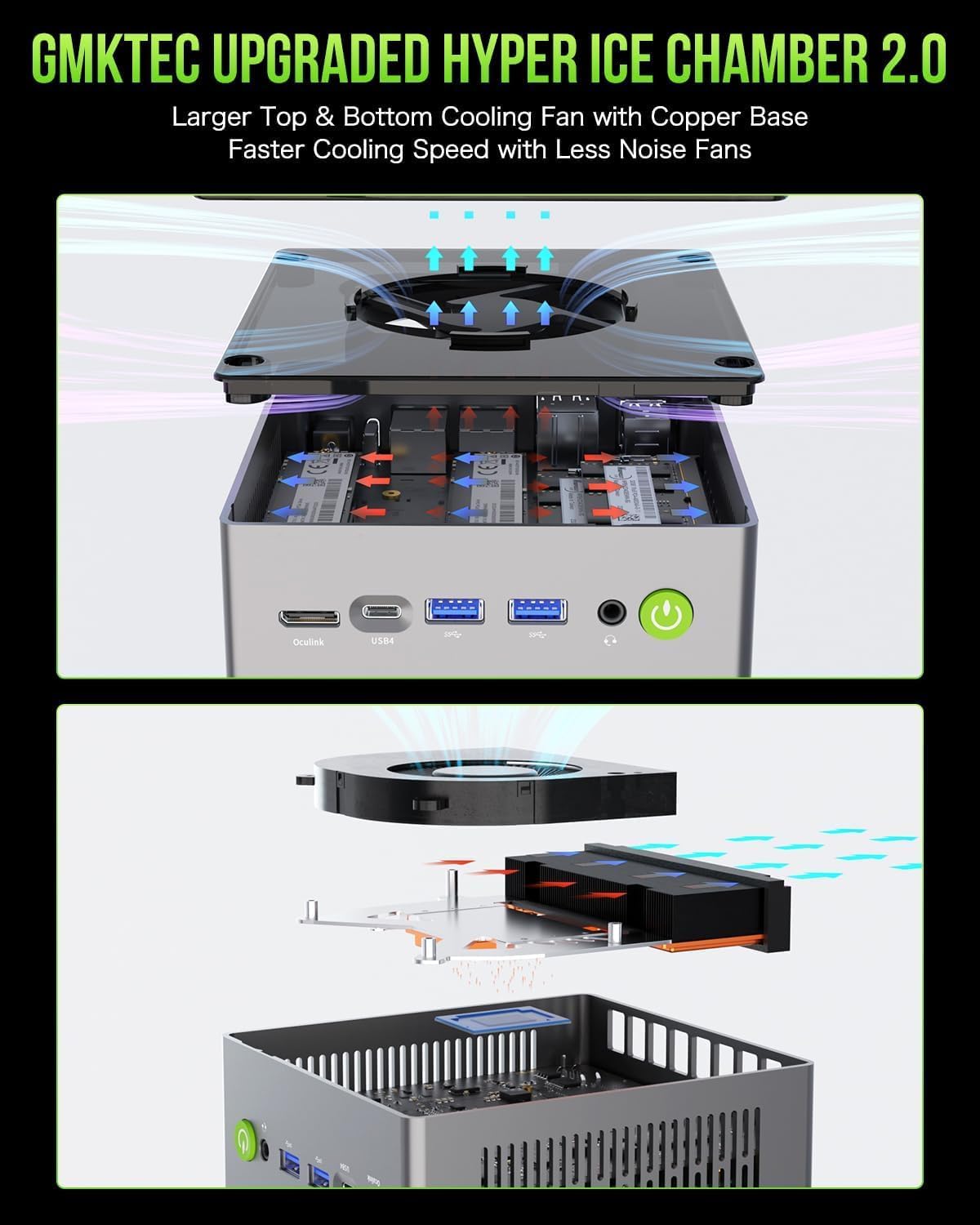
Figure 17: Diagram showing the components of the Hyper Ice Chamber 2.0 cooling system, including larger fans and copper base.

Figure 18: Exploded view of the upgraded twin cooling fan system, highlighting the large silent cooling fans and heatsink.

Figure 19: Another view of the Hyper Ice Chamber 2.0, emphasizing the improved airflow and cooling efficiency.
5.2 Storage and RAM Expansion
The M7 Mini PC is designed for easy upgrades:
- RAM: Comes with 32GB DDR5 4800MHz (2x16GB) and supports expansion up to 96GB RAM.
- SSD: Features a 1TB M.2 2280 PCIe 3.0 SSD and supports dual slot expansion to 2x PCIe 4.0 2TB SSDs, for a total of up to 4TB storage.
The disassembled design allows for convenient RAM and SSD upgrades. Refer to the detailed internal diagram for component locations.

Figure 20: Diagram illustrating the easy installation process for upgrading RAM and SSD storage in the GMKtec M7 Mini PC.
6. Troubleshooting
If you encounter issues with your GMKtec M7 Mini PC, consider the following general troubleshooting steps:
- No Power: Ensure the power adapter is securely connected to both the Mini PC and a working power outlet. Try a different outlet if necessary.
- No Display: Verify that the HDMI or DisplayPort cable is firmly connected to both the Mini PC and the monitor. Check the monitor's input source setting. Try a different cable or monitor if available.
- No Internet (Wired): Check the Ethernet cable connection. Ensure your router is functioning correctly.
- No Internet (Wireless): Verify WiFi is enabled in the operating system. Check your router's status and ensure you have the correct WiFi password.
- Peripheral Not Detected: Ensure USB devices are properly seated in their ports. Try a different USB port.
- System Slowdown: Check for background applications consuming resources. Ensure adequate ventilation around the Mini PC. Consider adjusting performance modes in BIOS.
- BIOS Access: To enter BIOS settings, typically press the DEL or F2 key repeatedly during startup.
For persistent issues, refer to the Warranty and Support section for contact information.
7. Specifications
Key technical specifications for the GMKtec M7 Mini PC:
| Feature | Specification |
|---|---|
| Processor | AMD Ryzen 7 PRO 6850H (8C/16T up to 4.7Ghz) |
| Graphics Coprocessor | AMD Radeon 680M 12Cores 2200MHz (Integrated) |
| RAM | 32GB DDR5 4800MHz (Dual Channel 2x16GB), expandable to 96GB |
| Storage | 1TB M.2 2280 PCIe 3.0 SSD, dual slot expansion to 2x PCIe 4.0 2TB SSD (Max 4TB) |
| Operating System | OS PRO (Windows 11 Pro pre-installed) |
| Network | Dual Intel NIC 2.5G LAN, WiFi 6, Bluetooth 5.2 |
| Video Output | HDMI 2.1 (8K@60Hz), DisplayPort 2.0 (4K@144Hz), 2x USB4 (Type-C) (4K@144Hz) |
| Ports | USB 3.2, USB 2.0, USB-C 4.0, Oculink, 3.5mm Audio Jack, Kensington Lock |
| Cooling | Upgraded Dual Cooling Fans (Hyper Ice Chamber 2.0) |
| Dimensions | Approx. 10 x 2.7 x 2 inches |
| Weight | Approx. 9.6 ounces |
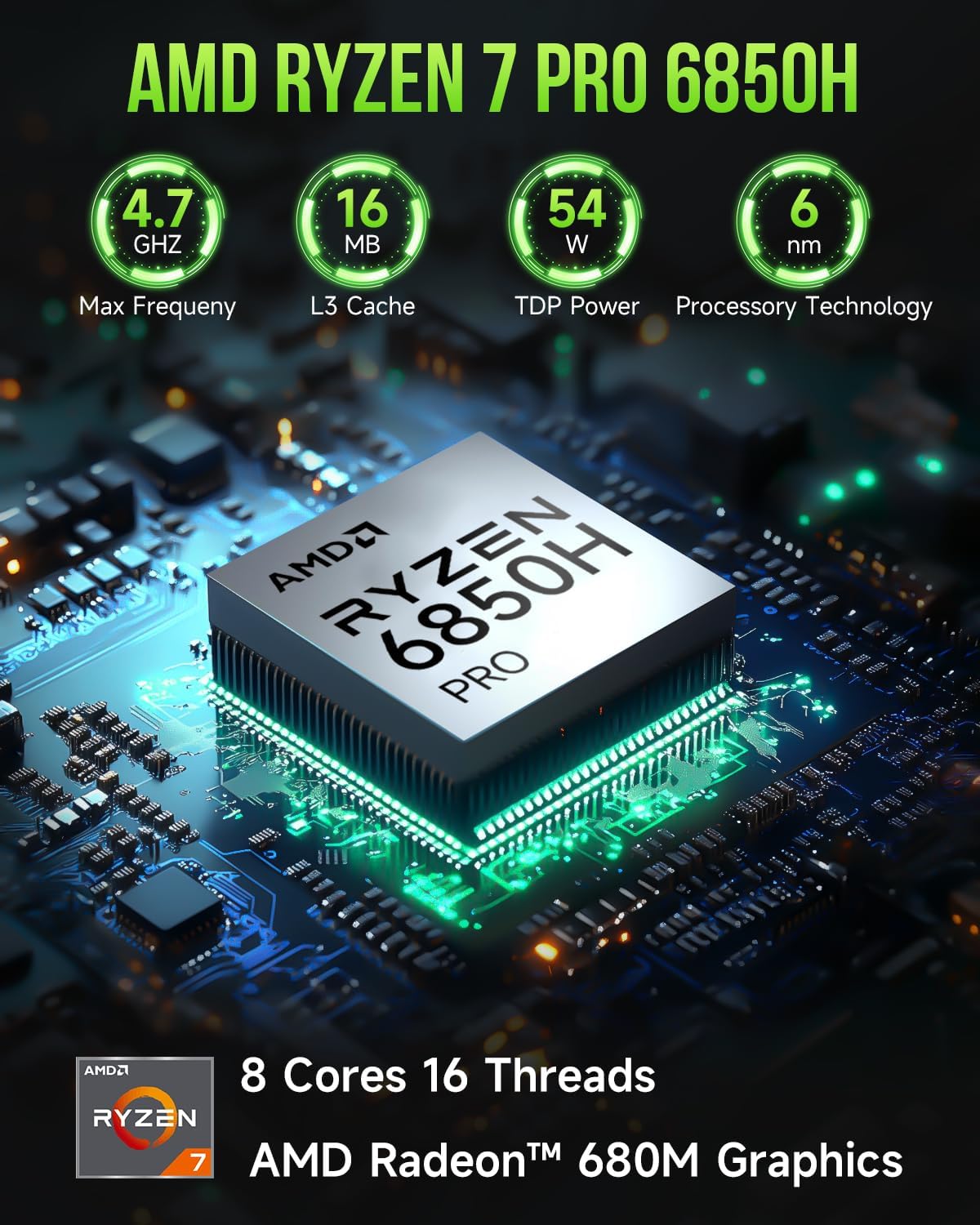
Figure 21: Detailed specifications of the AMD Ryzen 7 PRO 6850H processor and integrated AMD Radeon 680M graphics.

Figure 22: Overview of the GMKtec M7 Mini PC's core features, including CPU, GPU, storage, RAM, display outputs, and cooling.
8. Warranty and Support
GMKtec offers a 1-year limited warranty for each Mini PC, starting from the date of purchase. This warranty covers all defects due to design and workmanship.
For professional after-sales service and technical support, please use the following methods:
- Amazon Support: Log in to your Amazon account, navigate to "Your Orders," and select "Ask Product Question" for direct assistance.
- After-Sales Team: Send an email to support@gmktec.com for 24/7 customer support.

Figure 23: Contact information for GMKtec customer support and warranty details.
Related documentsM7


Ask a question about this manual
Ask about setup, troubleshooting, compatibility, parts, safety, or missing instructions. Manuals+ will review the question and use this page’s manual context to help answer it.