1. Introduction
This manual provides essential instructions for the safe and efficient use of your Pxdiiry 5V USB Type-C Replacement Power Adapter. This adapter is specifically designed to provide reliable power to devices such as the Potaroma PG-CS601 Smart Self Pet Water Fountain. Please read this manual thoroughly before use and retain it for future reference.
2. Safety Information
To ensure safe operation and prevent damage, observe the following precautions:
- Do not expose the adapter to water, moisture, or extreme temperatures.
- Do not attempt to disassemble or modify the adapter.
- Ensure the input voltage (120 Volts) matches your power outlet specifications.
- Avoid using the adapter with damaged cables or plugs.
- Keep out of reach of children and pets.
- Unplug the adapter from the power outlet when not in use for extended periods.
- This adapter is equipped with built-in safety features to protect against overvoltage and overheating.
3. Product Features
- High-Quality Materials: Made from durable and reliable materials to ensure long-lasting performance.
- Built-In Safety Features: Equipped with safety mechanisms to protect against overvoltage, overheating, and other common issues.
- Versatile Compatibility: Designed to work seamlessly with a wide range of devices and setups, specifically those requiring 5V DC USB Type-C power.
- Energy-Efficient: Engineered to minimize power consumption while maintaining optimal performance.
- Easy Maintenance: Designed for easy cleaning and upkeep to ensure consistent functionality.

Image: The Pxdiiry 5V USB Type-C Replacement Power Adapter, showcasing its compact design and integrated USB-C cable.
4. Setup Instructions
- Unpack the Adapter: Carefully remove the power adapter from its packaging.
- Inspect the Adapter: Check the adapter and cable for any visible damage. Do not use if damaged.
- Connect to Device: Insert the USB Type-C connector of the adapter cable into the corresponding USB Type-C port on your device (e.g., Potaroma PG-CS601 Smart Pet Water Fountain). Ensure a firm connection.
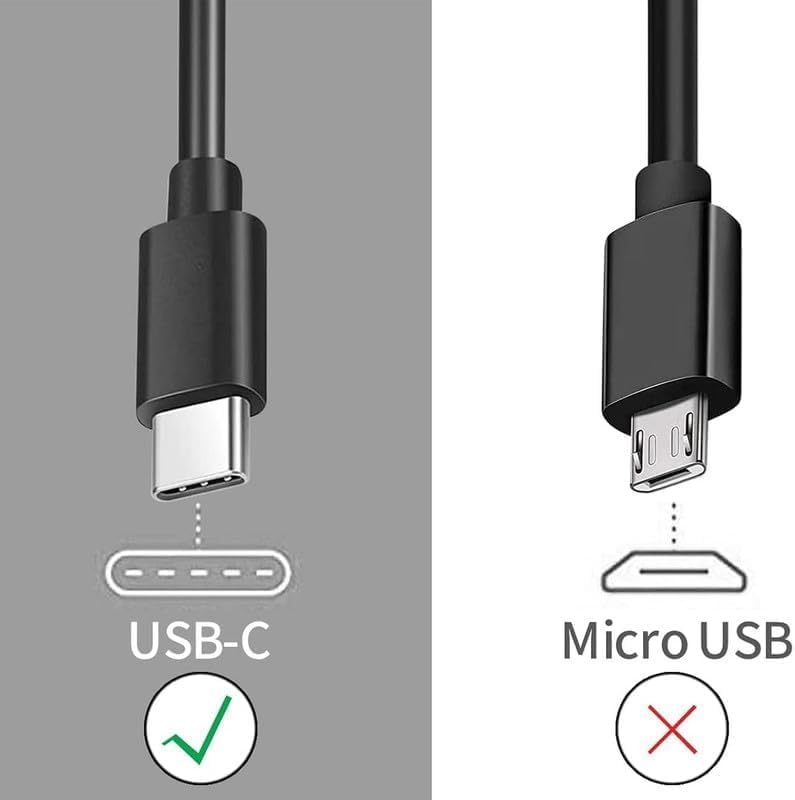
Image: A visual comparison highlighting the correct USB Type-C connector for this adapter, distinguishing it from a Micro USB connector.
- Plug into Power Outlet: Insert the adapter's prongs into a standard 120V AC wall outlet. Ensure the connection is secure.

Image: The power adapter plugged into a power strip, demonstrating a typical setup for use.
- Verify Power: Once connected, your device should begin to receive power or charge, indicated by its own power indicator (if applicable).
5. Operating Instructions
The Pxdiiry 5V USB Type-C Replacement Power Adapter operates on a plug-and-play principle. Once properly connected to a power source and your compatible device, it will automatically supply the necessary power.
- Ensure the adapter is always connected to a stable power source.
- Disconnect the adapter from the wall outlet before disconnecting it from your device to prevent accidental power surges.
6. Maintenance
To maintain the longevity and performance of your power adapter:
- Cleaning: Disconnect the adapter from both the power outlet and your device before cleaning. Use a soft, dry cloth to wipe the exterior. Do not use liquid cleaners or abrasive materials.
- Storage: When not in use, store the adapter in a cool, dry place, away from direct sunlight and extreme temperatures. Avoid tightly coiling the cable to prevent damage.

Image: Detailed view of the adapter, highlighting its robust construction including the American plug, thick copper core, and the flexible design of the power cord for durability.
- Cable Care: Do not bend or crimp the cable excessively. Avoid placing heavy objects on the cable.
7. Troubleshooting
| Problem | Possible Cause | Solution |
|---|---|---|
| Device not receiving power. | Adapter not properly plugged into outlet or device. Outlet is not functioning. Device is incompatible or faulty. | Ensure all connections are secure. Test the outlet with another device. Verify your device requires 5V USB Type-C power. Contact device manufacturer if device is faulty. |
| Adapter feels hot. | Normal operation under load. Overload or poor ventilation. | A slight warmth is normal. If excessively hot, disconnect immediately. Ensure adapter is in a well-ventilated area and not covered. Verify device power requirements. |
| Intermittent power supply. | Loose connection. Damaged cable or adapter. | Check all connections. Inspect cable and adapter for damage. If damaged, discontinue use and replace. |
8. Specifications
- Brand: Pxdiiry
- Model Compatibility: Potaroma PG-CS601
- Input Voltage: 120 Volts
- Output: 5V DC
- Connector Type: USB Type-C
- Color: Black
- Certifications: CCC, CE
- Power Source: Corded Electric
9. Warranty and Support
For warranty information or technical support, please refer to the documentation provided with your purchase or contact Pxdiiry customer service directly. Details can typically be found on the product packaging or the manufacturer's official website.


