
Introduction
The COMITOK MOTA Magnetic Auto Face Tracking Stand is designed to enhance your iPhone video recording, live streaming, and video call experiences. Utilizing Apple DockKit technology, this stand offers automatic 360-degree pan and 90-degree tilt tracking, ensuring you always remain in frame without manual adjustments. It features a strong magnetic attachment for quick setup and includes a remote controller for convenient operation. This manual provides detailed instructions for setup, operation, maintenance, and troubleshooting.

Image: COMITOK MOTA Magnetic Auto Face Tracking Stand with an iPhone, highlighting its magnetic attachment and NFC pairing capabilities.
What's in the Box
Verify that all items are present in the package:
- MOTA Auto Face Tracking Stand
- Remote Control
- Power Cable (USB-C)
- Quick Start Guide

Image: The COMITOK MOTA stand, remote control, power cable, and quick start guide.
Setup
- Charging: Before first use, fully charge the MOTA stand using the provided USB-C cable. The battery indicator lights will show charging status.
- Power On: Press and hold the power button on the MOTA stand to turn it on.
- Magnetic Attachment: Ensure your iPhone is compatible with MagSafe. Align your iPhone with the magnetic mount on the MOTA stand until it securely clicks into place. The stand supports iPhones up to 350g.
- NFC Pairing: Place your iPhone near the NFC area of the MOTA stand. Your iPhone will recognize the MOTA instantly and prompt you to connect. Follow the on-screen instructions to complete the one-tap pairing. No complex Bluetooth setup is required.

Image: An iPhone displaying a pairing prompt while being placed near the COMITOK MOTA stand for NFC connection.

Image: An iPhone magnetically attaching to the COMITOK MOTA stand, demonstrating instant connection.
Operating Instructions
Basic Operation
Once your iPhone is securely attached and paired, the MOTA stand will automatically begin tracking your face. It supports 360-degree horizontal pan and 90-degree vertical tilt, keeping you centered in the frame during movement. This functionality works directly with your iPhone's native camera, FaceTime, and other popular video applications without requiring a dedicated app.

Image: The COMITOK MOTA stand rotating 360 degrees to follow a subject, illustrating its auto-tracking capability.
Remote Control Usage
The included remote controller provides additional functionality for hands-free operation:
- Shutter Control: Capture photos or start/stop video recording remotely.
- Lens Swap: Switch between front and rear cameras on your iPhone.
- Subject Switching: Select different subjects for tracking in multi-person scenarios.
- Zoom Control: Adjust the zoom level of your iPhone's camera.

Image: A user operating the COMITOK MOTA stand with the remote control, with an Apple Watch also shown for control options.
Apple Watch Control
For enhanced convenience, the MOTA stand can also be controlled via your Apple Watch. This allows for visual operation and control of the iPhone's native camera functions directly from your wrist, including:
- Starting/stopping recording.
- Switching between front and rear cameras.
- Selecting tracking targets in group settings.
- Adjusting zoom.
Advanced Features (with COMITOK App)
For advanced functionalities like smarter group shooting, gaze-based subject selection, and voice-based tracking, pair the MOTA stand with the dedicated COMITOK App. This app expands the stand's capabilities for more complex video creation scenarios.

Image: An iPhone screen showing gaze-active framing, where the camera adjusts based on the subject's eye movement.
Video: Official product video demonstrating the auto-tracking capabilities of the COMITOK MOTA tripod with remote, highlighting its Apple DockKit certification.
Maintenance
To ensure the longevity and optimal performance of your COMITOK MOTA stand, follow these maintenance guidelines:
- Cleaning: Wipe the stand with a soft, dry cloth. Avoid using abrasive cleaners or solvents.
- Storage: When not in use, fold the stand to its original compact status. Store it in a cool, dry place away from direct sunlight and extreme temperatures.
- Battery Care: Charge the device regularly, even if not in frequent use, to maintain battery health. Avoid fully discharging the battery for extended periods.

Image: The COMITOK MOTA stand shown in its compact, folded state, emphasizing its portability.
Troubleshooting
If you encounter issues with your COMITOK MOTA stand, refer to the following common solutions:
- Not Tracking: Ensure the stand is powered on and your iPhone is securely attached and paired via NFC. Check that your iPhone's camera is active and facing the subject.
- Connection Issues: If the iPhone does not pair, try restarting both the MOTA stand and your iPhone. Ensure NFC is enabled on your iPhone.
- Remote Not Working: Check the remote's battery. Ensure the remote is paired with the MOTA stand.
- Unstable Tracking: Ensure the stand is placed on a stable, flat surface. Avoid rapid or extreme movements that may exceed the tracking capabilities.
- Battery Life: If battery life is shorter than expected, ensure the device is fully charged. Operating in high-intensity modes (constant rotation) will consume battery faster.
Specifications
| Feature | Detail |
|---|---|
| Model Number | MOTA |
| Product Dimensions | 4.52 x 4.4 x 7.16 inches (11.48 x 11.18 x 18.19 cm) |
| Item Weight | 12.3 ounces (350 Grams) |
| Battery | 1 A battery required (included), 2550 mAh rechargeable Lithium-ion |
| Tracking | 360° Pan, 90° Tilt Auto Face Tracking |
| Mounting | MagSafe compatible, 1/4"-20 Threaded Mount |
| Connectivity | NFC for instant pairing |
| Manufacturer | Shenzhen JX ROBOT Technology Co., Ltd |
| UPC | 756542429440 |
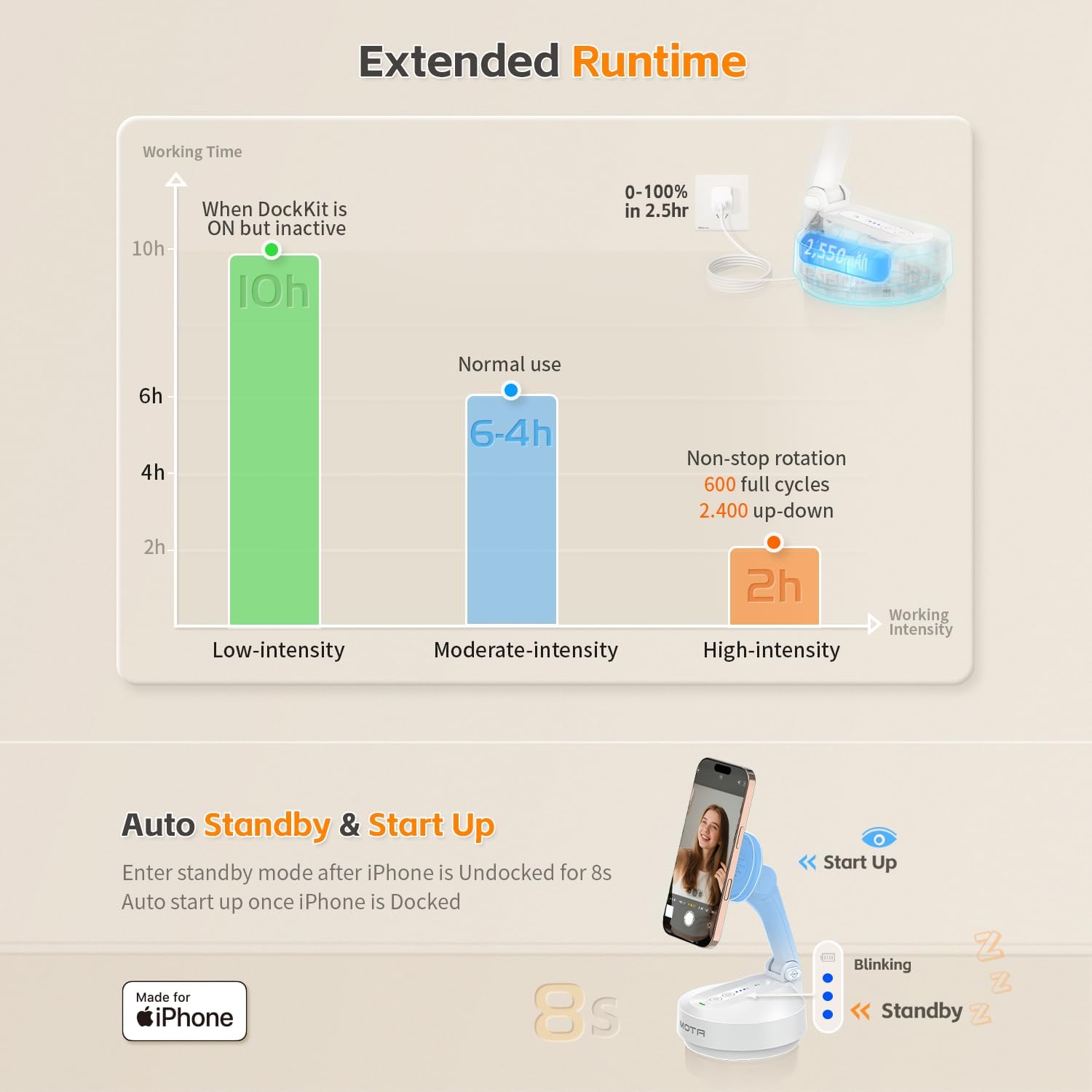
Image: A chart illustrating the extended runtime of the COMITOK MOTA stand's 2550mAh battery under various usage intensities.
Compatibility
The COMITOK MOTA stand is compatible with the following devices and operating systems:
- iPhone Models: iPhone 12 or later (excluding iPhone SE (3rd gen) and iPhone 16e).
- iOS Version: iOS 18+ is required for full functionality.
- App Compatibility: Works with iPhone Camera, FaceTime, and popular video apps. Advanced features available with the COMITOK App.

Image: A compatibility chart detailing supported iPhone models and iOS versions for the COMITOK MOTA stand.
Warranty and Support
For warranty information and customer support, please refer to the official COMITOK website or contact their customer service directly. Keep your purchase receipt for any warranty claims.
