
1. Introduction
Thank you for choosing the Ieejdn Makeup Vanity Desk with Mirror and Lights, Model 808. This manual provides essential information for the proper assembly, operation, and maintenance of your new vanity desk. Please read these instructions carefully before beginning assembly or use to ensure safe and efficient operation.

Image 1.1: The Ieejdn Makeup Vanity Desk with Mirror and Lights, Model 808, in a typical bedroom setting.
2. Product Overview and Features
The Ieejdn Makeup Vanity Desk is designed to provide a functional and organized space for your beauty routine. Key features include:
- Integrated Power Strip: Equipped with 2 standard plug sockets, 1 USB port, and 1 Type-C port for convenient charging of devices and powering beauty tools.
- Illuminated Mirror: Features a dimmable mirror with 3 adjustable LED lighting colors (natural, warm, cool) to optimize makeup application in various environments.
- Ample Storage: Includes 8 drawers and additional storage shelves, designed for organizing cosmetics, skincare products, jewelry, and other items.
- Flexible Configuration: The desk can be arranged in an L-shape or as a straight unit, allowing adaptation to different room layouts and personal preferences.
- Pegboard Storage: A dedicated pegboard area provides additional hanging storage for accessories, with two installation methods (facing inward or outward).
- Smooth Drawer Operation: Drawers are fitted with metal slides for effortless opening and closing.

Image 2.1: Illustration of the vanity desk's extensive storage capacity, with drawers and shelves organized for various items.

Image 2.2: Detail of the leg-area storage, featuring a pegboard for hanging small items and an alternative shelf configuration.
3. Setup and Assembly
The Ieejdn Makeup Vanity Desk requires self-assembly. Detailed, clear, and concise instructions are included within the product packaging. Please follow these instructions carefully, step-by-step, to ensure correct and stable assembly.
3.1 Before You Begin
- Unpack Carefully: Remove all components from the packaging. Inspect for any damage during transit.
- Verify Parts: Cross-reference all parts against the included parts list to ensure everything is present.
- Tools Required: Basic assembly tools are typically included. An electric drill may expedite the process, but exercise caution to avoid overtightening screws.
- Clear Workspace: Assemble the vanity in a spacious, clean area to prevent loss of small parts and facilitate movement.
3.2 Assembly Steps
Refer to the dedicated assembly manual provided in your product box for detailed, illustrated instructions. The general process involves:
- Assembling the main desk frame.
- Installing the drawers and their slides.
- Attaching the mirror unit and shelves.
- Integrating the power strip.
- Configuring the flexible cabinet and pegboard as desired.

Image 3.1: Dimensional diagram of the vanity desk, useful for planning placement and assembly.
3.3 Flexible Placement
The vanity desk offers two primary placement methods: an L-shape configuration or a straight, extended setup. The separate six-drawer cabinet can be moved to the left or right side of the main desk to suit your space and preference.
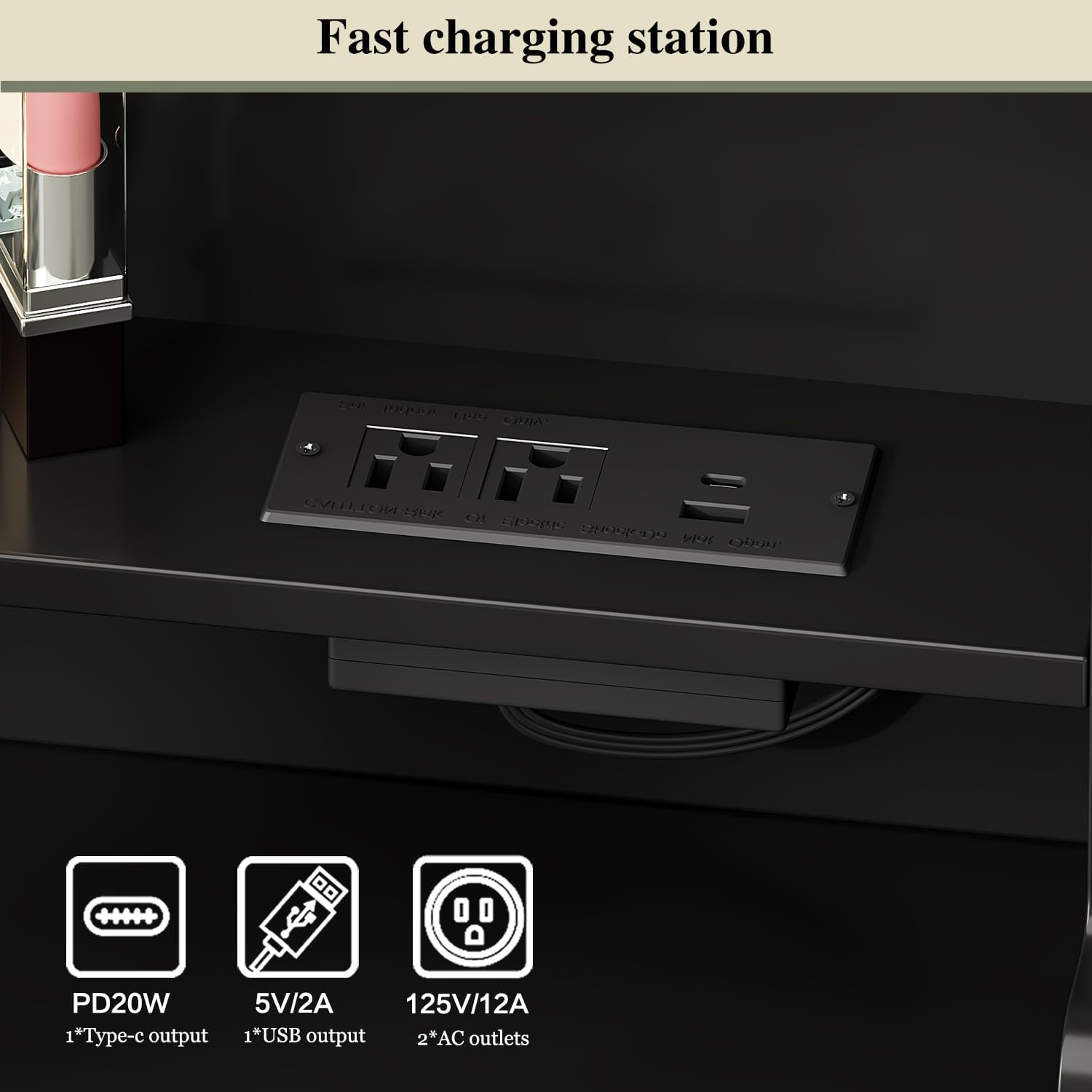
Image 3.2: Visual representation of the L-shaped and straight placement options for the vanity desk.
4. Operating Instructions
4.1 LED Mirror Lights
The integrated mirror features LED lighting with three color modes and adjustable brightness:
- Changing Color Modes: Touch the on/off button on the mirror to cycle through the three light colors: cold light, warm light, and warm yellow light.
- Adjusting Brightness: Long-press the on/off button to adjust the brightness level of the selected light color. Release the button when the desired brightness is achieved.

Image 4.1: Demonstration of the three color modes and brightness adjustment for the LED mirror lights.
4.2 Built-in Power Strip
The vanity desk includes a power strip with multiple outlets for your convenience:
- Outlets: 2 standard AC plug sockets (125V/12A), 1 USB port (5V/2A), and 1 Type-C port (PD20W).
- Usage: Plug in your hairdryer, curling iron, phone charger, or other electronic devices directly into the vanity desk. The 4.9-foot power cord provides flexibility for connecting to a wall outlet.

Image 4.2: Detail of the integrated power strip, highlighting the various charging and power options.
4.3 Drawer Operation
The drawers are equipped with metal slides for smooth and quiet operation. To open, gently pull the handle. To close, push the drawer firmly until it is fully seated. Avoid forcing drawers, especially if they encounter resistance, to prevent damage to the slides.
5. Maintenance
Proper care and maintenance will extend the life and appearance of your vanity desk.
- Cleaning: For general cleaning, wipe the surfaces with a dry, soft cloth. For minor spills or marks, use a slightly damp cloth and immediately dry the area. Avoid abrasive cleaners or harsh chemicals, as these can damage the finish.
- Mirror Care: Clean the mirror surface with a glass cleaner and a soft, lint-free cloth. Do not spray cleaner directly onto the mirror; instead, apply it to the cloth first.
- Drawer Slides: Periodically check drawer slides for smooth operation. If they become stiff, a small amount of silicone-based lubricant can be applied to the tracks.
- Electrical Components: Ensure the power strip and its connections remain dry. Do not attempt to disassemble or repair electrical components yourself.
6. Troubleshooting
This section addresses common issues you might encounter with your vanity desk.
6.1 LED Mirror Lights Not Working
- Check Power: Ensure the vanity desk is properly plugged into a functional wall outlet.
- Button Operation: Confirm you are touching the correct sensor button on the mirror. Try a short touch for on/off and a long press for brightness adjustment.
6.2 Power Outlets Not Functioning
- Verify Connection: Ensure the vanity desk's main power cord is securely plugged into a live wall outlet.
- Test Device: Try plugging a different device into the power strip to rule out an issue with your specific appliance.
- Circuit Breaker: Check your home's circuit breaker if multiple outlets are not working.
6.3 Drawers Sticking or Not Closing Properly
- Obstruction: Check for any items inside the drawer or along the slides that might be blocking movement.
- Alignment: Ensure the drawer is correctly seated on its slides. Gently remove and reinsert the drawer if necessary.
- Assembly: If the issue persists, review the assembly instructions for the drawer slides to ensure they were installed correctly.
If you encounter issues not covered here or require further assistance, please contact Ieejdn customer support.
7. Specifications
| Feature | Detail |
|---|---|
| Brand | Ieejdn |
| Model Number | 808 |
| Frame Material | Engineered Wood |
| Color | Black |
| Product Dimensions (Overall) | 15.75D x 40-68W x 55.91H inches (Flexible Width) |
| Item Weight | 52 pounds |
| Assembly Required | Yes |
| Product Care Instructions | Wipe with Dry Cloth |
| Power Outlet | 2 AC outlets (125V/12A), 1 USB (5V/2A), 1 Type-C (PD20W) |
| Mirror Lighting | 3 Color Modes (Natural, Warm, Cool), Adjustable Brightness |
8. Warranty and Support
Ieejdn is committed to providing excellent after-sales service. If you encounter any product problems, missing parts, or require assistance with assembly or operation, please do not hesitate to contact our customer support team. Refer to your purchase documentation or the Ieejdn brand store for contact information.
For additional information or to explore other products, please visit the official Ieejdn Store.