
SIXTOP 4 Core 4+128G
SIXTOP 4+128G Android 15 Car Radio User Manual
For Renault Clio 3rd Generation (2005-2014)
1. Introduction
Thank you for choosing the SIXTOP 4+128G Android 15 Car Radio. This device is designed to enhance your driving experience with advanced features including Wireless CarPlay, Android Auto, GPS navigation, Bluetooth 5.0, FM/RDS radio, and more. This manual provides essential information for installation, operation, maintenance, and troubleshooting to ensure optimal performance and user satisfaction. Please read this manual thoroughly before installation and use.
2. Package Contents
Please verify that all items listed below are included in your package:
- 1 x Car Player Unit
- 2 x Power Cables
- 1 x GPS Antenna
- 1 x Rear Camera Input Cable
- 1 x Rear Camera
- 1 x RCA Cable
- 2 x USB Cables
- 2 x Mounting Brackets
- 4 x Screws
- 1 x User Manual
- 1 x Canbus Box
- 1 x Installation Tool
- 1 x Radio Antenna
- 1 x Radio Adapter Cable
- 1 x Antenna Adapter
- Additional Accessories
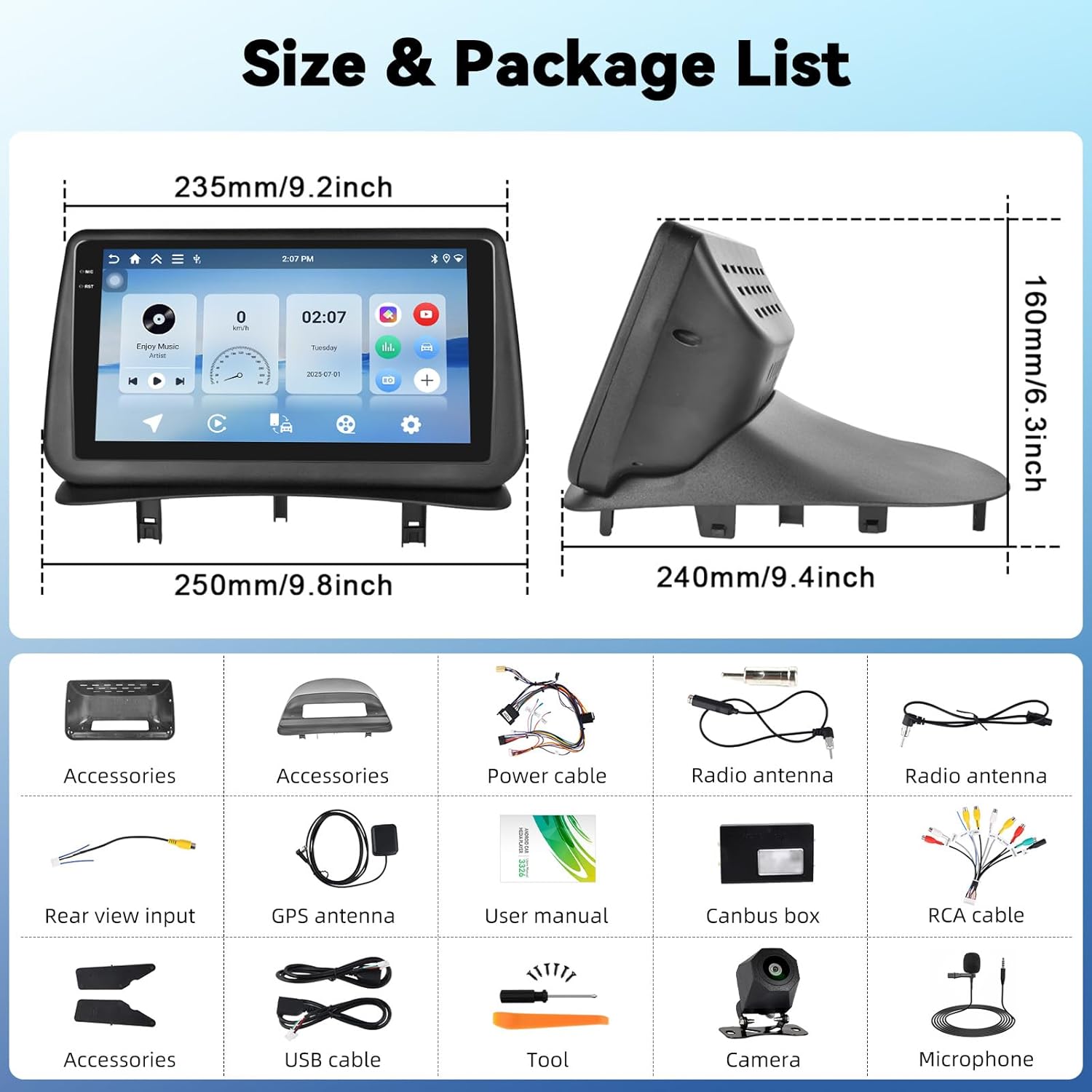
This image displays the dimensions of the car radio unit and a visual representation of all components included in the package.
3. Setup and Installation
This car radio is specifically designed for Renault Clio 3rd Generation models manufactured between 2005 and 2014. Professional installation is recommended to ensure proper functionality and avoid damage to your vehicle or the unit.
3.1 Vehicle Compatibility
Ensure your vehicle dashboard matches the compatible models for seamless integration.

This image illustrates the appearance of the SIXTOP car radio installed in a Renault Clio 3 dashboard, contrasting it with the original setup.
3.2 Wiring Connections
Carefully connect all cables according to the wiring diagram provided in the separate installation guide. Key connections include:
- Power Cables: Connect to the vehicle's power supply.
- GPS Antenna: Mount in a location with a clear view of the sky for optimal signal reception.
- Radio Antenna: Connect for FM/RDS reception.
- USB Cables: For data transfer and charging.
- RCA Cable: For audio/video output to external devices.
- Canbus Box: Integrate with vehicle's CAN-BUS system for steering wheel controls and other functions.
- Rear Camera Input: Connect the included rear camera for parking assistance.
4. Operating Instructions
4.1 Wireless CarPlay & Android Auto
Connect your iPhone or Android smartphone wirelessly to access navigation, make calls, listen to music, and send/receive messages directly from the car radio display. This feature ensures a safe and convenient driving experience.

This image demonstrates the wireless CarPlay and Android Auto functionalities, including hands-free calling, music playback, and app integration.
4.2 MirrorLink
MirrorLink allows you to project your smartphone screen onto the car radio display. Connect your smartphone via USB or Wi-Fi to use your favorite apps, such as music and video players, on the larger screen.
4.3 GPS Navigation
The unit features a built-in GPS module supporting both online and offline maps. For offline maps, an internet connection is required initially to download map data. Enjoy real-time traffic updates and voice guidance for accurate navigation.

This image displays the GPS navigation interface with various map applications and illustrates the WiFi connection for browsing and downloading apps.
4.4 Wi-Fi Connection
With integrated Wi-Fi, you can connect to your phone's hotspot to browse the internet, stream videos (e.g., YouTube), listen to music (e.g., Spotify), and download additional applications directly to the car radio.
4.5 Bluetooth 5.0
The Bluetooth 5.0 function enables clear hands-free calls, phonebook synchronization, and wireless music streaming from your smartphone. This ensures you stay connected while driving.

This image highlights the Bluetooth 5.0 features for hands-free communication and music streaming, as well as the FM/RDS radio interface.
4.6 FM/RDS Radio
Enjoy your favorite radio stations with the built-in FM/RDS tuner. It supports automatic channel search and station memory, providing an immersive audio experience.
4.7 Steering Wheel Control (SWC)
The unit supports the original steering wheel control learning function. This allows you to control volume, change tracks, and manage other functions without taking your hands off the steering wheel, enhancing safety.

This image illustrates the steering wheel control learning function and the AHD rear view camera input with parking guidelines.
4.8 AHD Rear View Camera Input
The car radio supports AHD/CVBS rear camera input. When reversing, the rear image automatically displays on the screen, making parking safer and more convenient. A rear camera is included in the package.
4.9 Split Screen Function
Utilize the split-screen function to run two applications simultaneously. For example, you can have navigation on one side and music playback on the other, improving multitasking capabilities.

This image shows the split-screen functionality, allowing two applications to run concurrently, and the graphic equalizer interface for sound customization.
4.10 EQ Function
The integrated equalizer (EQ) allows you to adjust sound effects, reduce noise, and enhance audio quality, providing a personalized and immersive listening experience.
5. Maintenance
To ensure the longevity and optimal performance of your car radio, follow these maintenance guidelines:
- Cleaning: Use a soft, dry cloth to clean the screen and exterior. Avoid abrasive cleaners or solvents.
- Software Updates: Periodically check for and install software updates to ensure the system runs efficiently and has the latest features.
- Temperature: Avoid exposing the unit to extreme temperatures, both hot and cold, for extended periods.
- Power Off: Turn off the unit before turning off your vehicle's ignition to prevent potential data corruption.
6. Troubleshooting
If you encounter any issues, refer to the following common problems and solutions:
| Problem | Possible Cause | Solution |
|---|---|---|
| Unit does not power on | Loose power connection, blown fuse, vehicle battery issue. | Check power cables, inspect fuses, verify vehicle battery voltage. |
| No sound | Volume too low, incorrect audio source, speaker wiring issue. | Increase volume, select correct audio source, check speaker connections. |
| GPS not working | GPS antenna not properly connected or positioned, no map data. | Ensure GPS antenna has clear sky view, check connection, download offline maps if needed. |
| Bluetooth connection issues | Bluetooth not enabled, device not discoverable, interference. | Ensure Bluetooth is on for both devices, make device discoverable, try re-pairing. |
| Steering wheel controls not responding | Canbus box not connected, SWC learning not completed. | Check Canbus connection, perform SWC learning procedure in settings. |
If the problem persists after trying these solutions, please contact customer support.
7. Specifications
| Feature | Detail |
|---|---|
| System | Android 15 |
| Screen Material | Incell Touch Screen |
| Screen Size | 9 inches |
| Screen Resolution | 1280*720 |
| RAM + ROM | 4GB RAM + 128GB ROM |
| Processor Speed | 1.5 GHz |
| Bluetooth Version | 5.0 |
| Radio Chip | UMW2652 |
| Radio Band | FM/RDS |
| Output Power | 4*45 W (Max 180W) |
| Operating Voltage | 9V-16V |
| Operating Temperature | -20 ℃ to 70 ℃ |
| Rear Camera Input | AHD/CVBS |
| USB Interface | Dual USB ports |
| Audio Formats | APE/FLAC/WAV/MP3/WMA, etc. |
| Video Formats | MKV/RMVB/AVI/MP4/MDV, etc. |
| Image Formats | PNG/JPEG/JPG/GIF/WBMP/BNP, etc. |
| Supported Languages | Chinese, English, French, Italian, Korean, Japanese, Arabic, Spanish, Portuguese, Russian, Turkish, Vietnamese, Hebrew, Polish, German |
| Weight | 3.35 Kilograms |
8. Warranty and Support
8.1 Warranty Information
Your SIXTOP car radio comes with a 2-year warranty. In case of any manufacturing defects or issues covered under warranty, please contact our customer service.
8.2 Return Policy
We offer a 30-day return policy for eligible products. Please refer to the retailer's return policy for detailed terms and conditions.
8.3 Customer Support
For technical assistance, troubleshooting, or warranty claims, please contact SIXTOP customer support. We aim to provide a response within 24 hours and offer lifetime technical support.
You can typically find contact information on the retailer's website or within the product packaging. For Amazon purchases, you can click on the seller's name (e.g., "xinshunhangdianpu") and then select "Ask a question" to reach us directly.

This image illustrates the process of contacting seller support through the Amazon platform.
Related documents4 Core 4+128G


Ask a question about this manual
Ask about setup, troubleshooting, compatibility, parts, safety, or missing instructions. Manuals+ will review the question and use this page’s manual context to help answer it.