
1. Introduction
This manual provides detailed instructions for the installation, operation, and maintenance of your eLinkSmart Slim Sliding Patio Door Lock, Model YL-D208F-D. Please read this manual thoroughly before installation and use to ensure proper function and safety. Keep this manual for future reference.
2. Product Overview
2.1 Key Features
- Multiple Unlocking Methods: Fingerprint, IC Card/NFC, Password, Tuya App control, and traditional physical keys.
- Temporary Access: Generate one-time or time-limited passwords for guests or service personnel via the Tuya App.
- Wide Door Compatibility: Supports door thicknesses from 22mm to 110mm. Minimum door frame width required is 40mm (1.57 inches).
- Reversible Handle: The lock handle can be reversed to suit both left and right-opening sliding doors.
- Enhanced Security: Features a double hook and full steel structure for increased robustness.
- Weather Resistance: IPX5 waterproof standard ensures reliable operation in various weather conditions.
- Emergency Power: Equipped with a Type-C emergency charging port for temporary power in case of battery depletion.
2.2 Package Contents
Verify that all components are present before beginning installation:

Image 2.2.1: Complete package contents of the eLinkSmart Slim Sliding Patio Door Lock. This image displays the main lock units (front and back), the mortise lock body, two physical keys, two RFID cards, and multiple sets of installation screws and accessories designed for various door thicknesses.
- Front Lock Unit (with keypad and fingerprint sensor)
- Rear Lock Unit
- Mortise Lock Body (2885 latch)
- Installation Screw Accessories (5 sets for 22-110mm door thickness)
- Physical Keys x 2
- RFID Cards x 2
- Installation Template (not explicitly listed but typically included)
3. Important Safety Information
- Do not attempt to disassemble or repair the lock yourself. Contact customer support for assistance.
- Use only the specified AAA batteries. Do not mix old and new batteries or different types of batteries.
- Ensure the door is properly aligned and closes smoothly before installing the lock.
- Keep physical keys in a secure location away from the lock.
- Regularly check battery levels and replace batteries when the low battery alarm activates.
- Protect your passwords and fingerprints from unauthorized access.
4. Setup and Installation
4.1 Pre-Installation Check
Before installation, confirm your door's compatibility:
- Door Thickness: The lock is designed for doors with a thickness between 22mm and 110mm.
- Door Frame Width: A minimum door frame width of 40mm (1.57 inches) is required.
- Door Type: Suitable for most single-cylinder sliding doors, including aluminum and glass doors.

Image 4.1.1: Dimensional diagram of the lock and mortise. This image provides critical measurements for the lock body, mortise, and required door specifications, including door thickness compatibility (22mm to 110mm) and lock width (36mm).
4.2 Installation Steps
The installation process typically takes 10-15 minutes and generally does not require drilling for standard installations. Refer to the included installation template for precise hole placement if necessary.
- Prepare the Door: Ensure the door is clean and the existing mortise cutout matches the dimensions of the new lock's mortise body.
- Install the Mortise Lock Body: Insert the mortise lock body into the door edge. Secure it with screws.
- Install the Front and Rear Lock Units: Connect the cables between the front and rear lock units. Align the spindle and mounting posts, then attach both units to the door, securing them with the appropriate screws from the accessory sets based on your door's thickness.
- Reverse Handle (if needed): The handle can be reversed to match your door's opening direction. Consult the specific instructions for handle reversal if required.
- Install Batteries: Insert 4 x AAA batteries into the battery compartment of the rear lock unit.
- Test Operation: After installation, test all unlocking methods (key, fingerprint, keypad) to ensure proper function before closing the door.
4.3 Tuya App Integration
To utilize smart features, download the Tuya Smart App from your device's app store. Follow the in-app instructions to pair your lock with the application. This enables remote control, temporary password generation, and access logs.
5. Operating Instructions
5.1 Unlocking Methods

Image 5.1.1: Overview of the multiple unlocking methods available for the eLinkSmart lock. This includes fingerprint recognition, keypad passcode entry, mobile application control, physical key access, RFID card/NFC, and Bluetooth Low Energy (BLE) for remote unlocking via a gateway.
- Fingerprint: Place your registered finger on the sensor. The lock will unlock if the fingerprint is recognized.
- Passcode: Enter your registered passcode on the keypad, followed by the '#' key.
- IC Card/NFC: Present your registered IC card or NFC-enabled device to the card reader area on the lock.
- Tuya App: Use the Tuya Smart App on your smartphone to unlock the door remotely (requires a Bluetooth gateway for remote access).
- Physical Key: In case of emergency or battery failure, use the provided physical key to unlock the door.
5.2 Locking the Door
The lock typically auto-locks after a set period. You can also manually lock the door by lifting the handle or pressing a designated lock button on the keypad, depending on the configuration.
5.3 Administrator Anti-Lock Mode

Image 5.3.1: Details of the lock's anti-lock features. This image highlights the 'Administrator Anti-Lock Mode' switch, which, when activated, allows only registered administrator users to unlock the door, enhancing security. It also shows a quick disengage knob for internal anti-lock release.
Activate the 'Admin Anti-locked Feature' by turning the designated toggle on the interior unit. When this feature is active, only registered administrator users can unlock the door, providing an additional layer of security.
5.4 Emergency Charging

Image 5.4.1: Type-C emergency charging port located at the bottom of the lock. This port allows for temporary power supply using a standard Type-C cable and power bank in case the internal batteries are completely depleted, enabling access.
If the batteries are completely drained, connect a power bank to the Type-C emergency charging port located at the bottom of the exterior lock unit to temporarily power the lock and gain access.
6. Maintenance
6.1 Battery Replacement

Image 6.1.1: Battery compartment of the eLinkSmart lock, designed for 4 x AAA batteries. The image also notes an approximate 6-month battery life and the presence of a low battery alarm feature to alert users when replacement is needed.
The lock uses 4 x AAA batteries. When the low battery alarm sounds, replace all four batteries promptly. Do not mix old and new batteries. Expected battery life is up to 6 months under normal usage.
6.2 Cleaning
Wipe the lock's surface with a soft, dry cloth. Avoid using abrasive cleaners, solvents, or harsh chemicals, as these can damage the finish and electronic components.
6.3 Weather Protection
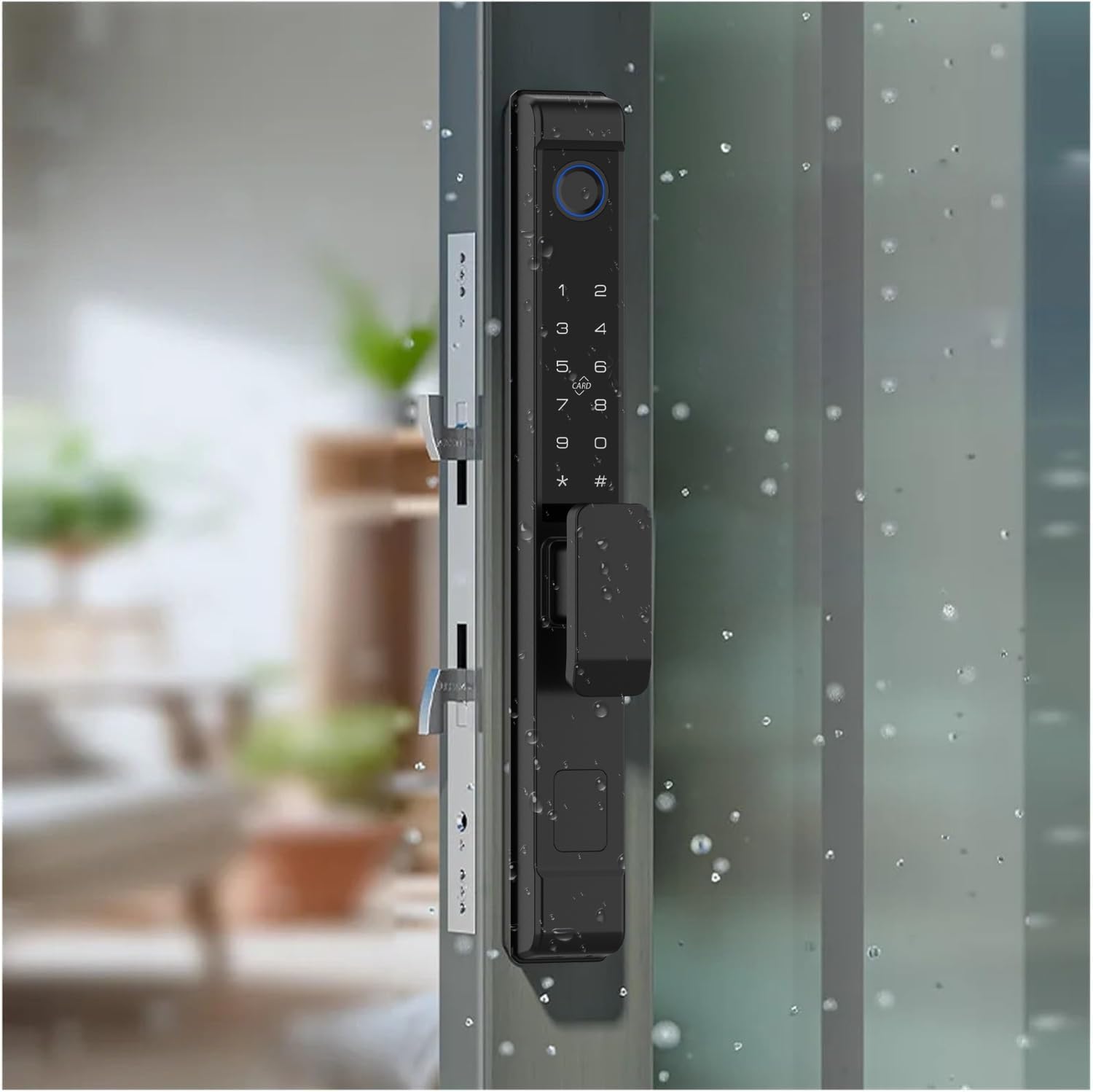
Image 6.3.1: The eLinkSmart lock installed on a glass door, with water droplets on its surface, illustrating its IPX5 waterproof capability. This indicates the lock is protected against low-pressure water jets from any direction, making it suitable for outdoor use.
The lock is rated IPX5 waterproof, providing protection against low-pressure water jets. While designed for outdoor use, avoid direct exposure to extreme weather conditions or prolonged submersion.
7. Troubleshooting
- Lock Not Responding: Check battery levels. If batteries are low, use the emergency Type-C charging port or replace batteries.
- Fingerprint Not Recognized: Ensure your finger is clean and dry. Re-register your fingerprint if the issue persists.
- Keypad Not Working: Verify that the keypad is clean. If the issue continues, try using another unlocking method or the physical key.
- App Connectivity Issues: Ensure your phone's Bluetooth is on and you are within range. If using remote access, verify the Bluetooth gateway is properly connected and online.
- Door Not Locking/Unlocking Smoothly: Check for any obstructions in the door frame or mortise. Ensure the lock is installed correctly and the door is aligned.
For persistent issues or problems not covered here, please refer to the Warranty and Support section for contact information.
8. Specifications
| Feature | Specification |
|---|---|
| Brand | eLinkSmart |
| Model Name | YL-D208F-D |
| Lock Type | Biometric (Fingerprint), Keypad, IC Card/NFC, App, Key |
| Material | Zinc Alloy |
| Color | Black |
| Dimensions (L x W x H) | 1.37 x 2.16 x 12.6 inches (34.8 x 54.9 x 320 mm) |
| Item Weight | 4.6 Pounds (2.09 kg) |
| Door Thickness Compatibility | 22mm - 110mm |
| Minimum Door Frame Width | 40mm (1.57 inches) |
| Power Supply | 4 x AAA Batteries (Not Included) |
| Emergency Power | Type-C USB Port |
| Waterproof Rating | IPX5 |
| Control Method | App (Tuya Smart) |
| Included Components | Lock units, Mortise, 5 sets of installation screws, 2 Keys, 2 RFID Cards |
| Manufacturer | Shenzhen Elink Smart Co., Ltd. |
9. Warranty and Support
eLinkSmart provides the following guarantee for your product:
- 30-Day Refund: Eligible for a full refund within 30 days from the date of purchase.
- 180-Day Free Exchange: Eligible for a free product exchange within 180 days from the date of purchase for any manufacturing defects or functional issues.
If you encounter any product problems or require assistance, please contact eLinkSmart customer support directly. Provide your purchase details and a description of the issue for prompt resolution.