Introduction
This manual provides essential instructions for the assembly, operation, maintenance, and troubleshooting of your Garvee Vanity Desk with Mirror and Lights. Please read this manual thoroughly before assembly and use to ensure proper function and safety.
Setup and Assembly
Your Garvee Vanity Desk requires assembly. All necessary tools and supplies are organized and packaged separately with clear labels to facilitate the process. Please follow the detailed assembly instructions provided in the packaging carefully to ensure the stability and safety of the product.
Safety Information:
- Always unplug the vanity desk before cleaning or making any adjustments.
- Do not place heavy objects on the mirror to prevent damage.
- Keep the vanity desk away from water to prevent electrical shorts.
- Always follow the assembly instructions carefully to ensure the stability and safety of the product.
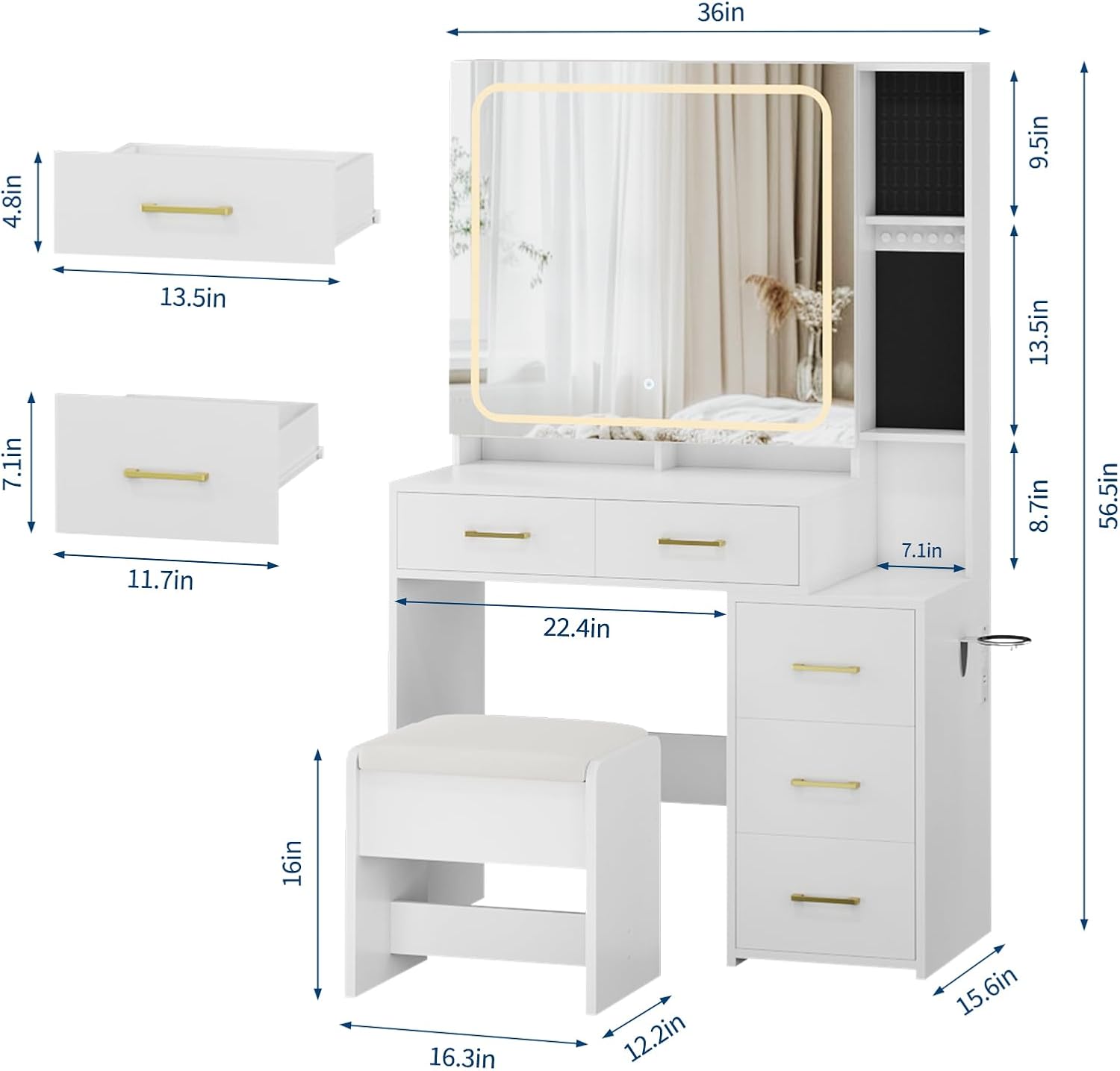
Image: Detailed dimensions of the Garvee Vanity Desk components, including drawers, mirror, and stool. This image assists in understanding the scale and fit of the vanity in your space.

Image: A fully assembled Garvee Vanity Desk with its cushioned stool, showcasing its appearance in a typical bedroom environment.
Operating Instructions
Mirror Lighting Modes
The vanity desk features an HD mirror with integrated lighting. The lighting system offers three distinct color modes and adjustable brightness, controlled via a touch sensor on the mirror surface.
- Warm Yellow Light: Suitable for creating a soft ambiance or for evening makeup application.
- Warm White Light: Ideal for general makeup application and daily use.
- Cool White Light: Provides bright, clear illumination, suitable for detailed tasks or professional makeup.
To adjust brightness, press and hold the touch sensor until the desired intensity is reached. Tap the sensor to cycle through the color modes.
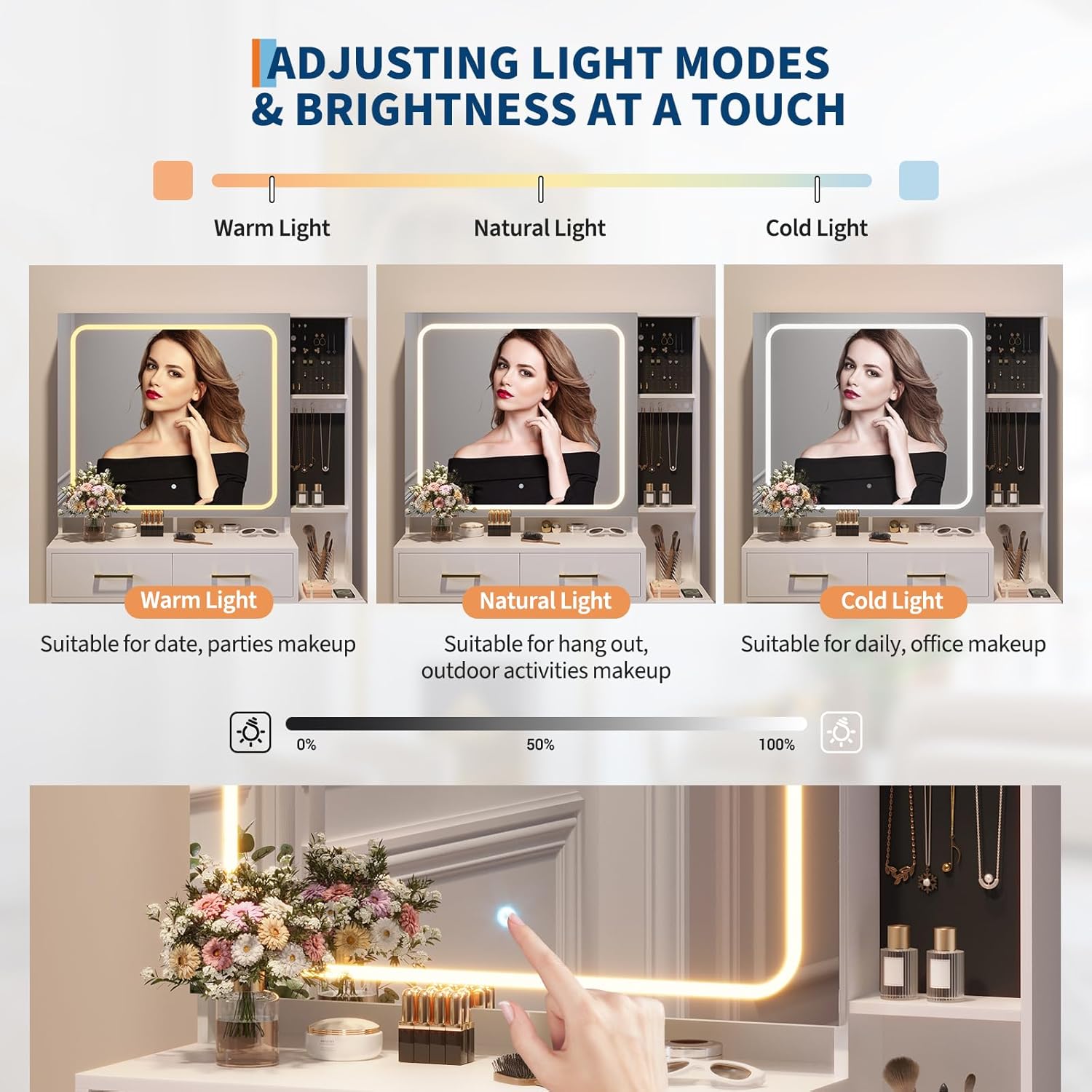
Image: The vanity mirror displaying the three adjustable light modes (Warm, Natural, Cold) and a touch control for brightness adjustment.
Integrated Charging Station
The vanity desk is equipped with a convenient charging station to power your electronic devices.
- 2 Standard Plug Sockets: For appliances requiring AC power (125V/12A).
- 2 USB Ports: For charging mobile phones, tablets, and other USB-powered devices (5V/2A).
Ensure the vanity desk is properly plugged into a wall outlet for the charging station to function.

Image: A close-up view of the integrated power strip, showing two standard AC outlets and two USB ports for charging devices.
Hair Dryer Rack
A dedicated rack is provided to store your hair dryer or curling iron, keeping it within easy reach and organized.
Maintenance and Care
Proper care will extend the life and appearance of your Garvee Vanity Desk.
- Cleaning: Always unplug the vanity desk before cleaning. Use a soft, damp cloth to wipe down surfaces. Avoid abrasive cleaners or harsh chemicals that may damage the engineered wood finish or mirror.
- Mirror Care: Clean the mirror with a glass cleaner and a lint-free cloth. Do not spray cleaner directly onto the mirror; apply it to the cloth first.
- Spills: Wipe up spills immediately to prevent staining or damage to the wood.
- Electrical Components: Ensure all electrical connections remain dry. Do not immerse any part of the vanity desk in water.
Troubleshooting
| Problem | Possible Cause | Solution |
|---|---|---|
| Mirror lights do not turn on. | Desk is not plugged in; power outage; faulty connection; touch sensor issue. | Ensure the desk is securely plugged into a working power outlet. Check if the power outlet is functional. Verify all internal connections are secure (refer to assembly manual). Contact customer support if the issue persists. |
| Charging station (outlets/USB) is not working. | Desk is not plugged in; power outage; device not compatible; faulty connection. | Confirm the vanity desk is plugged in. Test the outlet with another device. Ensure your device is compatible with the USB port specifications (5V/2A). Check internal wiring if accessible and safe. |
| Drawers are stiff or difficult to open/close. | Overloaded drawer; debris in tracks; improper assembly. | Reduce the weight in the drawer. Clean the drawer tracks of any dust or debris. Review assembly instructions to ensure drawers were installed correctly. |
| Vanity feels unstable. | Loose fasteners; uneven floor. | Check and tighten all assembly fasteners. Ensure the vanity is placed on a level surface. Use shims if necessary to stabilize. |
Product Specifications
- Model Number: cOmch-4ZZlnzum8-F3oILAYrufm
- Product Dimensions: 15.6"D x 36"W x 56.5"H
- Color: White
- Material: Engineered Wood
- Item Weight: 121.5 pounds
- Seat Height (Stool): 16 Inches
- Power Outlet: 2 Standard AC Sockets (125V/12A)
- USB Ports: 2 USB Ports (5V/2A)
- Lighting Modes: 3 Color Modes (Warm Yellow, Warm White, Cool White) with Adjustable Brightness
Warranty Information
For specific warranty details regarding your Garvee Vanity Desk, please refer to the documentation included with your purchase or contact the seller directly. Garvee is committed to providing quality products and customer satisfaction.
Customer Support
Should you have any questions, concerns, or require assistance with your Garvee Vanity Desk, our dedicated customer support team is ready to help. Please reach out to the seller, Garvee Direct, through your purchase platform for prompt assistance.


