
1. Important Safety Information
Before operating your NAVIC T5 Electric Scooter, please read and understand all safety instructions. Failure to follow these instructions may result in serious injury or damage to the scooter.
- Always wear a helmet and appropriate protective gear (knee pads, elbow pads) when riding.
- Ensure the scooter is fully charged and all components are securely fastened before each ride.
- Do not exceed the maximum weight limit of 264 pounds (120 kg).
- The NAVIC T5 Electric Scooter is designed for adult use only.
- Operate the scooter in accordance with local laws and regulations.
- Avoid riding in wet conditions, on uneven terrain, or in heavy traffic.
- Utilize the dual braking system (front E-ABS and rear drum brake) for controlled stopping.
- The scooter is equipped with ultra-bright LED headlights and brake taillights for improved visibility. Use them, especially in low-light conditions.
- This product has obtained UL 2272 certification for electrical safety.
2. Product Overview
The NAVIC T5 Electric Scooter is a foldable e-scooter designed for urban commuting and recreational use. It features a powerful motor, long-range battery, and a dual suspension system for a comfortable ride.

Figure 2.1: The NAVIC T5 Electric Scooter in its upright position, showcasing its sleek design and black-gray-yellow color scheme.
Key Features:
- Motor: 350W peak motor for efficient acceleration and uphill climbing.
- Speed: Up to 19-22 mph (30-35 km/h) depending on model and riding conditions.
- Range: Up to 22 miles (35 km) on a single charge.
- Braking System: Dual braking system with front E-ABS and rear drum brakes.
- Tires: 8.5-inch solid tires for durability.
- Suspension: Dual suspension for enhanced ride comfort.
- Portability: Fast folding system for easy storage and transport.
- Smart Control: LED display and smartphone app connectivity for monitoring and control.

Figure 2.2: Close-up view illustrating the 350W motor, 8.5-inch solid tire, 19 MPH top speed capability, and 15-degree uphill climbing capacity of the NAVIC T5 scooter.
3. Setup and Initial Use
3.1 Unboxing and Assembly
Your NAVIC T5 scooter comes partially assembled. Follow these steps to complete the setup:
- Carefully remove all components from the packaging.
- Unfold the scooter by releasing the folding mechanism. Ensure it locks securely into place.
- Attach the handlebars to the stem, ensuring all cables are properly connected and not pinched.
- Tighten all screws and bolts as instructed in the quick start guide (if provided).
- Adjust the handlebar height to a comfortable riding position.
3.2 Initial Charging
Before your first ride, fully charge the scooter's battery.
- Locate the charging port, typically near the base of the scooter.
- Connect the charger to the scooter and then to a power outlet.
- The charging indicator light on the charger will change (e.g., from red to green) when charging is complete.
- A full charge typically takes approximately 4 hours.

Figure 3.1: Illustration of the scooter's battery, highlighting its 22-mile long range and 4-hour fast charging capability.
3.3 App Connection
The NAVIC T5 scooter can connect to a smartphone app for additional features and control. While the official app may have connectivity challenges, users have reported success with third-party apps like 'Tuya Smart'.
- Download the recommended app (e.g., 'Tuya Smart') from your device's app store.
- Ensure your scooter is powered on and Bluetooth is enabled on your smartphone.
- Follow the in-app instructions to pair your scooter. This typically involves searching for nearby devices and selecting your scooter.
- Once connected, you can access features such as cruise control, speedometer, battery level, and locking/unlocking the scooter.
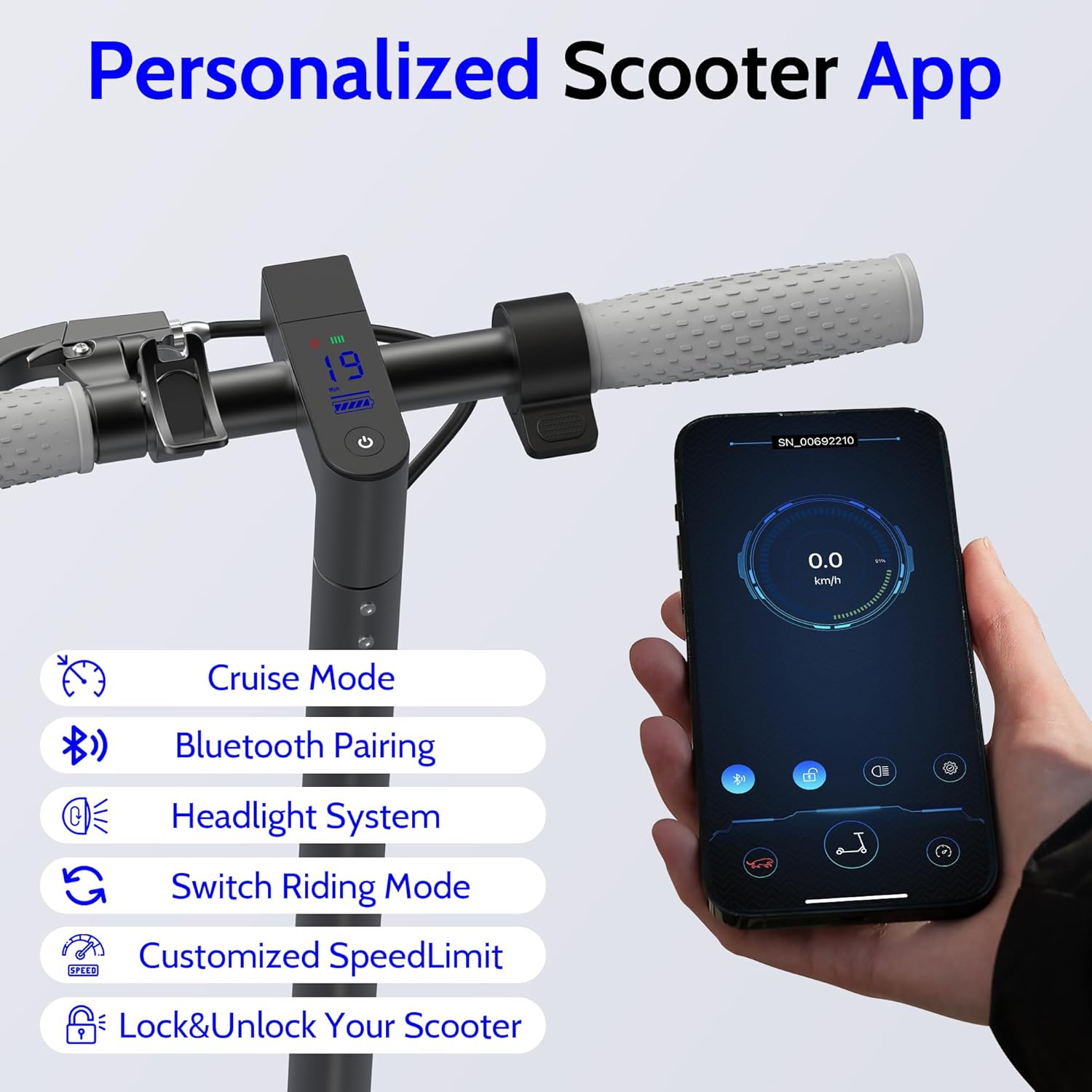
Figure 3.2: Display showing the scooter's LED screen and a smartphone interface for the personalized scooter app, detailing features like cruise mode, Bluetooth pairing, headlight control, riding mode selection, speed limit customization, and scooter locking/unlocking.
4. Operating Instructions
4.1 Power On/Off
- To Power On: Press and hold the power button on the handlebar display until the screen illuminates.
- To Power Off: Press and hold the power button until the display turns off.
4.2 Riding Modes
The NAVIC T5 offers multiple riding modes to suit different preferences and conditions:
- Eco Mode: Up to 7 MPH (11 km/h) - Ideal for beginners or maximizing battery life.
- Slow Mode: Up to 11 MPH (18 km/h) - Balanced speed for general riding.
- Sport Mode: Up to 19 MPH (30 km/h) - For experienced riders seeking maximum performance.
Switch between modes using the designated button on the handlebar or via the connected app.

Figure 4.1: Visual representation of the three riding modes: Eco (7 MPH), Slow (11 MPH), and Sport (19 MPH), demonstrating their suitability for different riding scenarios.
4.3 Braking
The scooter is equipped with a dual braking system for effective stopping:
- Front E-ABS Braking: Controlled by the left brake lever. Provides electronic anti-lock braking.
- Rear Drum Brake: Controlled by the right brake lever. Provides mechanical braking.
Always apply both brakes simultaneously for optimal stopping power and control, especially during emergency stops.

Figure 4.2: Detailed view of the dual braking system, showing the front E-ABS braking lever and the rear drum brake mechanism.
4.4 Folding and Unfolding
The NAVIC T5 features a quick-folding design for portability.
- To Fold: Engage the folding mechanism (refer to your quick start guide for specific lever/button location), and carefully fold the stem downwards until it locks into place.
- To Unfold: Release the locking mechanism, lift the stem until it clicks into the upright position, and ensure it is securely locked before riding.

Figure 4.3: Image demonstrating the one-step folding process of the NAVIC T5 scooter, highlighting its lightweight design for easy carrying.
5. Maintenance
Regular maintenance ensures the longevity and safe operation of your NAVIC T5 Electric Scooter.
5.1 Battery Care
- Charge the battery regularly, even if the scooter is not in use, to maintain battery health.
- Avoid completely draining the battery before recharging.
- Store the scooter in a cool, dry place away from direct sunlight and extreme temperatures.
- Use only the original charger provided with the scooter.
5.2 Tire Inspection
Although the scooter uses solid tires, regular inspection is still important:
- Check tires for any signs of wear, cracks, or damage before each ride.
- Ensure the tires are free of debris that could affect traction.
5.3 Cleaning
- Wipe down the scooter with a damp cloth. Avoid using high-pressure water or harsh chemicals.
- Do not immerse the scooter in water.
5.4 General Checks
- Regularly check all bolts and fasteners for tightness.
- Test the brakes before each ride to ensure they are functioning correctly.
- Inspect the folding mechanism for smooth operation and secure locking.
6. Troubleshooting
This section addresses common issues you might encounter with your NAVIC T5 Electric Scooter.
| Problem | Possible Cause | Solution |
|---|---|---|
| Scooter does not power on. | Low battery; loose connection. | Charge the battery fully. Check all cable connections. |
| Reduced range or speed. | Low battery; riding uphill; heavy load; extreme temperatures. | Ensure battery is fully charged. Adjust riding style. Avoid heavy loads. |
| App connection issues. | Bluetooth off; app malfunction; incorrect pairing. | Ensure scooter is on and Bluetooth is active. Try restarting the app and scooter. Consider using 'Tuya Smart' app if official app fails. |
| Brakes feel weak. | Brake adjustment needed; worn brake pads. | Inspect brake levers and cables. If issues persist, contact support for adjustment or replacement. |
| Unusual noises during operation. | Loose components; debris in wheels. | Check all fasteners. Inspect wheels and motor area for foreign objects. |
If you encounter a problem not listed here or if the suggested solutions do not resolve the issue, please contact customer support.
7. Specifications
Detailed technical specifications for the NAVIC T5 Electric Scooter.
| Feature | Specification |
|---|---|
| Brand | NAVIC |
| Model Name | T5 |
| Motor Power | 350W (Peak) |
| Top Speed | Up to 19 MPH (30 km/h) |
| Max Range | Up to 22 Miles (35 km) |
| Battery Type | Lithium Battery (10.5 AH) |
| Charging Time | Approximately 4 hours |
| Weight Limit | 264 Pounds (120 kg) |
| Item Weight | 35 Pounds (15.9 kg) |
| Wheel Size | 8.5 Inches |
| Wheel Type | Solid |
| Brake Style | Dual Braking System (Front E-ABS, Rear Drum) |
| Material | Aluminum |
| Special Features | Digital Display, Dual Braking System, Foldable, Lightweight |
| UPC | 767735848665 |
8. Warranty and Support
8.1 Warranty Information
The NAVIC T5 Electric Scooter comes with a 1-year manufacturer's warranty. This warranty covers defects in materials and workmanship under normal use. Please retain your proof of purchase for warranty claims.
The warranty does not cover damage caused by misuse, accidents, unauthorized modifications, or normal wear and tear.
8.2 Customer Support
For technical assistance, warranty claims, or any questions regarding your NAVIC T5 Electric Scooter, please contact the seller or manufacturer directly. Refer to your purchase documentation for specific contact details.