
1. Introduction
Thank you for choosing the WEP 927-IV 110W Soldering Station and WEP 8858-V Hot Air Rework Station bundle. This manual provides essential information for the proper setup, operation, maintenance, and troubleshooting of your new equipment. Please read this manual thoroughly before use to ensure safe and efficient operation and to prevent damage to the units or injury to yourself.
This bundle is designed for professional PCB repair and various soldering and desoldering tasks, offering high-power performance and user-friendly functions.
2. Safety Instructions
WARNING: Failure to follow these safety instructions may result in electric shock, fire, or serious injury.
- Always operate the stations in a well-ventilated area to avoid inhaling solder fumes. Use a fume extractor if available.
- The soldering iron and hot air gun tips reach very high temperatures. Avoid direct contact with skin or flammable materials.
- Always place the soldering iron and hot air gun in their respective holders when not in use.
- Ensure the power supply matches the specified voltage (110-127V USA specifications). Do not connect to a 220V power socket.
- Do not use the equipment near water or in damp conditions.
- Keep children and unauthorized personnel away from the workstation.
- Disconnect power before cleaning or performing maintenance.
- Wear appropriate personal protective equipment, including safety glasses.
- Do not operate the equipment if the power cord or any part of the unit is damaged.
3. Package Contents
Verify that all items listed below are present in your package:

Image 3.1: Complete WEP 927-IV and 8858-V Soldering and Rework Station Bundle with all included accessories.
- WEP 927-IV 110W Soldering Station Kit
- WEP 8858-V Hot Air Rework Station
- 5 Extra Soldering Tips
- 3 Hot Air Nozzles (5mm, 8mm, 10mm)
- Lead-free Solder Wire
- Solder Sucker
- Tweezers (various types)
- Handpiece Holder (for soldering iron)
- LED Magnifier
- Tip Cleaner (with brass wool)
- 2 Helping Hands
- Iron Tip Storage Slots
- Solder Wire Stand
- Power Cords
4. Product Overview
4.1 WEP 927-IV 110W Soldering Station
The WEP 927-IV is a high-power soldering station featuring a 110W heating element for rapid heat-up and stable temperature control. It incorporates PID technology for precise temperature maintenance and offers user-friendly functions such as preset temperature channels and a sleep mode.

Image 4.1.1: The WEP 927-IV soldering station displaying its wide temperature range and precision numerical display for actual and set temperatures.

Image 4.1.2: The WEP 927-IV soldering station with its three programmable channels (CH1, CH2, CH3) for general, micro, and sensitive component soldering.
4.2 WEP 8858-V Hot Air Rework Station
The WEP 8858-V is a compact hot air rework station designed for precise temperature control and air volume adjustment. It features an automatic shutdown protection for enhanced safety and is ideal for desoldering and rework tasks on PCBs.

Image 4.2.1: Close-up of the WEP 8858-V hot air rework station showing temperature adjustment buttons, air volume control knob, and digital temperature display.

Image 4.2.2: The three included hot air nozzles (5mm, 8mm, 10mm) for the WEP 8858-V hot air rework station, suitable for various component sizes.
5. Setup
5.1 WEP 927-IV Soldering Station Setup
- Place the soldering station on a stable, heat-resistant surface.
- Connect the soldering iron handpiece to the designated port on the station.
- Insert the desired soldering tip into the iron. Ensure it is securely fastened.
- Place the soldering iron into its handpiece holder.
- Position the tip cleaner (brass wool) and sponge near the workstation. Dampen the sponge slightly with water.
- Connect the power cord to the station and then to a 110-127V AC power outlet.

Image 5.1.1: Setup of various soldering kit accessories including helping hands, solder wire dispenser, and tip storage slots for an organized workbench.
5.2 WEP 8858-V Hot Air Rework Station Setup
- Place the hot air rework station on a stable, heat-resistant surface.
- Connect the hot air gun handpiece to the designated port on the station.
- Select the appropriate nozzle (5mm, 8mm, or 10mm) for your application and attach it securely to the hot air gun.
- Place the hot air gun into its holder.
- Connect the power cord to the station and then to a 110-127V AC power outlet.
6. Operating Instructions
6.1 WEP 927-IV Soldering Station Operation
- Power On: Flip the "POWER" switch to the ON position. The display will show the current and set temperatures.
- Set Temperature:
- Manual Adjustment: Use the temperature adjustment buttons (usually up/down arrows) to set the desired temperature. The station will quickly reach and maintain this temperature using PID technology.
- Preset Channels: Press the "MEMORY" button to cycle through the three preset channels (CH1, CH2, CH3). Each channel can be programmed with a specific temperature for quick recall. To program a channel, set the desired temperature, then press and hold the "MEMORY" button until the channel number flashes, indicating it's saved.
- Temperature Unit Conversion: Press the °F/°C button (if available) to switch between Fahrenheit and Celsius display.
- Soldering: Once the desired temperature is reached, tin the soldering iron tip with a small amount of solder. Apply the tip to the joint, then feed solder into the joint.
- Sleep Mode: The station features a sleep mode to prolong tip life during periods of inactivity. When the iron is placed in its holder for a set duration, the temperature will automatically reduce. Lifting the iron will resume the set working temperature.
- Power Off: When finished, place the iron in its holder and flip the "POWER" switch to the OFF position. Allow the iron to cool completely before storage.
6.2 WEP 8858-V Hot Air Rework Station Operation
- Power On: Flip the "POWER" switch to the ON position. The display will show the current temperature.
- Set Temperature: Use the temperature adjustment buttons (TEMP +/-) to set the desired hot air temperature (range: 212°F~896°F).
- Adjust Air Volume: Rotate the "AIR VOL" knob to adjust the airflow intensity. Start with a lower setting and increase as needed for your application.
- Hot Air Rework: Direct the hot air gun nozzle towards the component to be desoldered or reworked. Maintain a safe distance to avoid damaging surrounding components.
- Automatic Start/Stop: The hot air gun features an automatic start/stop function. When placed in its holder, the unit will cool down to 212°F and stop heating temporarily. Lifting the gun from the holder will automatically resume the set temperature and airflow.
- Power Off: When finished, place the hot air gun in its holder and allow it to cool down. Once cooled, flip the "POWER" switch to the OFF position.
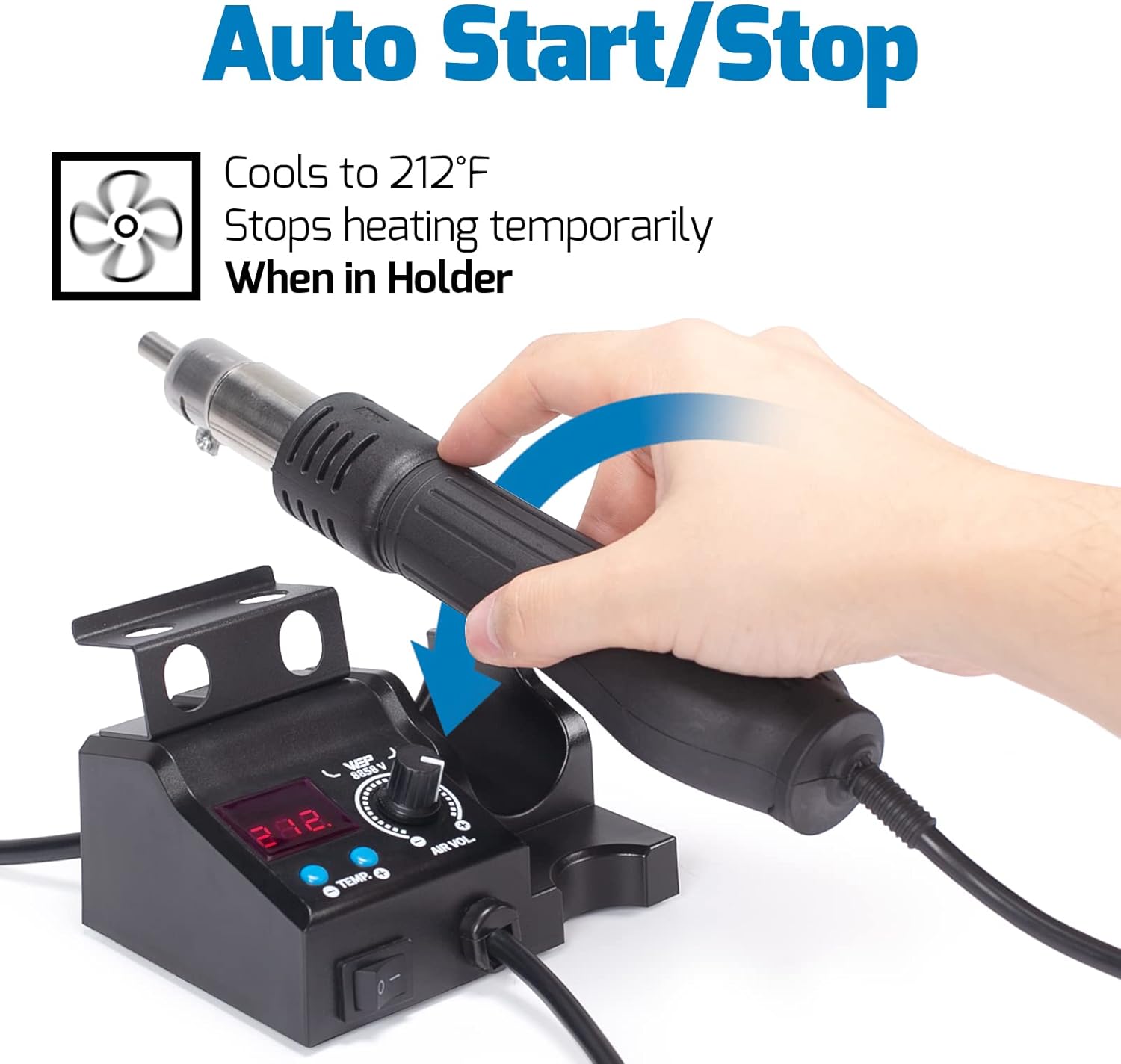
Image 6.2.1: The WEP 8858-V hot air rework station demonstrating its auto start/stop feature, where the unit cools and stops heating when placed in its holder.
7. Maintenance
Regular maintenance ensures optimal performance and extends the lifespan of your equipment.
- Soldering Iron Tips:
- Always tin the tip before and after use to prevent oxidation.
- Clean the tip frequently using the brass wool or a damp sponge.
- Replace tips when they become excessively worn or corroded.
- Hot Air Nozzles: Ensure nozzles are clean and free from solder residue. Clean gently with a soft brush if necessary.
- General Cleaning:
- Wipe down the station units with a soft, dry cloth.
- Do not use abrasive cleaners or solvents.
- Ensure all vents are clear of dust and debris to prevent overheating.
- Storage: Store the equipment in a dry, dust-free environment when not in use.
8. Troubleshooting
| Problem | Possible Cause | Solution |
|---|---|---|
| Soldering iron not heating up. | Power not connected, faulty heating element, loose connection. | Check power cord, ensure iron is properly connected, contact support if element is faulty. |
| Hot air gun not blowing air or heating. | Power not connected, fan malfunction, heating element failure. | Check power, ensure gun is properly seated in holder (for auto start/stop), contact support. |
| Temperature unstable or inaccurate. | Damaged sensor, incorrect calibration, worn-out tip. | Replace tip, ensure proper tip seating, contact support for calibration or sensor issues. |
| Solder not melting easily. | Temperature too low, oxidized tip, incorrect solder type. | Increase temperature, clean/tin tip, use appropriate solder for the application. |
If you encounter issues not listed here or if the suggested solutions do not resolve the problem, please contact customer support.
9. Specifications
WEP 927-IV Soldering Station
- Power: 110W
- Temperature Range: 194°F - 896°F (90°C - 480°C)
- Temperature Stability: ±2°F (±1°C)
- Display Type: LED
- Features: PID Technology, 3 Preset Channels, Sleep Mode, °F/°C Conversion
WEP 8858-V Hot Air Rework Station
- Temperature Range: 212°F - 896°F (100°C - 480°C)
- Air Volume: Up to 120 L/min (Max)
- Display Type: LED
- Features: PID Technology, Automatic Shutdown Protection, Auto Start/Stop (when in holder)
General
- Input Voltage: 110-127V AC (USA specifications)
- ASIN: B0FH1ZFNTH
10. Warranty and Support
This WEP product bundle is covered by a 1-year USA technical support warranty. For assistance, please contact our dedicated support team.
Contact Information:
- Technical Support: Available 24 hours. Refer to your purchase documentation for specific contact details or visit the official WEP website.
- Online Resources: Visit the WEP Store on Amazon for additional product information and support.
Please retain your proof of purchase for warranty claims.


