
1. Introduction
Thank you for choosing the Vector Optics Victoptics SRD 1x18x20 VOD RDSL34 Red Dot Sight. This manual provides essential information for the safe and effective use of your new red dot sight. Please read it thoroughly before installation and operation.
The Victoptics SRD 1x18x20 VOD RDSL34 is a compact, enclosed red dot sight designed for quick target acquisition at close to medium ranges. It features a 4 MOA dot, 8 visible brightness levels plus 1 night vision (NV) compatible setting, and a side-loading battery compartment for convenience. Its robust 6061-T6 aluminum alloy construction ensures durability with 750G shock resistance and IPX4 waterproofing.
2. Safety Information
- Always ensure your firearm is unloaded and safe before handling or installing any accessories.
- Never look directly at the sun or any intense light source through the red dot sight, as this can cause permanent eye damage.
- Handle the red dot sight with care to prevent damage. Avoid dropping or subjecting it to severe impacts.
- Keep batteries out of reach of children. If swallowed, seek immediate medical attention.
3. Package Contents
Verify that all items are present in your package:
- Victoptics SRD 1x18x20 VOD RDSL34 Red Dot Sight
- Riser Weaver Mount
- Hex Wrench
- Plastic Wrench
- Cleaning Cloth
- User Manual (this document)
Note: A CR2032 battery is required for operation and is not included in the package.

Image: Included accessories for the Victoptics SRD red dot sight.
4. Product Overview
Familiarize yourself with the main components of your red dot sight.

Image: General view of the Victoptics SRD red dot sight.
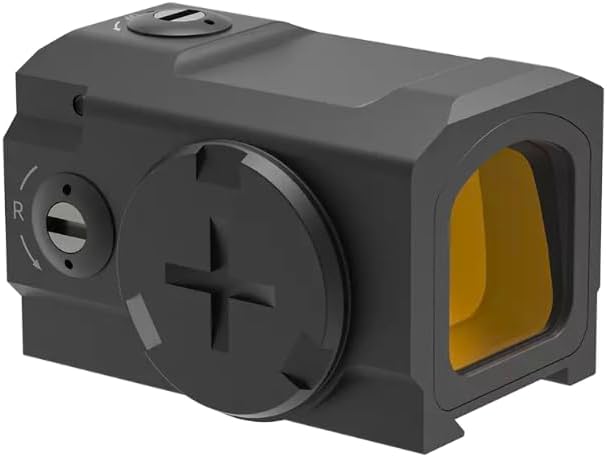
Image: Side view showing windage adjustment and battery compartment.

Image: Top view showing brightness control buttons.
5. Setup
5.1 Battery Installation
- Locate the battery compartment on the side of the red dot sight (refer to Product Overview image).
- Use the provided plastic wrench or a coin to unscrew the battery cap counter-clockwise.
- Insert one CR2032 battery with the positive (+) side facing outwards.
- Replace the battery cap and tighten it clockwise until snug. Do not overtighten.
5.2 Mounting the Sight
The Victoptics SRD is compatible with Weaver and Picatinny rails. A riser Weaver mount is included for optimal height.
- Attach the riser Weaver mount to your firearm's rail, ensuring it is securely fastened using the hex wrench.
- Slide the red dot sight onto the riser mount's rail.
- Position the sight for comfortable eye relief and tighten the mounting screw using the hex wrench. Ensure the sight is firmly attached and does not wobble.

Image: Red dot sight with riser mount.
6. Operating Instructions
6.1 Power On/Off
- To power on: Press and hold the '+' button for approximately 3 seconds.
- To power off: Press and hold the '-' button for approximately 3 seconds.
6.2 Brightness Adjustment
The red dot sight features 8 visible brightness levels and 1 night vision (NV) compatible setting.
- Press the '+' button to increase brightness.
- Press the '-' button to decrease brightness.
- The lowest setting is NV compatible.
6.3 Windage and Elevation Adjustment
The windage (left/right) and elevation (up/down) adjustments are located on the top and side of the sight, respectively. Each click adjusts the point of impact by 1 MOA.
- Remove the protective caps from the adjustment turrets.
- Use a flathead screwdriver or the plastic wrench to turn the adjustment screws.
- Elevation (Top Turret): Turn clockwise to move the point of impact down, counter-clockwise to move it up.
- Windage (Side Turret): Turn clockwise to move the point of impact right, counter-clockwise to move it left.
- After zeroing, replace the protective caps.
7. Maintenance
7.1 Cleaning
To maintain optical clarity, keep the lenses clean.
- Use the provided cleaning cloth or a soft, lint-free cloth to gently wipe the lenses.
- For stubborn dirt, use a small amount of lens cleaning solution designed for optics.
- Do not use abrasive materials or harsh chemicals, as they can damage the lens coatings.
- Wipe the exterior of the sight with a damp cloth as needed.
7.2 Battery Replacement
Replace the CR2032 battery when the dot becomes dim or fails to illuminate. Follow the battery installation steps in Section 5.1.
7.3 Storage
When not in use, store the red dot sight in a cool, dry place, away from direct sunlight and extreme temperatures. Consider removing the battery if storing for extended periods to prevent leakage.
8. Troubleshooting
- Dot does not illuminate: Check battery orientation and ensure it is a fresh CR2032 battery. Ensure the battery cap is tightened.
- Dot is dim: Adjust brightness using the '+' button. If still dim, replace the battery.
- Inaccurate zero: Ensure the sight is securely mounted to the rail. Re-zero the sight following the instructions in Section 6.3.
- Dot appears distorted or blurry: This can sometimes be an astigmatism issue with the user's eye. Try looking through the sight with corrective lenses if applicable. Ensure lenses are clean.
If you experience issues not covered here, please contact customer support.
9. Specifications
| Magnification | N/A |
| Lens Size | 18 x 20 mm (0.71 x 0.79 in) |
| Weight | 71 g (2.50 oz, including battery) |
| Parallax | Free @ 50 yards |
| Dot Size | 4 MOA |
| Brightness Settings | 8 visible levels + 1 NV compatible |
| Battery Type | CR2032 (not included) |
| Battery Life | Approx. 20,000 hours (lowest visible setting) |
| Adjustment Range | 100 MOA |
| Click Value | 1 MOA |
| Shock Resistance | 750G |
| Waterproof Rating | IPX4 |
| Finish | Black Matte |
| Operating Temperature | -20°C to +60°C |
| Material | 6061-T6 Aluminum Alloy |
| Footprint | VOD (ACRO compatible) |
| Mounting Type | Weaver / Picatinny |
10. Warranty
This product is covered by a 1-year manufacturer's warranty from the date of purchase.
The warranty covers defects in materials and workmanship. It does not cover damage caused by misuse, improper installation, unauthorized modification, or normal wear and tear.
Note: Damage to the product's packaging or included bags/boxes is not covered under warranty. However, scratches or malfunctions of the product itself are covered.
11. Support
For technical assistance, warranty claims, or any questions regarding your Victoptics SRD red dot sight, please contact your retailer or the Vector Optics customer support team. Please have your purchase receipt and product model number (RDSL34) available when contacting support.


