
1. Introduction
This manual provides detailed instructions for the installation, operation, and maintenance of the Unifit PID Controller with WiFi, specifically designed for the Pit Boss Platinum Series Brunswick Wood Pellet Vertical Smoker (PBV5PL). Please read this manual thoroughly before installation and use to ensure proper function and safety.
2. Product Overview
The Unifit PID Controller is an advanced digital control board engineered to enhance the cooking experience with your Pit Boss Platinum Series Brunswick Smoker. It features precise temperature management, WiFi connectivity for remote control, and a user-friendly digital touch screen interface.
Key Features:
- Compatibility: Specifically designed for Pit Boss Platinum Series Brunswick Wood Pellet Vertical Smoker (PBV5PL), Part NO. 80148.
- Digital PID Control: Maintains precise and steady temperatures within +/- 5 degrees Fahrenheit by constantly adjusting the auger pellet feed rate and blower fan airflow.
- WiFi Connectivity: Allows control of the smoker from a mobile device.
- Temperature Range: Operates within a temperature range of 150°F to 420°F.
- Cooking Versatility: Supports 8-in-1 cooking functions including Grill, Smoke, Bake, Braise, Roast, Sear, Char-Grill, and Barbecue.
- Meat Probe Support: Includes inputs for up to two meat probes (probes not included).
- Digital Touch Screen: Intuitive interface for setting and monitoring temperatures.
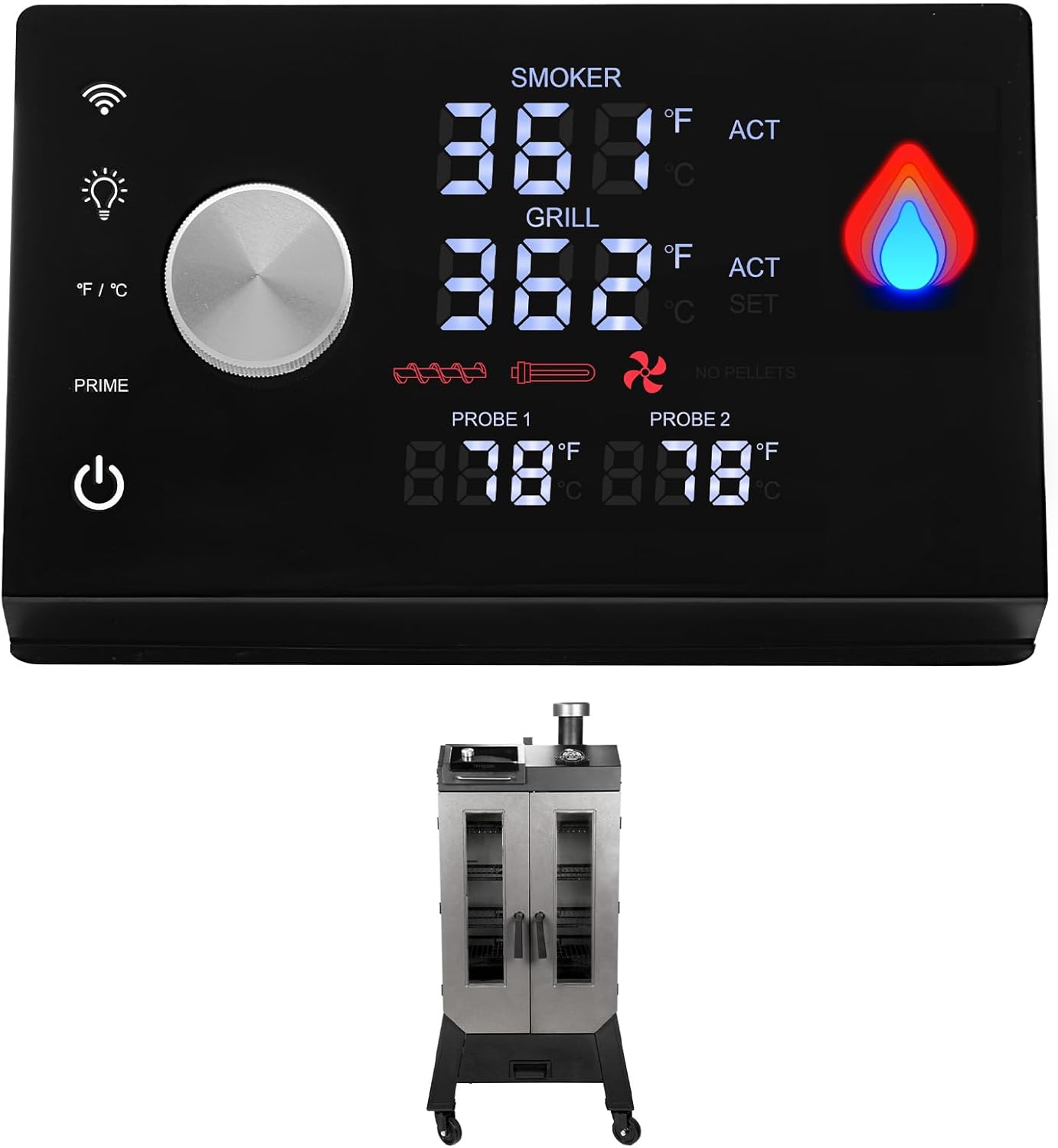
Image 2.1: The Unifit PID Controller with WiFi shown alongside a Pit Boss Platinum Series Brunswick Vertical Smoker, illustrating the product and its intended application.
3. Setup and Installation
The Unifit PID Controller is designed for straightforward replacement, often referred to as 'plug and play'.
Installation Steps:
- Safety First: Ensure the smoker is completely powered off and unplugged from the electrical outlet before beginning any installation or replacement procedures.
- Access the Existing Control Board: Locate the current control board on your Pit Boss Platinum Series Brunswick Smoker. This typically involves removing a cover panel.
- Disconnect Wiring: Carefully disconnect all wiring harnesses and connectors from the existing control board. Note the position of each wire for correct re-connection. Taking a photograph before disconnecting can be helpful.
- Remove Old Board: Unscrew or unclip the old control board from its mounting.
- Install New Board: Position the Unifit PID Controller in the same location. Secure it using the original screws or clips.
- Connect Wiring: Reconnect all wiring harnesses and connectors to the new Unifit PID Controller. Ensure each connection is firm and correctly seated.
- Secure Cover: Replace any cover panels removed earlier.
- Power On: Plug the smoker back into the electrical outlet and power it on.

Image 3.1: An internal view of a smoker's control panel area, showing the wiring for the control board. This illustrates the 'easy replacement plug and play' aspect of the Unifit PID Controller installation.

Image 3.2: The Unifit PID Controller positioned next to a Pit Boss Platinum Series Brunswick Wood Pellet Vertical Smoker, emphasizing its compatibility with this specific model.
4. Operating Instructions
The Unifit PID Controller provides precise control over your smoker's temperature and cooking functions.
Basic Operation:
- Power On/Off: Use the power button on the control panel to turn the smoker on or off.
- Setting Temperature: Utilize the digital touch screen and control knob to set your desired cooking temperature within the 150°F – 420°F range. The PID system will automatically adjust to maintain this temperature.
- Monitoring Temperature: The display shows both the actual smoker temperature and the set temperature. If meat probes are connected, their readings will also be displayed.
- WiFi Control: Refer to the specific instructions provided with the controller or the manufacturer's website for details on connecting to your mobile device and using the WiFi features. This allows for remote monitoring and adjustment of settings.
- 8-in-1 Cooking Versatility: The PID controller supports various cooking methods. Adjust temperature and smoke settings as needed for grilling, smoking, baking, braising, roasting, searing, char-grilling, and barbecuing.

Image 4.1: The Unifit PID Controller's digital display showing current smoker and grill temperatures, along with icons representing its 8-in-1 cooking versatility.
5. Maintenance
The Unifit PID Controller is designed for durability and requires minimal maintenance. However, proper care of your smoker system will ensure the longevity of all components, including the control board.
- Keep Clean: Regularly clean the exterior of the control panel with a soft, damp cloth. Avoid using abrasive cleaners or excessive moisture, which could damage electronic components.
- Protect from Elements: When not in use, ensure your smoker, and thus the control board, is protected from rain, snow, and extreme temperatures. A smoker cover is recommended.
- Inspect Wiring: Periodically check the wiring connections to the control board for any signs of wear, fraying, or loose connections. Ensure all connections are secure.
- Avoid Water Exposure: Prevent water from entering the control board housing, as this can cause short circuits and damage.
6. Troubleshooting
This section provides guidance on common issues and error codes you might encounter with your Unifit PID Controller.
Error Code Diagnosis:

Image 6.1: The Unifit PID Controller's display illustrating various error codes and their corresponding diagnostic information.
| Error Code/Indicator | Description | Possible Cause |
|---|---|---|
| Err & Blinking PELLET or Auger Icon | Indicates an issue with pellet feeding. | Hopper is empty of pellets, auger is blocked, or pellets have expanded due to moisture. |
| Err & Blinking IGNITOR Icon | Indicates an issue with the igniter. | Poor connection between the hot rod igniter and control panel, or the hot rod igniter has failed. |
| Err & Blinking FAN Icon | Indicates an issue with the induction/combustion fan. | Connection issue with the fan, or the fan motor has failed. |
If you encounter an error not listed here, or if troubleshooting steps do not resolve the issue, please contact customer support.
7. Specifications
| Specification | Detail |
|---|---|
| Brand | Unifit |
| Model Name | pb80148 |
| Item Model Number | 80148 |
| Compatibility | Pit Boss Platinum Series Brunswick Wood Pellet Vertical Smoker (PBV5PL) |
| Power Source | AC |
| Color | Black |
| Outer Material | Plastic |
| Item Weight | 16 ounces (1 pound) |
| Product Dimensions | 5.31"D x 8.66"W x 1.77"H |
| Temperature Range | 150°F – 420°F |
| UPC | 782003305961 |
8. Warranty and Support
For warranty information and customer support regarding your Unifit PID Controller, please refer to the documentation included with your purchase or contact the seller directly. Ensure you have your purchase details and model number (80148) available when seeking support.