
1. Important Safety Instructions
Please read all instructions carefully before using the fan and retain this manual for future reference. Failure to follow these instructions may result in electric shock, fire, or serious personal injury.
- Ensure the power supply voltage matches the rating label on the fan.
- Do not operate the fan with a damaged cord or plug. Contact authorized service personnel for repair.
- Keep fingers and other objects away from the fan blades and guards during operation.
- Do not immerse the fan, cord, or plug in water or other liquids.
- Unplug the fan from the power outlet before cleaning or performing any maintenance.
- This appliance is not intended for use by persons (including children) with reduced physical, sensory or mental capabilities, or lack of experience and knowledge, unless they have been given supervision or instruction concerning use of the appliance by a person responsible for their safety.
- Children should be supervised to ensure that they do not play with the appliance.
- Do not use the fan near curtains, drapes, or other objects that could be drawn into the fan.
- Place the fan on a stable, level surface to prevent it from tipping over.
2. Product Overview
The SONA SFS 9068DC is a remote-controlled DC dual-bladed high velocity fan designed for efficient air circulation. It features a brushless DC motor, dual fan blades for enhanced wind delivery, 3D oscillation, and smart memory functions.

Figure 2.1: Overview of the SONA SFS 9068DC fan highlighting its core features including 32W power, brushless DC motor, dual-bladed design, and up to 20m wind delivery.
3. Package Contents
Before assembly, please check that all items listed below are present in the package:
- Fan Head Assembly
- Pedestal Stand (Upper and Lower sections)
- Base Plate
- Remote Control
- User Manual (this document)
4. Setup and Assembly
Follow these steps to assemble your SONA SFS 9068DC fan:
- Attach the Pedestal Stand to the Base: Securely connect the lower section of the pedestal stand to the base plate. Ensure it is stable and tightened.
- Connect Upper Pedestal Section: Insert the upper section of the pedestal stand into the lower section. Adjust the height as desired and secure it.
- Mount the Fan Head: Carefully place the fan head assembly onto the top of the upper pedestal section. Ensure it clicks into place or is securely fastened according to the design.
- Connect Power: Plug the power cord into a suitable electrical outlet.
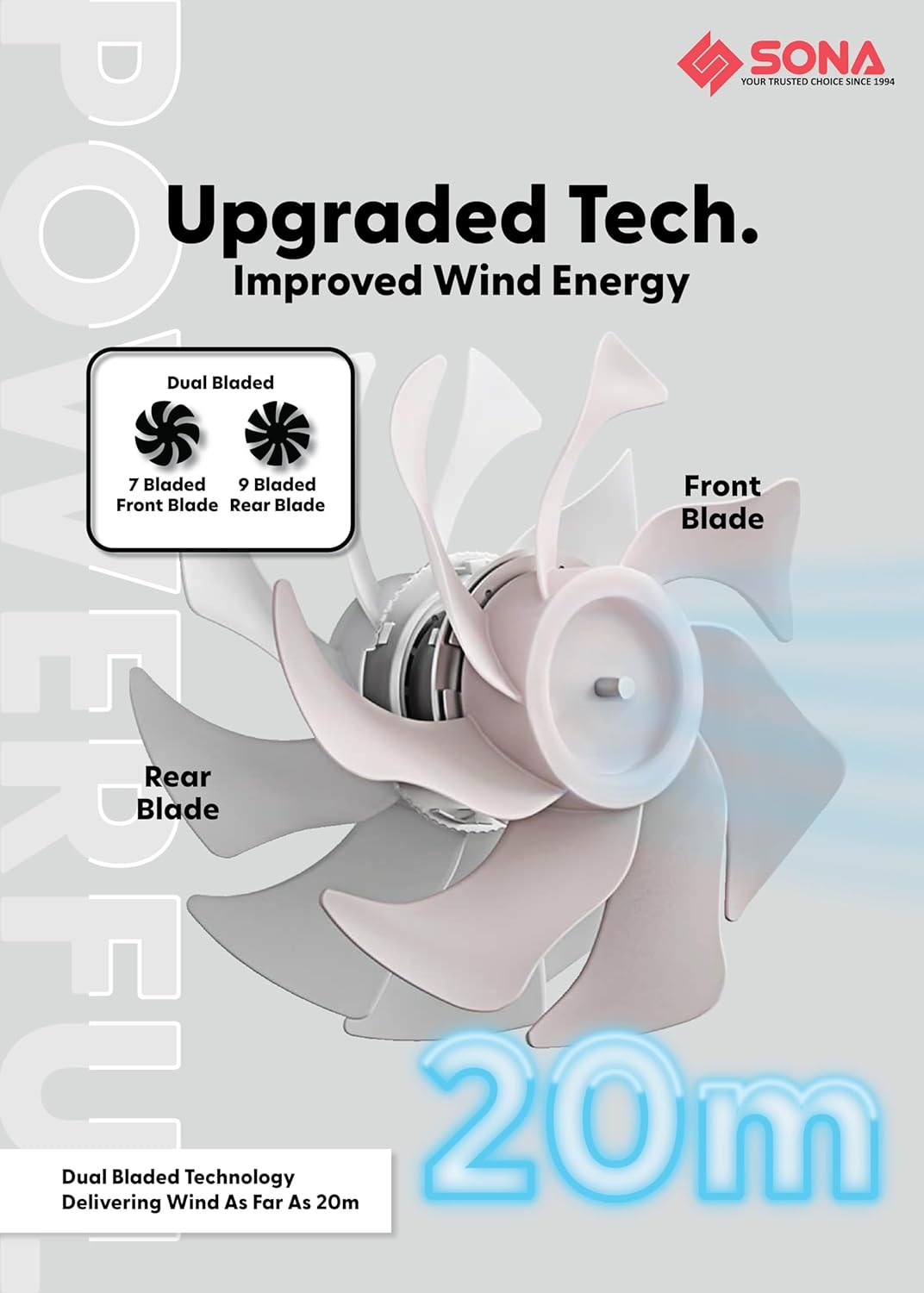
Figure 4.1: Illustration of the dual-bladed design, featuring a 7-bladed front fan and a 9-bladed rear fan, which contributes to improved wind energy and extended wind delivery.

Figure 4.2: Detail of the brushless DC motor, highlighting its role in providing powerful airflow with 32W power consumption and contributing to the fan's longevity.
5. Operating Instructions
The fan can be operated using the control panel on the unit or the included remote control.
5.1 Control Panel and Remote Functions
- Power Button: Turns the fan On/Off.
- Speed Adjustment: Cycle through 9 wind speeds.
- Oscillation Button: Activates/deactivates 3D oscillation (up-down and left-right).
- Timer Button: Sets the operating timer for up to 9 hours.
- ECO-Saving Function: Activates the energy-saving mode, which can operate for up to 15 hours.
- Smart Memory Function: The fan remembers your last used settings (speed, oscillation, mode) when turned off and resumes them upon restart.
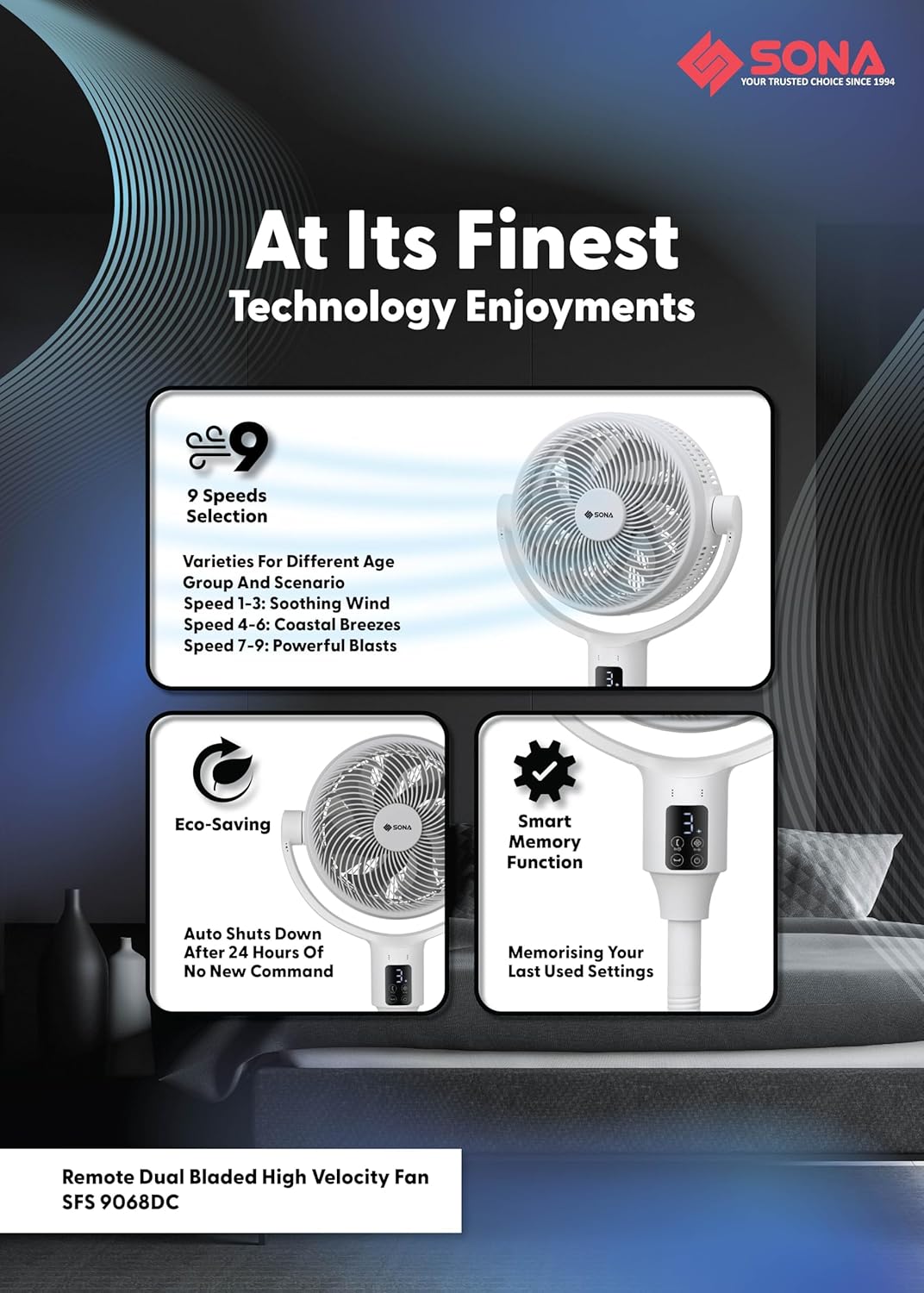
Figure 5.1: Overview of the fan's operational features, including 9 speed settings (1-3 soothing, 4-6 coastal breezes, 7-9 powerful blasts), Eco-Saving mode, and Smart Memory function.
6. Features Explained
6.1 Dual Bladed Technology
The fan incorporates a unique dual-bladed design with a 7-bladed front fan and a 9-bladed rear fan. This configuration works synergistically to generate a powerful and consistent airflow, delivering wind up to 20 meters.
6.2 Brushless DC Motor
Equipped with a premium brushless DC motor, the fan operates efficiently at 32W, providing strong wind output while ensuring a longer lifespan and quieter operation compared to traditional motors.
6.3 3D Oscillation and Height Adjustment
The fan offers 3D oscillation, allowing it to move both horizontally (left-right) and vertically (up-down) to distribute air across a wider area. It also features 2-in-1 height adjustments, enabling use as both a floor fan (lowest 63 cm) and a pedestal fan (highest 111 cm).
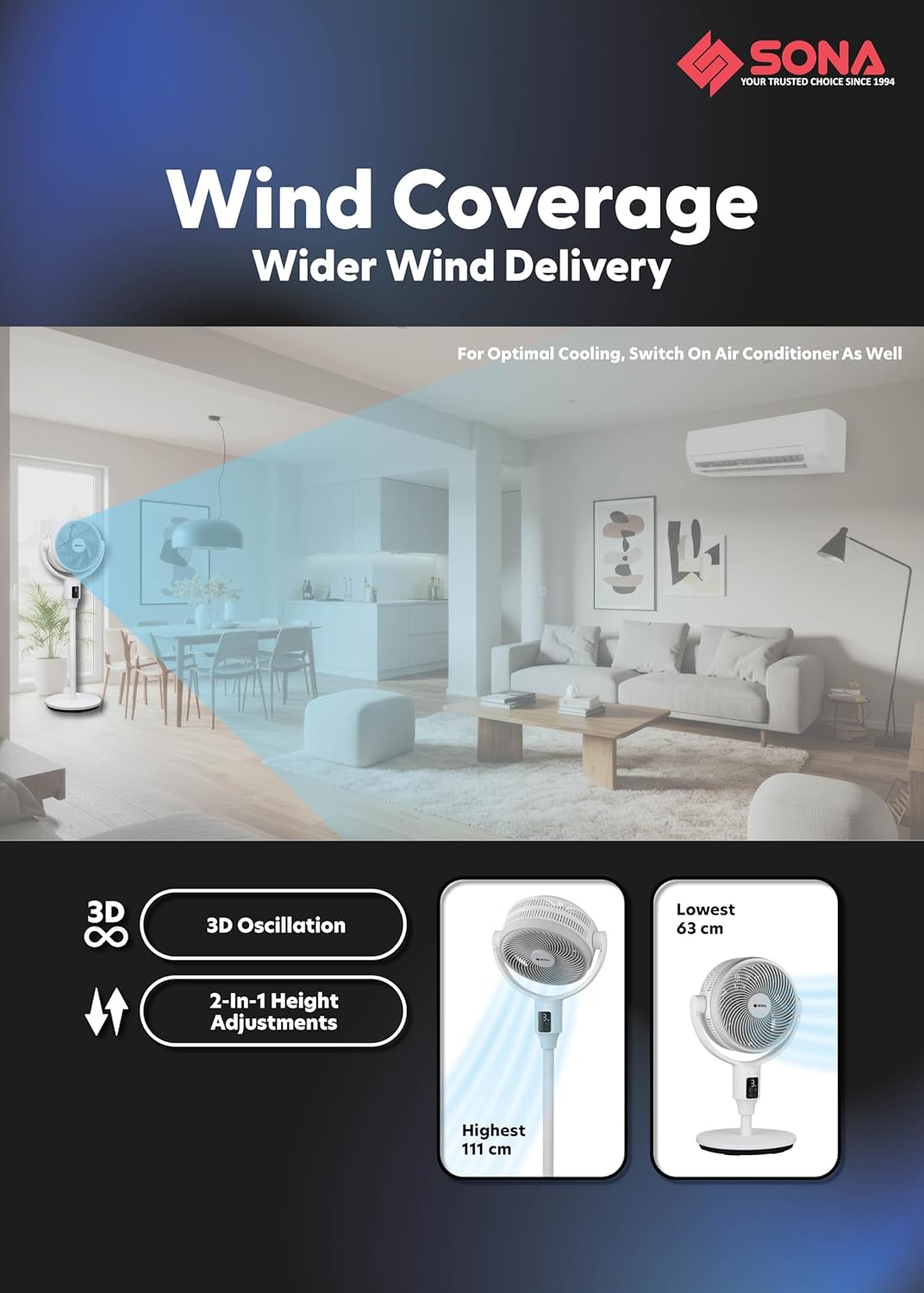
Figure 6.1: Visual representation of the fan's 3D oscillation capability and its adjustable height settings, ranging from 63 cm to 111 cm.
6.4 Anti-Drag Technology
This feature maximizes the drawing of air from the back of the fan and minimizes air loss as air travels from the back to the front. The unique shape and curving of the rear guard and rear fan blade are designed to maximize air intake. The unmovable middle fan blade pushes drawn air further without dispersing it, and the front fan blade's purpose is to deliver wind distance, with its curved edges on the front fan guard designed to push wind forward.
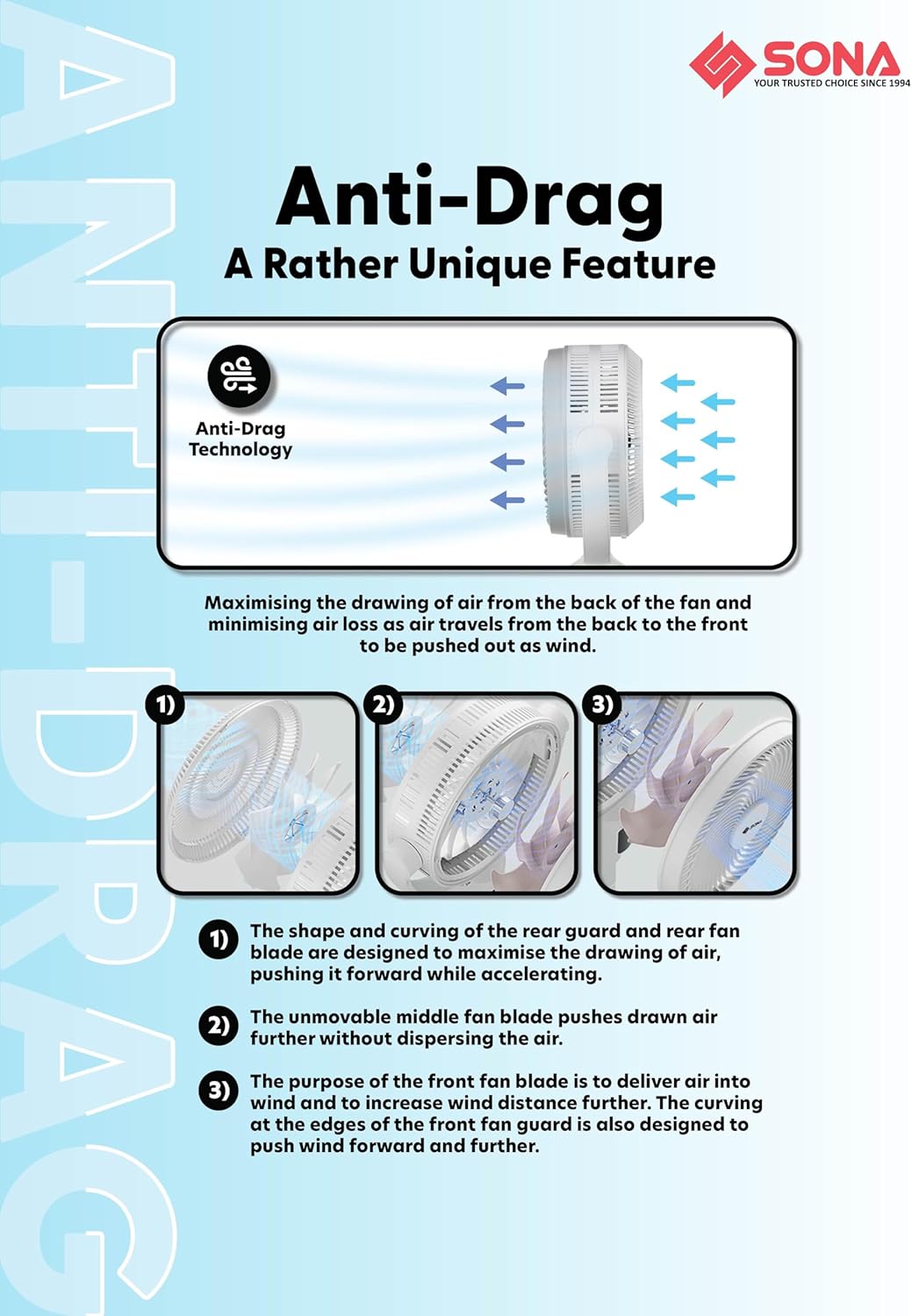
Figure 6.2: Detailed explanation of the Anti-Drag Technology, illustrating the airflow path and the roles of the fan components in maximizing wind delivery.
7. Maintenance and Cleaning
Regular cleaning ensures optimal performance and extends the lifespan of your fan. Always unplug the fan before cleaning.
- Exterior Cleaning: Wipe the exterior surfaces of the fan with a soft, damp cloth. Do not use abrasive cleaners or solvents.
- Blade Cleaning: The front and rear guards are dismantlable for easy access to the fan blades. Carefully remove the front guard, then the fan blades. Wipe the blades with a soft, damp cloth to remove dust and debris. Ensure blades are completely dry before reassembly.
- Guard Cleaning: The fan features anti-rusting plastic front and rear guards. Clean them with a damp cloth.
- Storage: When not in use for extended periods, store the fan in a cool, dry place, preferably in its original packaging.
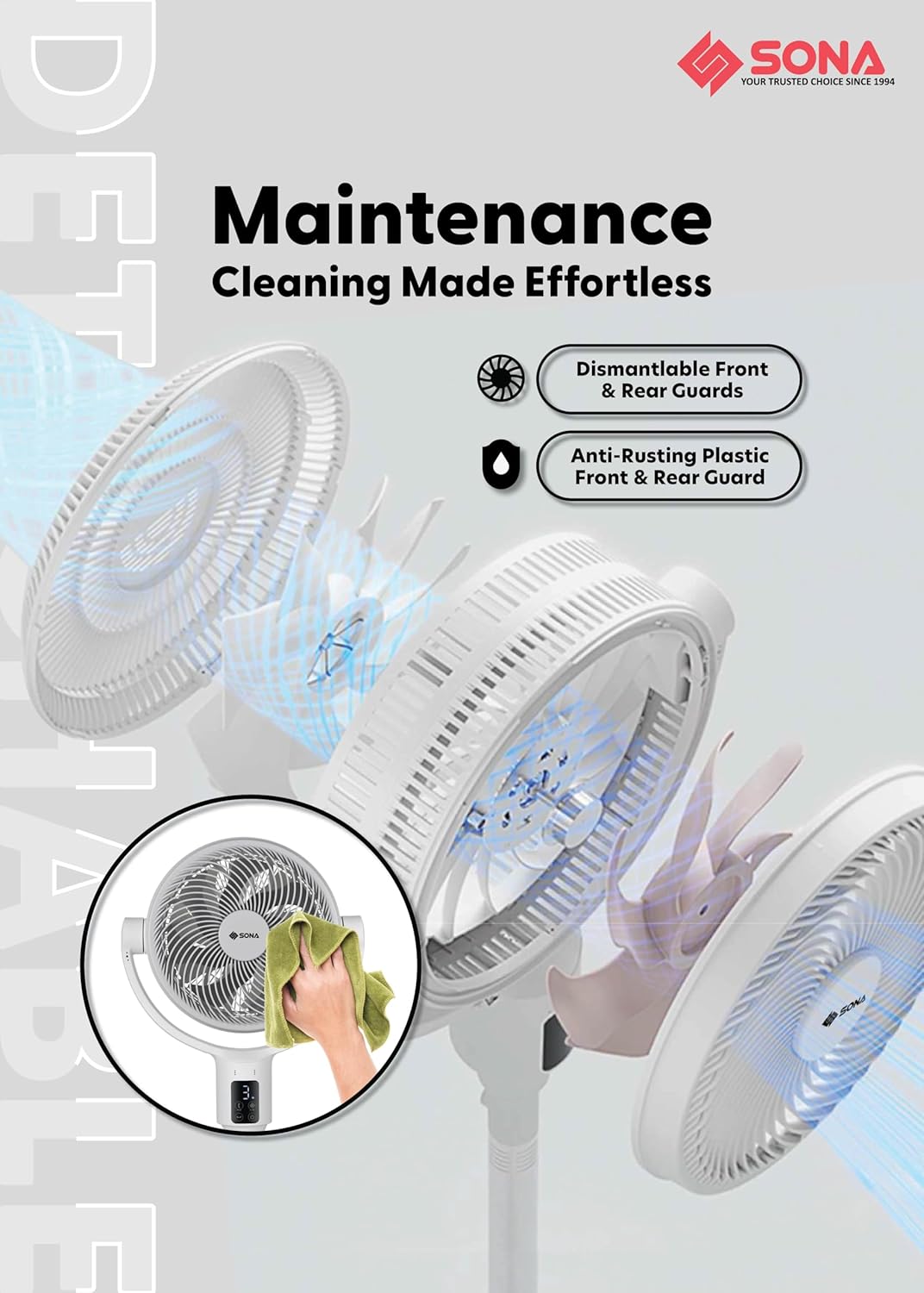
Figure 7.1: Visual guide for fan maintenance, demonstrating the ease of dismantling guards for cleaning and highlighting the anti-rusting material.
8. Troubleshooting
If you encounter any issues with your fan, please refer to the table below for common problems and solutions.
| Problem | Possible Cause | Solution |
|---|---|---|
| Fan does not turn on | No power supply Power button not pressed | Check if the power cord is securely plugged in. Ensure the power outlet is functional. Press the power button on the unit or remote. |
| Weak airflow | Fan blades are dirty Fan speed is too low | Unplug the fan and clean the fan blades and guards (refer to Maintenance section). Increase the fan speed setting. |
| Fan makes unusual noise | Loose parts Obstruction in fan blades | Unplug the fan and check for any loose components or foreign objects obstructing the blades. Ensure the fan is on a stable surface. |
| Remote control not working | Dead batteries Obstruction between remote and fan | Replace the batteries in the remote control. Ensure there is a clear line of sight between the remote and the fan's receiver. |
| Oscillation not working | Oscillation function not activated | Press the oscillation button on the unit or remote to activate the feature. |
9. Specifications
| Feature | Specification |
|---|---|
| Model Number | SFS 9068DC |
| Power Input | 100-240V~ 50/60Hz |
| Power Consumption | 32W |
| Motor Type | Brushless DC Motor |
| Number of Speeds | 9 |
| Timer | Up to 9 hours |
| Oscillation | Up-Down and Left-Right 3D Oscillation |
| Fan Blades | 7 Bladed Front Fan Blade, 9 Bladed Rear Fan Blade |
| Wind Delivery | Up to 20m |
| Special Features | Smart Memory Function, ECO-Saving Function (15Hrs), Remote Control, Anti-Drag Technology |
| Height Adjustment | 2-in-1 (Lowest 63 cm, Highest 111 cm) |
| Material | Plastic |
| Color | White |
10. Warranty Information
The SONA SFS 9068DC fan comes with a 3-year warranty on the motor from the date of purchase. This warranty covers manufacturing defects under normal use. Please retain your proof of purchase for warranty claims. The warranty does not cover damage caused by misuse, accident, unauthorized repair, or normal wear and tear.
11. Customer Support
For further assistance, troubleshooting, or warranty inquiries, please contact Sona customer support:
- Website: Visit the official Sona website for support resources.
- Email: Refer to your product packaging or the official website for customer service email.
- Phone: Refer to your product packaging or the official website for customer service phone numbers.
Please have your model number (SFS 9068DC) and proof of purchase ready when contacting support.