
1. Introduction
The Fieldpiece DRX3 is a professional-grade refrigerant and combustible gas leak detector designed for HVACR technicians. This device is engineered to accurately detect a wide range of gases, including A3, A2L, and A1 refrigerants, as well as various combustible gases. Its robust design and advanced sensor technology provide reliable performance in diverse field conditions. This manual provides essential information for the proper setup, operation, maintenance, and troubleshooting of your DRX3 unit.
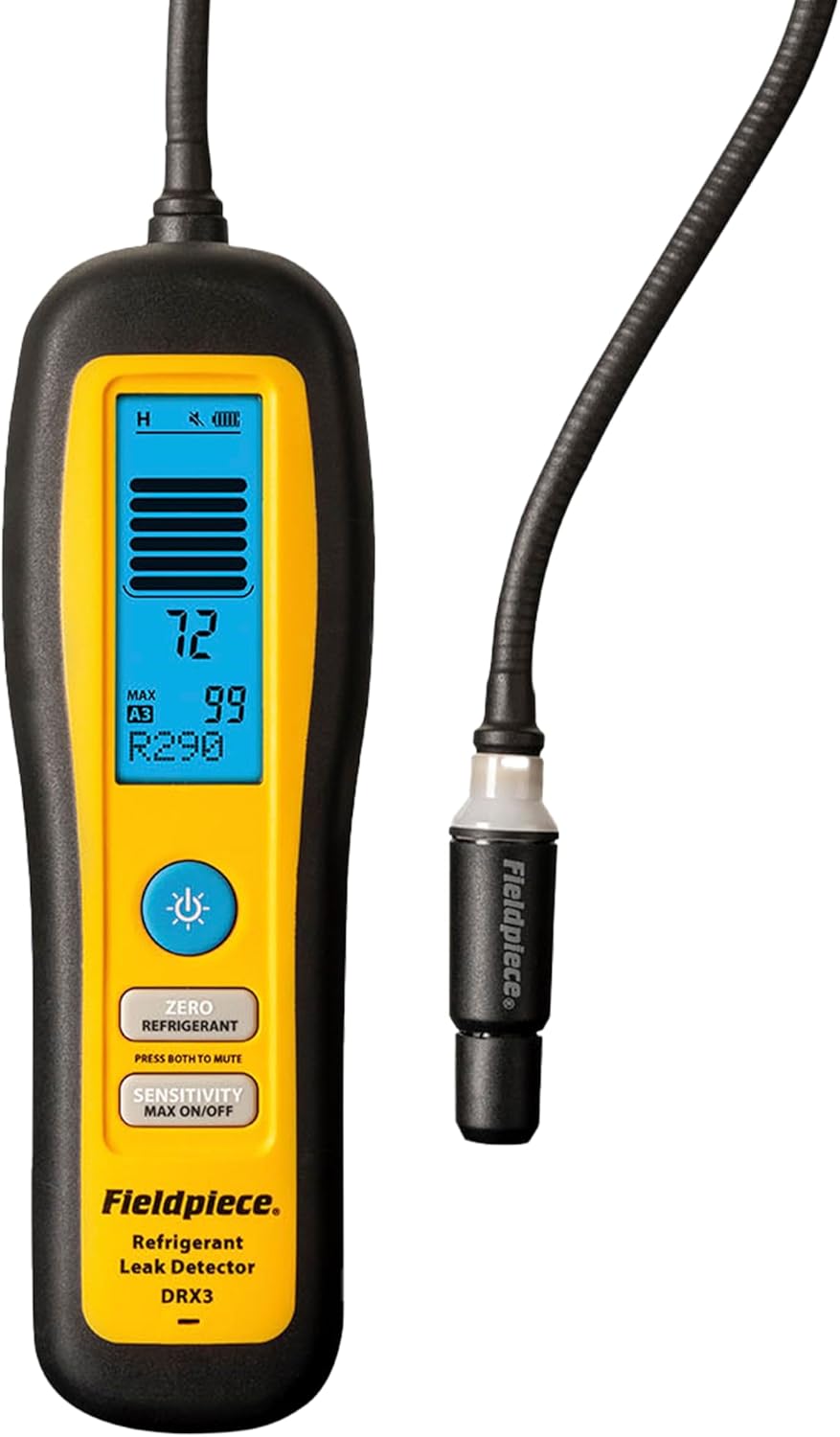
Image 1: The Fieldpiece DRX3 Refrigerant & Combustible Gas Leak Detector. This image displays the main unit with its flexible probe, digital display, and control buttons.
2. Features
The DRX3 leak detector incorporates several key features to enhance its functionality and user experience:
- Versatile Detection: Detects A3, A2L, A1 refrigerants, and combustible gases using an accurate, field-replaceable heated diode sensor.
- Broad Gas Compatibility: Suitable for use with HC, HFC, HCFC, CFC, HFO, H2/N2 (Tracer Gas), and blend refrigerants, as well as heating gases.
- Durable and Lightweight: Constructed for durability with a lightweight design, featuring long-life, field-replaceable batteries.
- Adjustable Sensitivity: Offers auto and manual zero modes, along with high, medium, and low sensitivity settings for precise leak identification.
- Clear Feedback: Provides multiple visual and audio feedback indicators that adjust with leak intensity, facilitating quick leak location.
- Job Link System App Connectivity: Integrates with the Job Link System app for enhanced data management and reporting.

Image 2: A graphic illustrating the key features and benefits of the Fieldpiece DRX3, including its detection capabilities for various refrigerants and gases, backlit LCD screen, and Job Link System app integration.
3. Package Contents
Upon unpacking your Fieldpiece DRX3, please verify that all the following items are included:
- One (1) Heated Diode Refrigerant Leak Detector - DRX3
- One (1) Blow-Molded Case
- One (1) Heated Diode Sensor - RXA3
- Four (4) AA batteries (pre-installed or included separately)

Image 3: A visual representation of the Fieldpiece DRX3 leak detector, its blow-molded carrying case, and the included heated diode sensor.
4. Setup
Follow these steps to prepare your DRX3 for operation:
- Battery Installation: Ensure four (4) AA batteries are correctly installed in the battery compartment. The DRX3 typically comes with batteries included.
- Power On: Press and hold the power button until the unit powers on and the display illuminates.
- Warm-up Period: Allow the DRX3 to complete its warm-up cycle, which is indicated on the display. This ensures the sensor reaches optimal operating temperature for accurate detection.
- Zeroing the Unit: In a clean, fresh air environment (free from any potential gas or refrigerant leaks), press the 'ZERO' button. This calibrates the sensor to the ambient air, establishing a baseline for leak detection. Repeat zeroing if moving to an area with different ambient conditions.
- Select Sensitivity: Choose the appropriate sensitivity level (High, Medium, or Low) using the 'SENSITIVITY' button based on the expected leak size or the environment. Start with high sensitivity for general scanning and reduce it to pinpoint larger leaks.
5. Operating Instructions
To effectively use your DRX3 leak detector:
- Scan Area: Slowly move the probe tip around suspected leak points. Maintain a consistent speed of approximately 1-2 inches per second.
- Observe Indicators: Pay attention to both the visual display and the audible alarm. The display will show a numerical reading and a bar graph indicating leak intensity. The audible alarm will increase in frequency and pitch as a leak is detected.
- Pinpointing Leaks: Once a leak is indicated, move the probe away from the area, re-zero the unit, and then slowly approach the suspected leak point again. This helps to isolate the exact source of the leak. Reduce sensitivity if the alarm is constant and overwhelming.
- Using Auto/Manual Zero: The auto-zero feature continuously adjusts to background gas levels. For more precise pinpointing, switch to manual zero mode after detecting a general leak area.
- Job Link System App: Connect the DRX3 to the Job Link System app via Bluetooth for real-time data logging, reporting, and integration with other Fieldpiece tools. Refer to the Job Link app's specific instructions for pairing and usage.

Image 4: A technician using the Fieldpiece DRX3 to detect leaks on an HVAC unit, demonstrating the device's practical application in the field.
6. Maintenance
Regular maintenance ensures the longevity and accuracy of your DRX3:
- Sensor Replacement: The heated diode sensor (RXA3) is field-replaceable and has a typical life of 300 hours. Replace the sensor when its performance degrades or when prompted by the unit. Refer to the sensor replacement guide for detailed steps.
- Cleaning: Wipe the unit with a damp cloth. Do not use abrasive cleaners or solvents. Ensure the probe tip is free from debris.
- Battery Care: Replace batteries when the low battery indicator appears. Remove batteries if the unit will not be used for an extended period to prevent leakage.
- Storage: Store the DRX3 in its blow-molded case in a cool, dry place, away from extreme temperatures and direct sunlight.
7. Troubleshooting
If you encounter issues with your DRX3, consider the following:
- Unit Not Powering On:
- Check battery installation and ensure batteries are fresh.
- Verify battery compartment contacts are clean and free of corrosion.
- Inaccurate Readings or Constant Alarm:
- Re-zero the unit in a known clean air environment.
- Check the sensor tip for obstructions or damage.
- Consider replacing the heated diode sensor if it has exceeded its typical lifespan or shows signs of wear.
- Adjust sensitivity settings; high sensitivity in a contaminated area can lead to constant alarms.
- No Detection:
- Ensure the unit is powered on and has completed its warm-up cycle.
- Verify the sensitivity setting is appropriate for the expected leak size.
- Confirm the sensor is properly installed and functional.
- Connectivity Issues with Job Link App:
- Ensure Bluetooth is enabled on your mobile device and the DRX3.
- Restart both the DRX3 and the Job Link app.
- Check the app for updates.
8. Specifications
Detailed technical specifications for the Fieldpiece DRX3:
| Sensor Type | Heated diode |
| Sensor Life | 300 hours typical |
| Sensitivity Levels | High, Medium, Low (selectable) |
| Maximum Sensitivity | 1g/yr (0.03 oz/yr) stationary; 3g/yr (0.1 oz/yr) in motion |
| Detection Feedback | Flashing LED, LCD bar graph and digits, audible beep, Job Link app |
| Refrigerants | HC, HFC, HCFC, CFC, HFO, H2/N2 (Tracer Gas: 5% Hydrogen, 95% Nitrogen), and blends |
| Heating Gases | Natural Gas, Propane, Butane, Methane |
| For Use With | A3 (R-290, R-600A, R-600), R-50, R-1270), A2L (Including R-32, R-454B, R-1234yf), and A1 refrigerants |
| Not For Use With | R-702, R-717, R-744 |
| Safety Compliance | ATEX Zone 2 (II 3 G Ex ic IIA T2 Gc); Class I, Division 2, Group D, T2 Hazardous Locations |
| Operating Environment | -20°C to 50°C (-4°F to 122°F); < 95% RH (non-condensing) |
| Battery Type | 4x Replaceable AA Lithium Iron Disulfide (To maintain ATEX and CID2 compliance, use 4x Energizer L91 AA batteries.) |
| Battery Capacity | 1.5 VDC (nominal) 3500 mAh |
| Battery Life | 60 hours typical |
| Auto Power Off | 10 minutes without detection or button press |
| Radio Frequency | 2.4 GHz |
| Wireless Range | Up to 200 meters (656 feet) line of sight |
| Storage Temperature | -20°C to 60°C (-4°F to 140°F); < 95% RH |
| Weight | 442g (15.6 oz) with Batteries Installed |
| Water Resistance | IP54 Main Body |

Image 5: A detailed table outlining the technical specifications of the Fieldpiece DRX3, including sensor type, sensitivity, gas compatibility, battery life, and environmental ratings.
9. Warranty and Support
For warranty information and technical support, please refer to the official Fieldpiece website or contact their customer service. Specific warranty terms and conditions may vary by region and purchase date. Keep your proof of purchase for warranty claims.
For additional resources, including FAQs and product registration, visit the Fieldpiece Store on Amazon.


