
Introduction
The Norwii N21 is a versatile Bluetooth presentation clicker designed to enhance your presentations. It combines multiple functions into one device, including wireless slide control, a telescopic pointer, a touchscreen stylus, a laser pointer, volume control, and a countdown timer with vibration alerts. This manual provides detailed instructions for setting up and operating your Norwii N21 presenter.
Key Features
- Dual Connectivity: Connects via Bluetooth or a USB-A receiver for broad compatibility.
- Presentation Control: Navigate slides forward and backward, activate full screen or black screen, and adjust system volume.
- Telescopic Pointer: Extends up to 65cm for physical pointing during presentations.
- Touchscreen Stylus: Integrated stylus on the telescopic pointer for writing on touch screens.
- Laser Pointer: Built-in red laser for highlighting specific content. (Class II laser product)
- Countdown Timer: Features vibration alerts at 10, 5, and 0 minutes before the set time ends, helping manage presentation duration.
- USB-C Rechargeable: Equipped with a 360mAh lithium battery, offering weeks of use on a 2-hour charge.
- Reprogrammable Buttons: Customize button functions via the Norwii Presenter software.

Figure 1: Overview of Norwii N21's six-in-one functionality.
Package Contents
The Norwii N21 package typically includes:
- Norwii N21 Presentation Clicker
- USB-A Receiver (stored inside the clicker)
- USB-C Charging Cable
- User Manual
- Lanyard (may vary by package)
Setup
1. Charging the Device
Before first use, fully charge the Norwii N21. Connect the provided USB-C cable to the charging port on the side of the presenter and to a USB power source. The display will show the battery percentage during charging. A full charge takes approximately 2 hours and provides weeks of usage.

Figure 2: Charging the Norwii N21 via USB-C port.
2. Power On/Off
Locate the power switch on the side of the device. Slide it to the "ON" position to power on the presenter. The display will show the current battery level. Slide to "OFF" to power off.
3. Connecting to Your Device
The Norwii N21 offers two connection methods: Bluetooth and USB-A receiver.
Bluetooth Connection:
- Ensure the presenter is powered on.
- Long-press the Setting/Bluetooth button (often marked with a gear or Bluetooth icon) until the blue LED starts blinking. This indicates pairing mode.
- On your computer or tablet, go to Bluetooth settings and select "Norwii Presenter" from the list of available devices to pair.
- Once paired, the blue LED will stop blinking and remain solid. The presenter will automatically reconnect to the last paired device when powered on.

Figure 3: Bluetooth pairing with a tablet.
USB-A Receiver Connection:
- Locate the USB-A receiver, typically stored in the tail end of the presenter.
- Plug the USB-A receiver into an available USB port on your computer.
- The computer should automatically detect and install the necessary drivers (Plug and Play).
- When both Bluetooth and USB-A are connected, the USB-A connection takes priority.

Figure 4: Connecting via USB-A receiver.
Operating Instructions
Familiarize yourself with the buttons and their functions:
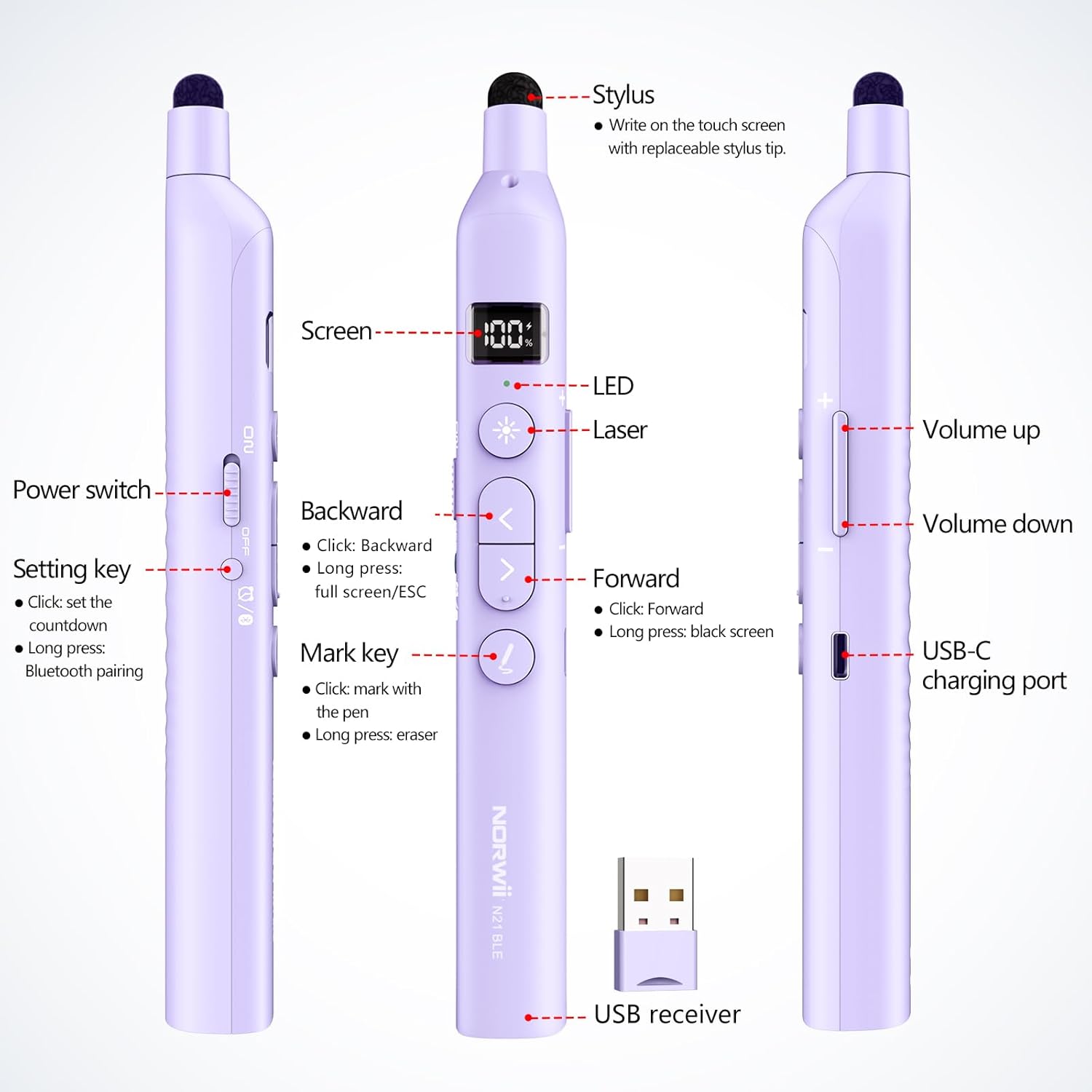
Figure 5: Norwii N21 button layout and functions.
- Forward Button (>):
- Short press: Advance to the next slide.
- Long press: Activate black screen or Exit (Esc) in presentation software.
- Backward Button (<):
- Short press: Go back to the previous slide.
- Long press: Activate full screen in presentation software.
- Laser Button (Star icon):
- Press to activate the red laser pointer. Release to turn off.
- Mark Key (Pen icon):
- Short press: Enter pen mode for annotation (e.g., in PowerPoint).
- Long press: Activate eraser function.
- Volume Buttons (+/-):
- Press to adjust the system volume up or down.
- Telescopic Pointer:
- Gently pull the tip to extend the telescopic pointer. It can extend up to 65cm.
- Use the soft stylus tip on the end for interacting with touchscreens.

Figure 6: Using the retractable pointer and stylus for annotation.
Countdown Timer
- Short press the Setting/Bluetooth button to enter timer mode.
- Use the Forward (>) and Backward (<) buttons to adjust the desired countdown time.
- Press the Setting/Bluetooth button again or wait 5 seconds for the timer to start automatically.
- The presenter will vibrate at 10, 5, and 0 minutes remaining to alert you.
- Double-press the Setting/Bluetooth button to quickly restart the last set countdown.

Figure 7: Setting and using the countdown timer.
Customizing Button Functions (Compatibility Modes)
The Forward and Backward buttons support four modes for different presentation software. Long-press the Backward (<) and Forward (>) buttons simultaneously for 3 seconds to switch between modes:
- Up/Down: For PowerPoint, Keynote, and similar applications.
- Left/Right: For Prezi, Propresenter, MediaShout, and similar applications.
- Page Up/Page Down: For Google Slides, web browsers, photo viewers, and more.
- Scroll Up/Down: For e-books and other scrolling content.
You can also customize key functions using the Norwii Presenter software, available for download from the official Norwii website.

Figure 8: Switching between compatibility modes.

Figure 9: Customizing buttons via Norwii Presenter software.
Compatibility
The Norwii N21 is compatible with a wide range of devices and operating systems:
- Operating Systems: Windows, macOS, Linux, Android.
- Presentation Software: PowerPoint, Prezi, Keynote, Propresenter, MediaShout, Google Slides, and more.
- Compatible Devices: Laptops, Personal Computers, Tablets, Home Theater systems.

Figure 10: Broad compatibility with various operating systems.
Specifications
| Model Number | N21 |
| Connectivity | Bluetooth, 2.4GHz USB-A Receiver |
| Wireless Range | Up to 100 meters (328 feet) |
| Laser Type | Red Laser (Class II) |
| Telescopic Pointer Length | Extends up to 65 cm |
| Battery | Built-in 360mAh Lithium Battery |
| Charging Port | USB-C |
| Item Weight | 2.24 ounces |
| Product Dimensions | 72.24 x 11.61 x 5.2 inches (Note: This dimension seems unusually large for a clicker, likely a packaging or shipping dimension. Actual device is compact.) |
Maintenance
- Keep the device clean by wiping it with a soft, dry cloth.
- Avoid exposing the device to extreme temperatures, moisture, or direct sunlight.
- Store the USB-A receiver inside the presenter when not in use to prevent loss.
- Ensure the telescopic pointer is fully retracted before storing to prevent damage.
Troubleshooting
- Device not responding:
- Check if the device is powered on and fully charged.
- Ensure the USB-A receiver is securely plugged in or Bluetooth is properly paired.
- Try restarting your computer or the presenter.
- Laser pointer not working:
- Ensure the device is powered on.
- Press the laser button firmly.
- Slide control issues:
- Verify the presenter is in the correct compatibility mode for your software (see "Customizing Button Functions").
- Ensure the presentation software is in focus on your computer.
Safety Information
- Laser Safety: This product contains a Class II laser. Do not stare directly into the laser beam or point it at people or animals. Avoid direct eye exposure.
- Keep the device out of reach of children.
- Do not attempt to disassemble or modify the device. This may void the warranty and pose safety risks.
- Use only the provided or recommended charging cable.
Official Product Video
Video 1: N21 BLE Product Introduction by NORWII. This video provides a brief overview of the Norwii N21 Bluetooth Presentation Clicker's features and functionality.
Warranty and Support
Norwii products are designed for reliability and performance. For warranty information, technical support, or service inquiries, please refer to the contact information provided on the product packaging or visit the official Norwii website. Keep your purchase receipt for warranty claims.


