
1. Introduction
The Vimose Phone Tripod & Selfie Stick with Remote is a versatile, all-in-one accessory designed to enhance your mobile photography and videography experience. This portable device functions as both a stable tripod and an extendable selfie stick, complete with a detachable wireless remote control for convenient operation. Its compact design and adjustable features make it ideal for various scenarios, from vlogging and live streaming to family photos and travel recordings.
2. What's in the Box
- Vimose Phone Tripod & Selfie Stick with Remote
3. Product Features
3.1. Portable All-in-One Design
The Vimose tripod combines a phone tripod and selfie stick into a single, highly portable unit. It collapses to a compact 12.5 inches, making it easy to carry in a bag or backpack for travel and everyday use.

Image: The Vimose Phone Tripod in its compact, folded state, held by a hand on a beach, illustrating its portability. It measures 12.5 inches when folded and weighs only 0.88 lbs.

Image: A diagram highlighting the all-in-one functionality of the Vimose device, showcasing its use as a tripod, a selfie stick, its wireless remote capability, and its compact design.
3.2. Adjustable Height and Flexible Shooting Angles
The tripod can extend up to 62 inches, providing ample height for various shooting needs. The phone holder features a 360° rotation and 180° tilt adjustment, allowing for flexible angle adjustments to capture wider views and adapt to different shooting scenarios.

Image: The Vimose Phone Tripod extended to its maximum height of 62 inches, holding a smartphone, positioned next to a woman exercising outdoors, demonstrating its adjustable height.
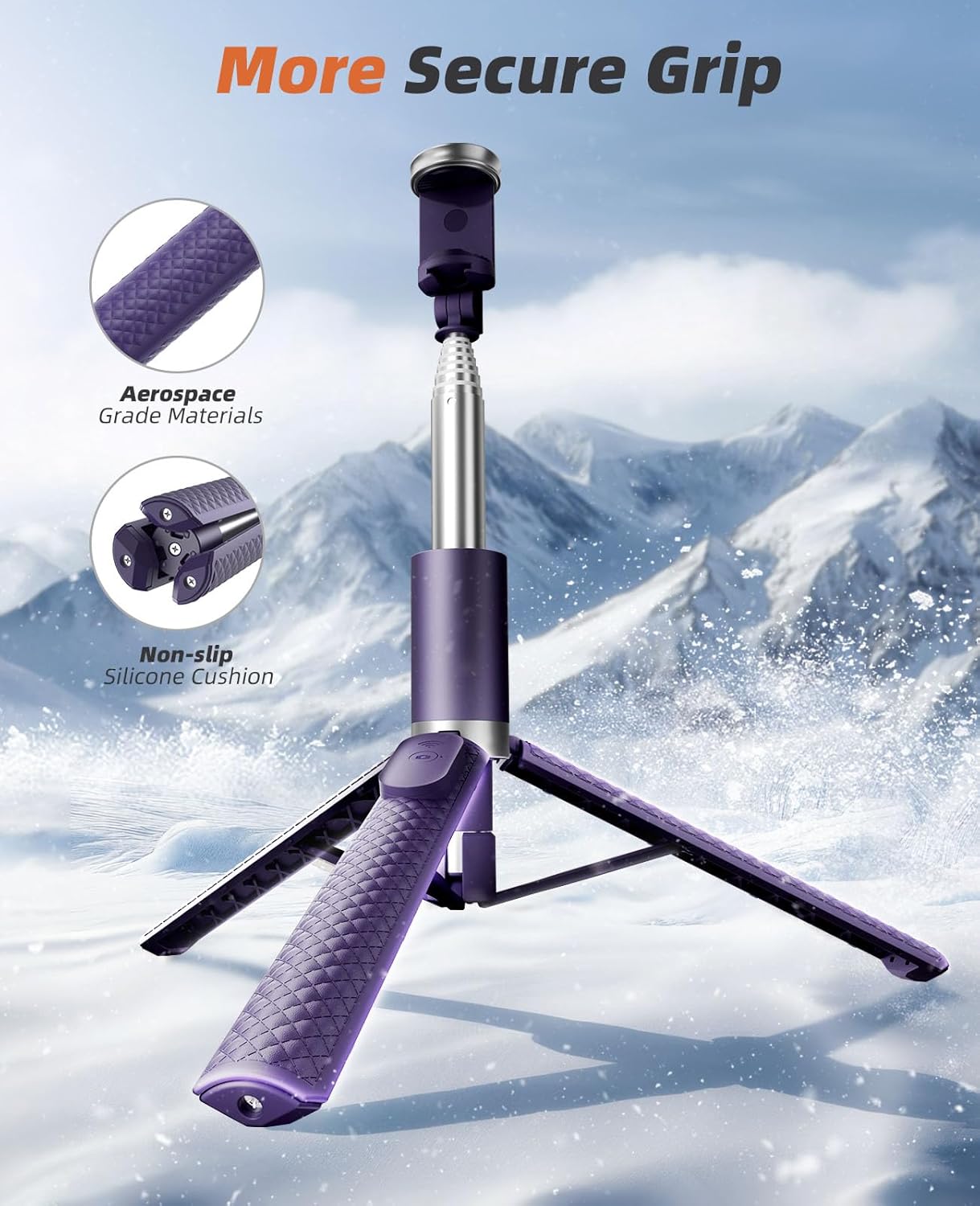
Image: A visual representation of the phone holder's flexibility, showing its ability to rotate 360 degrees and tilt 180 degrees for diverse shooting angles.
3.3. Stable and Durable Construction
Constructed from premium aluminum alloy, this tripod features a reinforced triangular base and anti-slip silicone pads. This design enhances load capacity and prevents tipping, ensuring stability for both indoor and outdoor use.

Image: The Vimose Phone Tripod with its legs extended, highlighting the textured grip on the legs and the non-slip silicone cushions on the feet for enhanced stability.

Image: A close-up view of the stable triangular base of the Vimose Phone Tripod, emphasizing its design for a more stable center of gravity.
3.4. Detachable Wireless Remote
The included wireless remote control supports a range of up to 33 feet (10 meters) and is compatible with both iOS and Android devices. It offers quick pairing and is conveniently stored within the handle to prevent loss. The phone holder securely accommodates smartphones between 2.2 to 3.7 inches wide.

Image: A close-up of the detachable Bluetooth remote control, showing its integration into the handle of the Vimose Phone Tripod for easy access and storage.
4. Setup Guide
4.1. Unfolding the Tripod
- Hold the handle firmly.
- Gently push the bottom part of the handle downwards to release and extend the tripod legs.
- Once the legs are fully extended, place the tripod on a flat, stable surface.
- Pull the telescopic pole upwards to extend it to your desired height.
Video: A seller demonstrates the unfolding and extension of the selfie stick tripod, showcasing its transformation from a compact unit to a fully functional tripod.
4.2. Attaching Your Smartphone
- Locate the phone holder at the top of the tripod.
- Gently pull the spring-loaded clamp to expand the holder.
- Insert your smartphone into the holder, ensuring it is securely gripped by the silicone pads. The holder supports phones between 2.2 to 3.7 inches wide.
4.3. Pairing the Bluetooth Remote
- Remove the remote control from its slot in the handle.
- Turn on the remote control (usually by pressing and holding the button until an indicator light flashes).
- On your smartphone, go to Bluetooth settings and search for available devices.
- Select "Vimose Remote" or a similar name to pair. The indicator light on the remote will stop flashing once paired.
Video: A seller demonstrates the versatility and ease of use of the tripod, including how to detach and use the remote control for capturing photos and videos.
5. Operating Instructions
5.1. Adjusting Height and Angle
- To adjust the height, pull the telescopic pole up or push it down. Ensure all sections are securely locked in place.
- To change the phone's orientation, rotate the phone holder 360° for landscape or portrait mode.
- To adjust the viewing angle, tilt the phone holder up or down by up to 180°.
5.2. Using the Remote Control
- Once paired, open your smartphone's camera app.
- Press the button on the remote control to take a photo or start/stop video recording.
6. Maintenance
- Clean the tripod and phone holder with a soft, dry cloth. Avoid using harsh chemicals or abrasive materials.
- Store the device in a cool, dry place away from direct sunlight and extreme temperatures.
- Ensure the remote control is securely stored in its slot when not in use to prevent loss.
7. Troubleshooting
7.1. Remote Control Not Pairing
- Ensure the remote control is charged and turned on.
- Check your smartphone's Bluetooth settings to ensure Bluetooth is enabled and the device is discoverable.
- Try unpairing and re-pairing the remote control.
- Ensure the remote is within the 33-foot operating range of your phone.
7.2. Tripod Instability
- Ensure the tripod legs are fully extended and locked into position.
- Verify that the telescopic pole sections are securely extended and tightened.
- Place the tripod on a flat, even surface.
8. Specifications
| Feature | Detail |
|---|---|
| Brand | Vimose |
| Model Number | VP-02 |
| Color | Purple |
| Material | Aluminum |
| Item Weight | 13.6 ounces |
| Minimum Height (Folded) | 12.5 Inches |
| Maximum Height (Extended) | 62 Inches |
| Compatible Devices | Smartphone (2.2 to 3.7 inches wide) |
| Special Feature | Portable, Adjustable, Flexible, Detachable Wireless Remote |
| Remote Control Range | Up to 33 feet (10 meters) |
9. Warranty and Support
The Vimose Phone Tripod & Selfie Stick comes with a 1-year warranty. For any technical assistance or support, please refer to the following:
- Lifetime Technical Help: Access to ongoing technical support for the lifespan of your product.
- 360-Day Quality Guarantee: Assurance of product quality for over a year.
- 60-Day Free Returns: Hassle-free returns within 60 days of purchase.
- 24/7 Fast Support: Round-the-clock customer service for quick resolution of any issues.